
(PRO) Clasificaciones de afiliados
Updated agosto 20, 2024
The “leaderboards” feature lets you generate and view a leaderboard of your top affiliates for a certain date period.
When generating a leaderboard, you can set the number of affiliates to display, the time period to show the stats for, how the affiliates are ranked, which columns to display, and choose to highlight the logged in user if they are on the table.
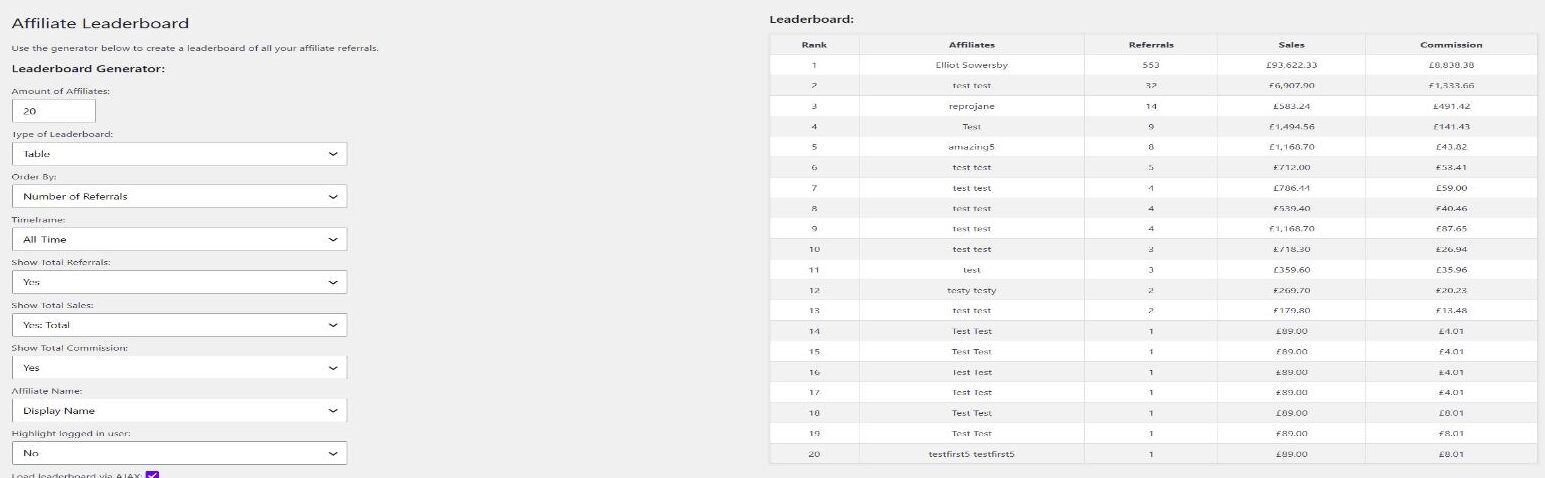
Esto también generará un código corto que se puede añadir a un post o página para mostrar la tabla de clasificación a los visitantes de su sitio en el frontend.
Simplemente copie el shortcode proporcionado y péguelo en el editor de entradas. El contenido de la tabla de clasificación se actualizará dinámicamente, por lo que si se actualiza cualquier dato, esto se reflejará en la tabla de clasificación mostrada a sus usuarios.
Las tablas de clasificación de afiliados son una excelente manera de añadir un elemento de competencia a su programa de afiliados y permitir a los usuarios ver lo bien que lo están haciendo en comparación con otros afiliados.
Para empezar, visite la página "Tablas de clasificación" en el menú "Afiliados a cupones" de su área de administración, para generar su primera tabla de clasificación.
Generator Options
The leaderboard generator has the following options:
- Amount of Affiliates – How many affiliates to display.
- Type of Leaderboard – Table or List.
- Order By – Rank affiliates by Number of Referrals, Commission Earned, or Total Sales.
- Timeframe – All-Time, Current Year (Last 12 Months), Current Month, Specific Month, or Custom Date Range. Choosing a custom date range shows Start Date and End Date fields, plus a Cache Duration (minutes) field that controls how long the results are cached (set to 0 to disable caching). A small note is shown beneath the leaderboard telling visitors how often it updates (for example “Leaderboard updated every 60 minutes”).
- Show Total Referrals / Show Total Sales / Show Total Commission – Choose which columns are displayed.
- Affiliate Name – Show each affiliate’s Display Name or Username.
- Highlight logged in user – Highlights the current user’s row if they appear on the leaderboard.
- Load leaderboard via AJAX – Loads the leaderboard after the page has rendered, which helps if you use full-page caching.
Shortcode
The generated shortcode is [couponaffiliates-leaderboard]. You can also add it yourself. Use ajax="yes" (default) or ajax="no" to control whether the table loads via AJAX.
The leaderboard is built from the shortcode settings, not from values sent by visitors. After you update a leaderboard, clear any full-page cache so the frontend shows the new settings.
If you have customised the word “Affiliate” in Custom Terminology, that wording also applies on the leaderboard. See Códigos cortos y Translations.
 English
  Spanish
  German
  French