
(PRO) Tableaux de bord des affiliés
Updated septembre 6, 2026
The “leaderboards” feature lets you generate and view a leaderboard of your top affiliates for a certain date period.
When generating a leaderboard, you can set the number of affiliates to display, the time period to show the stats for, how the affiliates are ranked, which columns to display, and choose to highlight the logged in user if they are on the table.
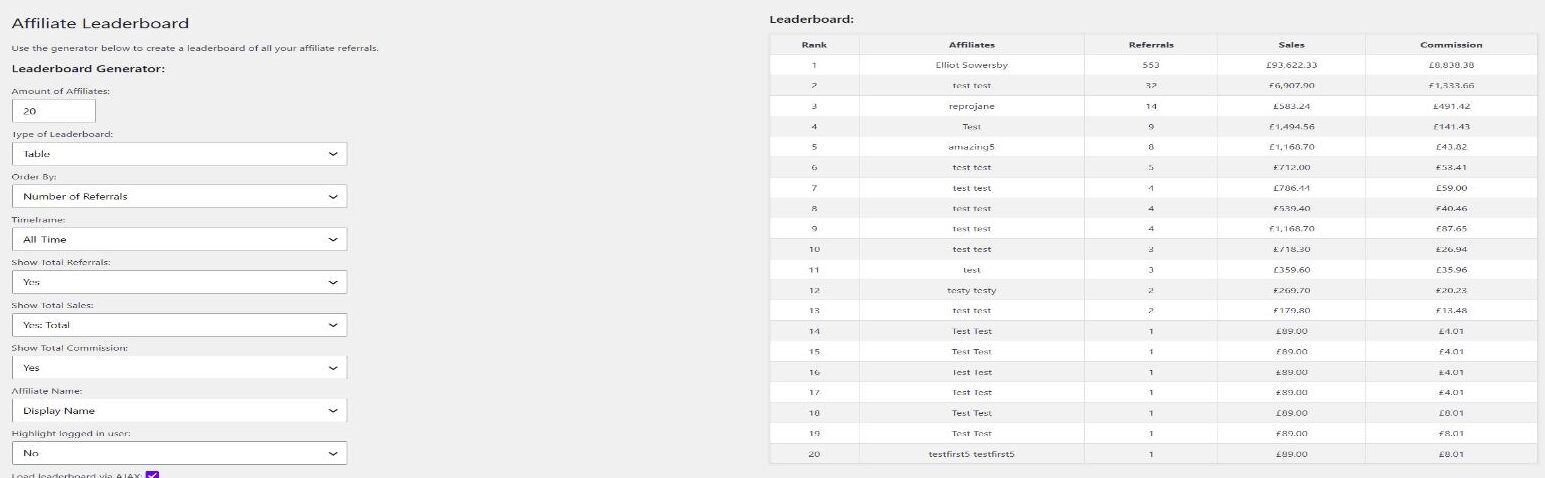
Il génère également un shortcode que vous pouvez ajouter à un article ou à une page pour afficher le classement aux visiteurs de votre site sur le frontend.
Il suffit de copier le shortcode fourni et de le coller dans l'éditeur de l'article. Le contenu du tableau de classement sera mis à jour dynamiquement, de sorte que si des données sont mises à jour, cela se reflétera sur le tableau de classement affiché à vos utilisateurs.
Les classements d'affiliés sont un excellent moyen d'ajouter un élément de compétition à votre programme d'affiliation et de permettre aux utilisateurs de voir comment ils se débrouillent par rapport aux autres affiliés.
Pour commencer, il vous suffit de visiter la page "Leaderboards" sous le menu "Coupon Affiliates" dans votre zone d'administration, pour générer votre premier leaderboard.
Generator Options
The leaderboard generator has the following options:
- Amount of Affiliates – How many affiliates to display.
- Type of Leaderboard – Table or List.
- Order By – Rank affiliates by Number of Referrals, Commission Earned, or Total Sales.
- Timeframe – All-Time, Current Year (Last 12 Months), Current Month, Specific Month, or Custom Date Range. Choosing a custom date range shows Start Date and End Date fields, plus a Cache Duration (minutes) field that controls how long the results are cached (set to 0 to disable caching). A small note is shown beneath the leaderboard telling visitors how often it updates (for example “Leaderboard updated every 60 minutes”).
- Show Total Referrals / Show Total Sales / Show Total Commission – Choose which columns are displayed.
- Affiliate Name – Show each affiliate’s Display Name or Username.
- Highlight logged in user – Highlights the current user’s row if they appear on the leaderboard.
- Load leaderboard via AJAX – Loads the leaderboard after the page has rendered, which helps if you use full-page caching.
Shortcode
The generated shortcode is [couponaffiliates-leaderboard]. You can also add it yourself. Use ajax="yes" (default) or ajax="no" to control whether the table loads via AJAX.
The leaderboard is built from the shortcode settings, not from values sent by visitors. After you update a leaderboard, clear any full-page cache so the frontend shows the new settings.
If you have customised the word “Affiliate” in Custom Terminology, that wording also applies on the leaderboard. See Shortcodes et Translations.
 English
  Spanish
  German
  French