
Version 8.3.0 – A New Designer For Dynamic Creatives
Version 8.3.0 of Coupon Affiliates is now available!
This one is almost entirely about creatives.
Dynamic creatives (the banners that fill themselves in with each affiliate’s coupon code, name and QR code) have been rebuilt around a new visual designer, with drag-and-drop layers, shapes, starter layouts, a blank canvas option, and live previews using a real affiliate’s details.
The images are also now cached on your server, which makes the affiliate dashboard noticeably quicker on sites with a lot of creatives. There is one Performance Bonuses fix in here too, along with a handful of smaller creative fixes.
A visual designer for dynamic creatives
Until now, building a dynamic creative meant filling in ten fixed text slots and then positioning each one by typing margin numbers, saving, checking the result, and going back to adjust the numbers again. It worked, but it was slow, and it was hard to get anything beyond a basic layout out of it.
You now design on a live canvas. Text, QR codes, images, profile pictures and shapes are placed by dragging them into position, with snapping guides to line things up, arrow keys to nudge by a pixel, undo and redo, multi-select, copy and paste, and a layer list for ordering what sits on top of what. You will find it under Coupon Affiliates > Creatives, on any creative with the “Dynamic” type.
Text layers have picked up a lot along the way: letter spacing, line height, wrapping, upper case, lower case and capitalised text, drop shadows, outlines, a background behind the text, gradient fills, rotation and opacity, with normal, bold, italic and serif faces to choose from. If you want to use your own font, it can be registered with the wcusage_creative_fonts filter.
There are two new layer types alongside the text and QR code layers you already had:
- Shapes. Rectangle, circle, triangle, diamond, arrow, chevron, star, burst, pentagon and hexagon, each with a solid or gradient fill, a corner radius, rotation and opacity. There is also an “outline only” mode, which is handy for rings and frames.
- Images. A “Profile image” layer shows each affiliate their own profile picture (or Gravatar) as a circle or square with an optional border ring, and a plain “Image” layer lets you drop a logo or any other upload onto the design.
A {store} merge tag for the site name has been added too, alongside {coupon}, {discount}, {nom d'utilisateur}, {first-name} et {company}.
Blank canvases and starter layouts
A creative no longer needs a background image. Leave the image empty and you get a blank canvas of whatever size you like, with a solid colour, a gradient or a transparent background. There are preset sizes for social posts, stories, leaderboards, skyscrapers, mobile banners and email headers, so you do not have to look up the dimensions each time.
If you would rather not start from nothing, there are sixteen starter layouts, including “Aurora”, “Neon night”, “Sale flash”, “Swing tag”, “Corner ribbon”, “Creator spotlight”, “QR card” and “Voucher”. Apply one, then change anything you like. If you already have a canvas size set, the layout is scaled to fit it rather than replacing it.
Background images, when you do use one, can now be JPEG, GIF, WebP or AVIF as well as PNG. Previously anything other than a PNG failed with a “Could not load image!” error. Very large background images are also now refused with a clear message, rather than running the server out of memory part way through a render.
Preview it as a real affiliate
Merge tags are easy to design around badly. A layout that looks fine with “{first-name}” in it can fall apart once someone with a long name and a twelve-character coupon code turns up.
The designer now has a “Preview as” option that searches for one of your affiliates by coupon code and fills the design in with their real details, so you can check how it holds up. “Preview exact PNG” goes a step further and renders the design through the same engine that produces the affiliate’s downloadable files, so what you see is exactly what they will get. A “Things to check” panel sits alongside these and points out text that runs off the edge of the canvas or is too small to read.
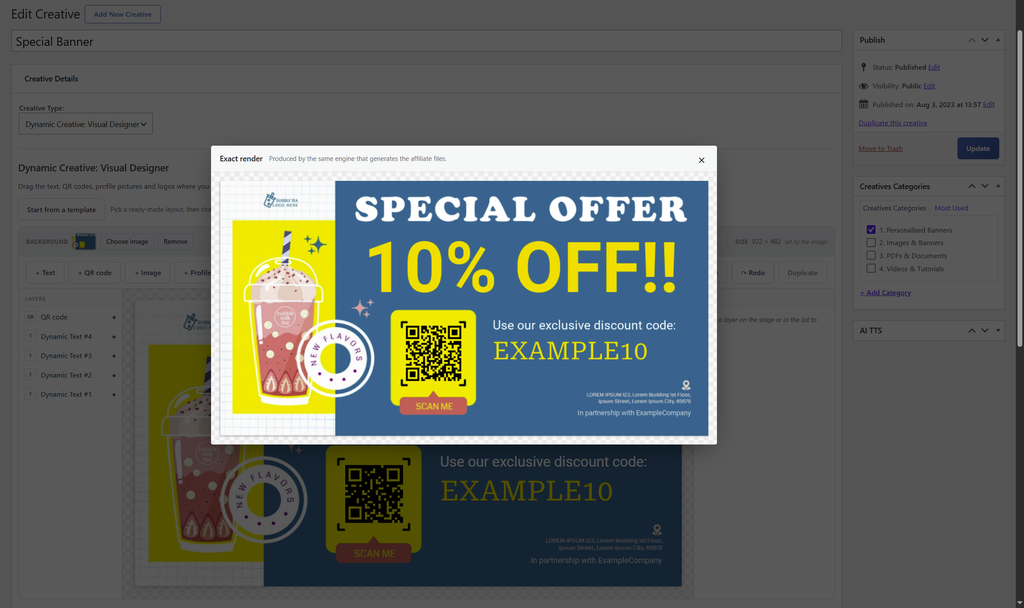
Creatives are now cached, and the dashboard is quicker for it
Previously, every dynamic creative shown on the affiliate dashboard was a separate WordPress request on every page view, and the result was only cached for 24 hours. On a dashboard with several creatives, that was a lot of image generation going on behind the scenes for each affiliate who logged in.
Generated creatives are now saved as image files in your uploads folder and served straight from your web server, the same as any other image. They are rebuilt automatically whenever the creative is updated, and they are pre-built when you save, so the first affiliate to open their dashboard afterwards is not left waiting. A creative with nothing affiliate-specific in it (no merge tags, QR code or profile picture) is generated once and shared, rather than once per affiliate.
On the dashboard itself, images now load lazily with a loading indicator, so creatives further down the page are not generated until they are scrolled into view. The grid uses a smaller display size, and the full-resolution version is only generated when the affiliate previews or downloads it. Downloads also now come with the correct file extension.
A few new options have been added to the creatives settings to go with this:
- Image Format. “Automatic” saves both WebP and PNG and keeps whichever is smaller.
- WebP Quality, for balancing file size against sharpness.
- Build missing creatives while the page loads, if you would rather generate on demand than at save time.
- Creative Display Width, to control the size used in the dashboard grid.
- A “Clear generated creative images” button, for when you want everything rebuilt from scratch.
Your existing creatives are not touched
If you already have dynamic creatives set up, they render exactly as they did before the update. Nothing moves until you open one in the designer and save it. When you do open one, “Preview exact PNG” lets you compare the converted design against the current output before you commit to it, so there are no surprises for your affiliates.
Two smaller admin changes: the creatives list now shows a thumbnail of the finished design rather than the background upload on its own, and each row has a “Duplicate” link, which is a quicker way to make a second size of the same design.
Other creative fixes
- A dynamic creative embedded on an affiliate’s own website using its embed code could fail to load, because the image endpoint rejected requests coming from other sites. Access is now controlled by the signed token in the URL alone.
- With the ‘Show Creative “Image”‘ setting turned off, the preview, download and embed-code links for dynamic creatives on the affiliate dashboard were empty.
- The preview popup on the affiliate dashboard showed an empty box, with no loading indicator, while a dynamic creative was being generated.
- When the Google Fonts plugin is installed, it no longer overrides the fonts bundled with the plugin.
Changelog complet
- New: (PRO) Creatives: Dynamic creatives have been rebuilt around a new visual designer. Rather than filling in ten fixed text slots and positioning them with margin numbers, you now place text, QR codes, images, profile pictures and shapes on a live canvas by dragging them, with snapping guides, arrow-key nudging, undo and redo, multi-select, copy and paste, and a layer list for ordering. See “Coupon Affiliates > Creatives”.
- New: (PRO) Creatives: A creative no longer needs a background image. Leave the image empty to design on a blank canvas of any size, with a solid colour, gradient or transparent background, and pick from preset sizes for social posts, stories, leaderboards, skyscrapers, mobile banners and email headers.
- New: (PRO) Creatives: Sixteen ready-made starter layouts, including “Aurora”, “Neon night”, “Sale flash”, “Swing tag”, “Corner ribbon”, “Creator spotlight”, “QR card” and “Voucher”. Apply one and change anything you like, or keep your own canvas size and have the layout scaled to fit.
- New: (PRO) Creatives: Text layers now support letter spacing, line height, wrapping, upper case, lower case and capitalised text, drop shadows, outlines, a background behind the text, gradient fills, rotation and opacity, with normal, bold, italic and serif faces. Extra fonts can be registered with the “wcusage_creative_fonts” filter.
- New: (PRO) Creatives: Shape layers: rectangle, circle, triangle, diamond, arrow, chevron, star, burst, pentagon and hexagon, each with a solid or gradient fill, an “outline only” mode for rings and frames, corner radius, rotation and opacity.
- New: (PRO) Creatives: A “Profile image” layer that shows each affiliate their own profile picture (or Gravatar) as a circle or square with an optional border ring, and an “Image” layer for placing a logo or any other upload onto the design.
- New: (PRO) Creatives: A {store} merge tag for the site name, alongside {coupon}, {discount}, {username}, {first-name} and {company}.
- New: (PRO) Creatives: “Preview as” fills the design in with a real affiliate’s details by searching for their coupon code, and “Preview exact PNG” renders it through the same engine that produces the affiliate’s files. A “Things to check” panel points out text that runs off the canvas or is too small to read.
- New: (PRO) Creatives: Generated creatives are now saved as image files in the uploads folder and served straight from your web server. Previously every dynamic creative on the dashboard was a separate WordPress request on every page view, cached for only 24 hours. Cached images are rebuilt automatically whenever the creative is updated, and are pre-built when you save so the first affiliate to view them does not wait.
- New: (PRO) Creatives: A creative with nothing affiliate-specific in it (no merge tags, QR code or profile picture) is now generated once and shared, rather than once per affiliate.
- New: (PRO) Creatives: New options under the creatives settings: “Image Format” (Automatic saves both WebP and PNG and keeps the smaller file), “WebP Quality”, “Build missing creatives while the page loads”, “Creative Display Width”, and a “Clear generated creative images” button.
- New: (PRO) Creatives: A “Duplicate” link on each row of the admin list.
- Tweak: (PRO) Creatives: Existing dynamic creatives render exactly as before. Nothing moves until you open one in the designer and save it, and “Preview exact PNG” lets you compare the converted design against the current output first.
- Tweak: (PRO) Creatives: Background images can now be JPEG, GIF, WebP or AVIF as well as PNG. Previously anything other than PNG failed with “Could not load image!”.
- Tweak: (PRO) Creatives: The admin list now shows a thumbnail of the finished design for dynamic creatives, rather than the background upload alone.
- Tweak: (PRO) Creatives: Images on the affiliate dashboard now load lazily, with a loading indicator while an image is generated, so creatives further down the page are not generated until they are scrolled into view. The dashboard grid uses a smaller display size, and the full-resolution version is only generated when the affiliate previews or downloads it.
- Tweak: (PRO) Creatives: Downloaded dynamic creatives now carry the correct file extension.
- Tweak: (PRO) Creatives: Very large background images are now refused with a clear message rather than exhausting the server’s memory mid-render.
- Tweak: (PRO) Creatives: When the Google Fonts plugin is installed, it no longer overrides the plugin’s bundled fonts.
- Tweak: (PRO) Performance Bonuses: Bonuses are awarded from each coupon’s saved “all time” stats, so they depend on the ‘Save the calculated “all time” stats for coupons as meta data’ option in the “Debug” settings tab. Previously, with that option switched off, the Performance Bonuses menu disappeared, bonuses silently stopped being awarded, and the “Add New Bonus” button in the Bonuses settings led to an “Invalid post type” error. The Bonuses settings tab, the Performance Bonuses admin pages and the Coupon Affiliates dashboard now show a notice explaining this with a one-click “Enable now” button, existing bonuses stay listed while paused, and a bonus cannot be published until the option is enabled.
- Fix: (PRO) Creatives: A dynamic creative embedded on an affiliate’s own website using its embed code could fail to load, as the image endpoint rejected requests from other sites. Access is now controlled by the signed token in the URL alone.
- Fix: (PRO) Creatives: With the ‘Show Creative “Image”‘ setting turned off, the preview, download and embed-code links for dynamic creatives on the affiliate dashboard were empty.
- Fix: (PRO) Creatives: The preview popup on the affiliate dashboard showed an empty box, with no loading indicator, while a dynamic creative was being generated.

Elliot Sowersby est un développeur WordPress du Yorkshire, au Royaume-Uni. Il est le fondateur et le développeur principal de Coupons affiliés et RelyWP.

 English
  Spanish
  German
  French
Laisser un commentaire