
Commission Breakdown on Orders
Updated September 3, 2026
When you edit a WooCommerce order, the Coupon-Partner box shows the commission for that order. Hover the commission amount to open Commission Breakdown. The tooltip explains the figure saved on the order. It does not run a second live recalculation.
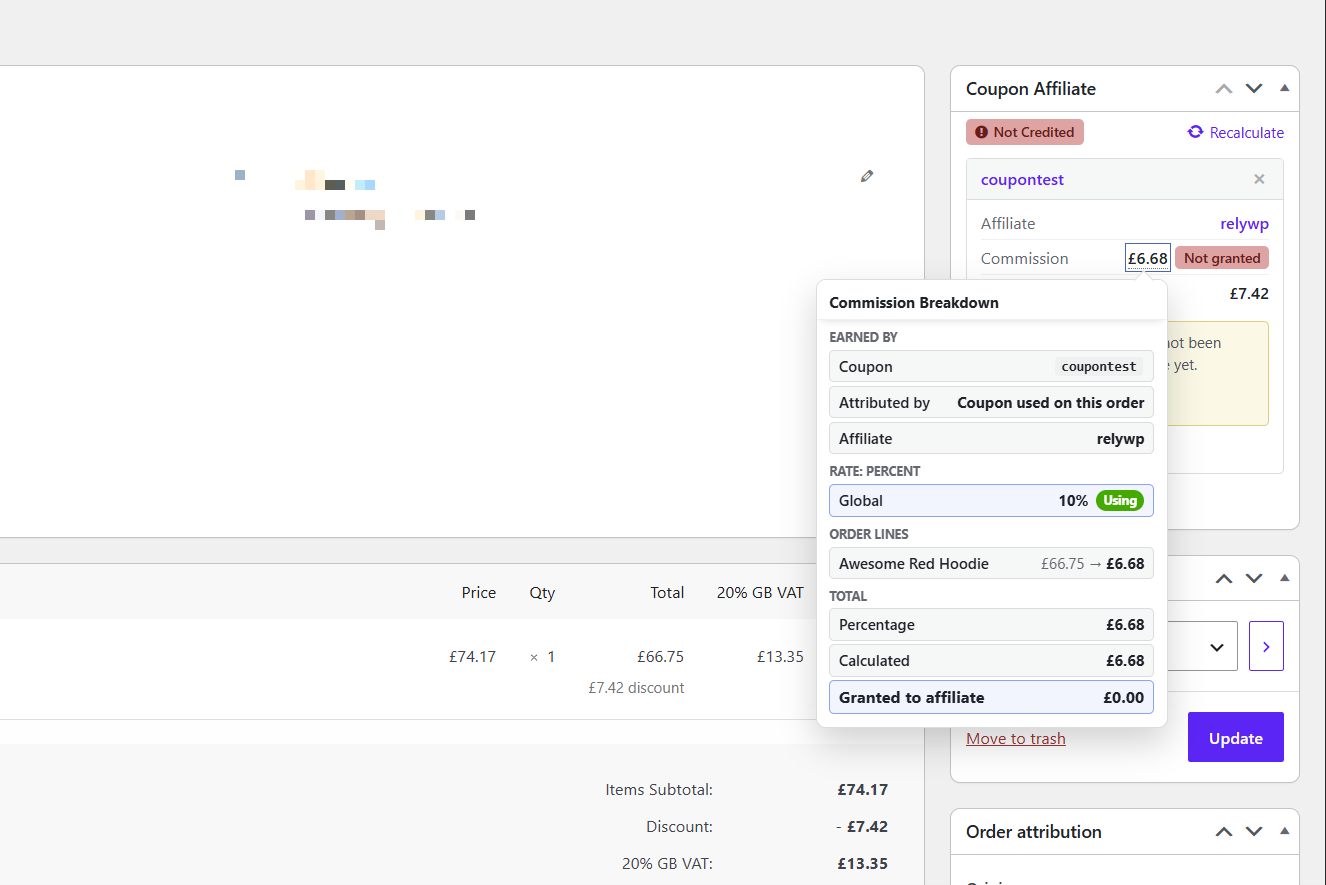
What the breakdown shows
Earned by
- Coupon — the coupon that earned the commission.
- Attributed by — Lifetime commission, Referral URL / custom referrer, or Coupon used on this order.
- Tochtergesellschaft — the user assigned to that coupon.
If several coupons are on the order, only one earns the saved commission. The tooltip names that coupon, even if you hovered a different coupon row.
Bewerten Sie
Each commission type (for example Rate: Percent) lists the levels that apply, marked Verwendung von oder Overridden. This is the same idea as Commission Levels on the coupons list.
Order lines
- Each product, with the amount the percentage was based on, then the commission for that line.
- Adjustments such as Fees, Custom Discounts, Shipping, and Store Credit, when they affect commission.
Total
- Percentage, Fixed per orderund Fixed per product, when they apply.
- Capped at maximum, if a maximum commission setting limited the total.
- Calculated vs Granted to affiliate when those two amounts differ. That is typical after a refund, or when unpaid commission has not been granted yet.
If the box is missing
Aktivieren Sie Show Affiliate Info widget on single order unter Settings → Debug.
Related
- Flexible Provisionseinstellungen
- Was geschieht, wenn eine Bestellung erstattet oder teilweise erstattet wird? — the same box can offer a Deduct action when granted commission is higher than the current calculated amount.
- How to manually assign referral coupons to completed orders
 English
  Spanish
  German
  French