
(PRO) Auszahlungen von Geschäftsguthaben - Integrationen
Updated September 21, 2026
Store credit payouts can be paid into a different store credit/wallet plugin’s system, instead of our built-in wallet system.
You can select which system to use in the plugin settings (under “Store Credit Payouts”), in the “Wallet System” dropdown.
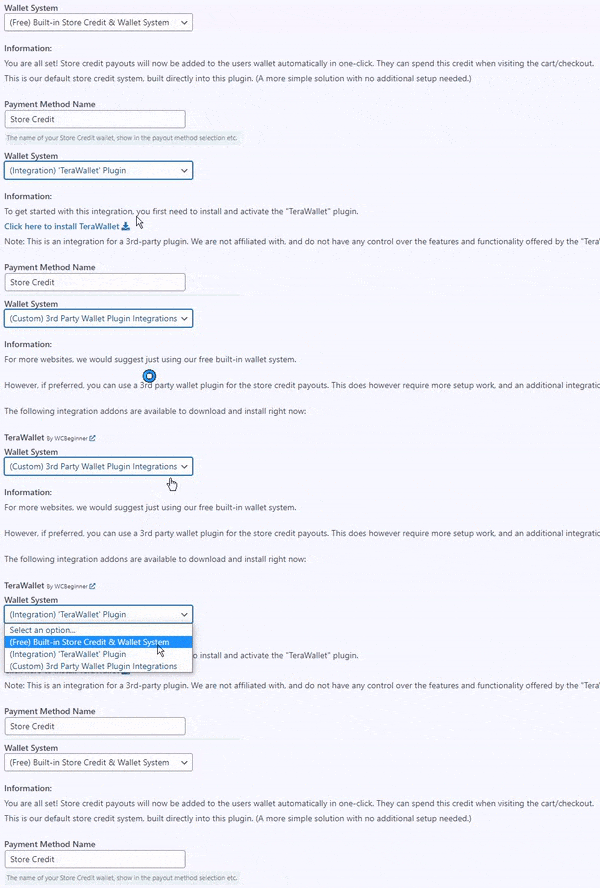
Recommended: Simple Store Credit & Wallet – by RelyWP
The integration for “Simple Store Credit & Wallet for WooCommerce” is built directly into Coupon Affiliates, so there is no integration addon to download. It is the first option in the “Wallet System” dropdown, and the free version can be installed in one click from the settings page.
- Plugin: Hier klicken
- Documentation: Simple Store Credit Integration
The following integration addons are also available to download right now:
TeraWallet - Für WooCommerce
- Plugin: Hier klicken
- Integration addon: Hier klicken
YITH WooCommerce Kontoguthaben
- Plugin: Hier klicken
- Integration addon: Hier klicken
Möchten Sie, dass wir ein Integrations-Addon für ein anderes Wallet-Plugin entwickeln? Bitte einen Vorschlag einreichen.
Benutzerdefinierte Integrationen
For developing your own custom integration, there are three filters to hook into: one to read the affiliate’s balance, one to pay a payout into your wallet, and one to reverse a payout back out of it.
- wcusage_hook_custom_get_credit_users_balance – returns the user’s current balance.
- wcusage_hook_custom_credit_create_payout – pays the commission into your wallet. Return 1 once paid, or 0 if it failed.
- wcusage_hook_custom_credit_reverse_payout – takes the amount back out again when a payout is reversed.
You can add your own system to the “Wallet System” dropdown with the “wcusage_hook_settings_store_credit_dropdown” action.
Two things to be aware of when writing the callbacks:
- The first parameter of each filter starts out as the selected system ID, but it is passed along the chain and changed by each callback, so check the “wcusage_field_storecredit_system” setting directly rather than relying on it. When the selected system isn’t yours, return the value you were given so other integrations still work.
- An integration only counts as active once one of these three filters has actually been registered. If a wallet system is selected but nothing is hooked in – for example the integration’s plugin has been deactivated – the built-in wallet takes over again, so payouts and balances don’t silently disappear.
Zum Beispiel:
// The ID used to identify your own wallet system.
define( 'MY_WALLET_SYSTEM_ID', 'mywallet' );

/**
 * Add your system to the "Wallet System" dropdown.
 */
add_action( 'wcusage_hook_settings_store_credit_dropdown', function( $system ) {
  ?>
  <option value="<?php echo esc_attr( MY_WALLET_SYSTEM_ID ); ?>" <?php selected( $system, MY_WALLET_SYSTEM_ID ); ?>>My Wallet Plugin</option>
  <?php
}, 10, 1 );

/**
 * Whether your system is the one currently selected.
 */
function my_wallet_is_selected() {
  return wcusage_get_setting_value( 'wcusage_field_storecredit_system', 'default' ) === MY_WALLET_SYSTEM_ID;
}

/**
 * Get the affiliate's balance.
 */
add_filter( 'wcusage_hook_custom_get_credit_users_balance', function( $balance, $user_id ) {

  if ( ! my_wallet_is_selected() ) {
    return $balance;
  }

  return (float) my_wallet_get_balance( $user_id );

}, 20, 2 );

/**
 * Pay a payout into the wallet.
 */
add_filter( 'wcusage_hook_custom_credit_create_payout', function( $paid, $user_id, $amount ) {

  if ( ! my_wallet_is_selected() ) {
    return $paid;
  }

  $note = wcusage_get_setting_value( 'wcusage_field_tr_payouts_storecredit_description', 'Affiliate Commission' );

  return my_wallet_add_credit( $user_id, (float) $amount, $note ) ? 1 : 0;

}, 20, 3 );

/**
 * Reverse a payout back out of the wallet.
 */
add_filter( 'wcusage_hook_custom_credit_reverse_payout', function( $paid, $user_id, $amount ) {

  if ( ! my_wallet_is_selected() ) {
    return $paid;
  }

  return my_wallet_deduct_credit( $user_id, (float) $amount ) ? 1 : 0;

}, 20, 3 );
Wenn Sie ein Entwickler sind und weitere Informationen zur Integration Ihres eigenen Wallet-Plugins benötigen oder ein eigenes Integrations-Addon erstellt haben, das Sie hier auflisten möchten, wenden Sie sich bitte an kontaktieren Sie uns.
 English
  Spanish
  German
  French