
Comment créer une page de conditions générales d'affiliation ?
An affiliate terms and conditions page is the rulebook for your program. It sets out how affiliates earn, how they get paid, what they can and can’t do, and how either side can walk away. Putting that in writing keeps everyone clear on the deal, and gives you something to point to when a partner steps out of line.
The short version: cover the areas below (commission, payments, tracking, promotion rules, disclosures, termination, and basic legal protections), publish them as a page, and link to that page from your affiliate sign-up form.
If you run a WooCommerce store, the free Coupon Affiliates plugin has a built-in generator that drafts the whole thing from your program settings and publishes the page for you.
The rest of this guide walks through what goes in a terms page and the different ways to create one.
In this guide
- What an affiliate terms and conditions page is
- Do you actually need one?
- What to include (checklist)
- How to create one
- Affiliate disclosures and the FTC
- Frequently asked questions
Avis de non-responsabilité : This article is for informational purposes only and does not constitute legal advice, nor does it substitute for legal advice. We recommend consulting a qualified legal professional to ensure your terms meet your specific business needs and comply with applicable laws. CouponAffiliates.com and its contributors are not responsible for any legal consequences arising from the use of this information.
What is an affiliate terms and conditions page?
An affiliate terms and conditions page (sometimes called an affiliate agreement or program terms) is the document affiliates agree to when they join your program. It explains how the program works and what both sides are signing up for: how commission is earned, when it’s paid, what promotion is allowed, and when the arrangement can end.
In practice, affiliates accept it by ticking a box on your registration form, and the page stays published on your site so anyone can read it. It isn’t a marketing page. It’s the plain agreement that sits behind the program.
Do you actually need one?
No single law forces every program to have written terms, and a very small or informal program might get by without them. But running without any is a gamble. If an affiliate demands commission on a refunded order, refers themselves for a discount, or starts bidding on your brand name in paid search, written terms are what let you say no with something to back it up. Without them, those situations turn into arguments with no clear answer.
A published terms page does a few useful jobs for you:
- Sets expectations up front, so commission rates, payout timing, and acceptable promotion are agreed before anyone earns a penny.
- Limits your liability and keeps your right to remove affiliates who break the rules.
- Spells out the disclosure and privacy obligations you expect partners to follow.
New to all this? Our overview of Marketing d'affiliation WooCommerce and the step-by-step on setting up a WooCommerce affiliate program cover the wider picture that the terms page fits into.
What to include in your affiliate terms and conditions
Writing a terms page from scratch feels like a lot until you break it into sections. Here’s a checklist of the areas most programs cover. You won’t need every line, and your program may need something extra, but this is a sensible starting point:
- Program overview. A plain summary of what affiliates promote and how they earn, so the detailed rules that follow have context.
- Who can join. Eligibility such as minimum age, the application and approval process, and any sites or content you won’t accept.
- Commission structure. The rate (a percentage or a fixed amount), what counts as a qualifying sale, and what “net revenue” means for you (usually the sale minus refunds, tax, and shipping). Note the things that don’t count, like self-referrals or fraudulent orders.
- Payment terms. When you pay (monthly or quarterly, say), how you pay (PayPal, bank transfer), and any minimum payout threshold before money is released.
- Referral tracking. How referrals are credited (a unique affiliate link or coupon code) and the tracking window during which a sale counts, with 30 days being common. Most affiliate plugins handle this with a first-party cookie set on your own domain, so it isn’t affected by browser changes to third-party cookies.
- Promotion rules. The marketing you allow (blogs, social media, email) and the tactics you don’t (spam, misleading ads, or bidding on your brand terms in paid search).
- Disclosure requirements. Asking affiliates to disclose the relationship on their content, for example “this post contains affiliate links.” There’s more on the FTC angle below.
- AI-generated content. Whether affiliates may use generative AI tools to produce reviews, ads, or social posts, and on what conditions (claims still have to be accurate and disclosed). Plenty of older templates skip this, so it’s a useful one to add in 2026.
- Trademark and brand use. How affiliates can use your name, logo, and promotional materials, and where they can’t, such as in domain names or misleading contexts.
- Termination. How either side ends the arrangement, any notice period, what happens to unpaid commission, and grounds for immediate removal such as fraud or brand damage.
- Data and privacy. Obligations under laws like GDPR or CCPA where they apply, protecting customer data, and keeping program details confidential.
- Legal protections. Clauses such as indemnification, a cap on liability, and which jurisdiction’s law governs the agreement.
- Changes. Reserving the right to update the terms, and how you’ll let affiliates know (usually by email or a notice on your site).
How to create an affiliate terms and conditions page
There are three common routes, depending on your budget and how hands-on you want to be: a generator built into your affiliate plugin, a third-party template or generator, or a lawyer. Here’s how each one works.
Option 1: Generate the terms with the Coupon Affiliates plugin
If you’re using the Coupons affiliés plugin for WooCommerce, there’s a built-in Terms & Conditions Generator that drafts a template from your program settings and publishes the page for you. It’s included in the free version. Here’s the process:
- Open the tool. In your WordPress dashboard, go to the Coupon Affiliates menu, open the Outils administratifs page, and choose the Terms & Conditions Generator.
- Fill in the details. Add your company name, website, commission rate, payment terms, and so on. Most fields are pre-filled from your current program settings, but read through them and adjust anything that isn’t right.
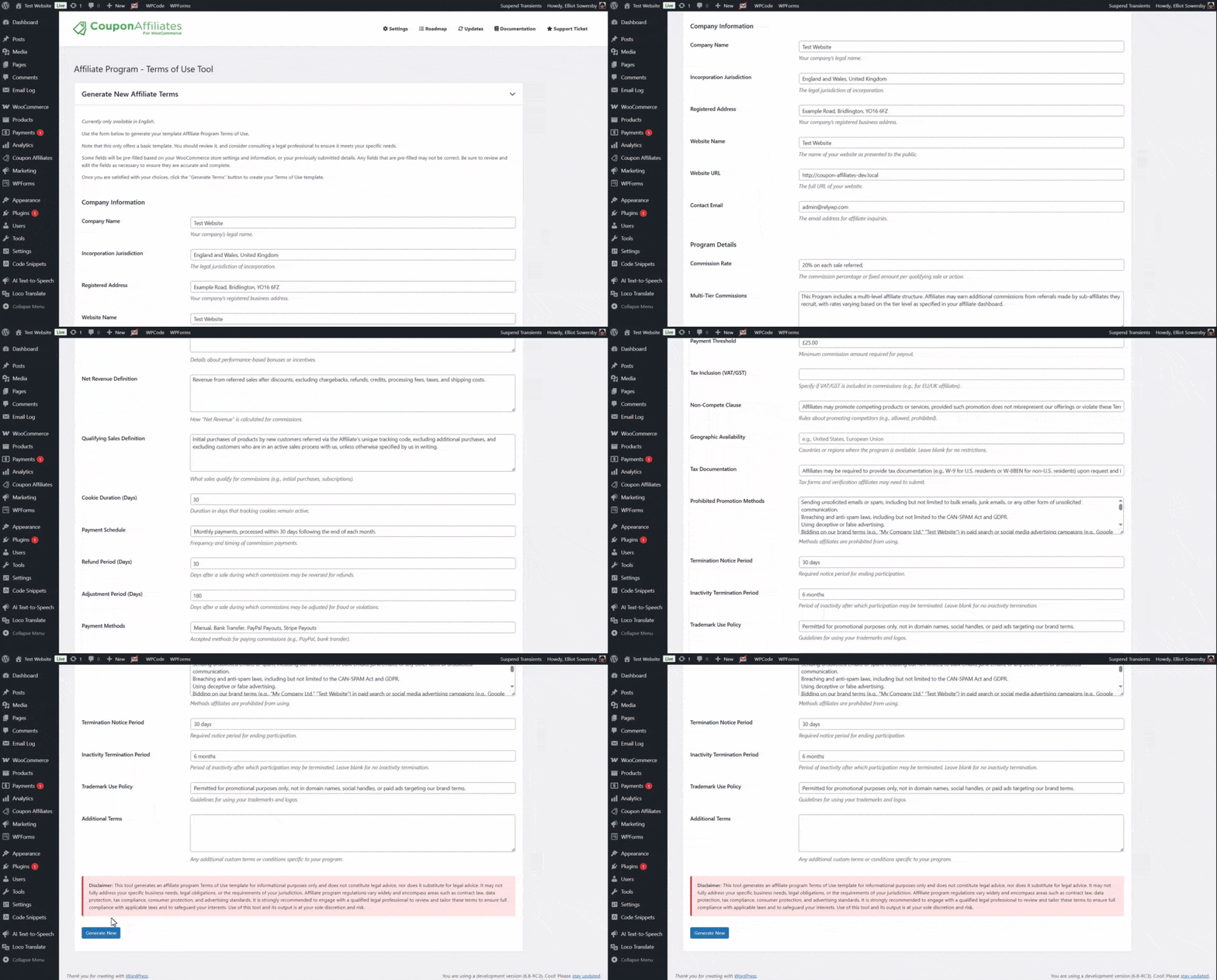
- Generate the draft. Cliquez sur Generate New. The tool builds a full template from your inputs, with headings and formatted text you can edit further to fit your program.

- Publish the page. Cliquez sur Generate Page and the plugin creates a published page on your site (for example, /affiliate-terms) that you can keep editing.

- Link it on sign-up. The plugin adds the terms to your affiliate registration form with an acceptance message (such as “I agree to the Affiliate Program Terms and Conditions”) that links straight to the page.

Why people reach for it: you skip the blank page, everything stays editable in the built-in editor, and the sign-up form links to the page without any extra setup. The catch is that it gives you a starting template, not a legal review, so you still need to read it over (and ideally have a lawyer check it) before you rely on it.
Option 2: Third-party terms generators and templates
If you’d rather use a dedicated legal template, a few tools focus on affiliate agreements specifically. Here’s how the main ones compare (prices checked July 2026, so double-check before you buy):
| Option | What it is | Cost | Watch-out |
|---|---|---|---|
| Coupon Affiliates generator | Free tool inside the WooCommerce plugin; pre-fills from your settings and publishes the page | Free (included) | A starting template, not legal review |
| Wonder.Legal | Fill-in-a-form affiliate agreement builder that exports to Word and PDF | Free basic template; paid for the full custom document | The free version is fairly basic |
| Navigateur AM | Downloadable “fill in the blanks” agreement from affiliate consultant Geno Prussakov | $11.95 | You add your details manually (no auto-fill) |
| WP Legal Pages | WordPress plugin with an affiliate agreement generator among its legal pages | Paid (Pro plugin) | Another plugin to license and maintain |
All of these give you a document to start from rather than advice about your specific situation, so the review step still matters whichever one you pick.
Option 3: Hire a lawyer
For a document written around your business and jurisdiction from the start, a lawyer is the thorough route. It isn’t a generator, so it costs more and takes longer, but you get terms tailored to you and a professional standing behind them. Many people use a generator or template for the first draft, then pay a lawyer to review and tighten it, which keeps the cost down.
Affiliate disclosures and the FTC
One area worth understanding before you finalise your terms is disclosure. In the US, the Federal Trade Commission (FTC) asks anyone promoting a product they’re compensated to promote to disclose that relationship clearly and conspicuously. For an affiliate program, that usually means your terms ask affiliates to add a visible disclosure (for example, “I earn a commission from links in this post”) close to where they share their link.
The plainest-language reference is the FTC’s own Endorsement Guides Q&A, and it’s a good idea to point affiliates to it directly. The guides are administrative interpretations rather than a standalone law, and how they apply depends on the situation, so treat this as background rather than a checklist, and get a lawyer to confirm what your program needs. Similar disclosure and consumer-protection rules exist in other countries too, so check the ones that apply where you and your affiliates operate.
Frequently asked questions
Do I legally need affiliate terms and conditions?
No single law makes written terms mandatory for every program, but running without them leaves you exposed if there’s a dispute over commission, refunds, or promotion. For US programs, the FTC also expects affiliates to disclose the relationship on their content. Check with a lawyer for your particular situation.
What should affiliate terms and conditions include?
At a minimum: commission and payment details, how referrals are tracked, promotion rules, disclosure requirements, termination, and basic legal protections. The checklist earlier in this guide covers the usual sections and a couple of newer ones, like an AI-content clause.
Where do I put my affiliate terms and conditions?
Publish them as a page on your site, then link to that page from your affiliate registration form so affiliates accept them when they sign up. That way the terms are always available and there’s a record that partners agreed to them.
Can I write my own affiliate terms, or do I need a lawyer?
You can draft your own from a template to get going, and a generator speeds that up a lot. For anything you’re relying on legally, it’s sensible to have a qualified lawyer review the final version.
How do I add terms to a WooCommerce affiliate program?
The free Coupon Affiliates plugin includes a generator that drafts the terms from your settings, publishes the page, and adds the acceptance checkbox to your registration form. You can then edit the draft to fit your program before going live.
Clause de non-responsabilité
This article, and any template generated by the Coupon Affiliates plugin, is for informational purposes only and does not constitute legal advice, nor does it substitute for legal advice. It may not fully address your specific business needs, legal obligations, or the requirements of your jurisdiction. Affiliate program regulations vary widely and encompass areas such as contract law, data protection, tax compliance, consumer protection, and advertising standards. We recommend engaging a qualified legal professional to review and tailor your terms to ensure full compliance with applicable laws and to safeguard your interests. Use of any generated output is at your sole discretion and risk.
Final thoughts
A terms page won’t win you affiliates, but it saves a lot of awkward conversations later. Work through the checklist above, publish a page, and link it from your sign-up form. A template (ours or someone else’s) gets you most of the way, and a lawyer’s read-through is the part worth paying for before you depend on it.
If you’re on WooCommerce, the built-in generator in Coupon Affiliates is the quickest way to get a first draft live. Get the free plugin and try the Terms & Conditions Generator, or see everything it does on the Coupon Affiliates site.

Elliot Sowersby est un développeur WordPress du Yorkshire, au Royaume-Uni. Il est le fondateur et le développeur principal de Coupons affiliés et RelyWP.

 English
  Spanish
  German
  French
Laisser un commentaire