
Verweis-URLs
Updated September 6, 2026
Frontend: Affiliate
Erlauben Sie Affiliates, eine Referral-URL in ihrem Coupon-Affiliate-Dashboard zu erhalten, die den Coupon automatisch beim Checkout anwendet.
Außerdem können sie im Dashboard die Gesamtklicks, die Nutzung und die Konversionsrate für ihre Referral-URL einsehen.
In der PRO-Version können Sie Nutzern Zugang zu Kurz-URLs, Kampagnen, Social Sharing und QR-Codes geben.
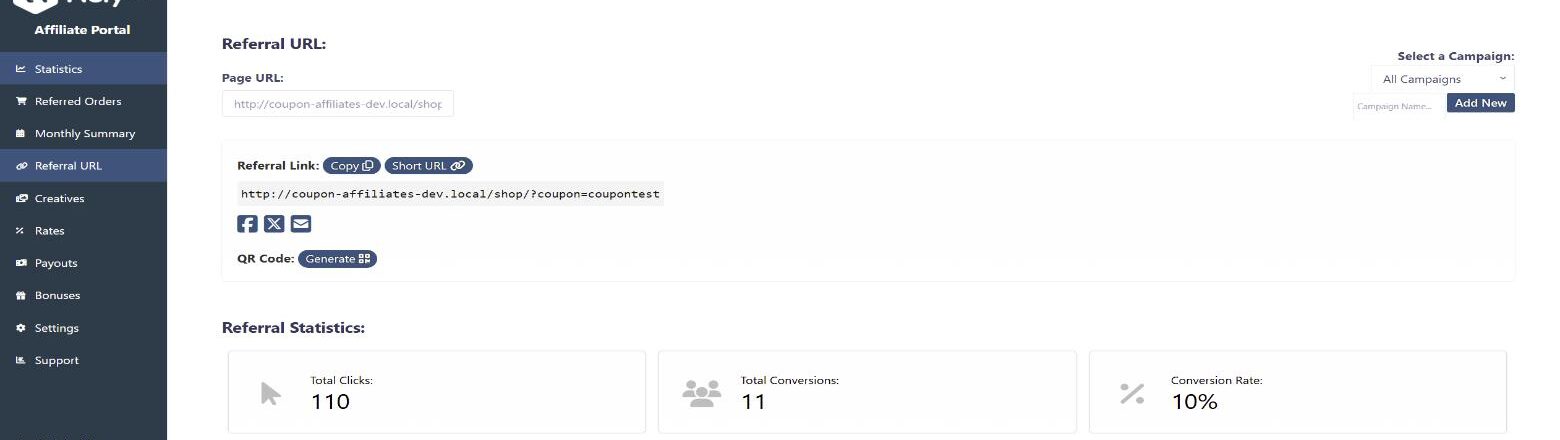
How Referral URLs Work
Each affiliate coupon has its own referral URL, made up of your site URL plus a URL variable and the coupon code, for example https://yoursite.com/?coupon=CODE. The variable (“coupon” by default) can be changed in the “Referral Links” settings tab.
When someone visits a referral URL, a referral cookie is stored in their browser for the number of days set in the “Referral Cookie Settings”. While the cookie is active, the coupon is applied automatically at checkout if “Auto Apply Coupon” is enabled, and the visit is recorded as a click for that affiliate. When the visitor places an order, it is attributed to the affiliate and counts towards their conversion rate.
If a visitor follows more than one affiliate’s referral URL, the “Attribution Model” setting decides which affiliate is credited (last-click by default, or first-click). Cookies can also be removed once an order is placed, or disabled entirely in the “Privacy & Cookies” settings tab.
Backend: Admin Settings
All of the referral URL options are found in the “Referral Links” tab of the plugin settings. The tab is split into the following sections:
- Aktivieren Sie die Generierung von Verweis-URLs und die Verfolgung von Klicks – The main toggle for the whole feature.
- Coupon automatisch anwenden – Automatically apply the coupon to the cart/checkout if a referral URL was used, and optionally attempt to apply it instantly on the first page visited rather than waiting until the cart or checkout page.
- “Referral URL” Tab – Enable the tab on the affiliate dashboard, and choose whether to show the “Referral Link” generator section and the “Referral Statistics” section. You can also add custom text to display at the top of the tab.
- Referral Link Format – Customise the referral URL variable (for example changing
?coupon=to something else) and the format of the links your affiliates generate. - URL Conversion Tracking – Options for tracking referrals and conversions from the referral link. See Tracking conversions via referral URL without coupons.
- Referral Cookie Settings – How long the referral cookie lasts, and when it is removed.
- Click Attribution – Choose last-click or first-click attribution. See Zuschreibungsmodell.
- Click / Visit History – Enable the click history log for affiliates, set how many clicks are shown per page, and enable pagination. See Referral URL Click History.
- Empfehlungs-Kampagnen (PRO) – Let affiliates create campaigns to track clicks and conversions separately. See Kampagnen.
- QR-Code-Generator (PRO) – Let affiliates generate a QR code for their referral URL. See QR Codes.
- Direktes Link-Tracking (PRO) – Track referrals from an affiliate’s own domain without a referral link. See Direktes Link-Tracking.
- Short URLs (PRO) – Give affiliates a shortened version of their referral link. See Short URLs.
- Social Sharing Buttons (PRO) – Show sharing buttons alongside the referral link. See Soziale Teilhabe.
- Kreative (PRO) – Display banners, videos, PDFs and colours for affiliates to download. See Kreative.
- Affiliate Landing Pages (PRO) – Link a page to an affiliate coupon so it works like a referral URL. See Affiliate Landing Pages und Dynamische Landing Pages.
- Empfehlungs-Popup – Show a welcome popup to visitors who arrive via a referral link. See Referral Welcome Popup.
 English
  Spanish
  German
  French