
Track Influencer Sales with Coupon Codes in WooCommerce
Give every influencer their own coupon code. When their followers use it at checkout, the sale is tracked and their commission is worked out for you, even if nobody clicks a link.
- Rated 4.9/5 Stars★★★★★On WordPress.org
- Trusted By7000+Businesses
- Built exclusively forWooCommerce
Why coupon codes
Influencer sales don’t always start with a click
Followers hear a code in a video, a podcast or a story, then type it in at checkout, often days later and on a different device. A referral link would miss that sale.
With Coupon Affiliates, each influencer’s coupon is linked to their account, so every order that uses it is credited to them. Their followers get a discount, and you only pay commission on real sales.
- Tracked without a referral link
- Works for Instagram, TikTok, YouTube, podcasts and print
- Runs inside WooCommerce, with no extra platform or fees
I worry about conventional affiliate programs because people tend to use more than one device… Affiliate coupons solve that problem.
Avlis Productions Inc on WordPress.org
How it works
From coupon code to commission in four steps
No separate influencer platform to set up. It all runs on your own WooCommerce store, using the coupons you already know.
- Add your influencerTheir account and coupon code are created for you, from your template coupon.
- They share their codeIn videos, stories, posts and podcasts, or with a referral link in their bio.
- Every sale is trackedOrders that use their code show the referral and the commission earned.
- Pay their commissionPay them however you like, or in one click with Pro payouts.
Free
Add an influencer in seconds
Give each influencer their own code
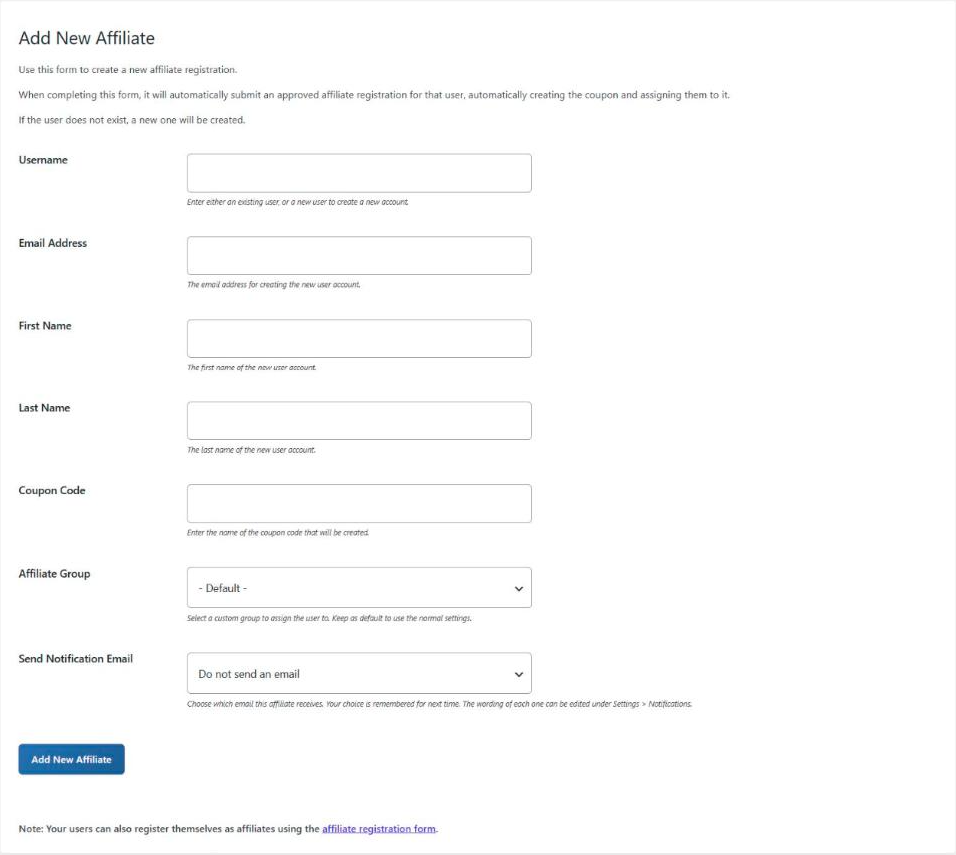
Go to Add New Affiliate, enter their username, name and email, and the code they’ll share, like SARAH10. Their user account and coupon are created for you.
The coupon copies the discount, usage limits and restrictions from your template coupon, so every influencer starts with the same settings.
- Creates their user account if they don’t have one
- Coupon copied from your template coupon
- Bulk create coupons for a whole list of influencers
Free
Let creators come to you
An application form for new influencers
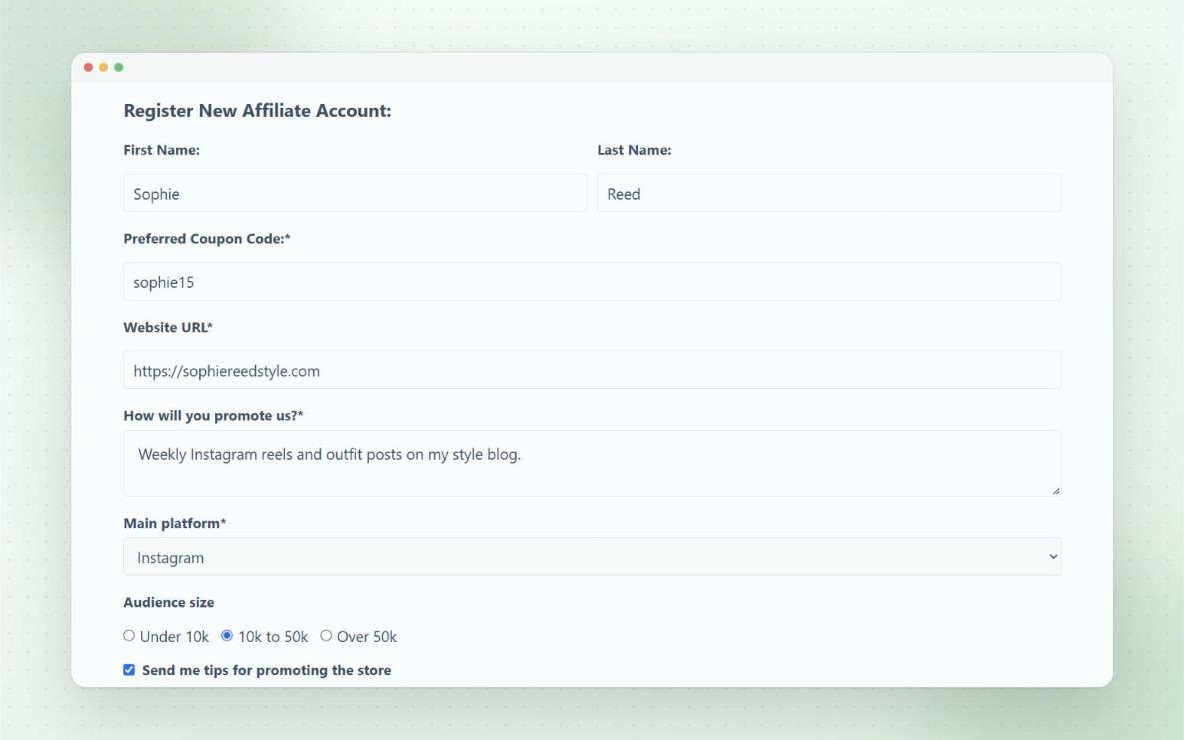
Add a registration form to your site, and creators can apply to join, choosing the coupon code they’d like. You review each application under Registrations, and accepting it creates their account and coupon.
With Pro, ask for the details you care about, like their platform and audience size, with custom fields, and accept applications automatically if you prefer.
- Applicants choose their own code
- Spam protection built in
- Custom fields and auto-approval Pro
Free
Already sharing a code?
Keep the codes they already use
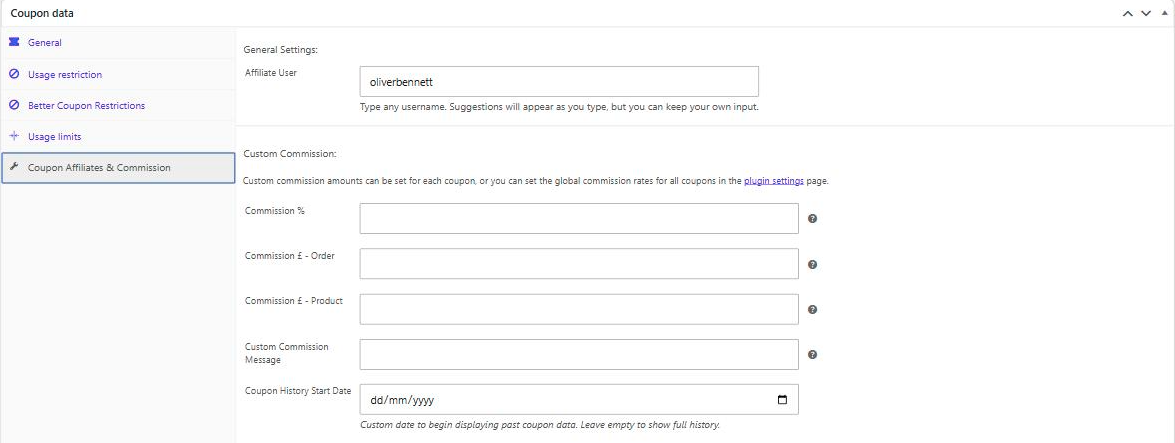
Working with an influencer who already has their own code? Edit that coupon, open the Coupon Affiliates & Commission tab, and select their user account.
Orders that already used the code show up on their dashboard straight away, so nothing is lost when you switch.
- Past orders included in their stats
- Assign a coupon to past orders in bulk
Free
Their discount, their commission
Set a deal for each influencer
Their followers get the discount on their coupon. It’s a normal WooCommerce coupon, so if an influencer has agreed a different deal, like 15% off or free shipping, just edit their coupon.
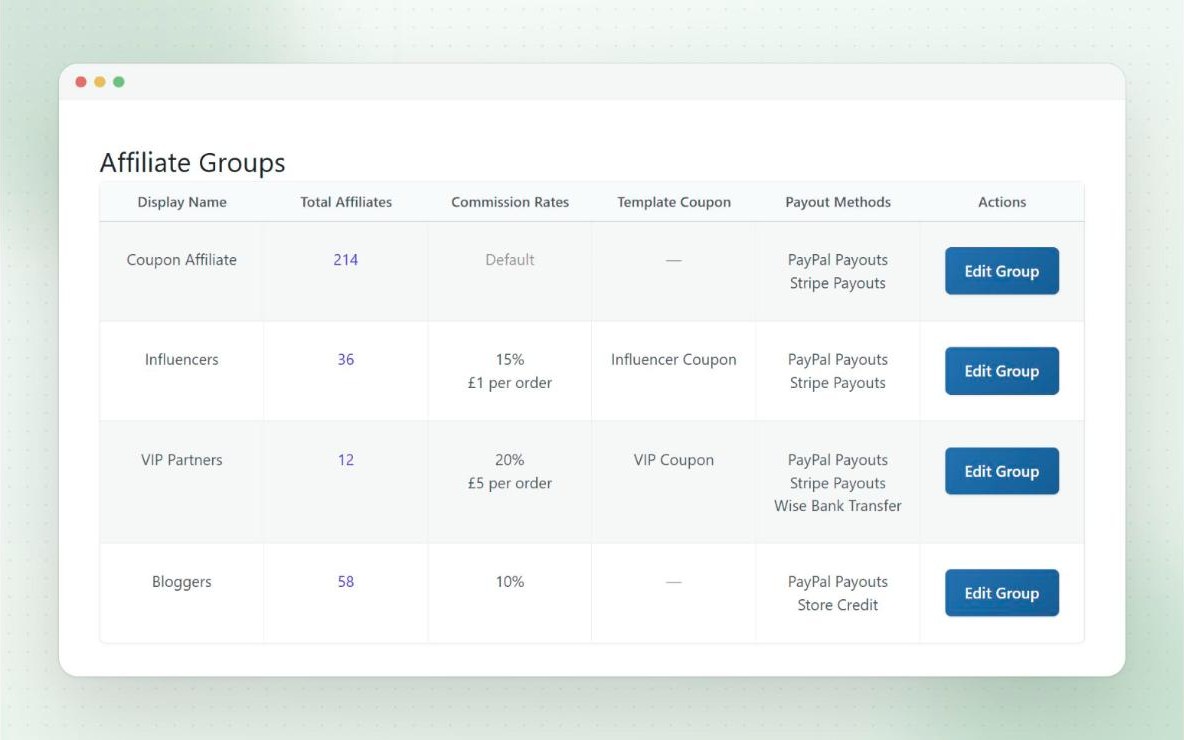
Commission can be a percentage, a fixed amount, or both. Everyone starts on your default rate, and with Pro you can give one influencer a custom rate, or put them all in an Influencers group with its own rate.
- Percentage or fixed commission
- Cap the commission on any single order
- Rates per affiliate, group or product Pro
- Bonus commission for new customers Pro
Free
Every sale, accounted for
See which influencer sold what
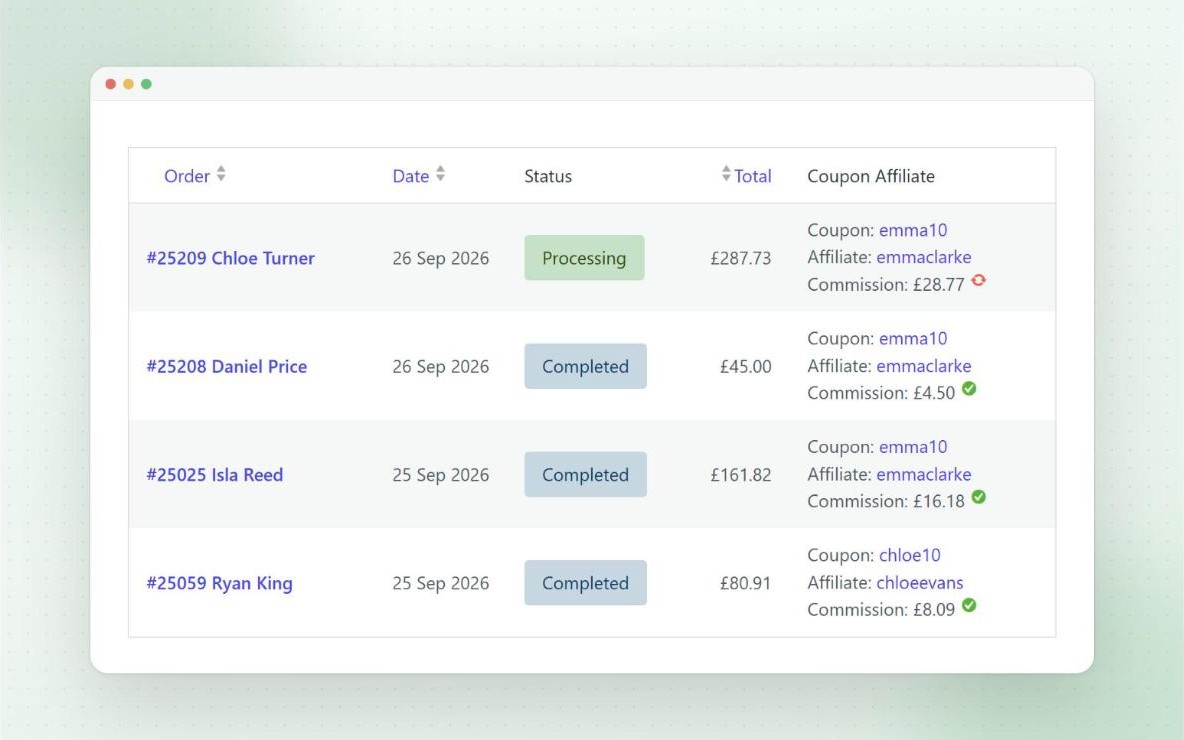
When a customer uses an influencer’s code, the WooCommerce order shows the referral, the affiliate and the commission they’ve earned. Hover the commission to see exactly how it was worked out.
A column on your orders list shows the same at a glance, and if you refund an order, the commission is adjusted automatically.
- Commission breakdown on every order
- Refunds adjust commission automatically
- Reports for every coupon and affiliate
Free
Their own dashboard
Influencers can see how their code is doing
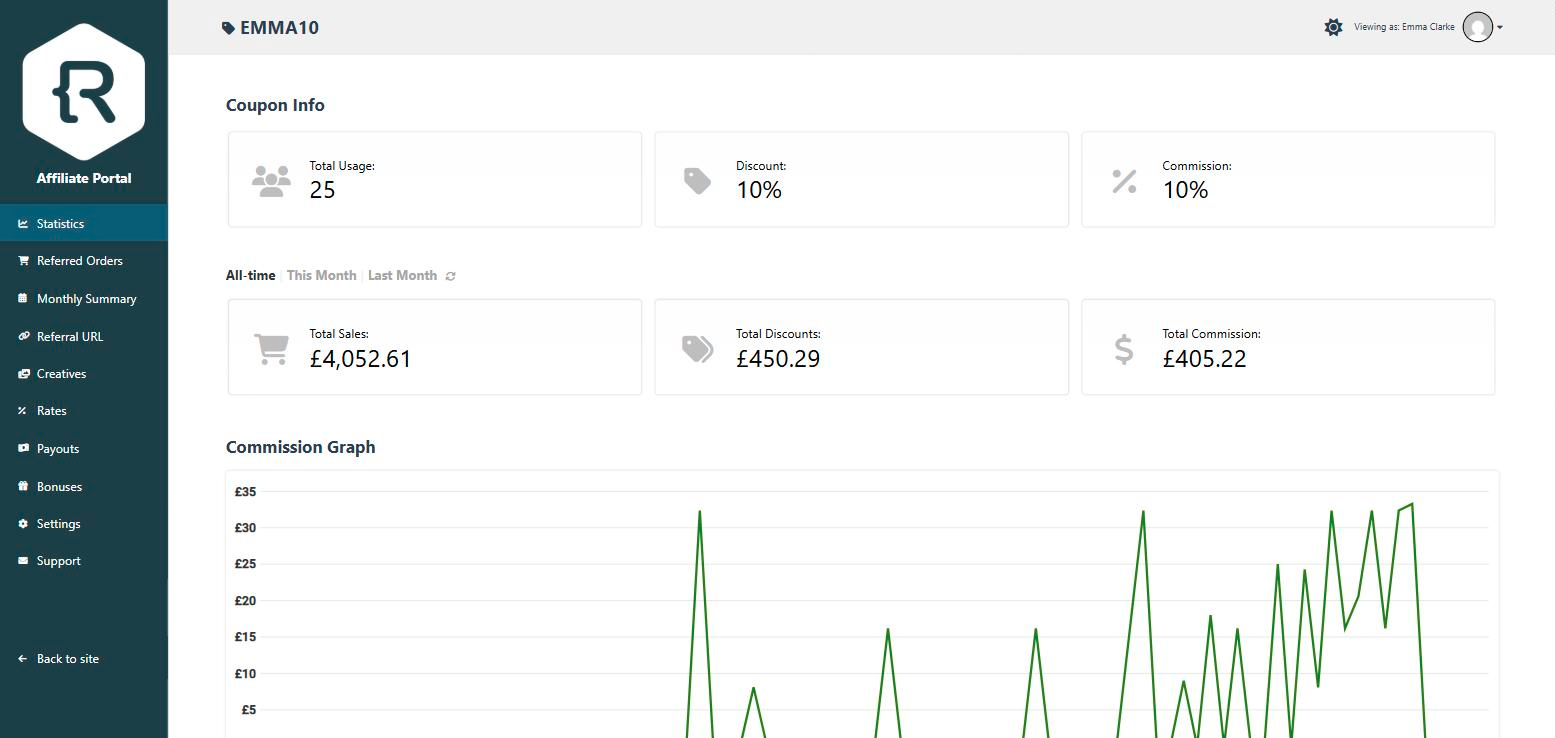
Influencers log in to see their code’s uses, sales and commission, and every order they’ve referred, all in real time. They can also get an email each time their code is used.
Turn on the Affiliate Portal, and they get a full-screen dashboard with your own logo and brand colours.
- Real-time stats and referred orders
- Affiliate Portal with your branding
- Commission graphs and monthly email reports Pro
Free
For their link in bio
Referral links, campaigns and QR codes
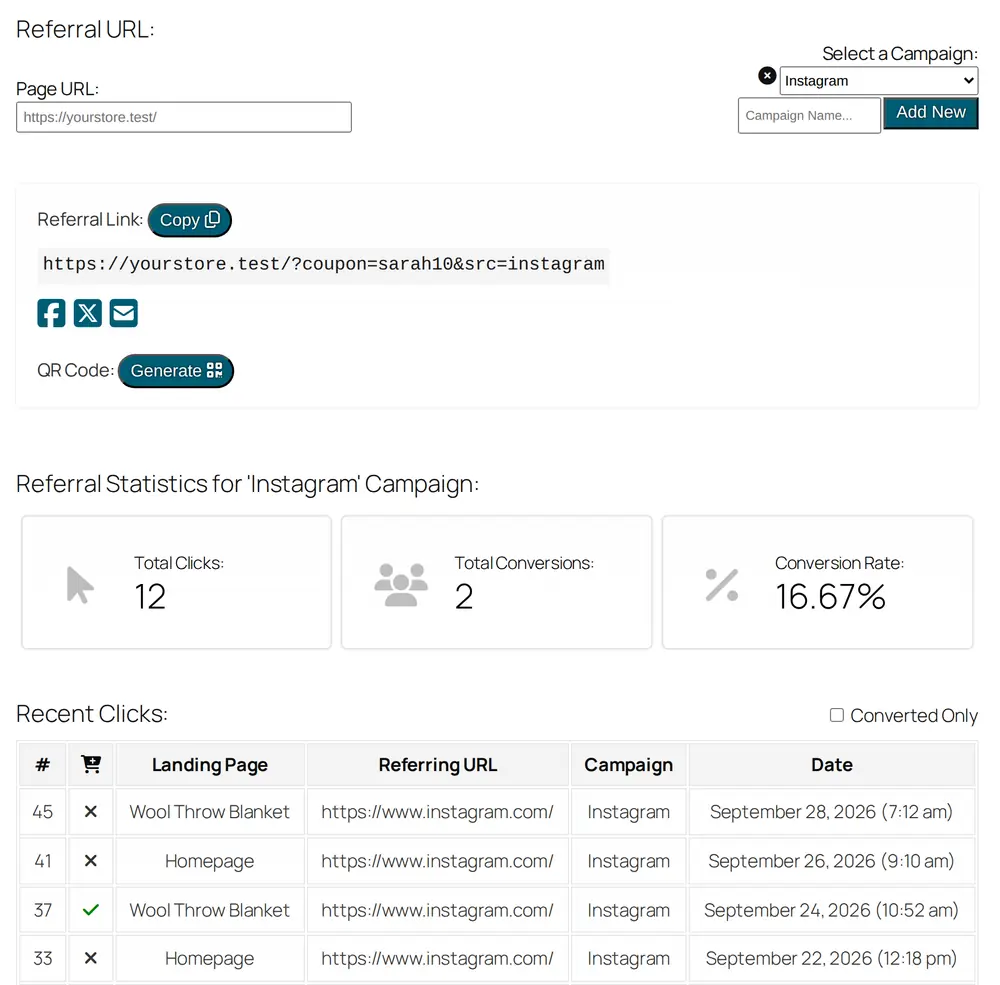
Influencers can also create a referral link to any page on your store. It applies their coupon automatically, and tracks every click and conversion.
With Pro, they can create a campaign for each place they post, like Instagram, TikTok or YouTube, to see which one sells best. Short links, QR codes and share buttons make it easy to post anywhere.
- Coupon applied automatically from the link
- Campaigns with their own stats Pro
- Short links, QR codes and social sharing Pro
Pro
Optional
Lifetime commissions
Turn on lifetime commission, and once a customer with an account uses an influencer’s code, they stay linked to that influencer. Their future orders earn commission too, even without the code.
Add an expiry if you’d rather it only lasted a set time. Either way, it gives influencers a strong reason to keep sending you new customers.
- Optional expiry time
- Link existing customers to an influencer manually
Free
Protect your margin
Keep influencer codes in check
Influencer codes get shared, and sometimes they end up on coupon sites. Built-in fraud prevention can stop affiliates earning commission on their own orders, limit affiliate coupons to new customers, and block specific visitors.
With Pro, if a code turns up on a coupon site, you can stop it applying automatically for visitors from that site. You can also delay commission to cover your refund window.
- No commission on their own orders
- New customers only
- Visitors blacklist
- Domains blacklist and delayed commission Pro
Pro
Paying influencers
Pay them your way
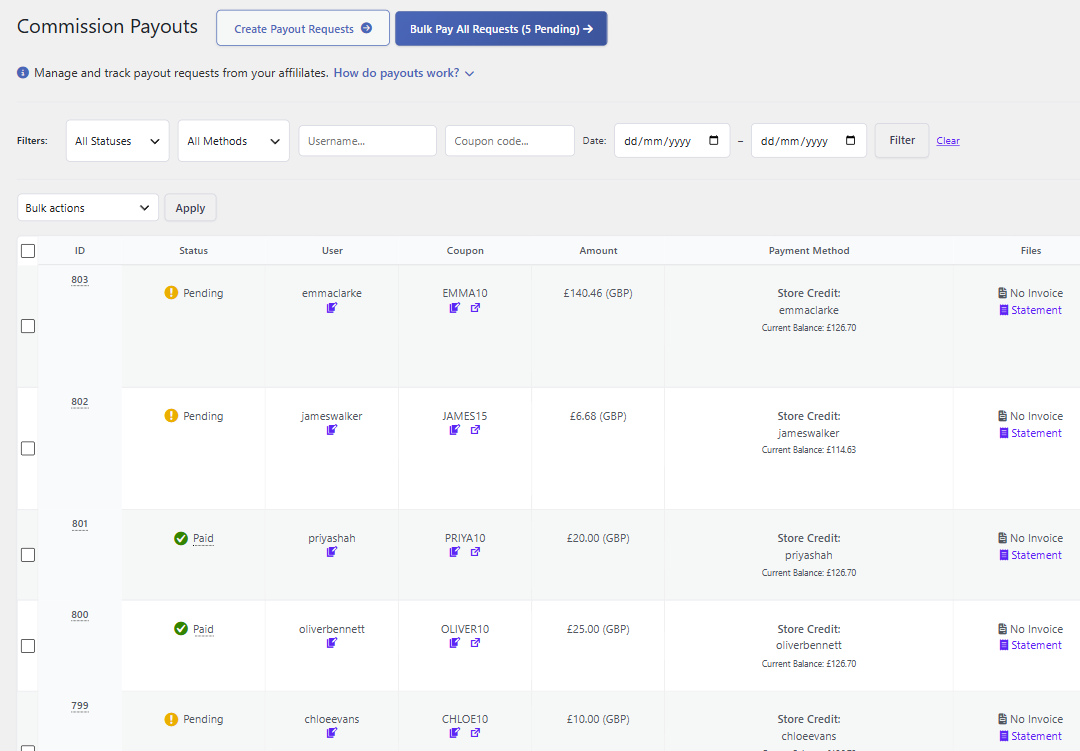
Influencers request a payout from their dashboard, and you’re emailed straight away. Pay it in one click with PayPal, Stripe or store credit, or by bank transfer with Wise.
Or turn on automatic payouts, and requests are paid as soon as they’re made, up to a limit you set.
- Payout requests from their dashboard
- Scheduled payout requests and automatic payouts
- PDF statements and invoices
Plus lots more
More tools for influencer programs
Everything else you might need as your list of influencers grows.
Free
Custom Terminology
Call them creators, ambassadors or partners instead of affiliates, across the dashboard and admin pages.
Free
Bulk Create Coupons
Onboard a list of influencers at once. Each coupon is created, assigned to its user, and the emails are sent for you.
Pro
Dynamic Creatives
Share brand assets with your influencers, and generate personalised banners for each of them automatically.
Pro
Dynamic Landing Pages
Design one page, and every influencer gets their own copy, with their name, code and discount filled in.
Pro
Referral Welcome Popups
Greet their followers with a popup showing their discount, the code and who sent them.
Pro
Performance Bonuses
Reward influencers for hitting goals with bonus commission, store credit, a gift coupon or a free product.
Pro
Affiliate Leaderboards
Show your top influencers for the month or year, to encourage some friendly competition.
Pro
Email Newsletters
Send news, launches and new offers to all your influencers, or just one group.
Trusted by 7000+ businesses to run their affiliate and influencer programs

Bane Dostanic, radnasebi.com
“If you are looking for an amazing affiliate plugin that is constantly being developed and updated, but also an amazing support, look no further – you have a whole package here. My top recommendation. You will love it.”

Wiliam Jose Koester, wjk marketing
“This plugin solved our problems with a super simple solution based on data that WooCommerce already collects. In addition, developer support is great. I recommend!”

Johanna Kate, The Wedding Society
“This Plugin has exactly what we were after and is brilliant, allowing for almost completely hands-off from us and a seamless, profitable user experience for the consumer. It is incredibly user friendly, both for the consumer and for us.”

Arjan Lautenbach, Skillmeister.nl
“This plugin is simple to understand and operate for the WP-novice. Lots of options to really get what you want, with clear explanations with every option (a rarity in the WP plugin world). Excellent! I’m impressed. Affiliates made simple.”
Questions
Frequently asked questions
Can I track influencer sales without a referral link?
Yes. Each influencer’s coupon is linked to their account, so any order that uses their code is credited to them, whether or not they clicked a link. Referral links are there too, for their bio.
Can influencers keep a code they already use?
Yes. Edit the coupon and select their user account on the Coupon Affiliates & Commission tab. Orders that already used the code are included in their stats straight away. Assigning coupons guide
Can each influencer have their own discount and commission?
Yes. The discount is set on their coupon, like any WooCommerce coupon. Commission uses your default rate, and Pro adds custom rates for each affiliate, group or product. Commission settings guide
Can influencers see their own sales?
Yes. They log in to their affiliate dashboard, or the full-screen Affiliate Portal, to see their code’s uses, sales, commission and referred orders in real time. Affiliate Portal guide
What if an influencer’s code ends up on a coupon site?
You can limit affiliate coupons to new customers, stop affiliates earning on their own orders, and block specific visitors. With Pro, the domains blacklist stops the code applying automatically for visitors from that site, and can block manual use too. Fraud prevention guide
How do I pay influencers?
In the free version, you can see what each influencer has earned and pay them however you like. Pro adds payout requests from their dashboard, and one-click payouts with PayPal, Stripe or store credit, plus Wise bank transfers. Payouts guide
Do I need a separate influencer marketing platform?
No. Coupon Affiliates runs inside your WooCommerce store, so your data stays on your own site. There are no transaction fees, and no limits on the number of influencers or coupons.
Is there a free version?
Yes. The free version on WordPress.org includes coupon tracking, the affiliate dashboard, referral links and the registration form. Features marked Pro on this page need Coupon Affiliates Pro, which has a free 7-day trial.