
(PRO) Automated Conversion Rates
Updated September 4, 2026
We’ve incorporated a feature that automatically updates multi-currency conversion rates every 12 hours.
This automatic update ensures you’re always working with the most current exchange rates, making your multi-currency transactions more accurate and hassle-free.
To enable this feature, you will need to go to the “Currencies” settings tab, with multi-currency enabled, and go to the “Automated Conversion Rates” section.
Step 1: Select an API Provider
Use the “Select an API Provider” dropdown to choose which service the plugin should collect the rates from. Two providers are supported:
- apilayer.com (Recommended) – The APILayer free plan supports all base currencies and 100 requests per month, which is all that is required.
- exchangeratesapi.io – Note: currently only the “EUR” base store currency is supported on the Exchangerates API free plan. If you need to use a different base currency (for example USD), you will need to upgrade to their “Basic” API plan.
Step 2: Enter your API Key
Sign up for a free account with the provider you selected, and get your API key:
- APILayer: https://apilayer.com/marketplace/exchangerates_data-api
- Exchangerates API: https://exchangeratesapi.io
Then enter the key into the “API Key” field for that provider in the settings.
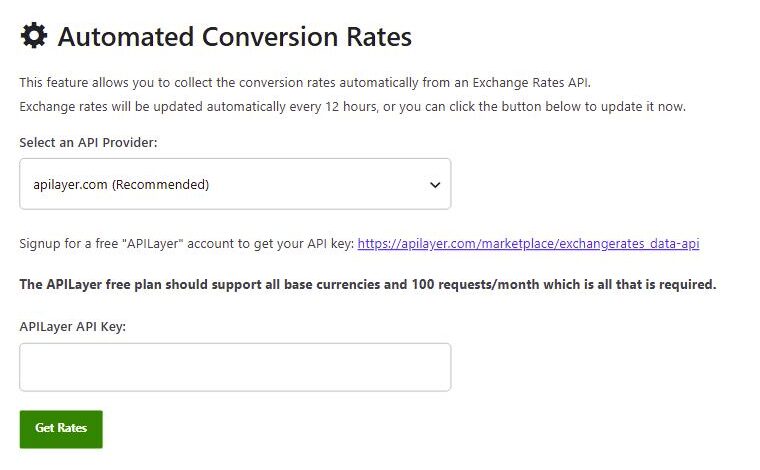
Step 3: Get Rates
You can then click “Get Rates” to get the new rates instantly, or this will be done automatically every 12 hours.
Saving the rate used for each order
Because the rates change every 12 hours, you may want to enable “Save the conversion rate for each order”, found further up the “Currencies” tab. With this enabled, the plugin permanently saves and uses the conversion rate that was set at the time the order was created, even if you update the rates later. This keeps historical order totals and commission consistent.
For an overview of the multi-currency feature itself, see Multi-Currency Support & Setup.
 English
  Spanish
  German
  French