
Set custom commission per affiliate / coupon.
Updated September 3, 2026
(Requires PRO version.)
With Coupon Affiliates, you can set custom commission amounts on a per affiliate/coupon level, which will overwrite the default amounts.
Additionally, you can take things even further, and set custom commission amounts per affiliate coupon. So if you want to different affiliates to earn different amounts, you can.
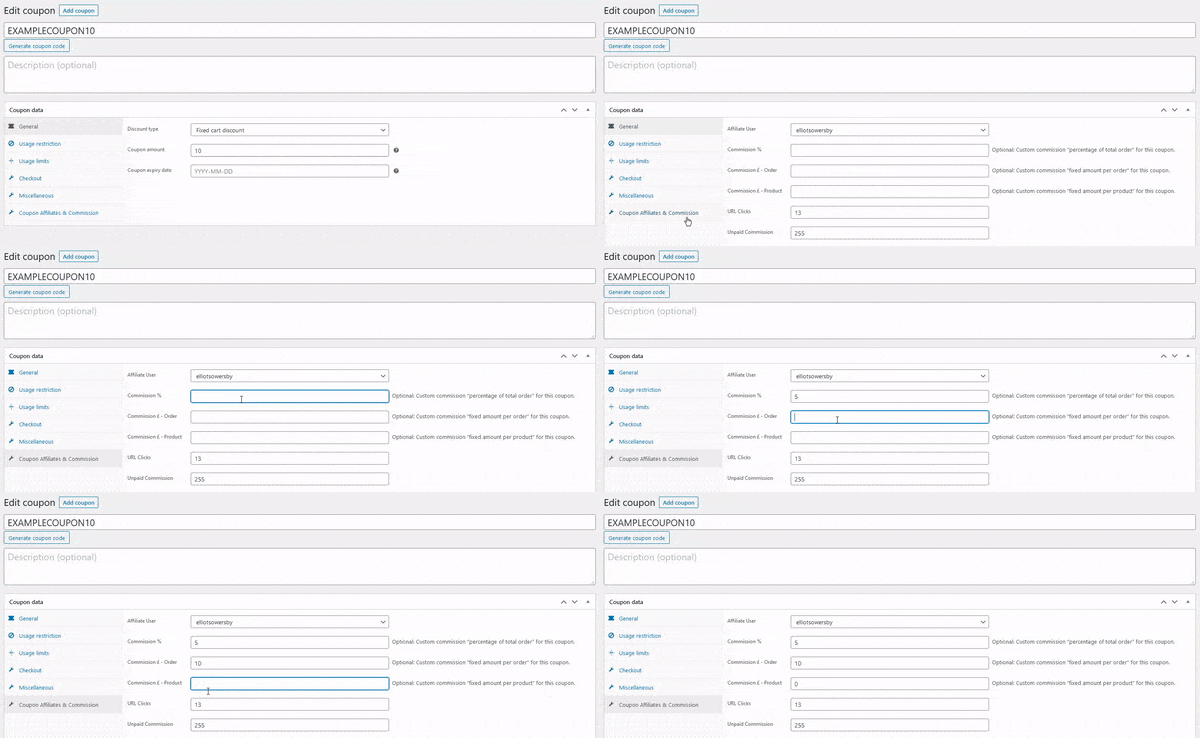
To set custom product level permission:
- Edit a coupon code.
- Under “coupon data” section, select “Coupon Affiliates & Commission”.
- Enter your custom coupon level commission here.
Learn more about flexible commission settings >>
All-time statistics
The same Coupon Affiliates box on the coupon edit screen also shows all-time Sales, Commission, Processing, and Unpaid. These figures update when you run Refresh Statistics. See How to refresh statistics for past orders.
 English
  Spanish
  German
  French