
Version 8.6.0 – AI & MCP Support
Version 8.6.0 of Coupon Affiliates is now available!
The big one in this release is AI. You can now connect AI apps such as Claude, ChatGPT and Cursor to your affiliate program, and ask them about your affiliates, coupons, commission and payouts in plain English.
It is built on the WordPress Abilities API, which arrived in WordPress 6.9, and it works over MCP (Model Context Protocol), the standard most AI apps now use to talk to other software. It is included in the free version, and nothing is switched on until you turn it on yourself.
Connect AI apps to your affiliate program
Version 8.2.0 added a REST API, which is great if you have a developer or an automation tool to call it. An AI app needs a bit more than a list of endpoints, though. It needs to know what each action does, who is allowed to use it, and which ones it should check with you before running.
That is what the Abilities API is for. Coupon Affiliates now registers its own set of “abilities” with WordPress, each with a description an AI app can read, and those abilities are what the AI app sees as its tools.
Once it is connected, you can ask things like:
- “How much unpaid commission do we owe right now, and who are our top affiliates?”
- “Was order #4821 referred by an affiliate, and how was it credited?”
- “Are there any affiliate applications waiting for review?”
- “How many clicks did the SUMMER10 referral link get this month, and how many turned into orders?”
- “Make me a referral link for SUMMER10 that goes to the sale page, with the campaign name instagram.”
The AI app works out which abilities to use, runs them against your store, and answers from the real figures.
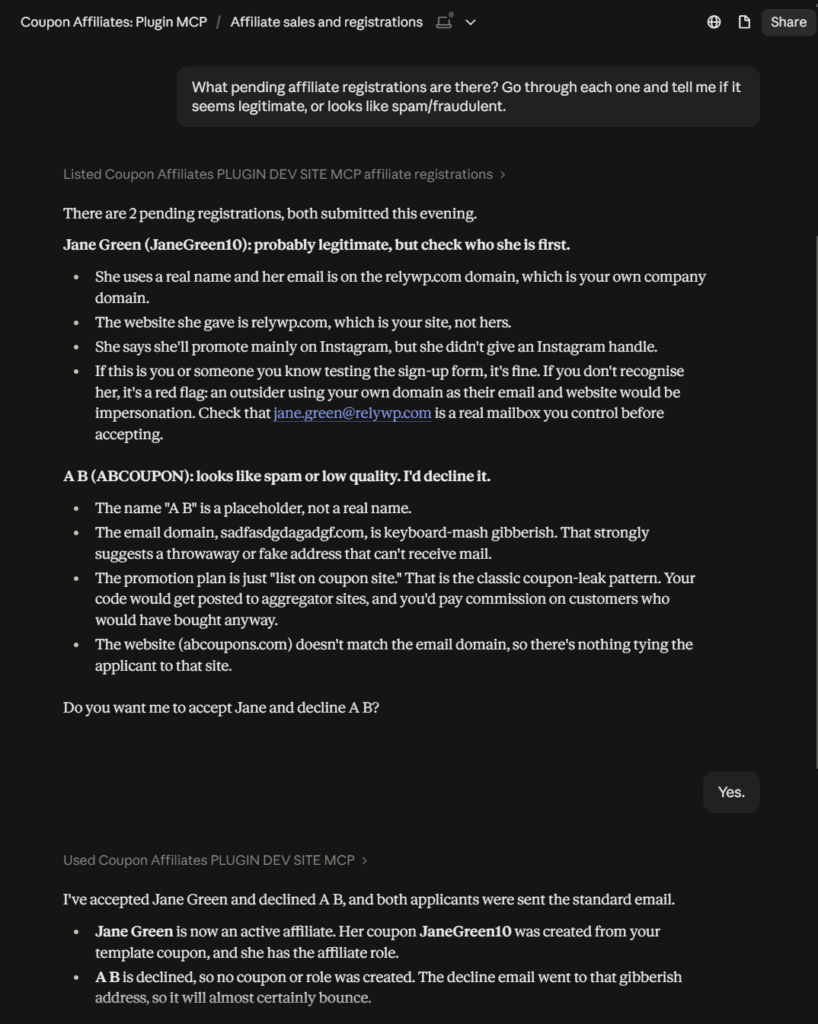
Here is an example from our test site, in Claude. We asked it to go through the pending affiliate registrations, and it flagged one of the two as likely spam. It then asked before changing anything, and only approved and declined them once we said yes. Approving and declining needs “Allow actions that change data” switched on, which is covered below.
What it can do
There are 19 abilities in the free version, plus 4 more for payouts in PRO:
- Program. A store-wide summary (affiliates, referred orders, sales, commission earned and unpaid, pending registrations, top affiliates), the recent activity log, and a “who am I” check the app runs first to see what the connected user can access.
- Affiliates. List and look up affiliates and their stats, over all time or a date range. With changes allowed, it can also add a new affiliate, give an affiliate an existing coupon, or take a coupon away from them.
- Coupons and referrals. Affiliate coupons with their commission balances and stats, the orders each coupon referred, referral click and conversion stats, building referral links, and checking which affiliate an order is credited to.
- Registrations. List and read affiliate applications, and (with changes allowed) approve or decline them.
- Payouts (PRO). List and read payouts, request a payout, and update a payout’s status.
Customer details are left out of the order results, and payment destination details are never included in anything to do with payouts.
Read-only unless you say otherwise
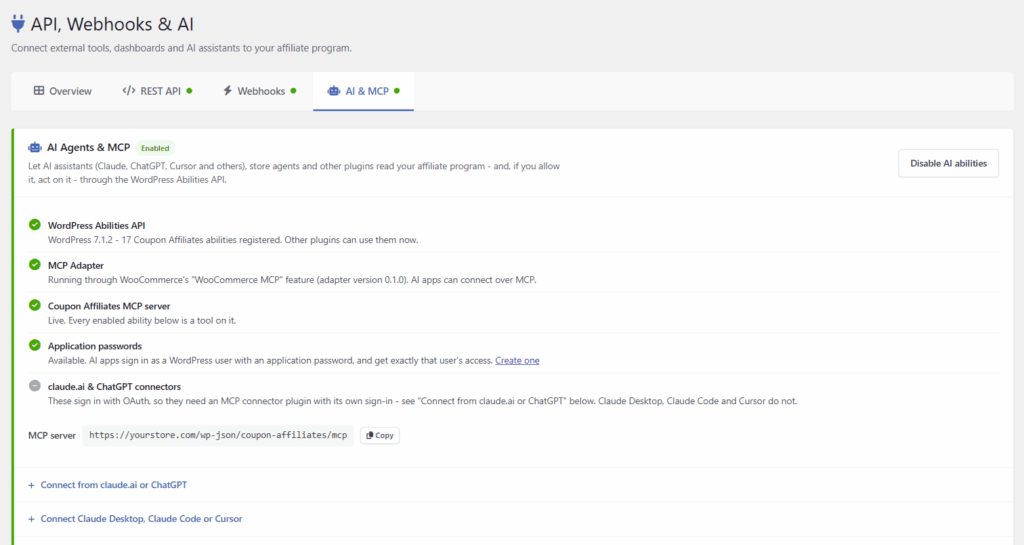
You will find everything under Coupon Affiliates > API, Webhooks & AI > AI & MCP. It is off until you enable it there, and once it is on, AI apps can only read, and only admins can connect.
Two options open it up further:
- Allow actions that change data. Lets AI apps add affiliates, assign and remove their coupons, and approve or decline registrations. With PRO, it also covers requesting payouts and updating payout statuses.
- Let affiliates connect their own AI app. An affiliate who signs in with their own application password gets the abilities marked “Admins + the affiliate”, and sees exactly what their affiliate dashboard shows them. That means their own coupons, stats and payouts, plus the coupons of affiliates below them if you use Multi-Level Affiliates.
Below those, every ability is listed with what it does, who can use it and whether it reads or writes, and each one has its own switch.
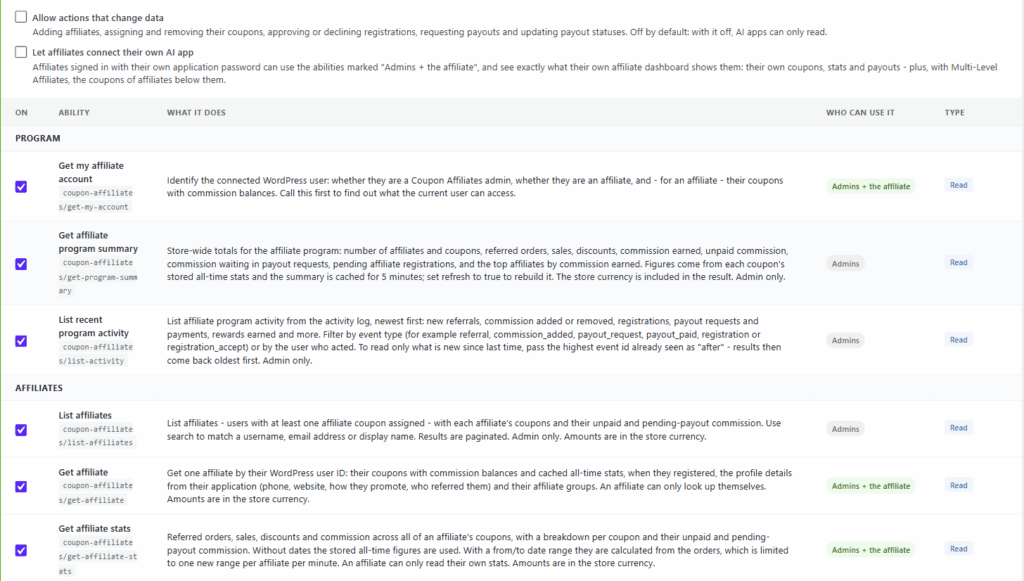
Each ability reuses the same permission checks as the REST API, so an AI app can never see more than the WordPress user it signs in as. The abilities that change something also tell the AI app to confirm with you before running them.
The two payout actions are marked “High impact”. Updating a payout’s status is bookkeeping only, but requesting a payout follows the same rules as the affiliate’s own “Request Payout” button. So if your store pays out automatically, that request can send money through PayPal, Stripe or Wise straight away.
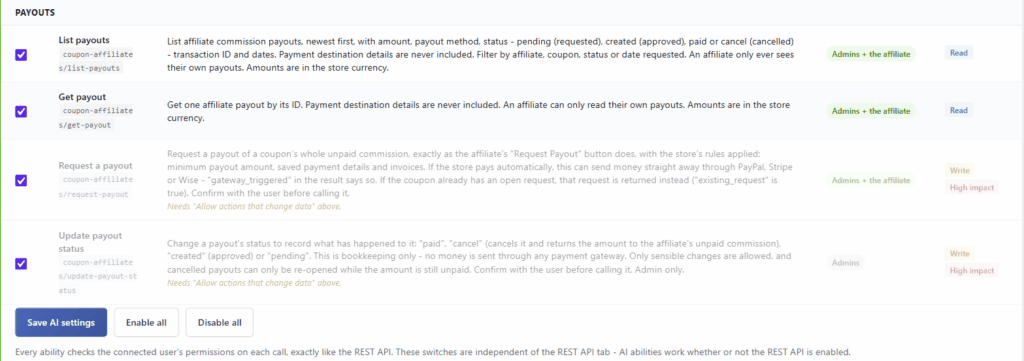
AI apps do get things wrong from time to time, so our advice is to start read-only, see how you get on, and only allow changes once you are comfortable with it.
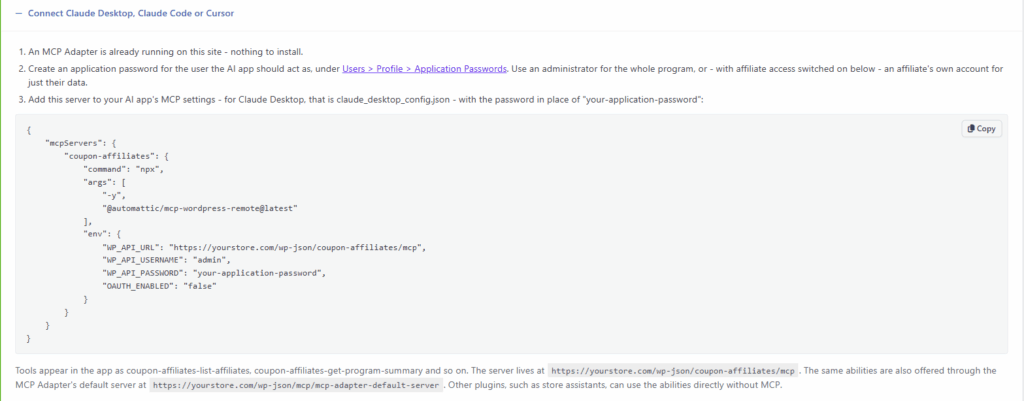
Connecting Claude Desktop, Claude Code or Cursor
To connect over MCP, your site needs an MCP Adapter. That is either the WordPress MCP Adapter plugin, or WooCommerce’s own “WooCommerce MCP” feature switched on. With either one active, a dedicated “Coupon Affiliates” MCP server is available at /wp-json/coupon-affiliates/mcp, with every ability you have enabled as a tool. The abilities are also offered through the MCP Adapter’s default server.
The AI & MCP tab checks all of this for you. It shows whether the Abilities API, the MCP Adapter, the MCP server and application passwords are ready, with a link to set up anything that is missing.
AI apps sign in with a WordPress application password, and get exactly that user’s access. Create one under your user profile, then paste the configuration from the tab into your AI app’s MCP settings. For Claude Desktop, that is the claude_desktop_config.json file.
Connecting claude.ai or ChatGPT
The web versions of claude.ai and ChatGPT add connectors that sign in with OAuth rather than an application password, so they need an MCP connector plugin that provides that sign-in.
The tab suggests a few free ones from WordPress.org (Easy MCP AI, Royal MCP, and Enable Abilities for MCP) and shows when one of them is already active. If you use Easy MCP AI, it also warns you when some of the Coupon Affiliates abilities are not being shared through it. That tends to happen with the actions that change data, once you allow them, because Easy MCP AI has its own list of which abilities to share.
Seeing what AI apps have been doing
At the bottom of the tab, “Recent AI activity” lists the last 30 calls: which ability was used, by whom, how it connected (MCP, REST API, WP-CLI or another plugin), and whether it worked.
It is not only AI apps that can use the abilities either. Other plugins on your site, such as a store assistant, can call them directly without MCP.
If your store is already set up for AI apps (the MCP Adapter plugin is active, or WooCommerce MCP is switched on), you will see a one-time notice on the Coupon Affiliates admin pages offering to enable the AI tools. It goes away for good once a choice has been made, and each admin can dismiss it.
The API page is now “API, Webhooks & AI”
With AI added, the old API page was getting crowded, so it has been split into four tabs: Overview, REST API, Webhooks, and AI & MCP.
The Overview explains what each one is for, how it signs in, and whether it is switched on, with an “At a glance” table comparing them. If you are not sure which one you actually need, start there. Each tab also has an on/off indicator, and saving a form now returns you to the tab you were on.
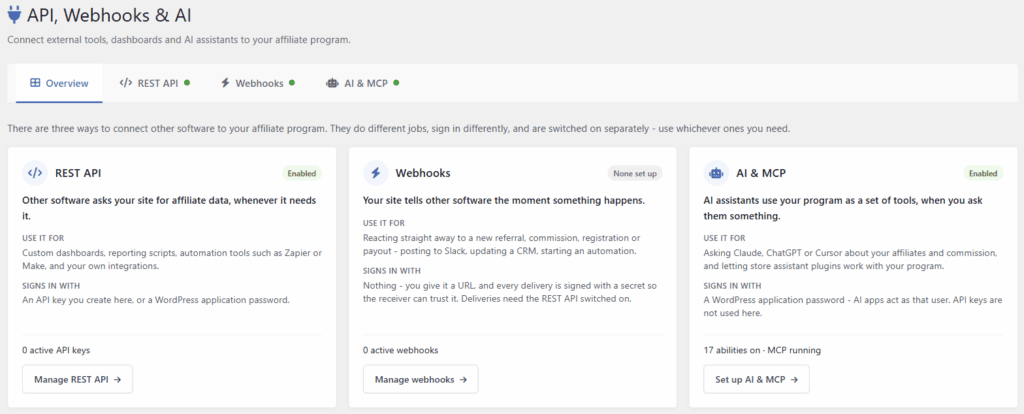
It also has its own item in the Coupon Affiliates admin menu now, directly below “Admin Tools”, and it is still listed on the Admin Tools page. In PRO, “Leaderboards” has moved up above “Admin Tools” in the same menu.
One more small change on the PRO side: webhooks need the REST API switched on to deliver anything. If it is off, the Webhooks tab now tells you deliveries are paused, with a link to the REST API tab to turn it on, rather than leaving you to work out why nothing is arriving.
For developers
There are new filters for customising the AI abilities:
wcusage_abilities_definitionsto add, change or remove abilities, andwcusage_abilities_controller_filesfor the REST API controllers they call.wcusage_abilities_rate_limitfor the rate limit, which defaults to 120 reads and 20 changes per user per minute.wcusage_abilities_log_sizefor how many calls “Recent AI activity” keeps.wcusage_abilities_mcp_server_enabled,wcusage_abilities_show_notice,wcusage_abilities_connector_plugins,wcusage_abilities_connector_gapsandwcusage_abilities_request_channel.
There is also a wcusage_api_admin_handle_action filter for handling your own form actions on the API, Webhooks & AI screen.
For Multi-Level Affiliates (PRO), there are new wcusage_mla_refresh_sub_affiliate_parents( $user_id ) and wcusage_mla_refresh_all_parents() functions. wcusage_mla_add_parent_to_user() still only updates the one user, so if your code assigns MLA parents to a user who may already have sub-affiliates, call wcusage_mla_refresh_sub_affiliate_parents() for that user afterwards.
Fixed lifetime commission windows
With lifetime commission (PRO) and an expiry period set, a customer stays linked to their affiliate for that many days. Until now, each time the customer used the affiliate’s coupon again, the link was extended by the full expiry period. A customer who kept using the coupon could stay linked indefinitely.
That is still the default, but there is a new option under Settings > Commission: “Don’t extend the expiry date when the customer uses the coupon again”. Switch it on and the link lasts a fixed time from when the customer was first linked (for example, exactly 365 days from their first order), however many times they use the coupon in between. Once it expires, the customer can be linked again by using an affiliate coupon.
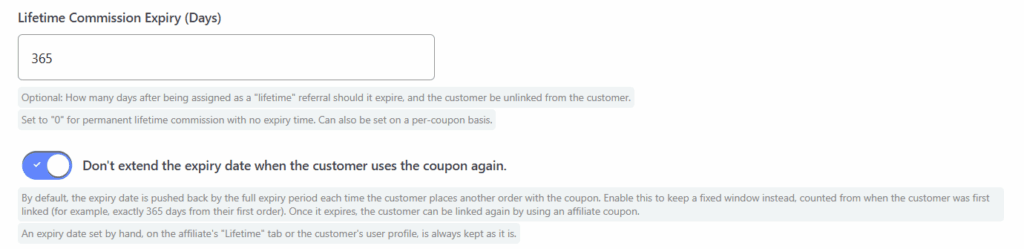
Related to this, an expiry date you set by hand, on the affiliate’s “Lifetime” tab or on the customer’s user profile, is now kept when the customer uses the coupon again. Before, it was replaced with a new date from the expiry period. Only a date you actually changed counts as set by hand, so editing just the linked coupon on the “Lifetime” tab, or saving a customer’s profile without touching the date, leaves it following the expiry period as before.
There were two lifetime commission fixes as well:
- Orders placed without the coupon were not always credited. If a customer had an expiry date that did not apply (one set on their user profile, or one left behind after the expiry period was set back to 0), their coupon-less orders were not credited to their lifetime affiliate. The “Lifetime” tab showed these links as “Never Expires”, but the dates were never cleared, so the customer could stay uncredited indefinitely. Those dates are now ignored, matching what the tab already showed.
- Lifetime Affiliate fields on the user profile are now only saved for users who can manage other users, which matches who can see them.
Full Changelog
- New: AI & MCP > AI apps such as Claude, ChatGPT and Cursor, and other plugins such as store assistants, can now work with your affiliate program through the WordPress Abilities API (WordPress 6.9 or later). 19 abilities cover your program summary, affiliates, coupons, referral links, referred orders and who an order is credited to, commission, referral clicks, registrations and recent activity, and (PRO) 4 more cover payouts. Each one reuses the same permission checks as the REST API, so an AI app can never see more than the WordPress user it signs in as. AI & MCP is off until you switch it on under “API, Webhooks & AI > AI & MCP”.
- New: AI & MCP > MCP support. When the WordPress MCP Adapter plugin is active, or WooCommerce’s own “WooCommerce MCP” feature is switched on, a dedicated “Coupon Affiliates” MCP server is available at /wp-json/coupon-affiliates/mcp, with every enabled ability as a tool. The abilities are also offered through the MCP Adapter’s default server. AI apps sign in with a WordPress application password. The AI & MCP tab shows whether everything needed is in place, with setup steps and a ready-to-copy configuration for AI apps such as Claude Desktop. For claude.ai, ChatGPT and other web connectors, which sign in with OAuth, the tab suggests free MCP connector plugins that provide it, shows when one is already active, and warns when Easy MCP AI is not sharing some of the Coupon Affiliates abilities – such as the actions that change data, once they are allowed.
- New: AI & MCP > Once switched on, AI apps can only read, and only admins can connect. Two extra options: “Allow actions that change data” (adding affiliates, giving them coupons or taking coupons away, approving or declining registrations and, with PRO, requesting payouts and updating payout statuses), and “Let affiliates connect their own AI app”, which lets affiliates see exactly what their own affiliate dashboard shows them. Every ability can also be switched on or off individually, and AI apps are told which actions to confirm with you first.
- New: AI & MCP > A “Recent AI activity” list on the AI & MCP tab shows the last 30 calls: which ability was used, by whom, how it connected (MCP, REST API, WP-CLI or another plugin), and whether it worked.
- New: AI & MCP > On stores already set up for AI apps (the MCP Adapter plugin is active, or WooCommerce MCP is switched on), a one-time notice on the Coupon Affiliates admin pages offers to enable AI tools. It is never shown once a choice has been made, and each admin can dismiss it for good.
- New: (PRO) Lifetime Commission > A “Don’t extend the expiry date when the customer uses the coupon again” option under Settings > Commission. By default, each time a customer uses the affiliate’s coupon again, their lifetime link is extended by the full expiry period. With this option on, the link lasts for a fixed time from when the customer was first linked (for example, exactly 365 days from their first order), however many times they use the coupon in between.
- New: (PRO) Multi-Level Affiliates > A “Rebuild Network Tiers” button on the MLA Users page. It recalculates every sub-affiliate’s tier 2 and higher parents from their direct (tier 1) parent, working down from the top of each network. Use it once to repair networks affected by the parent chain fix below, or after changing the “Number of Tiers” setting to apply the new number to existing sub-affiliates. Only commission on future orders follows the rebuilt tiers – past commission is not changed.
- Tweak: The API page is now “API, Webhooks & AI”, organised into tabs: Overview, REST API, Webhooks, and AI & MCP. The Overview explains what each one is for, how it signs in and whether it is switched on, with an “At a glance” comparison, and each tab shows an on/off indicator. Saving a form returns you to the tab you were on.
- Tweak: “API, Webhooks & AI” now has its own item in the Coupon Affiliates admin menu, directly below “Admin Tools”. It is still listed on the Admin Tools page too.
- Tweak: (PRO) “Leaderboards” has moved above “Admin Tools” in the Coupon Affiliates admin menu.
- Tweak: (PRO) Webhooks > When the REST API is switched off, the Webhooks tab now explains that deliveries are paused, with a link to the REST API tab to switch it on.
- Tweak: (PRO) Lifetime Commission > An expiry date set by hand, on the affiliate’s “Lifetime” tab or the customer’s user profile, is now kept when the customer uses the coupon again. Before, it was replaced with a new date from the expiry period. Only a date that was actually changed counts as set by hand, so editing just the linked coupon on the “Lifetime” tab, or saving a customer’s profile without changing the date, leaves the date following the expiry period as before.
- Fix: Affiliate registrations failed to save on sites whose registrations table still had the “date accepted” column from before version 7.8.0 – for example after that table was restored from an older backup, so new applications, and affiliates added from the admin, could not be saved. The table is now updated automatically the first time this happens, and the registration saved.
- Fix: “Add New Affiliate” with “Assign this user to the existing coupon” ticked also created a second coupon with the same code, copied from the template coupon. The existing coupon is now used, with its own settings and balance.
- Fix: The “Affiliate Application Accepted” email was not sent to affiliates added or approved by an admin while the public registration form was switched off, even when that email was chosen.
- Fix: When one user was given two affiliate coupons within a few seconds, the second one got no registration record of its own, and the first record was marked accepted again instead.
- Fix: The check that stops an affiliate being given an admin-level role (Administrator, Editor, Author or Shop Manager) when their application is accepted has been hardened.
- Fix: (PRO) Payouts > With “Delay Commission (Number of Days)” set, the scheduled check that adds commission once the delay has passed could run for many minutes on stores with a lot of orders, holding up checkout while it ran, especially where the order tables use MyISAM.
- Fix: (PRO) Performance Bonuses > A bonus with a requirement of 0 always showed “0.00 / 0.00” and an empty progress bar on the affiliate dashboard, whatever the affiliate had actually referred. A requirement of 0 is met from the start, so these bonuses now show a full progress bar marked “Qualified”. This only changed what the dashboard showed: when the bonus is awarded is unchanged.
- Fix: (PRO) Lifetime Commission > A customer’s orders placed without the coupon were not credited to their lifetime affiliate when the customer had an expiry date that did not apply. This affected dates set on the customer’s user profile, and dates left behind after the expiry period was set back to 0. The affiliate’s “Lifetime” tab showed these links as “Never Expires”, but the dates were never cleared, so the customer could stay uncredited indefinitely. These dates are now ignored, as the tab already showed.
- Fix: (PRO) Lifetime Commission > The Lifetime Affiliate fields on the user profile are now only saved for users who can manage other users, matching who can see them.
- Fix: (PRO) Multi-Level Affiliates > In a network built up in stages, such as by assigning sub-affiliates one at a time, affiliates further down could keep out-of-date tier 2 and higher parents, so the network was right near the top and wrong further down. A top-level affiliate then did not see the whole network below them on their MLA dashboard, or earn MLA commission from all of it. Each sub-affiliate stores a copy of their parent’s own parents, and after a change the sub-affiliates were updated in no particular order, so some copied their parent’s parents before those had been updated. Adding a sub-affiliate who already had sub-affiliates of their own did not pass the new parents down to them at all. Sub-affiliates are now updated from the top down whenever a tier 1 parent is changed or cleared on the user profile, and when a sub-affiliate is added or removed on the View Affiliate page. Networks saved before this fix can be repaired with the new “Rebuild Network Tiers” button.
- Fix: (PRO) Multi-Level Affiliates > Changing a parent higher up no longer cuts a sub-affiliate’s parents back to a deleted account when their direct parent’s account has been deleted. Their parents are now left as they were.
- Fix: (PRO) Multi-Level Affiliates > Removing a sub-affiliate on the View Affiliate page now reloads the page, as adding one already does, so their own sub-affiliates, who leave the network with them, disappear from the table too.
- Fix: (PRO) Multi-Level Affiliates > The MLA network chart stopped rendering when a sub-affiliate’s direct parent had no coupon, because the parent is not drawn on the chart but the sub-affiliate was still attached to them. Such sub-affiliates are now attached to the nearest parent above them that is on the chart. The same applies to a sub-affiliate whose direct parent’s account was deleted: they are now shown on the chart rather than left out.
- Fix: (PRO) Multi-Level Affiliates > On sites set to 10 or more MLA tiers, tier 10 and above were saved under the wrong name (“U0” instead of “T10”), so no MLA commission was ever paid for those tiers. New assignments now use the correct name, and “Rebuild Network Tiers” corrects existing sub-affiliates.
- Dev: New filters for AI & MCP: “wcusage_abilities_definitions” to add, change or remove abilities, “wcusage_abilities_controller_files” for the REST API controllers they call, “wcusage_abilities_rate_limit” (default 120 reads and 20 changes per user per minute), “wcusage_abilities_log_size”, “wcusage_abilities_mcp_server_enabled”, “wcusage_abilities_show_notice”, “wcusage_abilities_connector_plugins”, “wcusage_abilities_connector_gaps” and “wcusage_abilities_request_channel”.
- Dev: A “wcusage_api_admin_handle_action” filter for handling custom form actions on the API, Webhooks & AI screen.
- Dev: (PRO) Multi-Level Affiliates > New “wcusage_mla_refresh_sub_affiliate_parents( $user_id )” and “wcusage_mla_refresh_all_parents()” functions. “wcusage_mla_add_parent_to_user()” still only updates the one user, so code that assigns MLA parents to a user who may already have sub-affiliates should call “wcusage_mla_refresh_sub_affiliate_parents()” for that user afterwards.
Update now
Update from Dashboard > Updates in wp-admin as usual. The AI features need WordPress 6.9 or later, and you can switch them on under Coupon Affiliates > API, Webhooks & AI > AI & MCP. The AI & MCP docs walk through setting it up and connecting your AI app.
There is more on the REST API and webhooks in the API & Webhooks docs, and the full endpoint reference is in the API documentation.

Elliot Sowersby is a WordPress developer from Yorkshire, United Kingdom. He is the founder and lead developer of Coupon Affiliates and RelyWP.
Leave a Reply