
To shorten an affiliate link, paste the full link into a URL shortener such as TinyURL or Short.io, or create a redirect on your own domain with a WordPress plugin like Pretty Links. The short link forwards visitors to the full affiliate URL, so your tracking ID reaches the merchant and the sale is credited to you as normal. If you’re an Amazon affiliate, you can also grab a short link from the SiteStripe bar while browsing Amazon.
Which option makes sense depends on where you share your links. Our picks:
- Quick links with no account: TinyURL
- Free short links on your own domain: Short.io
- Affiliate links on a WordPress blog: Pretty Links
- Amazon links for readers in several countries: Geniuslink
- WooCommerce stores giving their own affiliates short links: Coupon Affiliates
Before we go further: we make Coupon Affiliates, which is on this list. Unlike the others, it’s aimed at WooCommerce store owners who run their own affiliate program rather than affiliates promoting other brands. We’ve listed its downsides the same way as everything else here.
Jump to a section:
- Does shortening an affiliate link break tracking?
- Check your program’s rules first
- Affiliate link shorteners compared
- Way 1: Use a URL shortener
- Way 2: Use a WordPress link plugin
- Way 3: Use the short links your program provides
- Way 4: Skip the link and use a coupon code
- A short link strategy that keeps working
- FAQ
Does Shortening an Affiliate Link Break Tracking?
Not if the short link points to the full, unedited affiliate URL. When someone clicks a short link, the shortener looks up the original address and redirects the visitor there. The merchant or network then sees your complete link, tracking ID included, and sets its cookie as it normally would. Rakuten Advertising’s publisher help, for example, tells affiliates they can use any shortener they like as long as every tracking variable is kept.
When tracking does fail, it’s usually because of something around the shortener:
- The link was copied without part of its tracking parameters
- Someone edited the destination later and pasted a plain product URL
- A free plan adds an ad page before the redirect, and some visitors give up there
- The program doesn’t allow redirects at all
Click every new short link before you share it, and check that the page you land on still has your affiliate ID in the address bar.
It helps to be clear on the difference between a referral link and a short link. The referral link is the one your program gives you, with your ID built in. A short link is a second, tidier address that forwards to it, and it only changes how the link looks.
Check Your Program’s Rules First
Most networks are fine with shortened links. A few programs set conditions, and Amazon is the one people run into most.
The Amazon Associates Participation Requirements (last updated April 14, 2026) don’t ban shorteners. They say you can’t use one in a way that “makes it unclear that you are linking to an Amazon Site.” In practice, the link text or the words around it should mention Amazon, like “See the price on Amazon”. The same section bans hiding which website a click came from. Avoid any tool that strips the referrer.
Other programs vary. Some ban cloaked links in their terms, and a few don’t allow links on certain platforms at all. Read the terms for each program before you shorten its links, and look again when they change.
Shortening doesn’t remove your duty to disclose, either. A short link hides that it’s an affiliate link, which makes a clear note next to it more important.
How We Compared the Tools
We went through each tool’s pricing page, and the WordPress.org listing for the plugins, in September 2026. For each one we noted the free plan limits and whether you can use your own domain. Click stats mattered too, along with anything that could get in the way of an affiliate link, like ad pages or links that expire. We didn’t run click-through tests and make no claims about which tool gets more clicks.
Affiliate Link Shorteners Compared
| Tool | Type | Free option | Paid plans from | Your own domain | Best for |
|---|---|---|---|---|---|
| TinyURL | URL shortener | Yes, no account needed | $9/month | Paid plans | Quick one-off links |
| Bitly | URL shortener | 5 links/month, with an ad page | $10/month, billed yearly | From the Growth plan | Teams already using Bitly |
| Short.io | URL shortener | 1,000 links, 5 domains | $5/month | Yes, on the free plan | Free links on your domain |
| Rebrandly | URL shortener | 10 links/month | $8/month, billed yearly | Yes (a .bio domain on the free plan) | A separate branded short domain |
| Geniuslink | URL shortener for Amazon | 14-day trial | $6/month plus clicks | $50/month add-on | Amazon links worldwide |
| Pretty Links | WordPress plugin | Yes | $99.60 first year | Yes, your site | Bloggers on WordPress |
| ThirstyAffiliates | WordPress plugin | Yes | $99.60 first year | Yes, your site | Large libraries of affiliate links |
| Amazon SiteStripe | Built into Amazon | Yes | None | No | Amazon Associates |
| Coupon Affiliates | WooCommerce plugin | Yes (short URLs need PRO) | $23.99/month | Yes, your store | Stores running their own program |
Way 1: Use a URL Shortener
This is the fastest way to shorten an affiliate link. You paste in the long link and get a short one back, either on the service’s domain or on a domain of your own. It works for social media bios, emails, videos and anywhere else you can’t control how a link is displayed.
The risk is that your links depend on the service. If it closes or you lose access to the account, every link you’ve shared stops working. Connecting your own domain reduces that risk, because you can point the domain at another tool later.
TinyURL
TinyURL is the simplest tool here. You can shorten a link on its homepage without signing up and add your own alias of five characters or more, like tinyurl.com/bluekettle.
- Best for: one-off links where you don’t need stats
- Pros: no account needed, and you can pick a custom alias for free. Links on the free and Pro plans don’t expire.
- Cons: click analytics and branded domains are only on paid plans
- Pricing: free, or Pro at $9 a month ($108 a year) for 125 links a month and three branded domains
Bitly
Bitly is probably the shortener people recognize most, and it also does QR codes and simple landing pages. Its free plan has become much tighter, though. You get five links a month, and Bitly’s support pages confirm that links on free accounts show a preview page with an ad before sending visitors on.
- Best for: marketers who already use Bitly for other campaigns
- Pros: bit.ly links are familiar to most readers, and paid plans add detailed click stats and more QR codes
- Cons: the ad page on free links puts an extra step between your reader and the merchant, and you need the Growth plan for a custom domain
- Pricing: free for 5 links a month. Core costs $10 a month billed yearly. Growth is $35 a month, or $29 a month billed yearly, and includes a custom domain.
Short.io
Short.io has the most generous free plan we found for anyone who owns a domain. You can connect up to five custom domains without paying, so your links can look like go.yourname.com/kettle instead of a generic short domain.
- Best for: free short links on a domain you control
- Pros: 1,000 branded links and 50,000 tracked clicks a month on the free plan. Paid plans start at $5.
- Cons: you’ll need to add DNS records to connect a domain, and the free plan is limited to one user and 1,000 links in total
- Pricing: free. Hobby is $5 a month, Pro $18 and Team $48, with 17% off if you pay yearly.
Rebrandly
Rebrandly is built around branded domains. The free plan even comes with a .bio domain for your brand and tracks unlimited clicks.
- Best for: affiliates who want a separate short domain for their brand
- Pros: a custom domain on every plan, including the free one, and QR codes built in
- Cons: only 10 new links a month for free, and even paid plans limit how many times you can change where a link points (10 edits a month on Essentials). That matters when a program changes its links.
- Pricing: free for 10 links a month. Essentials is $11 a month, or $8 a month billed yearly. Professional is $32 a month, or $22 billed yearly.
Geniuslink
Geniuslink is a shortener aimed at Amazon affiliates. A normal Amazon link sends everyone to one country’s store. Geniuslink sends each shopper to the matching product in their local Amazon store and can open the Amazon app on phones.
- Best for: Amazon affiliates whose readers are spread across several countries
- Pros: handles country localization for you, and warns you when a linked product breaks or goes out of stock
- Cons: you pay per click, so costs rise with your traffic. A custom domain is an extra $50 a month, and the trial needs a card.
- Pricing: $6 a month including 1,000 clicks, then $3.50 per 1,000 clicks, with a 14-day free trial
Way 2: Use a WordPress Link Plugin
If you publish affiliate links on a WordPress site, a link plugin creates short redirects on your own domain, such as yoursite.com/go/blue-kettle. Readers see your domain instead of a random string. When a program changes its link format, you update the destination once instead of editing every post that uses it.
Whichever tool you pick, add rel="sponsored" to affiliate links on your site. It’s the attribute Google asks for on paid links, and it applies to short redirect links too.
Pretty Links
Pretty Links has more than 200,000 active installs and a 4.8 out of 5 rating on WordPress.org. The free version handles custom slugs and 301, 302 or 307 redirects, and its click tracking filters out bots.
- Best for: bloggers who want short links on their own domain at no cost
- Pros: the free version is enough for most blogs, and you can import or export links as a CSV file
- Cons: keyword auto-linking needs the Marketer plan and QR codes need Super Affiliate. The first-year prices renew at full price.
- Pricing: free. Beginner is $99.60 for the first year (then $249), Marketer $149.60 and Super Affiliate $199.60.
ThirstyAffiliates
ThirstyAffiliates is made specifically for affiliate links. The free version sorts links into categories under a /recommends/ prefix and adds a button to the editor for inserting them. It also has an “uncloak” option for programs that don’t allow redirected links.
- Best for: affiliates managing a big library of links across many programs
- Pros: link categories and an uncloak option for strict programs. Paid plans add Amazon importing and geographic redirects.
- Cons: a smaller user base than Pretty Links (30,000+ active installs), and the broken link checker and advanced reports need the Plus plan or higher
- Pricing: the free version costs nothing. Paid plans start with Basic at $99.60 for the first year (normally $249), then Plus at $149.60 and Advanced at $199.60.
Way 3: Use the Short Links Your Program Provides
Some affiliate programs build short links for you. These are the safest to use, since the program made them and its tracking is already inside.
Amazon SiteStripe
When you’re signed in to Amazon Associates, the SiteStripe bar at the top of Amazon pages can build a short amzn.to link for the page you’re on. Amazon’s help page notes that your Associate ID and tracking ID are already included.
- Best for: Amazon Associates
- Pros: free, and there’s nothing to set up
- Cons: Amazon links only, created one page at a time, and every shopper lands in the same country’s store
- Pricing: free
Coupon Affiliates (for WooCommerce store owners)
If you run your own affiliate program on WooCommerce, you can hand your affiliates short links rather than expecting them to find a shortener. With the Short URL module in Coupon Affiliates PRO, affiliates click a button on the Referral URL tab of their dashboard and get a link on your store’s domain, like yourstore.com/link/a1b2c1. You can change the “link” part in the settings.
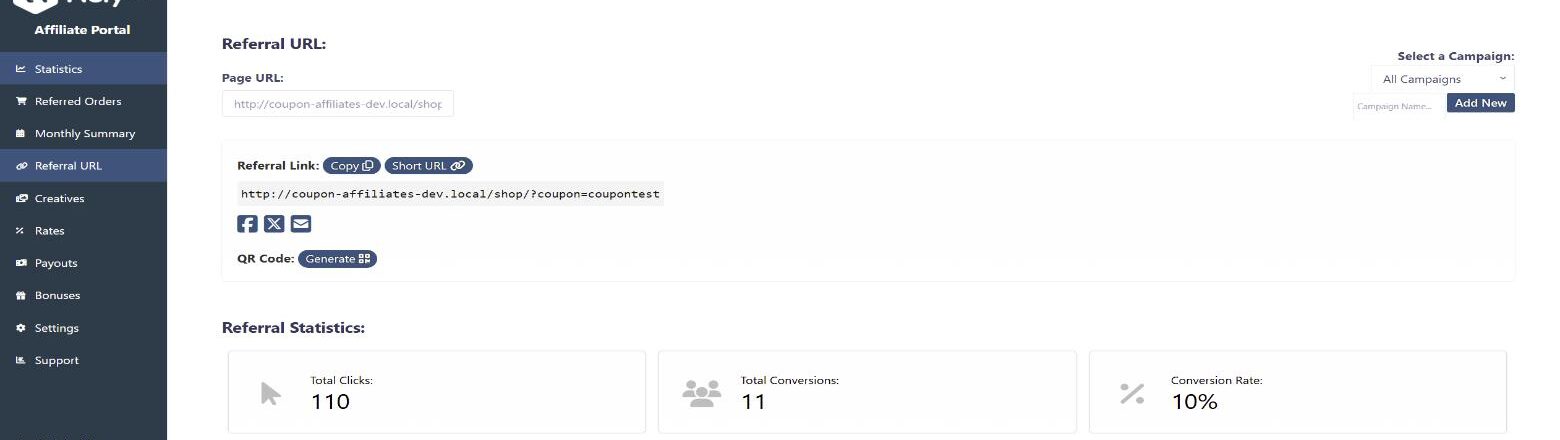
Short links can only point to pages on your own site, so nobody can use your domain to shorten links to somewhere else. Generating a short link twice for the same page returns the same link. There’s also a QR code generator that updates whenever the affiliate changes their link, and you can put your logo in the middle of the code.

- Best for: WooCommerce stores running their own affiliate program
- Pros: short links and QR codes on your own domain, and referral links that also apply the affiliate’s coupon at checkout
- Cons: it only works with WooCommerce, and short URLs, QR codes and campaigns are PRO features. It’s no help if you’re an affiliate promoting other brands.
- Pricing: a free version is on WordPress.org. PRO for one site is $23.99 a month or $179.99 a year, with a discounted first payment and a 7-day free trial.
Way 4: Skip the Link and Use a Coupon Code
For some channels, a coupon code works better than any link. Podcast listeners can’t click anything, and neither can someone holding a printed flyer. A code like KETTLE15 is easier to say out loud than any URL, however short.
With coupon-based tracking, the affiliate gets credit whenever their code is used at checkout, whether or not the customer clicked a link first. That’s how Coupon Affiliates works, and we cover the setup in our guide to running a WooCommerce affiliate program without links. For codes people will actually remember, try our list of catchy discount code ideas.
A Short Link Strategy That Keeps Working
Once you’re managing more than a handful of links, a few habits make them much easier to keep working:
- Use your own domain where you can. If you switch tools later, you can move the domain with you and old links keep working.
- Readable names help. A slug like /go/kettle-review is far easier to find in a list than /x7k2p.
- Make a separate link for each place you share it, such as your bio and your newsletter. That shows you which one gets the clicks. Many networks let you add a sub-ID too, and Amazon lets you create extra tracking IDs, which splits your commission reports the same way.
- A simple spreadsheet of every link and where it’s used saves a lot of hunting when a program changes its links or closes.
- Test each link when you create it, and again every few months. Some paid tools, like Geniuslink and ThirstyAffiliates Plus, can warn you about broken links.
- Disclose near the link. Readers can’t tell a short link is an affiliate link unless you tell them.
If you’re sharing links through video creators, our guides to YouTube affiliate marketing and influencer affiliate programs go into more detail.
FAQ
Will shortening my affiliate link affect my commission?
No. A short link redirects to your full affiliate link, and the merchant tracks the sale from that. Just make sure the program allows shortened links and test the link before you share it.
Can I shorten Amazon affiliate links?
Yes. You can use the short link option in SiteStripe or a third-party shortener, as long as it’s clear to readers that the link goes to Amazon. Amazon’s rules forbid hiding the site a click came from, too.
What’s the difference between shortening and cloaking a link?
Shortening makes a link shorter. Cloaking usually means putting it behind your own domain so the affiliate URL isn’t visible, which is what WordPress link plugins do. People often use the two words for the same thing. Some programs are fine with a short link but don’t allow cloaking, and their terms will say so.
What’s the best free affiliate link shortener?
It depends on where your links go. If you want links on your own domain but don’t have a website, start with Short.io. On a WordPress blog, the free version of Pretty Links does the job. TinyURL is fine for quick links when you don’t need stats. Bitly’s free plan is now limited to five links a month and adds an ad page.
Are short links bad for SEO?
Links you share on social media or in emails don’t affect your site’s search rankings either way. On your own site, what matters is marking affiliate links with rel="sponsored", whether they’re short redirects or full URLs.
Which Option Should You Use?
For bloggers on WordPress, Pretty Links or ThirstyAffiliates is the tidiest setup because links stay on your own domain and you can update them in one place. If you share most of your links on social media and don’t have a site, a shortener connected to your own domain, like Short.io, gives you the same control. Amazon affiliates can start with SiteStripe and try Geniuslink once a good share of their readers are outside their home country.
If you’re on the other side, running an affiliate program for your own WooCommerce store, we’re naturally biased toward Coupon Affiliates. Short URLs and QR codes are part of PRO, while the free version still gives every affiliate a referral link and their own coupon code. PRO has a 7-day free trial if you want to test those features.

Elliot Sowersby is a WordPress developer from Yorkshire, United Kingdom. He is the founder and lead developer of Coupon Affiliates and RelyWP.
Leave a Reply