
Version 7.5.0 – MLA Enhancements: MLA Rates Per User & Group, MLA Rates Tab, MLA Users Page, and more!
Version 7.5.0 of Coupon Affiliates is now available with a bunch of highly requested feature updates for the Multi-Level affiliates system, along with a few other tweaks and fixes.
Multi-Level Affiliate Enhancements
This update includes a variety of improvements to the MLA system.
Per-Group & Per-User MLA Commission Rates
You can now set custom MLA commission rates per group or per user, which will override the default MLA tier commission rates for that specific user.
You will first need to enable this option in the MLA settings tab: Enable Per-User and Per-Group Commission Rate Settings.
Once enabled, you will then see options to set custom commission rates for each tier when editing a group or user.
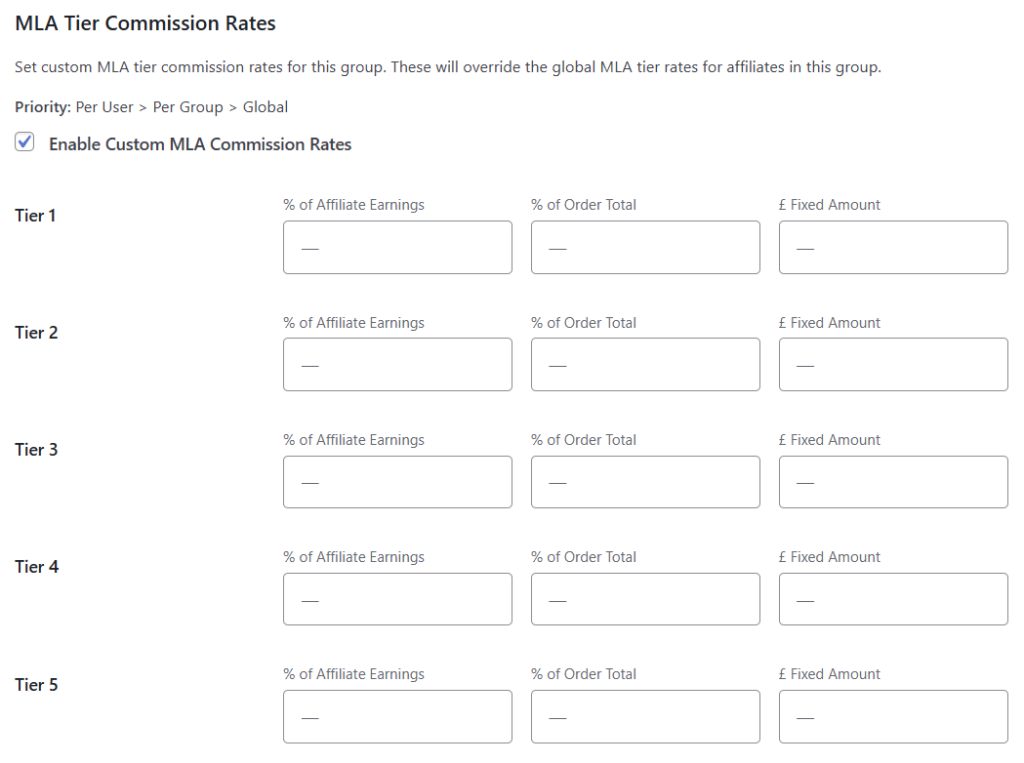
This is great for rewarding your top-performing super-affiliates with better rates.
New “Rates” Tab on the MLA Dashboard
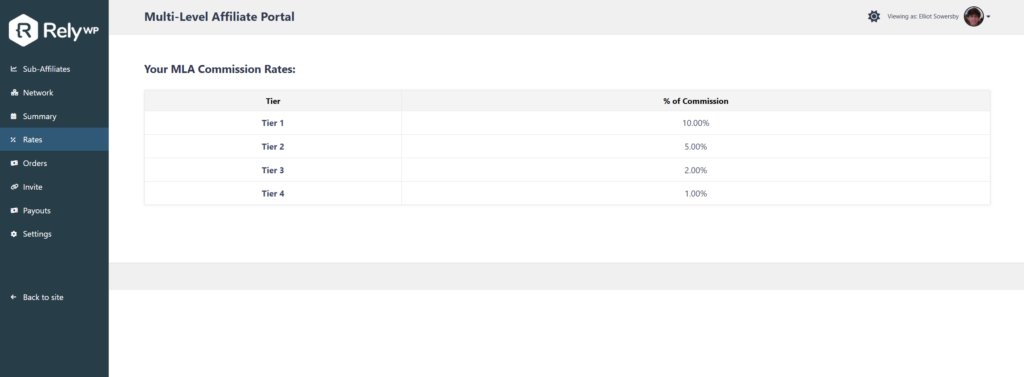
You can now enable a dedicated “Rates” tab on their MLA dashboard, showing the commission rates for each tier in their network – including any custom rates that have been set for them specifically.
This can be enabled in the “MLA” settings tab under “MLA Dashboard Sections”.
New “MLA Users” Admin Page
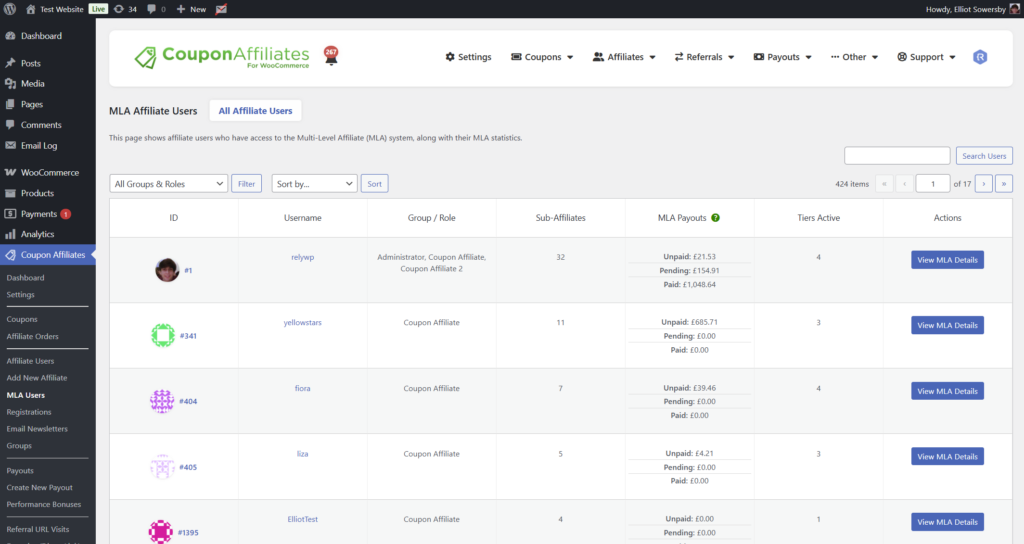
A brand new “MLA Users” admin page has been added, giving you a full list of all users that are part of your multi-level affiliate system, along with their affiliate details and stats – all in one place.
Expanded “MLA” Tab on the View Affiliate Page
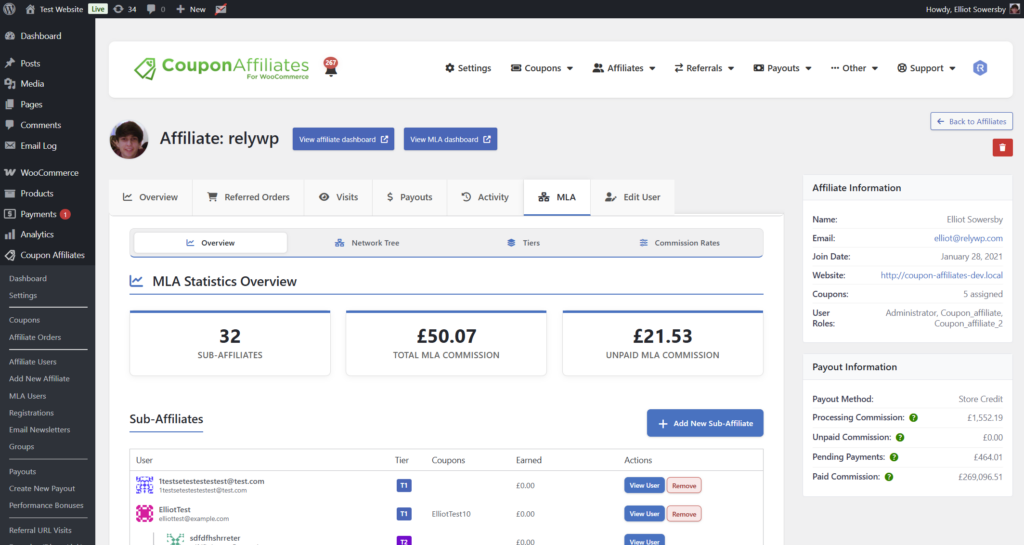
The “MLA” tab on the View Affiliate admin page has been significantly expanded.
It now shows much more detail about an affiliate’s sub-affiliates, including their total stats, recent orders, and more.
You can also now easily remove sub-affiliates or add new ones directly from this tab.
Sub-Affiliate Registrations on the MLA Dashboard
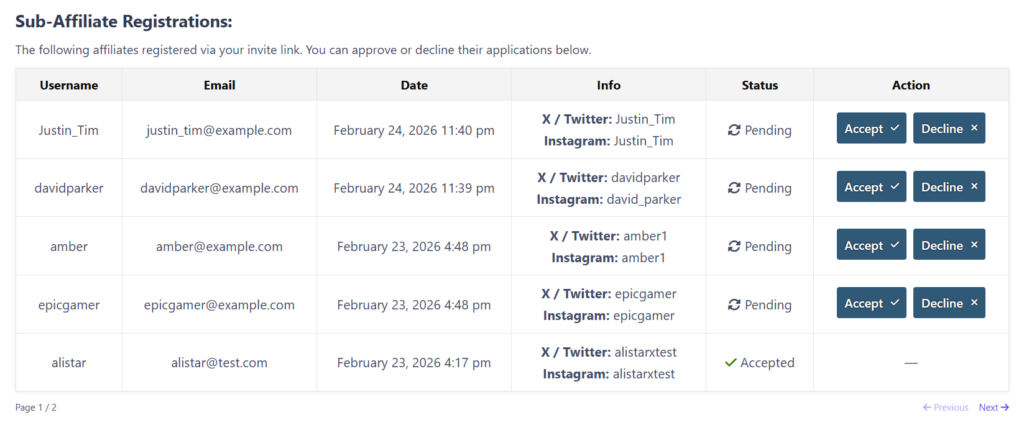
You can now optionally show a “Sub-Affiliate Registrations” section on their MLA dashboard.
This lets the parent affiliate view and manage affiliate applications from their sub-affiliates.
They’ll also receive email notifications when new sub-affiliate applications come in, and can approve or reject them directly from the MLA dashboard.
QR Codes for MLA Invite Links
If QR codes are enabled on your site, the QR code generator will now also appear for MLA invite referral links on the MLA dashboard – making it even easier for affiliates to share their MLA invite links.
“Pending Commission” Renamed to “Processing Commission”
A point of confusion has been the difference between “Pending Commission” (commission from orders in a processing/pending payment state) and “Pending” payouts (commission waiting to be paid out).
To clear this up, we’ve renamed “Pending Commission” to “Processing Commission” across the entire plugin.
This makes it much clearer that this value represents commission tied to orders that are still being processed – not commission that is awaiting a payout.
Edit Processing Commission When Editing Coupons
Following on from the rename, you can now edit the “Processing Commission” amount directly from the WooCommerce coupon edit page – just like you already could for “Unpaid Commission” and “Pending Payments”.
This gives admins full control to manually adjust processing commission values when needed, without having to dig into the database.
Unaccounted Commission Row
On the affiliate page, if the payout information totals (processing, unpaid, pending, and paid commission) don’t add up to the affiliate’s “total commission”, the plugin will now display an “unaccounted commission” row with a helpful message explaining why there may be a discrepancy.
Activity Log Filters
The admin activity log page now includes filters, making it much easier to find specific events in the log – such as commission edits, payout changes, and more.
Affiliate Groups Page Columns
We have added extra columns to the Affiliate Groups admin page, showing each group’s commission rates, assigned template coupon, and enabled payout methods.
Other Tweaks & Fixes
- On the “View Affiliate” page, the “Payouts” tab and the “Unpaid” column in the coupons table are now only shown when the payout tracking setting is enabled.
- MLA unpaid commission changes are now added to the activity log.
- Updated the JS method for setting cookies when headers have already been sent, to be more reliable in some cases.
- reCAPTCHA and Turnstile now load on the floating widget registration form if enabled.
- Made some design improvements on mobile to the view affiliate page.
- Added a search field to the “PRO Modules” settings tab.
Other Fixes
- Fixed an issue where the affiliate registration form would incorrectly show a “coupon already exists” error when submitting with a new coupon code, due to a compatibility issue with newer versions of WooCommerce.
- Fixed some issues with per-group fixed commission not showing visually in some cases.
- Fixed Turnstile rendering twice in some cases.
- Fixed PHP warnings for undefined variables in the mobile dropdown menu section of the affiliate dashboard.
- Fixed a bug where referred orders could be counted twice in the coupon all-time statistics.
- Fixed payout request button not working in some cases when invoice uploads are not enabled, due to a missing JavaScript validation function.
- Fixed processing commission being added twice for some orders due to an HPOS compatibility issue.
- Potential fix for issues with the WP Compress plugin.
- Fixed a bug where affiliate bonuses with a “Once Per Month” (or other period) trigger could become permanently locked if the reward date meta was missing, preventing the bonus from ever being awarded again.
- Fixed a bug where removing all affiliate group restrictions from a bonus would not clear the saved restriction, causing affiliates to be silently excluded from earning the bonus.

Elliot Sowersby is a WordPress developer from Yorkshire, United Kingdom. He is the founder and lead developer of Coupon Affiliates and RelyWP.



 English
  Spanish
  German
  French
One Comment
Very useful and interesting