
The short answer: WooCommerce has no multi-level (MLM) features built in, so you need an affiliate plugin that supports tiers. You turn on the multi-level module, set a small commission for each tier, and give affiliates a dashboard where they can invite others. When a sub-affiliate makes a sale, the affiliate who invited them earns a little extra on top.
A lot of store owners search for “WooCommerce MLM” when what they actually want is simpler: a way for their best affiliates to bring in other affiliates, and get rewarded when those people sell. That’s a multi-level (or multi-tier) affiliate program. It borrows the tier idea from network marketing (in MLM terms it’s close to a unilevel plan), but the money still comes from customers buying your products.
Below you’ll find a worked example of tier commissions and the setup steps for WooCommerce and WordPress. There’s also a section on staying clear of the pyramid-scheme end of MLM.
Disclosure: we make Coupon Affiliates, the WooCommerce affiliate plugin used in the setup steps below. We also mention other options, including dedicated MLM plugins, for cases where ours isn’t the right fit.
Key takeaways
- A multi-level affiliate program pays a parent affiliate a small extra commission when someone they invited refers a sale.
- Every commission should come from a real customer order. Paying people for recruiting, or charging them to join, is what regulators treat as a pyramid scheme.
- Add up the total payout per order, base rate plus every tier, before you publish the rates.
- In Coupon Affiliates, multi-level affiliates (MLA) is a PRO feature with unlimited tiers, three ways to calculate tier commission, and a dashboard that shows each parent their network.
In this guide
- Multi-level affiliate program vs. MLM
- How tier commissions work (with an example)
- Is a multi-level program right for your store?
- How to set up a multi-level affiliate program in WooCommerce
- What parent affiliates see
- Is a multi-level affiliate program legal?
- Other WooCommerce MLM plugins
- FAQ
Multi-level affiliate program vs. MLM
People use “MLM”, “multi-tier” and “sub-affiliate program” to mean the same thing. They overlap, but the differences matter, both for how you design the program and for how it looks to regulators.
In a multi-level affiliate program, affiliates promote your store and earn commission on the customers they send. Some of them also invite other affiliates. When one of those sub-affiliates refers a customer, the person who invited them earns a smaller, second commission. Nobody pays to join, and nobody earns anything unless a customer places an order.
Traditional multi-level marketing is a wider business model. Distributors often buy stock or starter kits, and many compensation plans (binary, matrix and so on) add bonuses based on the size of a person’s downline.
A pyramid scheme is where the money comes mainly from recruiting people rather than selling to real customers. It’s illegal in the US and the UK.
| Multi-level affiliate program | Traditional MLM | Pyramid scheme | |
|---|---|---|---|
| Cost to join | Free | Often a starter kit or stock purchase | Pay to join |
| Where the money comes from | Customer orders | Sales to customers and to other distributors | Mainly new recruits |
| Reward for recruiting | None on its own; parents earn only when their recruits sell | Varies by plan | Yes, often the main reward |
| Who buys | The affiliate’s audience | Customers and distributors | Mostly participants |
How tier commissions work (with an example)
Every affiliate earns their normal rate on their own sales. Tier commission is an extra amount paid “up the chain” to the people who brought that affiliate in. The tier 1 rate goes to the person who invited the seller, the tier 2 rate to whoever invited them, and so on.
Here’s an example using the settings from our multi-level affiliates documentation: a 25% base commission, tier 1 set to 20% of the affiliate’s earnings, and tier 2 set to 10%.
- John invites Fred to join your program. Fred is tier 1 in John’s network.
- Fred invites Sally. Sally is tier 1 in Fred’s network and tier 2 in John’s.
- Sally refers a $200 order.
| Who | How it’s calculated | Commission |
|---|---|---|
| Sally (made the sale) | 25% of $200 | $50.00 |
| Fred (tier 1) | 20% of Sally’s $50 | $10.00 |
| John (tier 2) | 10% of Sally’s $50 | $5.00 |
| Total paid | $65.00 (32.5% of the order) |
That last line is the one to check. Your normal rate was 25%, but with two tiers switched on this order costs you 32.5% in commission. If your margin can’t carry that on every affiliate sale, lower the base rate or the tier rates before you launch. Our affiliate commission calculator helps you test the numbers against your margins.
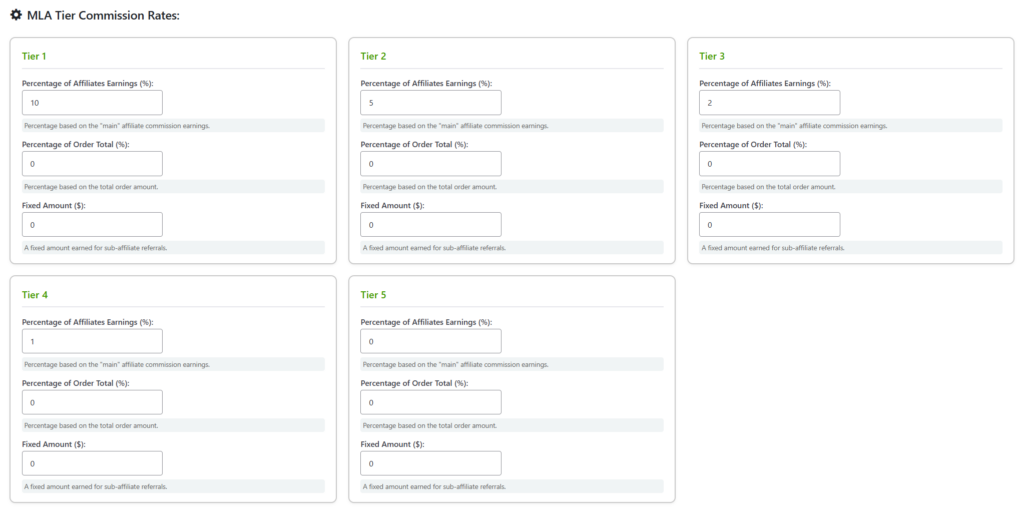
Coupon Affiliates gives you three ways to set each tier’s commission:
- Percentage of the affiliate’s earnings, as in the example above
- Percentage of the order total
- A fixed amount each time the sub-affiliate refers a customer
By default, tier commission is paid on top and isn’t taken out of the selling affiliate’s earnings. There’s a setting to deduct it instead if you’d rather keep the total cost per order the same.
Is a multi-level program right for your store?
Tiers help most when your affiliates naturally know other people who could promote you. Think of a fitness coach who knows other coaches, or a web designer who works with a circle of freelancers. In those cases, one well-connected affiliate can bring in several good ones, and the tier commission thanks them for it.
It’s a poorer fit if your margins are thin, because every tier adds to the cost of each order. It also makes less sense if you want tight control over who represents your brand. Invited affiliates are one step removed from you, so you’ll want approval steps in place (covered below).
If you’re not sure, start with one or two tiers and low rates. It’s much easier to raise a rate later than to take one away from people who are already earning it.
How to set up a multi-level affiliate program in WooCommerce
These steps use Coupon Affiliates. If you don’t have an affiliate program running yet, set that up first with our guide to creating a WooCommerce affiliate program, then add tiers on top.
1. Turn on the Multi-Level Affiliates module
Multi-level affiliates are part of Coupon Affiliates PRO. In the plugin settings, enable the “Multi-Level Affiliates” module. A new MLA tab appears with the options for tiers and the dashboard.
2. Set the number of tiers and the rate for each
Choose how many extra tiers you want (there’s no upper limit) and fill in the commission for each one using one of the three methods above. One or two tiers, with the rate dropping at each level, is a reasonable place to start.
You can also set different tier rates per affiliate group or per user, which override the defaults. That’s useful if you want a small group of partners or resellers on higher tier rates without changing them for everyone. See affiliate groups for how groups are set up.
3. Create the MLA dashboard page
Add a new page and put this shortcode on it: [couponaffiliates-mla]. This is where parent affiliates see their network, invite people and check what they’ve earned from it.
4. Decide who can build a network
You don’t have to open tiers to everyone. With the invite-only option, the MLA dashboard is only available to affiliates you give access to, either one by one or by user role. Starting with your top few affiliates is a good way to test tiers.
You can also have parents approve or reject sub-affiliate applications from their own dashboard. They get an email when someone applies through their invite.
5. Choose how sub-affiliates get linked to a parent
The main way is an invite. Parents can send one by email from the dashboard or share their personal invite link. A few options change how this works:
- Invite links can also work as a normal referral link, so one link both applies the parent’s coupon for shoppers and signs up new affiliates.
- Customers who order with a parent affiliate’s coupon can be automatically assigned as sub-affiliates in that parent’s network.
- As the admin, you can set or change anyone’s parent by editing the user. The plugin refuses changes that would create a loop, such as making someone the parent of their own upline.
This short video walks through the module:
What parent affiliates see
Parents get their own MLA dashboard, separate from the normal affiliate dashboard. From there they can:
- See their whole network as a tree, with each sub-affiliate’s coupon and earnings
- View the orders their sub-affiliates referred and the commission they earned from each
- Check the tier rates that apply to them on the Rates tab (if you enable it), including any custom rates
- Invite new people, and review sub-affiliate applications if you’ve turned on parent approval
- Manage and request payouts for their MLA commission

On the admin side, the MLA Users page lists everyone in the multi-level system with their stats, and the View Affiliate screen has an MLA tab where you can add or remove sub-affiliates.
Is a multi-level affiliate program legal? MLM vs. pyramid schemes
The line regulators draw is about where the money comes from. The FTC’s consumer guidance on MLMs and pyramid schemes puts it plainly: a legitimate MLM “will pay you based on your sales to retail customers, without having to recruit new distributors,” while in a pyramid scheme “your income would be based mostly on how many people you recruit, not how much product you sell.” Its business guidance adds that courts look at how a company actually operates, beyond what its written policies say.
In the UK, the ASA’s advice on pyramid schemes explains that the advertising code bans promoting schemes where people pay “for the opportunity to receive payments derived primarily from the introduction of other consumers into the scheme”.
A multi-level affiliate program that pays only on customer sales is much less likely to raise these concerns, as long as it runs that way in practice. That means:
- Only pay tier commission on customer orders. In Coupon Affiliates, tier commission is only created when a sub-affiliate refers an order, so there’s no payment for a sign-up on its own.
- Never charge affiliates to join, and don’t make buying your products a condition of earning.
- Keep tier rates small. Most of what an affiliate earns should come from customers they sent you themselves.
- Block self-referrals. Affiliates shouldn’t earn commission, or generate tier commission for their upline, on their own orders. See how to block self-referrals and coupon abuse.
- Be careful with earnings claims when you recruit. “Build a network and earn passive income” is exactly the pitch regulators look for.
- Write it into your terms. Our guide to affiliate terms and conditions covers what to include.
This is general information, not legal advice. If your program pays across several tiers or operates in several countries, get it checked for your jurisdiction.
Other WooCommerce MLM plugins
Coupon Affiliates is an affiliate plugin with tiers, built for paying commission on customer sales. If you’re setting up a classic MLM business with a binary or matrix compensation plan, joining bonuses and distributor genealogy, you want a dedicated MLM plugin instead. Webkul’s WooCommerce Binary MLM and Matrix MLM plugins are two that come up often. There’s also standalone MLM software, which usually runs as a separate system connected to your store rather than as a WordPress plugin.
Several general affiliate plugins also offer multi-tier commissions. Affiliate for WooCommerce supports unlimited tiers, for example. Our roundup of the best WooCommerce affiliate plugins compares the main options, including where each one falls short.
To be clear about ours: multi-level affiliates need Coupon Affiliates PRO, and the free version doesn’t include them. PRO is $23.99 a month or $179.99 a year for one site at list price, with 25% off the first payment (see our pricing page). Every PRO plan includes MLA, and there’s a 7-day free trial.
Once tiers are live, your affiliates will be doing some of your recruiting. Our guide on how to recruit affiliates covers how to find the first, well-connected ones.
Frequently asked questions
Can WooCommerce do MLM without a plugin?
No. WooCommerce itself has no affiliate or multi-level features, so you need a WordPress plugin to track referrals and pay tiered commission. An affiliate plugin with tiers covers most stores. A dedicated MLM plugin is for classic network-marketing compensation plans.
Is a multi-level affiliate program the same as MLM?
Not quite. Both use tiers, but a multi-level affiliate program pays only on customer orders and is free to join. Traditional MLM often involves buying stock and rewards based on the size of a downline.
Is a multi-level affiliate program legal?
Tiered commission on real customer sales is common and generally legal. What crosses the line is paying people mainly for recruiting, or charging them to join. Rules vary by country, so check yours if you’re unsure.
How many tiers should I use?
One or two is usually enough to start with. Coupon Affiliates allows unlimited tiers, but each one adds cost to every order, and the amounts paid on deep tiers get very small.
Does tier commission come out of the selling affiliate’s earnings?
Not by default. In Coupon Affiliates it’s paid on top, and you can switch on an option to deduct it from the selling affiliate’s commission instead.
Can different affiliates have different tier rates?
Yes. You can set custom MLA rates per affiliate group or per individual user, and they override the default tier rates.
PS: Want to add tiers to your WooCommerce affiliate program? Coupon Affiliates PRO includes multi-level affiliates on every plan, with a 7-day free trial. You can also start with the free version and upgrade when you’re ready for tiers.

Elliot Sowersby is a WordPress developer from Yorkshire, United Kingdom. He is the founder and lead developer of Coupon Affiliates and RelyWP.

Leave a Reply