
Cookieless affiliate marketing means tracking affiliate sales without relying on browser cookies. Instead of following a visitor from click to checkout with a tracking cookie, you give each affiliate a unique coupon code and credit the sale whenever that code is used. Because the code is entered (or applied) at checkout, the sale is still credited when an ad blocker, a privacy-focused browser or an in-app browser like Instagram’s has lost the tracking cookie, or when there was never a click at all. This guide shows how to set one up on WooCommerce with Coupon Affiliates, our own plugin.
Cookies have been the main way affiliate sales get tracked for years, following a visitor from the moment they click a referral link to the point they buy. That way of tracking has been getting less reliable for years, but not for the reason you might expect.
The common claim is that browsers are about to switch cookies off entirely. The reality in 2026 is more complicated than that. Google decided to keep third-party cookies in Chrome rather than phase them out, but Safari blocks them by default, Firefox isolates them to each site, and ad blockers are common. In the UK and EU, PECR and the ePrivacy Directive require consent before you set non-essential tracking cookies, and in California the CCPA gives people the right to opt out. Even first-party cookies face limits, such as Safari capping how long they survive. The result is the same: cookie-based affiliate tracking loses accuracy, and it comes with extra legal hassle.
Coupon-based tracking avoids most of that, because the code itself carries the credit.
Why Go Cookieless?
A few reasons stores move away from cookie-dependent affiliate tracking:
- Privacy regulations: in the UK and EU, tracking cookies need consent under PECR and the ePrivacy Directive, and laws such as GDPR and CCPA govern how you handle the data, which adds work and legal risk.
- Browser restrictions: Safari blocks third-party cookies by default and Firefox isolates them to each site, and even first-party cookies have shorter lifespans than they used to.
- User behaviour: a large share of people run ad blockers or clear cookies, so a cookie set on click often isn’t there at checkout.
Switch to coupon-based tracking and these matter much less, because the sale is tracked by the coupon code, not the browser.
Where Cookie Tracking Breaks Down
Cookie tracking works when a visitor clicks a link and buys in the same browser, on the same device, before the cookie expires. A lot of real buying journeys don’t look like that:
- In-app browsers: links tapped in Instagram, TikTok or Facebook open inside the app’s own browser, which keeps its own cookies. If the customer comes back later in Safari or Chrome to buy, the referral cookie isn’t there.
- Ad blockers and privacy browsers: many block affiliate tracking scripts and domains, and Safari limits how long many cookies last.
- Switching devices: someone might see a recommendation on their phone and buy on their laptop a few days later. A cookie on one device means nothing on the other.
- No click at all: when a code is mentioned in a podcast, a YouTube video, an Instagram story or a conversation, there’s no link to click, so there’s nothing for a cookie to record.
A coupon code gets through all of these. It’s part of the order itself, so whichever browser or device the customer ends up using, the sale is credited to the affiliate whose code was used. That’s why coupon codes suit influencer marketing and podcast sponsorships so well.
How Coupon Affiliates Handles Cookieless Tracking
With Coupon Affiliates, you can run a coupon-based affiliate program that doesn’t depend on cookies. By default the plugin still sets a couple of cookies, but there’s a setting to disable them completely and go fully cookieless.
Three things make this work:
- Coupon-based tracking: each affiliate promotes a specific coupon code, and customers enter it at checkout. The code ties the sale to the affiliate directly, with no need to watch the customer’s browsing.
- Referral links that auto-apply coupons: affiliates can share a link that drops their coupon into the cart automatically, so customers get the discount without typing anything.
- Optional cookieless mode: you can turn the plugin’s referral cookies off. Any order that uses an affiliate’s code is still credited, but referral links become less forgiving (see step 4).
How To Switch Your Program To Cookieless
Here’s how to set up a cookieless affiliate program with Coupon Affiliates, step by step.
1. Install the Coupon Affiliates plugin
Start by getting the Coupon Affiliates plugin, or download the free WooCommerce affiliate plugin from the WordPress.org directory. In your WordPress admin, go to Plugins > Add New, upload the plugin and activate it. Then follow the setup wizard to configure your coupon-based affiliate program.
2. Assign unique coupon codes to affiliates
Give each affiliate their own coupon code to promote on their site, social channels or email list. When a customer checks out with that code, the affiliate is credited for the sale automatically.
To set this up, edit the WooCommerce coupon and assign a user to it, which turns that user into an affiliate.
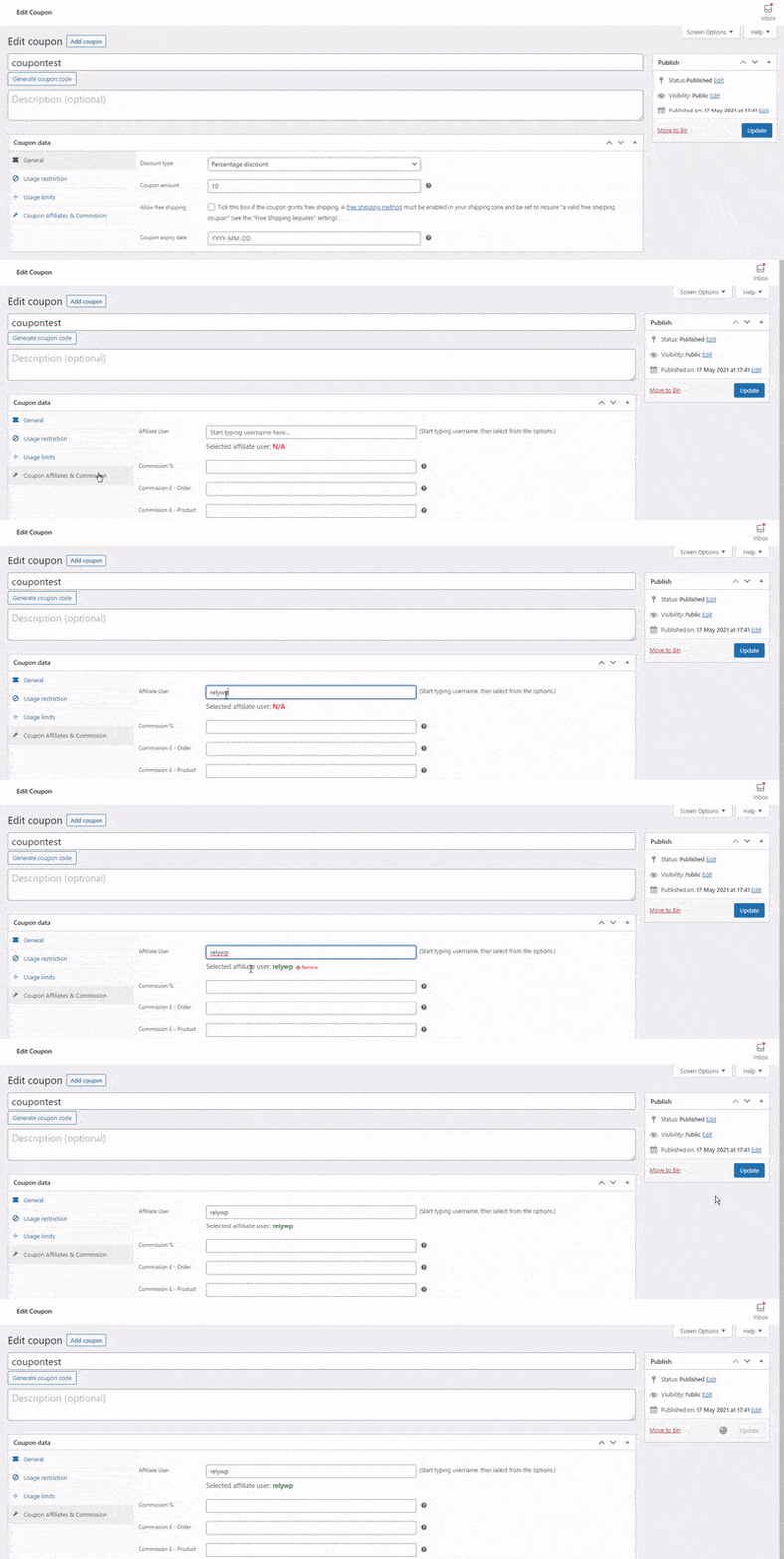
You can also use the affiliate registration system to publish a signup form. When someone applies and is approved, their coupon code is generated automatically from a template.
3. Set up custom referral links
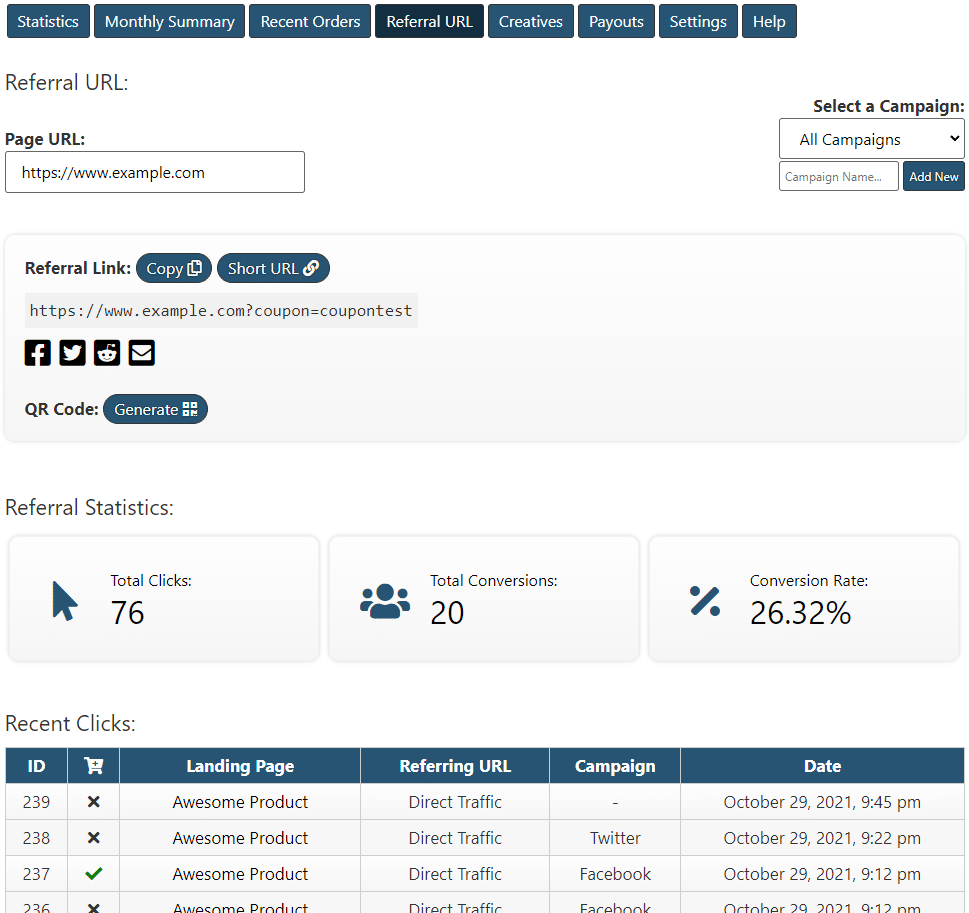
Coupon Affiliates can create referral links that apply an affiliate’s coupon automatically. They look like this:
https://yourstore.com/?coupon=AFFILIATECODEWhen a customer clicks the link, the coupon is applied to their cart. By default a cookie remembers it while they browse, and a WooCommerce session acts as a backup if cookies are blocked.
4. Turn off cookie tracking
If you don’t want to store anything in visitors’ browsers, go to Coupon Affiliates > Settings > Privacy & Cookies and switch off Store cookies for referral links. There are separate toggles for multi-level referral cookies and for domain link tracking, if you use those features.
Know the trade-off before you do it. With referral cookies off, a referral link can only auto-apply the coupon on the first page the visitor lands on, and orders placed without the code are no longer credited to the link. It suits programs where affiliates mainly share their code. The privacy and cookie settings guide covers each option.
5. Track performance without cookies
Affiliates still get a personalised dashboard showing sales generated, commission earned and how often their coupon has been used, all calculated from orders rather than cookie data.

What to Look For in Cookieless Affiliate Tracking Software
If you’re comparing tools, check that the software can:
- Credit orders by coupon code, not only by link clicks, so sales with no click are still tracked.
- Give each affiliate their own code, created automatically when they’re approved.
- Auto-apply the code from a referral link, so affiliates who share links and affiliates who share codes are tracked the same way.
- Let you switch cookies off completely, if your privacy policy or consent setup calls for it.
- Protect against leaked codes, for example by blocking self-referrals or limiting codes to new customers.
- Report from order data, so each affiliate’s dashboard matches what’s in WooCommerce.
Coupon Affiliates does all of these on WooCommerce. For a wider comparison, see our roundup of the best WooCommerce affiliate plugins.
Benefits of a Cookieless Affiliate Program
Running your program on coupons rather than cookies brings a few clear advantages:
- More reliable credit: cookies can be blocked or expire before a customer buys. A coupon code links the sale to the affiliate at the moment of purchase, so a blocked or expired cookie doesn’t cost them the sale. Codes can leak to coupon sites, so pair this with the fraud prevention settings.
- Simpler privacy compliance: with no tracking cookies to ask consent for, coupon-based programs are easier to run under PECR and GDPR.
- Quick to set up: assign a code, share a link, done. There’s no tracking system to keep running.
- More customer trust: shoppers who care about privacy can see they’re using a discount code, not being followed around the web.
Frequently Asked Questions
What is cookieless affiliate marketing?
It’s affiliate tracking that credits sales without browser cookies. The most common method is coupon-based: each affiliate has a unique code, and any order using that code is credited to them, so tracking doesn’t depend on cookies surviving from click to checkout.
Can you track affiliates without cookies?
Yes. Coupon codes tie each sale to an affiliate at checkout, and you can also use referral links that auto-apply a coupon. With Coupon Affiliates you can switch the referral cookies off and still credit every order that uses an affiliate’s code.
Are third-party cookies going away?
Not all at once. Google kept third-party cookies in Chrome instead of removing them, but Safari blocks them by default, Firefox isolates them to each site, and ad blockers remove them for many other users. For reliable affiliate tracking, that alone is reason enough to switch to coupons.
Is coupon-based affiliate tracking GDPR compliant?
Coupon-based tracking is easier to keep compliant because it doesn’t require setting tracking cookies to attribute a sale. You should still follow your usual data-protection practices, but there’s far less to manage when consent-based cookies aren’t part of the flow.
What affiliate tracking works without cookies or clicks?
Coupon code tracking. Each affiliate shares their own code, and the order is credited to them when a customer enters it at checkout. There’s no click to record, so it works for podcasts, videos, social posts and word of mouth, as well as links.
Do affiliate links work in Instagram and TikTok’s in-app browsers?
The link opens, but the in-app browser keeps its own cookies. If the customer buys there and then, the referral can still be tracked. If they come back later in another browser, a cookie-based program loses the sale. With coupon tracking, the sale is still credited as long as they use the affiliate’s code.
Does cookieless tracking work with ad blockers?
Yes. A coupon code is part of the order, so there’s no tracking script or cookie for an ad blocker to remove. Coupon Affiliates referral links also point straight at your own store, rather than going through a third-party tracking domain.
Conclusion
Cookie-based affiliate tracking keeps losing ground to browser restrictions, ad blockers and privacy law, even now that Chrome has kept cookies in place. A coupon-based program with Coupon Affiliates gives you accurate tracking that respects customer privacy, using unique coupon codes and auto-applying referral links instead of cookies. If you want an affiliate setup that holds up as tracking gets harder, this is a solid way to build it.
Try the free version, or get the premium version with a 7-day free trial.

Elliot Sowersby is a WordPress developer from Yorkshire, United Kingdom. He is the founder and lead developer of Coupon Affiliates and RelyWP.
Leave a Reply