
Multi-Level Affiliates for WooCommerce
Let your affiliates build their own network.
Let your affiliates invite new people to your program. When their recruits refer a sale, they earn extra commission too, across as many tiers as you set up. Your network grows itself, and you keep full control of the rates. Multi-level affiliates are part of Coupon Affiliates Pro.
Pro
Build a network
How multi-level affiliates work
Your affiliates invite new people to join your program. When a sub-affiliate refers a sale, they earn their normal commission, and the affiliates above them in the network earn extra commission based on your tier rates.
It turns your best affiliates into recruiters, so your program grows through the people who already know how to sell your products.
See it in action
How commission flows through your network
Here’s a £200 order with a 25% affiliate rate and two MLA tiers.
- £CustomerPlaces an order£200Using Sophie’s coupon
- SAffiliateSophie£50Her normal 25% commission
- DTier 1Daniel, who invited Sophie£1020% of Sophie’s earnings
- ATier 2Amelia, who invited Daniel£510% of Sophie’s earnings
Sophie earns her full £50, and her network earns £15 on top. Every tier can use a percentage of earnings, a percentage of the order, a fixed amount, or a mix.
Pro
Recruiting made simple
Invite new affiliates in seconds
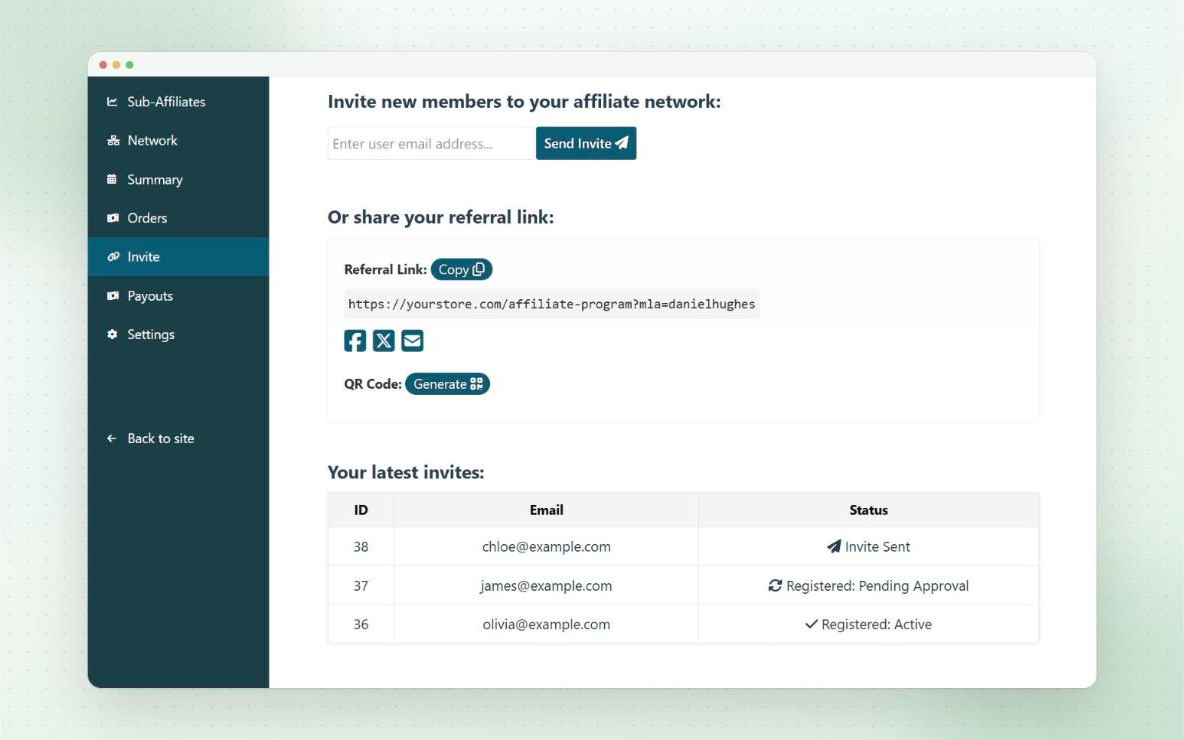
Affiliates invite people from the Invite tab on their MLA dashboard, either by entering an email address, or by sharing their own invite link and QR code.
Anyone who registers through their link joins their network automatically. The inviter becomes their tier 1 parent, and the inviter’s own parents become tier 2 and above.
- Email invites and shareable invite links
- QR codes for invite links
- Optionally let invite links work as normal referral links too
- Automatically add customers who use an affiliate’s coupon to their network
Pro
Your structure, your rates
Multi-level tiers and rates
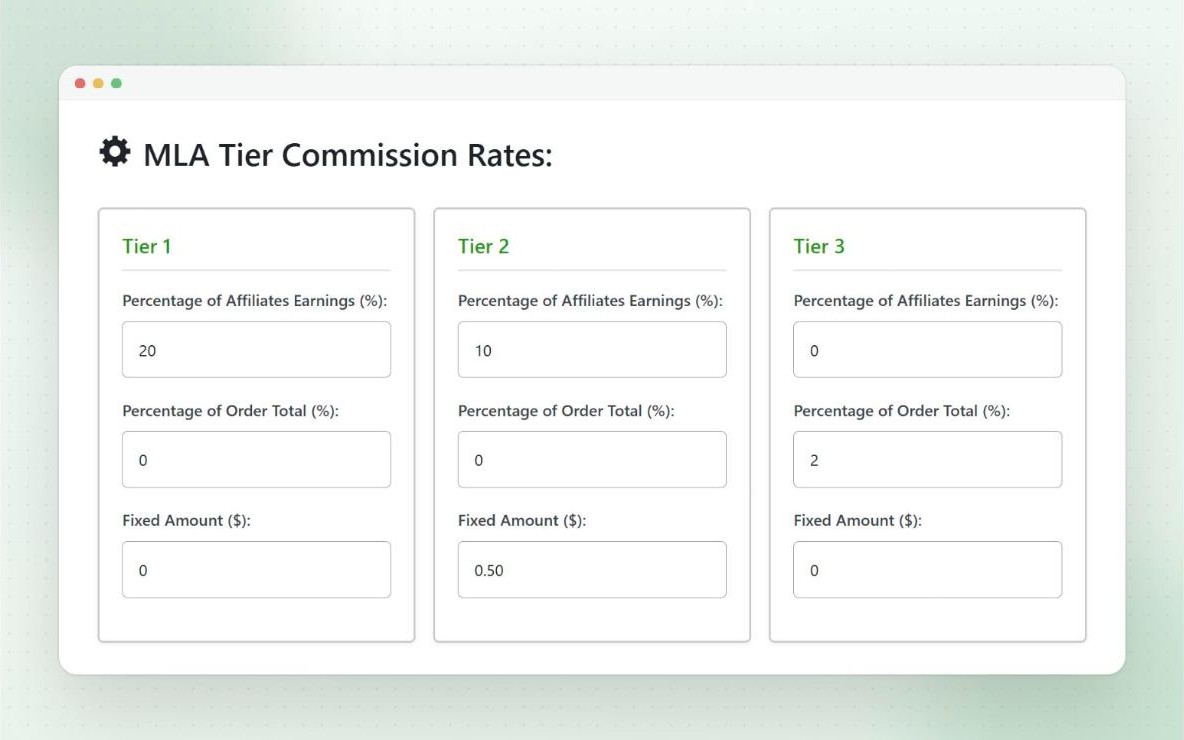
Choose how many tiers your network has, and what each tier earns. Every tier can pay a percentage of the sub-affiliate’s earnings, a percentage of the order total, a fixed amount per order, or any mix of the three.
MLA commission is paid on top of the sub-affiliate’s commission by default. If you’d rather keep your total cost the same, it can be taken out of the sub-affiliate’s commission instead.
- 5 tiers by default, and you can set as many as you need
- Give groups or individual affiliates their own tier rates
- Rates are saved on each order, so later changes don’t alter past commission
For parent affiliates
A dashboard for their whole network
Parent affiliates get their own MLA dashboard, as a page in your theme or a full-screen portal. Turn each tab on or off to show exactly what you want.
Pro
Sub-Affiliates
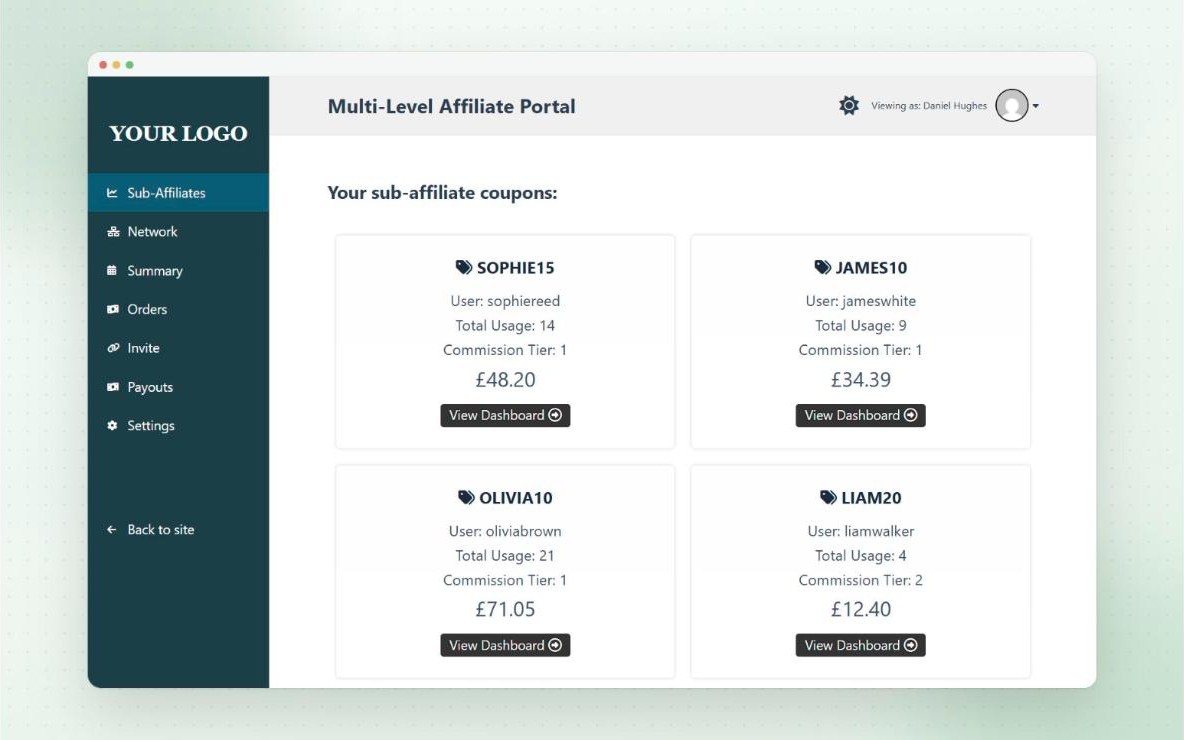
Every coupon in their network, with its usage, tier and what they’ve earned from it.
Pro
Network
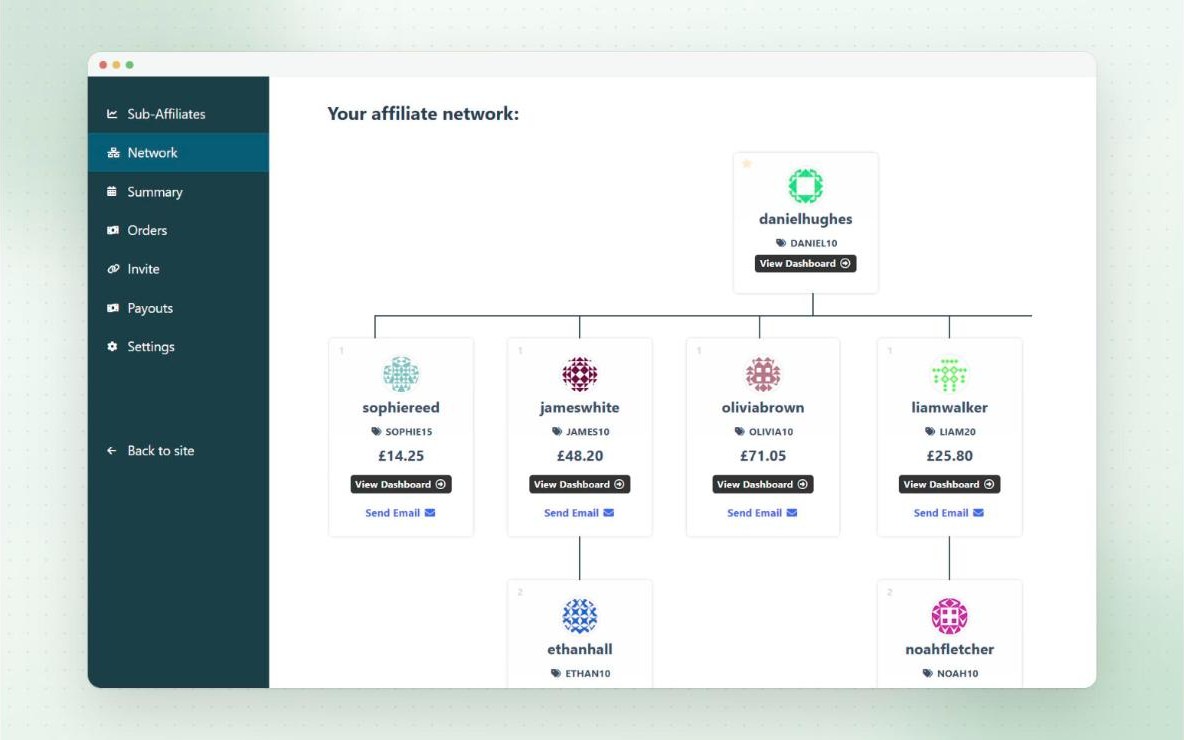
A tree diagram of their whole network, tier by tier.
Pro
Summary
Commission for each sub-affiliate over any date range, with Excel export.
Pro
Orders
Orders referred by their sub-affiliates, and their commission from each.
Pro
Invite
Email invites, their invite link and QR code, and the status of every invite.
Pro
Payouts
Request payouts of their MLA commission, using your payout methods.
Pro
See every recruit
Sub-affiliates at a glance
The Sub-Affiliates tab shows every coupon in the affiliate’s network, with who owns it, how often it’s been used, which tier it’s in, and how much the parent has earned from it.
Parents can open any sub-affiliate’s dashboard to see how they’re doing, and help them sell more.
- Available on the MLA portal, or with the [couponaffiliates-mla] shortcode
- A link to the MLA dashboard from the main affiliate dashboard
- Uses your custom affiliate terminology
Pro
The big picture
Network tree
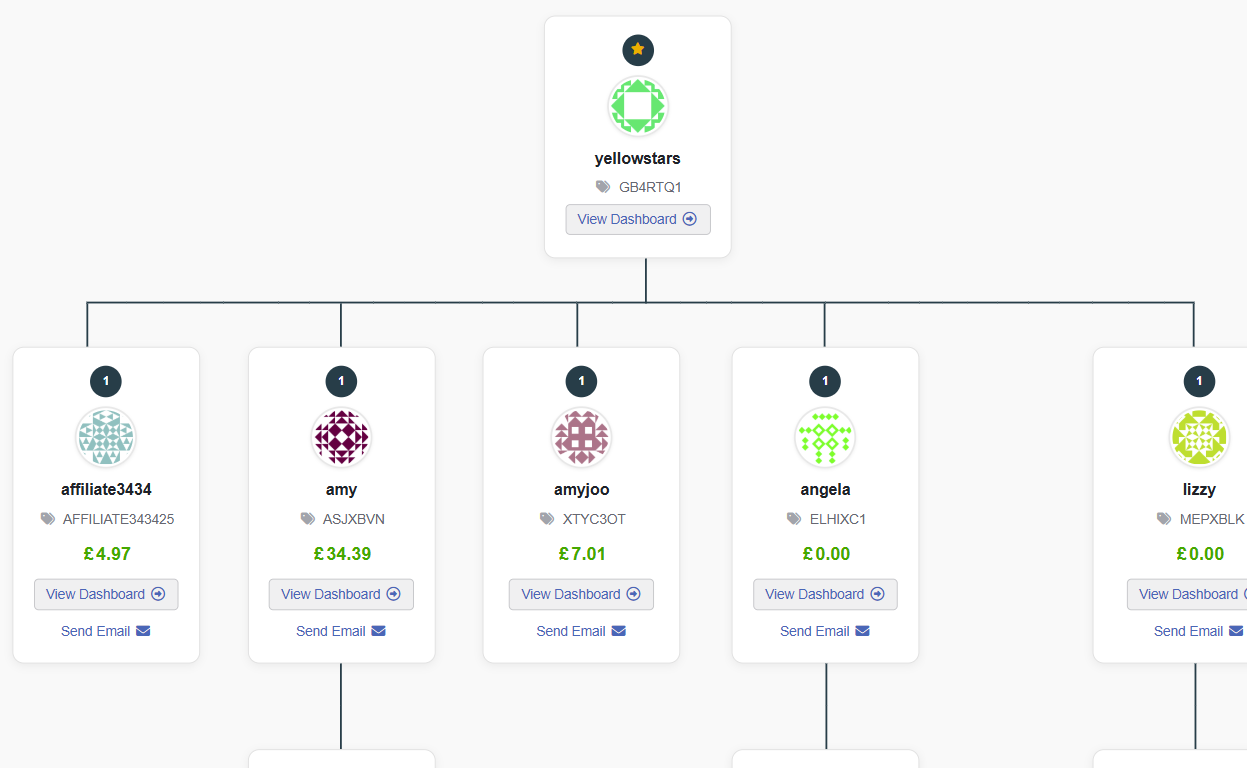
The Network tab shows a tree of the affiliate’s whole network, with every sub-affiliate in each tier, their coupon, and the commission the parent has earned from them.
Each sub-affiliate has buttons to view their dashboard or send them an email, so it’s easy to keep in touch with the team.
- Profile images, tier badges and earnings for each affiliate
- Drag to scroll through bigger networks
- The same tree on the admin View Affiliate page
Pro
Know who’s performing
Network summary and orders
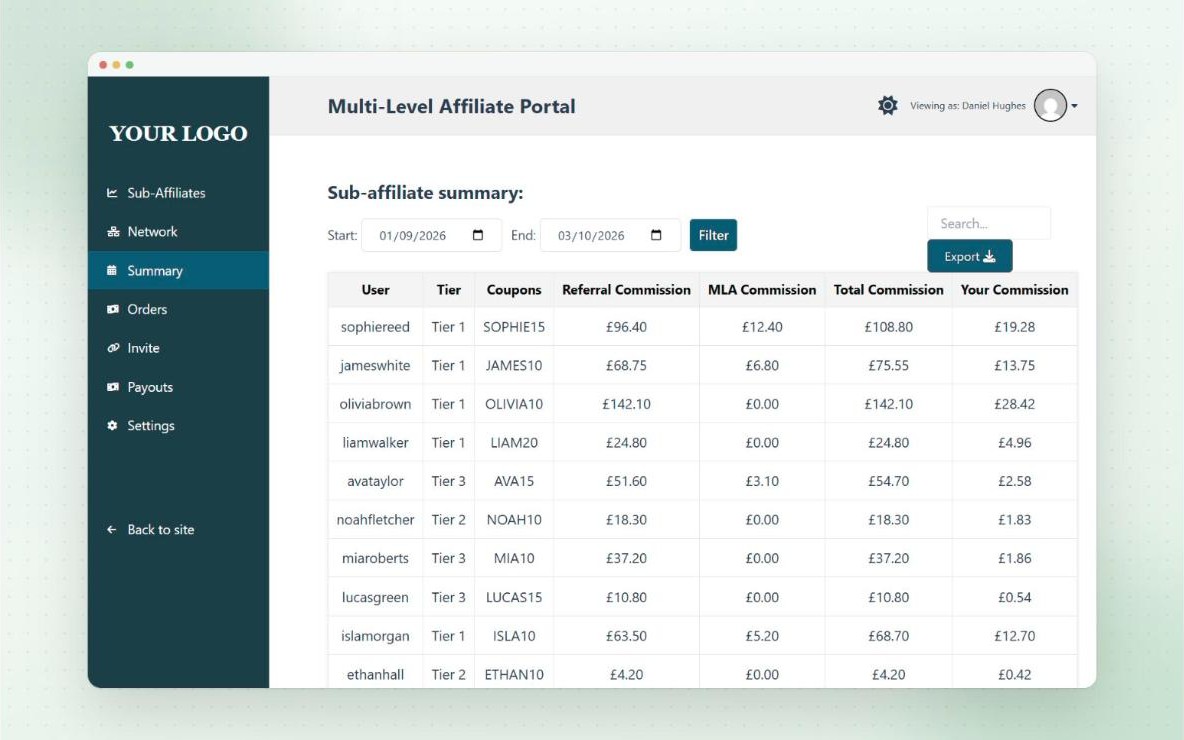
The Summary tab shows each sub-affiliate’s referral commission, MLA commission and total, plus the parent’s own commission from them, for any date range.
The Orders tab lists the latest orders referred by their sub-affiliates, with the coupon used and the commission the parent earned.
- Filter by date and search
- Export the summary to Excel
- Choose which columns to show
Pro
Paid like any other commission
MLA commission and payouts
MLA commission is added to the parent’s MLA balance as soon as their sub-affiliate earns commission, and it’s reversed automatically if the order is refunded. It works for coupon orders, referral link orders and lifetime commission.
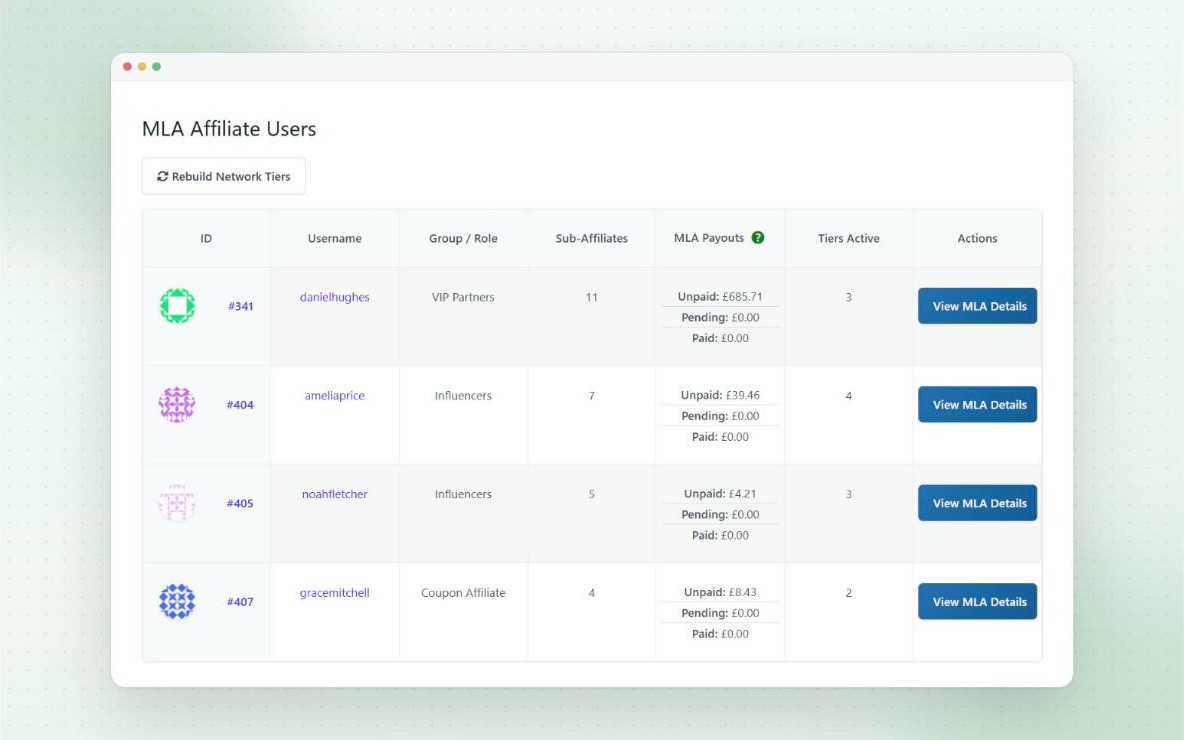
Parents request payouts from the Payouts tab on their MLA dashboard, using your payout methods, threshold and invoice settings. You can see every parent’s unpaid, pending and paid MLA commission in one place.
- Create MLA payout requests for affiliates in bulk
- MLA payouts are labelled in payout lists, Bulk Pay and exports
- MLA commission per tier shown on each order
Pro
Stay in control
Invite-only access and approvals
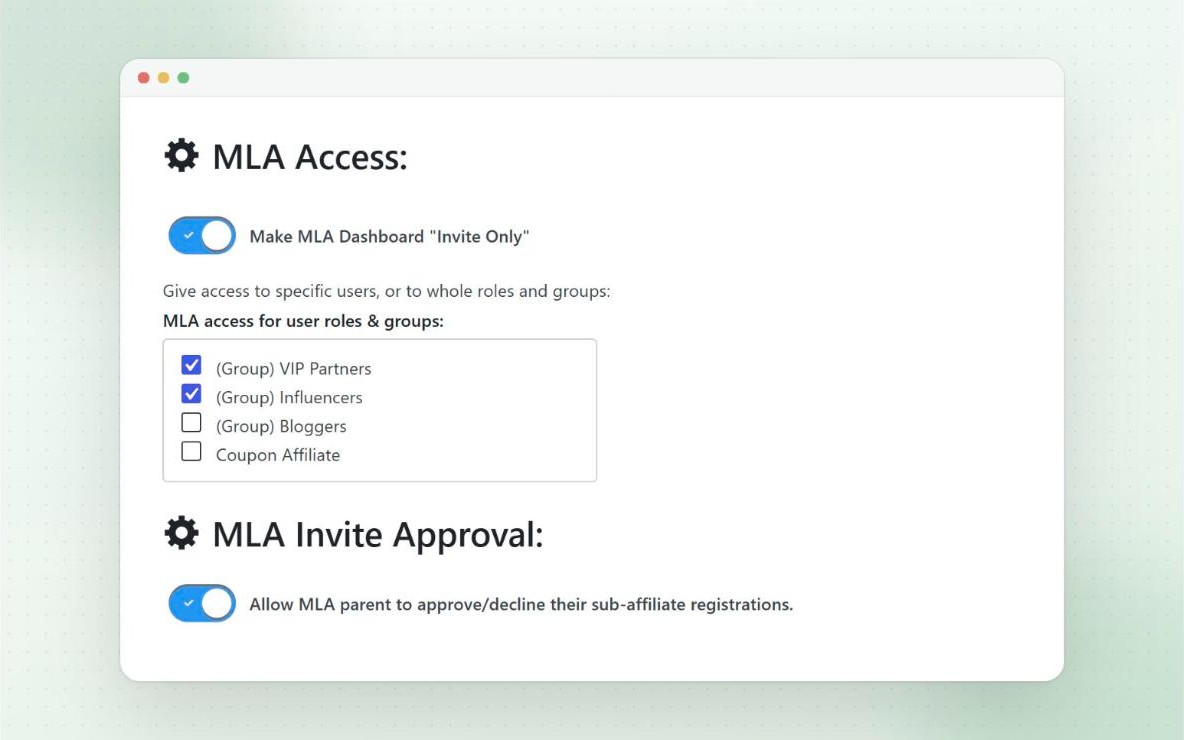
Make the MLA dashboard invite-only, and give access to the affiliates you choose, one by one, or automatically to whole roles and affiliate groups.
You can also let parent affiliates review applications from their own recruits. They’re emailed when someone applies, and can see their details and accept or decline them from the Invite tab.
- Grant MLA access per user, role or group
- Parents approve or decline their sub-affiliates
- Admins always have access
Pro
Manage the network
Admin tools for your network
Every affiliate’s MLA details are on their View Affiliate page in your admin, with their sub-affiliates, network tree, commission by tier and rates. You can add a sub-affiliate to their network from the same screen.
You can also move an affiliate to a different parent (their whole downline moves with them), adjust MLA balances, and rebuild network tiers after changing your tier settings.
- MLA Users page with sub-affiliates, payouts and active tiers
- Edit an affiliate’s parent from their profile
- Total MLA commission column on the affiliate users list
And more
Also included
- MLA emails Pro
Invitations, new sub-affiliate signups and registrations, and new MLA commission. - Per-user & group rates Pro
Override tier rates for top affiliates or whole groups. - Invite links as referral links Pro
Let the same link recruit affiliates and refer customers. - Auto-assign customers Pro
Customers who use an affiliate’s coupon can join their network. - MLA webhooks Pro
Events for MLA commission, invites and new sub-affiliates. - Network in email reports Pro
Add a network summary to affiliate email reports.
Questions
Frequently asked questions
How do affiliates recruit sub-affiliates?
By sending an email invite from their MLA dashboard, or by sharing their own invite link or QR code. Multi-level guide
How many tiers can I have?
5 by default, and you can set as many as you need. Each tier has its own commission rates. Multi-level guide
Does MLA commission come out of the sub-affiliate’s earnings?
Not by default. It’s paid on top, but there’s an option to deduct it from the sub-affiliate’s commission instead. Multi-level guide
Can top affiliates get better tier rates?
Yes. You can override the tier rates for an affiliate group or an individual affiliate. Per-group and per-user rates
How is MLA commission paid?
Parents have their own MLA balance, and request payouts from their MLA dashboard using the same payout methods as normal commission. Multi-level guide
Can I limit MLA to selected affiliates?
Yes. Make the MLA dashboard invite-only, and give access per user, or by role or group. Invite-only guide
Can parent affiliates approve their recruits?
Yes. They can accept or decline sub-affiliate applications from their MLA dashboard. Sub-affiliate approvals guide
Ready to launch your affiliate program?
Try Coupon Affiliates Pro free for 7 days, or get started with the free version on WordPress.org.