
Affiliate Banners and Creatives: Sizes, Examples and What to Give Affiliates
The short answer: give affiliates a small set of banners in the sizes they can actually place (300 x 250, 728 x 90 and a 1080 x 1080 social square cover most of them), each with one message, your product, their coupon code and a single button. Add product photos, a few lines of ready-made copy and your logo, keep it all in one place they can reach from their dashboard, and swap out anything seasonal before it goes stale.
Affiliates promote what’s easy to promote. If they have to screenshot your homepage or dig through your Instagram for a usable photo, most of them won’t bother. A good creatives kit removes that step, and it also means your brand shows up the way you want it to on sites you don’t control.
This guide covers the banner sizes worth making, how to design banners that get used, what else belongs in the kit, and how to hand it all over inside WooCommerce.
Disclosure: we make Coupon Affiliates, a WooCommerce affiliate plugin with a creatives section for affiliates. We cover it in its own section near the end, downsides included. The design advice applies whatever tool you use.
Key takeaways
- 300 x 250 and 728 x 90 appear on the recommended lists of both AvantLink and Commission Factory. Start there, then add a square for social.
- Keep banner files small. AvantLink caps banners at 300KB, and Commission Factory asks for under 100KB where possible.
- For a coupon-based program, put the code on the banner. People can use it at checkout even if they never click.
- Banners are only part of the kit. Photos, copy and a short brand guide often get more use.
In this guide
- What affiliate creatives are
- Affiliate banner sizes
- How to design a banner affiliates will use
- Affiliate banner examples
- Other creatives to give affiliates
- Sharing creatives with affiliates in WooCommerce
- Keeping creatives current
- FAQ
What affiliate creatives are
Affiliate creatives are the marketing materials you hand to your affiliates so they can promote you. Banners are the classic example, but the term covers anything they might post or send: product photos, social graphics, short videos, email copy, text links and your logo.
Who uses what depends on the affiliate. A blogger with a sidebar wants a banner that fits it. An Instagram creator wants a square image and a caption they can adapt. Someone with an email list wants a block of copy and a header image. You don’t need to cover every case on day one, but it helps to know which kinds of affiliates you have before you start designing. Your onboarding process is a good place to ask.
Affiliate banner sizes
Websites have fixed ad slots, so a banner in an odd size usually doesn’t get placed at all. Affiliate networks publish lists of the sizes they support, and two of them agree on a core set. AvantLink’s suggested banner specs and Commission Factory’s supported sizes both put 300 x 250, 728 x 90, 468 x 60 and 160 x 600 near the top.
Social sizes come from the platforms themselves. For Pinterest, the recommendation for standard Pins is a 2:3 ratio, or 1000 x 1500 pixels.
| Size (pixels) | Common name | Where affiliates use it |
|---|---|---|
| 300 x 250 | Medium rectangle | Sidebars, inside blog posts. The one size almost everyone can place. |
| 728 x 90 | Leaderboard | Across the top of a page or between sections on desktop |
| 160 x 600 | Wide skyscraper | Tall sidebar slots |
| 300 x 600 | Half page | Larger sidebar slots |
| 468 x 60 | Full banner | Older sites, forums, footers |
| 320 x 50 or 320 x 100 | Mobile banner | Mobile layouts where a 728 x 90 won’t fit |
| 1080 x 1080 | Social square | Instagram and Facebook feed posts |
| 1080 x 1920 | Story | Instagram and Facebook stories, and other vertical formats |
| 1000 x 1500 | Pinterest Pin | |
| 600 x 200 | Email header | Top of an affiliate’s newsletter |
If you’re starting from nothing, make three: a 300 x 250, a 728 x 90 and a 1080 x 1080. Add the others when affiliates ask for them. It’s easier to build a set from one design than to invent ten different layouts, so design the square first and adapt it.
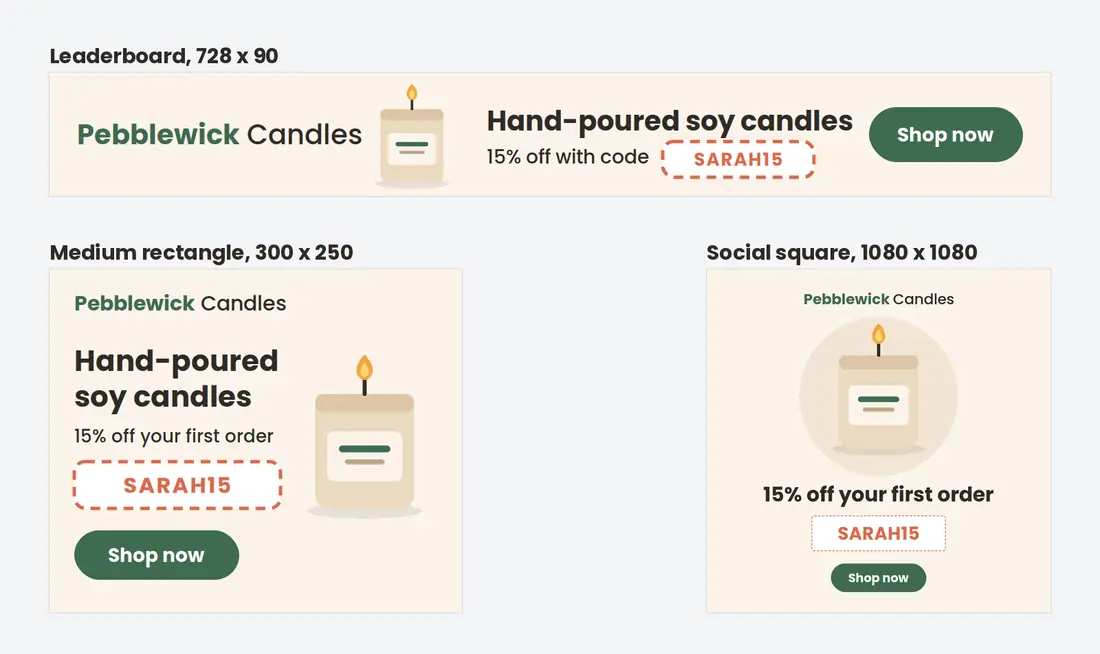
On file size: AvantLink requires banners under 300KB, and Commission Factory asks for under 100KB if you can manage it. Both list PNG, JPG and GIF as the formats to use. A heavy banner slows down your affiliate’s page, and that’s a quick way to get it removed.
How to design a banner affiliates will use
A banner gets a second or two of attention on someone else’s page, often at a small size and next to their own content. That favors plain designs. Here is what to check before you hand one over.
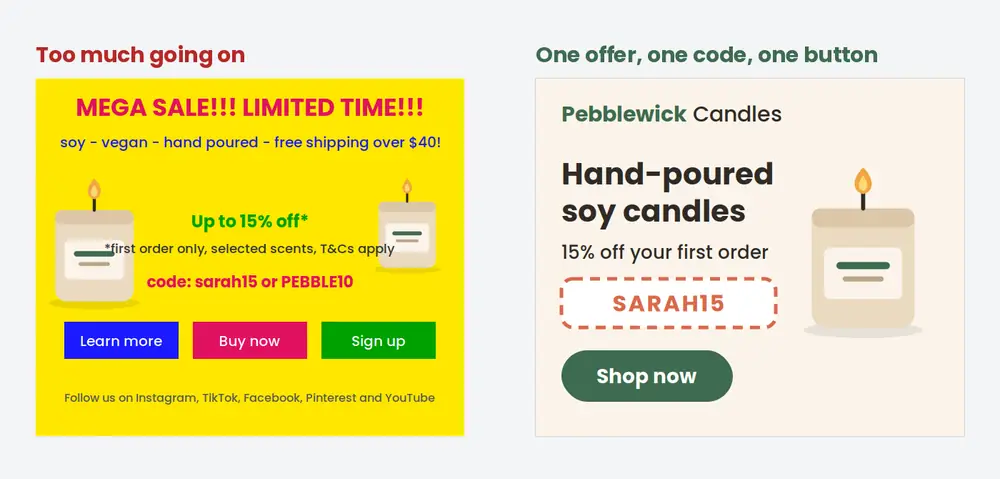
- Pick one message. “20% off your first order” or “New autumn range” works. Trying to fit both usually means neither gets read.
- Show the product. A clear photo of the thing you sell does more than an abstract background.
- Put the coupon code on it if your program runs on codes. Someone who sees the banner on a podcast website or in a screenshot can still type it at checkout.
- Use a single button with a short label such as “Shop now”. Two or three buttons on a 300 x 250 just compete with each other.
- Check it at actual size. Designs are made zoomed in. Look at the finished file at 100% and make sure the smallest text is still readable.
- Leave out anything that will date it, like a price you might change or an end date, unless you plan to take the banner down when it passes.
- Keep your logo and colors consistent across the set, so the leaderboard and the square look like they came from the same brand.
Affiliate banner examples
Most affiliate banners fall into a handful of types. A small kit might include one of each.
Product banners put a best-seller front and center with a short line about it. They suit content affiliates who write reviews or roundups, because the banner matches what the post is already about.
Offer banners lead with the discount and the code, like the candle store example above. These tend to be the most useful for coupon affiliates and influencers, since the code is the whole point of their audience clicking.
Seasonal banners tie into Black Friday, Christmas, back to school or whatever matters in your niche. They get a burst of use and then need removing, so plan when each one comes down before you publish it.
Personalized banners show each affiliate’s own code, name or QR code. They take more setup (or a tool that generates them), but affiliates don’t have to explain “use code X” separately, because it’s already in the image.
Other creatives to give affiliates
Plenty of affiliates never place a banner. Social creators and email publishers usually want raw materials they can fit into their own style. These are worth adding once the banners are done:
- Product photos on a plain background, plus a few lifestyle shots. High resolution, so they can crop.
- Swipe copy: two or three short captions and a longer paragraph describing the product, written so they can be edited rather than pasted word for word.
- An email block for affiliates with lists, with a subject line suggestion and a header image 600 pixels wide.
- Short video clips of the product in use. Even phone footage helps creators who post Reels or TikToks.
- A brand guide of one or two pages: logo files, brand colors with their hex codes, and any claims they shouldn’t make (health claims in particular).
- Story templates in 1080 x 1920 with space left for their own photo or code.
A text link is the simplest creative of all. Every affiliate should be able to copy their referral link in one click, and if you want to send that traffic somewhere better than your homepage, a personalized affiliate landing page is worth setting up.
Sharing creatives with affiliates in WooCommerce
The low-tech option is a shared folder on Google Drive or Dropbox, with the link in your welcome email. It works, but affiliates have to find their own link or code and add it themselves, and old files tend to hang around long after they should have been deleted.
If you run your program with Coupon Affiliates (our plugin), the PRO version adds a Creatives tab to each affiliate’s dashboard. You upload creatives in the admin area and they appear for every affiliate, sorted into categories you choose.
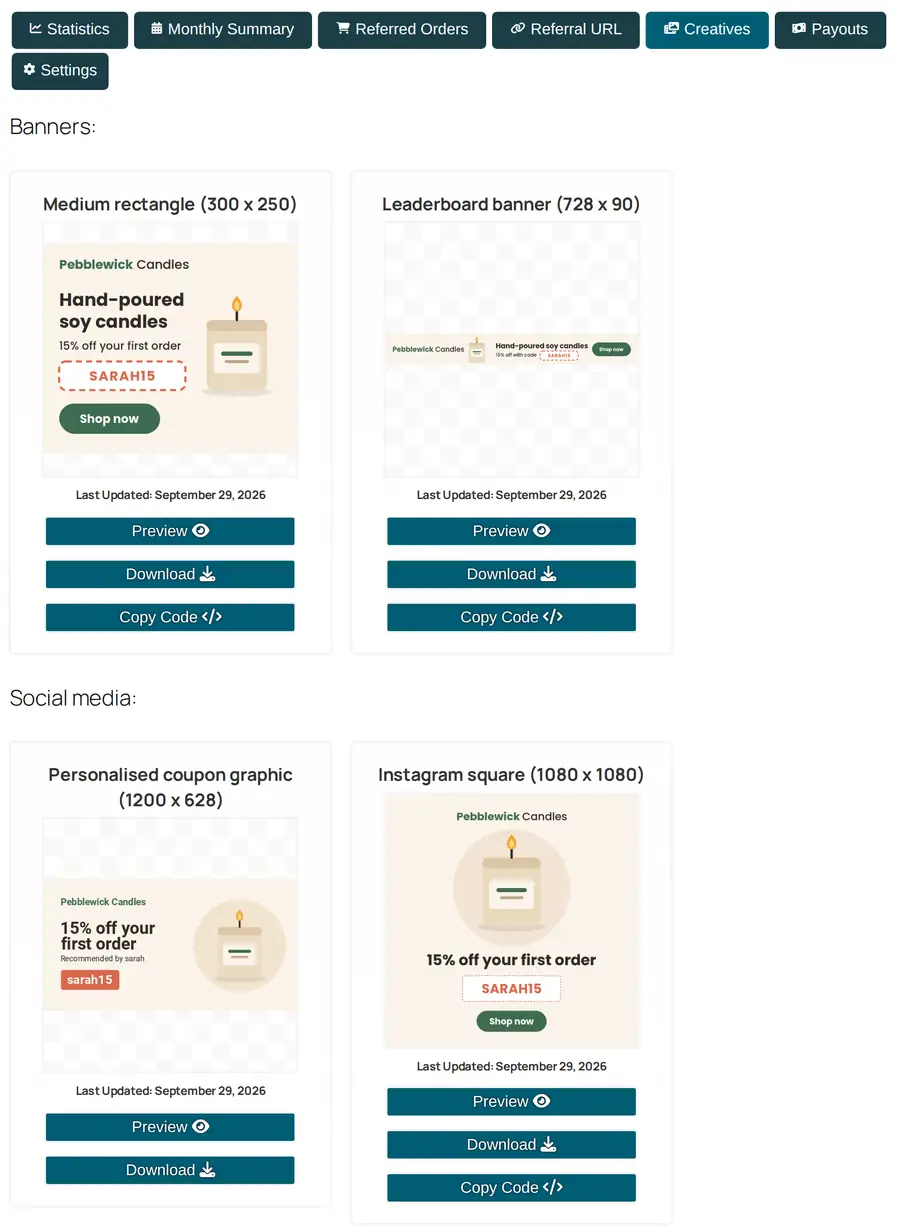
A creative can be an image, a YouTube or MP4 video, a PDF, or a brand color with its hex code. Image creatives come with Preview, Download and Copy Code buttons. Copy Code gives the affiliate a snippet of HTML where the banner is already wrapped in their own referral link, so they can paste it into a sidebar widget without editing anything.
A few settings help with the housekeeping covered earlier:
- Scheduling. Give a creative a start and end date and it only shows in that window. Leave the year out and it comes back every year, which suits Black Friday or holiday banners.
- Limits by role or group. Show a creative only to certain affiliates, for example a higher-commission offer for your top tier.
- Campaign selector. If you turn it on in the creatives settings, affiliates can pick one of their campaigns and the copied code includes it.
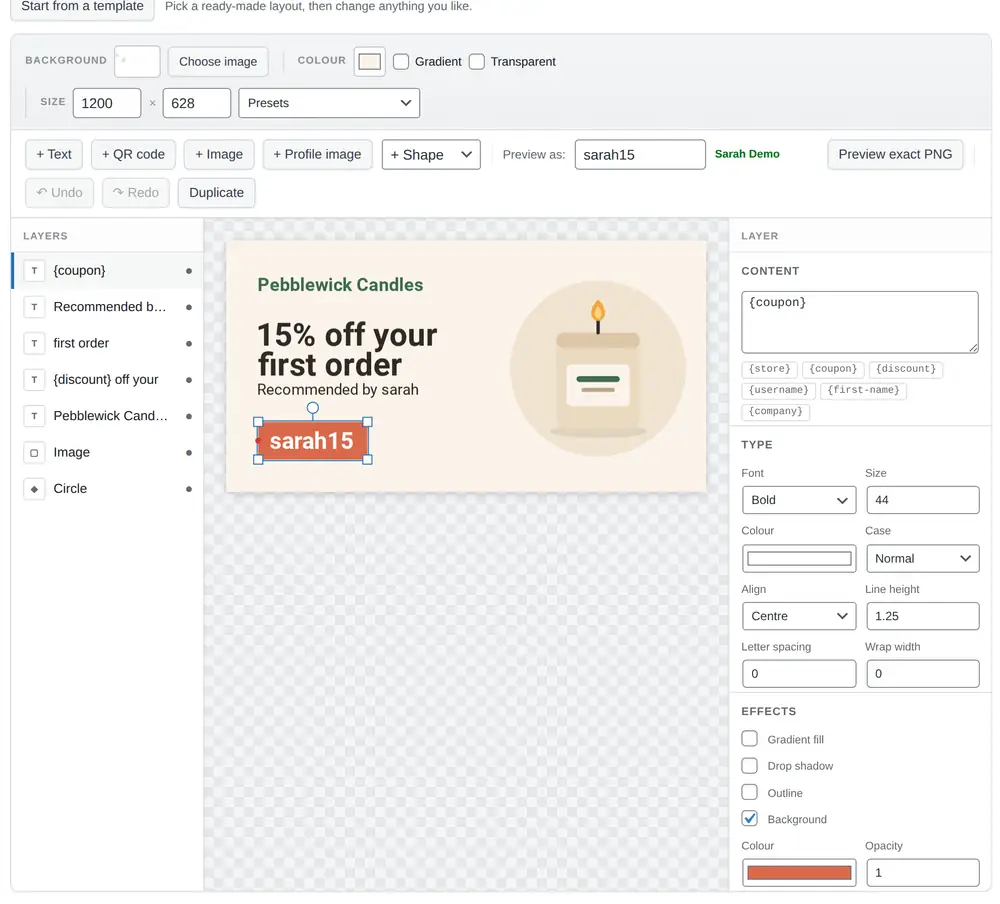
The PRO version also has dynamic creatives, the personalized kind described above. You build a design once in a visual editor, using merge tags such as {coupon}, {discount} and {first-name}, plus QR code and profile picture layers. Each affiliate then gets their own version, with their details filled in, to download from the Creatives tab. The canvas has presets for the common sizes (the leaderboard, medium rectangle, wide skyscraper, social square and story are all there), and you can preview the design with a real affiliate’s details before publishing, which is where a long name or code shows up problems.
The downsides. Creatives are a PRO feature, so they aren’t in the free plugin. There’s also no report showing clicks or sales per banner. If you want to compare two designs, you’ll need to give them separate campaigns or tracking parameters and check the results yourself. The full setup is in the creatives documentation.
PRO is $23.99 a month or $179.99 a year for one site at list price, with 25% off the first payment (see our pricing page).
Keeping creatives current
Creatives go out of date quietly. A banner advertising a sale that ended in March will keep running on an affiliate’s site until someone notices, and that someone is usually a confused customer whose code doesn’t work.
Go through the kit every few months. Remove anything tied to a finished promotion and any photos of products you no longer sell. Ahead of your busy season, add a fresh seasonal set. When you add something new, say so in your affiliate newsletter. Affiliates rarely check the creatives page on their own.
To see which creatives earn their place, ask affiliates to tag their traffic by where it came from. With referral campaigns, an affiliate can create one campaign for their sidebar banner and another for their Instagram posts, then compare the clicks and orders from each. After a couple of months you’ll know which formats to make more of. It’s also worth simply asking your top affiliates what they’d use. They’ll often tell you exactly which size or format is missing.
FAQ
What are affiliate creatives?
They’re the promotional materials a brand gives its affiliates: banners, product images, social graphics, videos, email copy and text links. The idea is that affiliates can promote you without making their own assets.
What size should an affiliate banner be?
300 x 250 is the safest single size, followed by 728 x 90. Both appear on the recommended lists of AvantLink and Commission Factory. For social media, add a 1080 x 1080 square.
Should I put the coupon code on the banner?
If your affiliates each have their own code, yes. A banner can be seen without being clicked, and the code gives that viewer another way to buy through the affiliate. Generic banners can’t show individual codes, which is why personalized banners are useful.
How many creatives do affiliates need?
Fewer than you’d think. Three banner sizes, a handful of product photos, some ready-made copy and your logo will cover most affiliates. A kit that’s small and current is better than a big one full of old promotions.
Can affiliates make their own creatives?
Many will, especially creators who have their own look. A short brand guide keeps what they make close to your brand. If anything they post makes claims about your product, ask to see it first.
Wrapping up
Start small: three banner sizes with your code on them, some photos and a paragraph of copy. Put them somewhere affiliates can find without asking. Then tell them when something new arrives and take old things down once they expire. We think the Creatives tab in Coupon Affiliates is a tidy way to do that in WooCommerce, but we built it, so weigh that accordingly. A shared folder and a reminder in your calendar will get you a long way too.

Elliot Sowersby is a WordPress developer from Yorkshire, United Kingdom. He is the founder and lead developer of Coupon Affiliates and RelyWP.
Leave a Reply