
Affiliate Payouts for WooCommerce
Pay your affiliates in one click, the way that suits them.
Affiliates request their commission from their dashboard. You pay them with PayPal, Stripe, Wise, store credit or your own method, and every payout is tracked in one place. Affiliate payouts are part of Coupon Affiliates Pro.
How it works
From sale to payout
Commission builds up as unpaid commission until it’s paid, so you always know what you owe.
- 1EarnCommission is addedCompleted orders add to the affiliate’s unpaid commission.
- 2RequestA payout is requestedThe affiliate requests it once they reach your threshold, or requests are scheduled for them.
- 3PayYou pay itPay with PayPal, Stripe, Wise or store credit in a click, or mark manual payouts as paid.
- 4RecordIt’s trackedThe affiliate sees it on their Payouts tab, with an optional PDF statement.
Turn on automatic payouts and PayPal, Stripe or store credit requests are paid as soon as they’re made.
Pro
For your affiliates
Payout requests from the dashboard
When an affiliate’s unpaid commission reaches your payment threshold, they can request a payout from the Payouts tab on their dashboard. You get an email, and the request appears in your admin, ready to pay.
Affiliates can see their unpaid commission, and keep track of every pending, paid and cancelled payout.
- Set a minimum payment threshold
- Optionally let affiliates request a custom amount
- Require payment details before a request can be made
- Create payout requests for affiliates yourself

Pay your way
Payout methods
Switch on the payout methods you want to offer, and affiliates choose their preferred one in their dashboard settings. You can set a default method, and limit each method to certain user roles or affiliate groups.
Pro
PayPal Payouts
Pay in one click from your PayPal Business account, straight to the affiliate’s PayPal account.
- Affiliates just enter their PayPal email
- Sandbox mode for testing
- Custom payment subject and message
Pro
Stripe Payouts
Affiliates connect their own Stripe account, and you pay them in one click from your Stripe balance.
- Affiliates sign up through Stripe’s own onboarding
- Standard or Express connected accounts
- Paid from your Stripe balance
Pro
Wise Bank Transfers
Pay affiliates by bank transfer. The transfer is created in Wise for you, ready to complete.
- Affiliates don’t need a Wise account
- US, UK, EU and international bank details
- Sent in your store currency, converted by Wise
Pro
Store Credit
Let affiliates take their commission as store credit, to spend on orders in your store.
- Built-in wallet, or Simple Store Credit & Wallet
- Optional bonus % for choosing store credit
- Works with the Cart and Checkout blocks
Pro
Direct Bank Transfer
Collect bank details from your affiliates, pay them through your own bank, then mark the payout as paid.
- Customisable field labels
- An extra field for anything else you need
Pro
Custom Methods
Add up to two payout methods of your own, like Cash App or crypto, each with its own details field.
- Name each method yourself
- Pay outside the plugin, then click Paid
Pro
For store owners
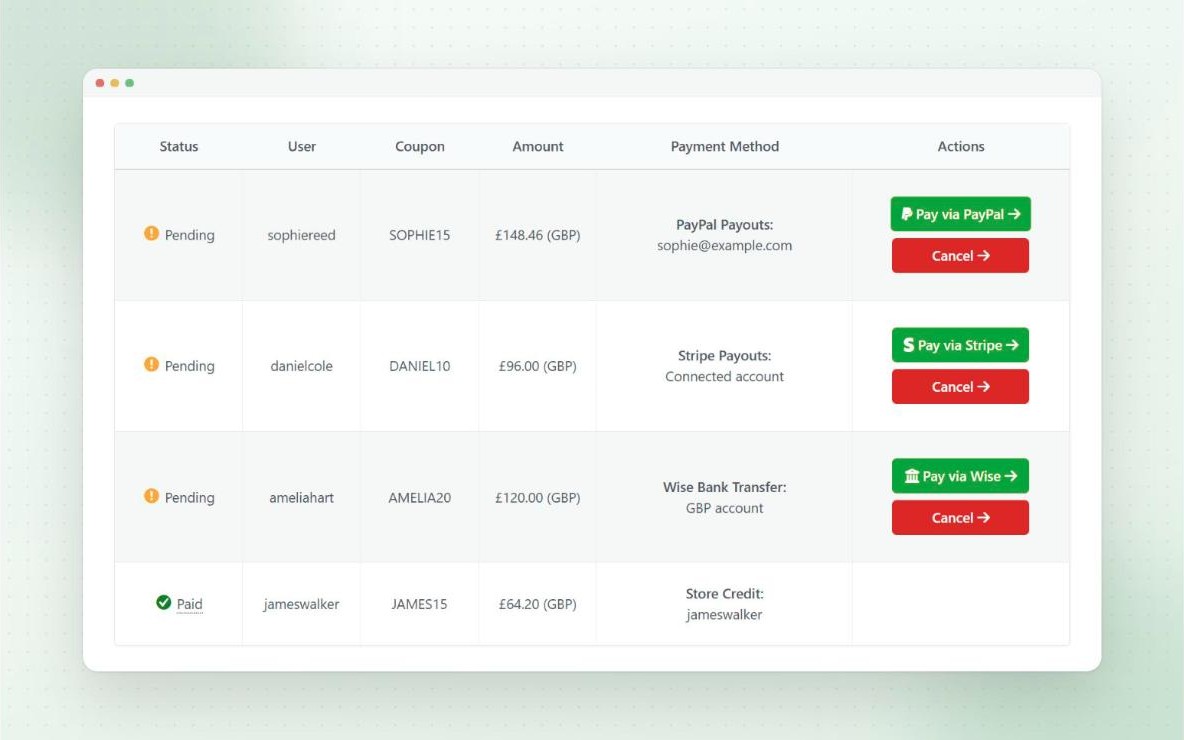
Pay and track all your affiliate payouts in one place
Every request appears on the Commission Payouts admin page, with the affiliate, amount, payout method and status. Click to pay with PayPal, Stripe or Wise, or mark manual payouts as paid.
Affiliates are emailed when their payout has been paid, and the payout is updated on their dashboard.
- Filter requests by status, payout method and date
- Download the affiliate’s invoice before you pay
- Export payouts to CSV or PDF
Pro
Hands-off
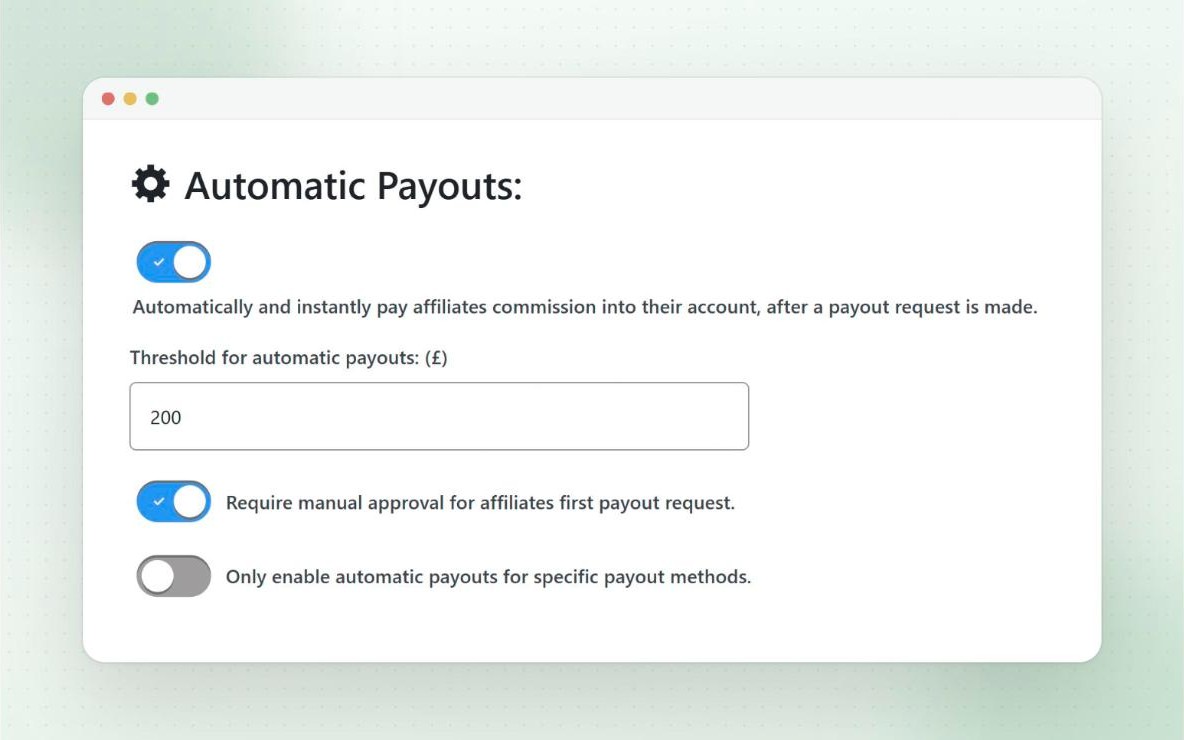
Automatic payouts
Switch on automatic payouts, and requests by PayPal, Stripe or store credit are paid as soon as they’re made, with no admin step needed.
Safeguards keep you in control. Requests over your limit, and each affiliate’s first payout, can still wait for your approval.
- Set a maximum amount for automatic payouts
- Require approval for an affiliate’s first payout
- Choose which payout methods are paid automatically
- For Wise, the transfer is created, ready to complete
Pro
A regular pay day
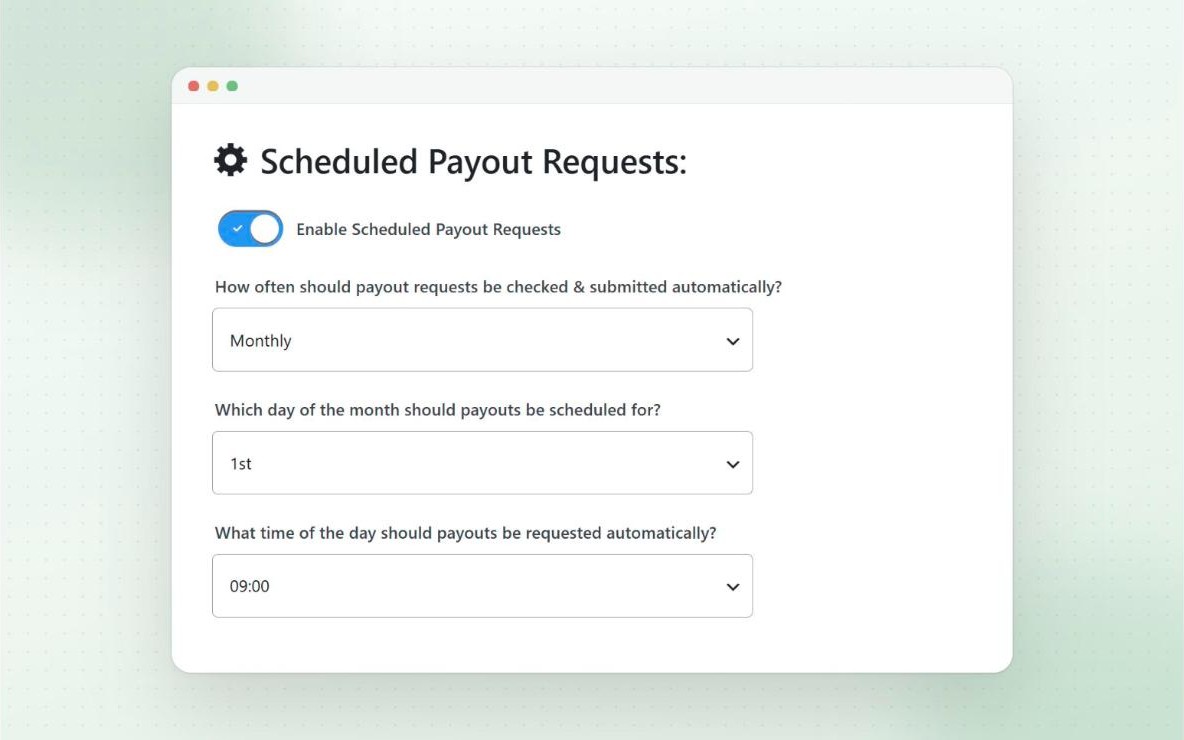
Scheduled payout requests
Prefer to pay on a schedule? Payout requests can be submitted for your affiliates automatically every day, week, month or quarter.
A request is only created when the affiliate has reached your threshold and has their payment details set up. You get an email summary after each run.
- Choose the weekday, day of the month, or last day of the month
- Pick the hour it runs
- Limit it to certain payout methods
Pro
Pay day, done
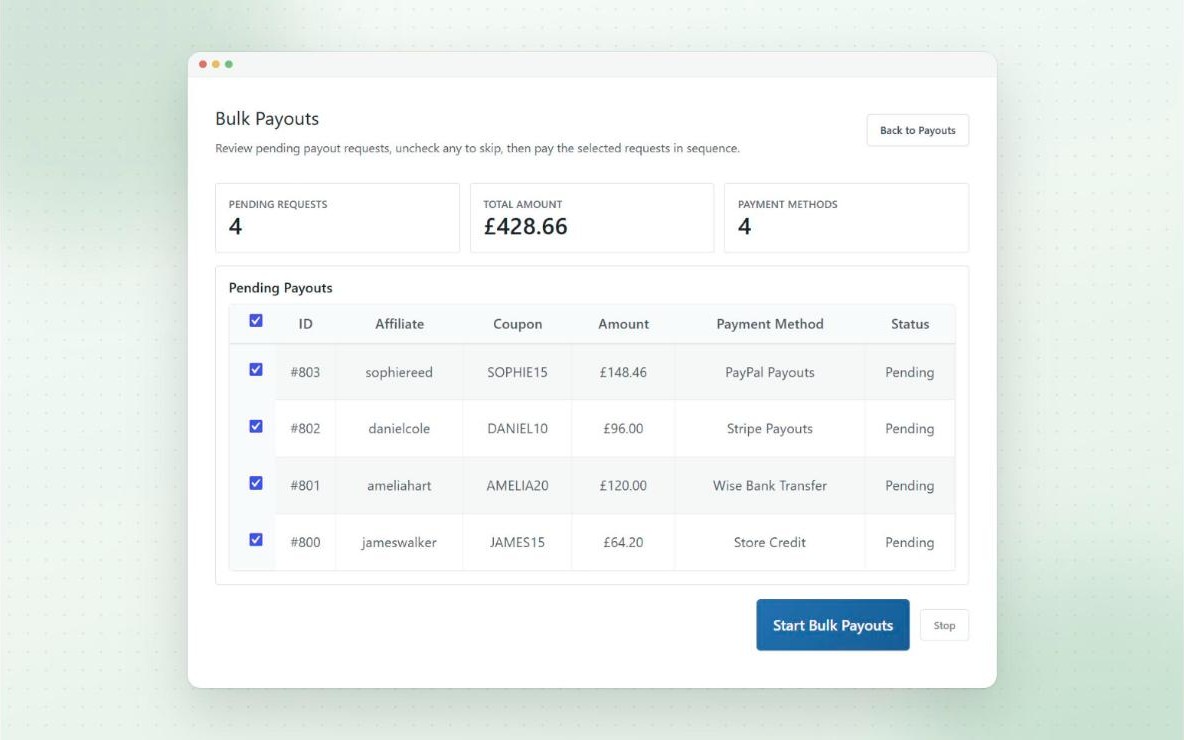
Bulk Pay
Pay every pending request in one go. Bulk Pay lists all your pending payout requests, with a total for each payout method, so you can check everything before you start.
Untick any you want to skip, then start. Each payment is processed in turn, with a progress bar and a live log as it goes.
- Works across every payout method
- Manual payouts are marked as paid
- Stop at any time
Pro
Paperwork sorted
Invoices and PDF statements
Let affiliates upload an invoice when they request a payout, as an optional or required step. You can download it from the request before you pay.
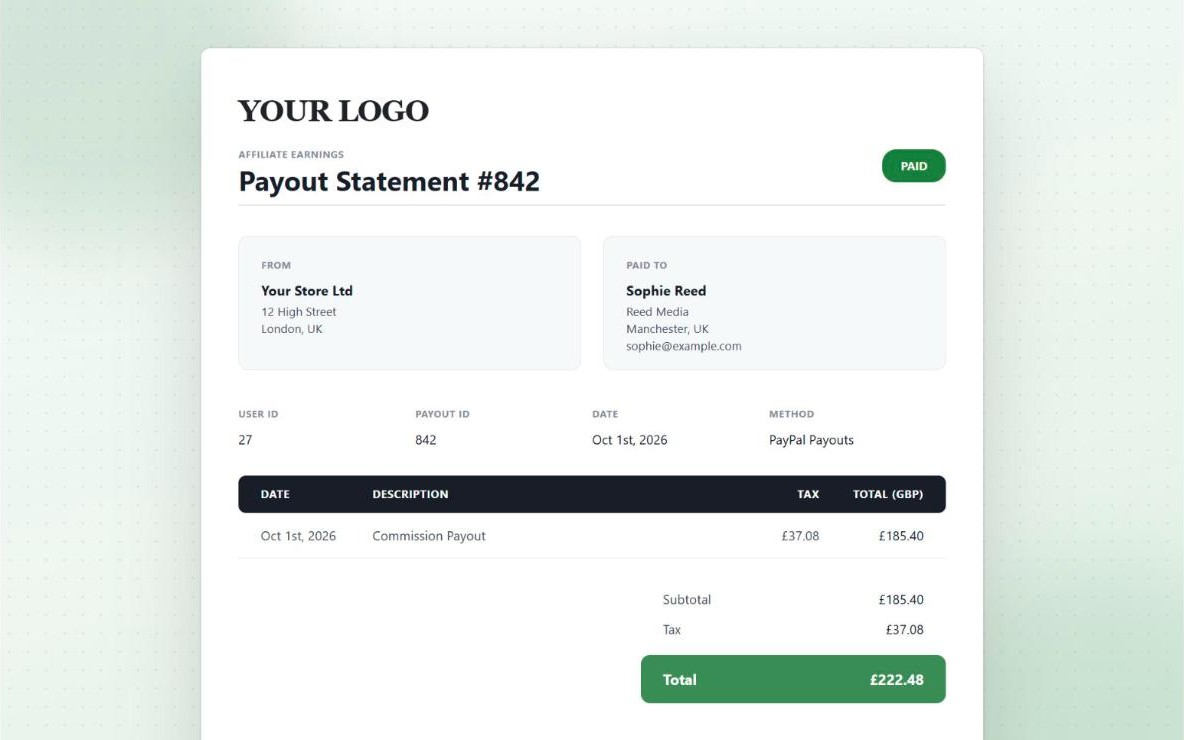
Or create a PDF statement for every payout automatically, with your logo and company details, for affiliates to download from their Payouts tab.
- Collect the affiliate’s billing details, plus your own custom fields
- Show tax, inclusive or exclusive
- Statements use your brand colour
Pro
Protect your margin
Delayed commission and refunds
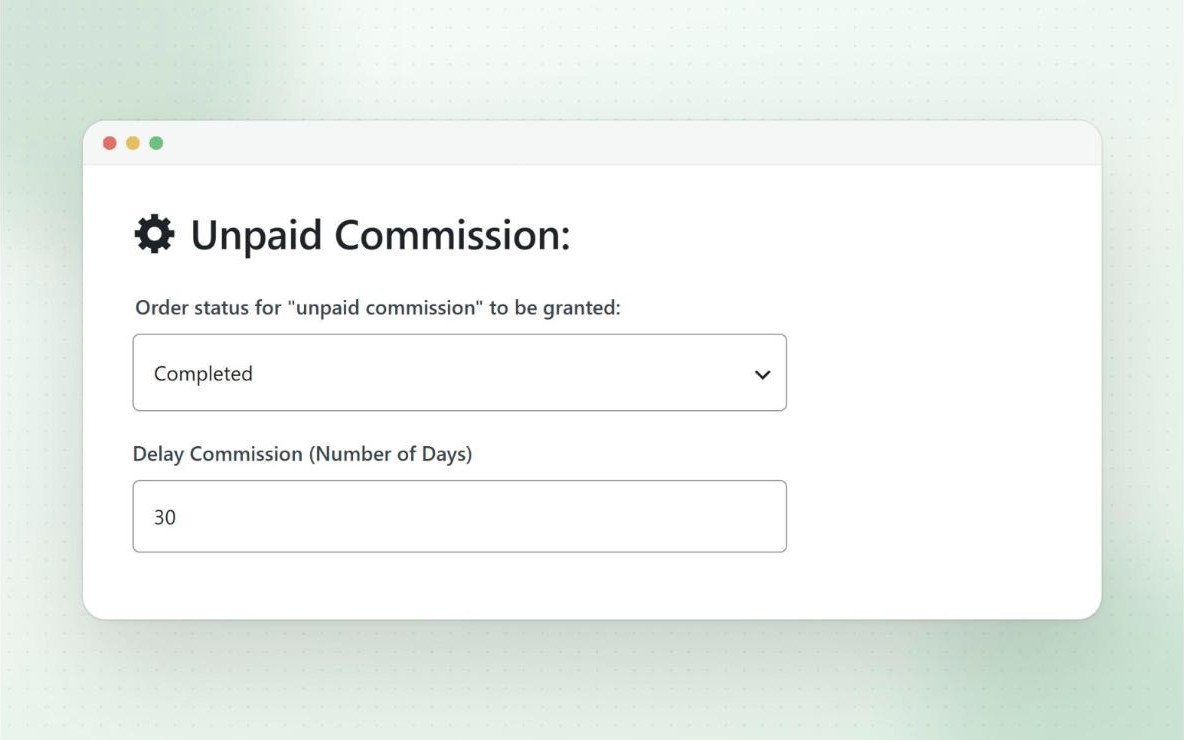
Delay commission by a set number of days to cover your refund window, so it only becomes payable once the order is safe.
If a referred order is fully or partially refunded before the commission is paid, it’s recalculated and taken off the affiliate’s unpaid commission automatically.
- Choose which order status grants commission
- Affiliates can see commission that’s on its way
- One-click deduct for amount-only refunds
And more
Also included
- Payout tracking Pro
Affiliates see their unpaid commission and every pending, paid and cancelled payout. - Payout emails
You’re emailed about new payout requests, and affiliates are emailed when they’re paid. - Export payouts Pro
Export payouts to CSV or PDF, filtered by status, method and date range. - Default payout method Pro
Choose which method new affiliates start with. - Methods by role or group Pro
Only offer certain payout methods to certain affiliates. - Encrypted bank details Pro
Optionally encrypt the bank details saved for Wise payouts.
Questions
Frequently asked questions
Can I pay affiliates automatically?
Yes. With automatic payouts, requests paid by PayPal, Stripe or store credit are sent as soon as they’re made, with a maximum amount and first-payout approval as safeguards. Automatic payouts guide
Do affiliates need a Wise account?
No. Affiliates just enter the bank details for their region. Payouts are sent in your store currency, and Wise converts them. Wise payouts guide
Can I set a minimum payout amount?
Yes. Set a payment threshold, and affiliates can’t request a payout until their unpaid commission reaches it. Payouts guide
What happens if an order is refunded?
The commission is recalculated and taken off the affiliate’s unpaid commission, if it hasn’t been paid yet. You can also delay commission to cover your refund window. Refunds guide
Can affiliates be paid in store credit?
Yes. Affiliates choose store credit as their payout method and spend it at checkout. You can add a bonus percentage for choosing it. Store credit guide
Can I pay affiliates with the free version?
The payouts system is part of Pro. On the free version, you can still pay affiliates manually. Paying affiliates on the free version
Start paying your affiliates the easy way
Try Coupon Affiliates Pro free for 7 days, or get started with the free version on WordPress.org.