
Version 8.4.0 – Suspend Affiliates, Improved Email Reports
Version 8.4.0 of Coupon Affiliates is now available!
There are two main things in this one.
The first is suspending affiliates. You can now pause an affiliate’s account rather than deleting it, which blocks their dashboard and stops their coupons working, without removing anything. That one is in the free version.
The second is the scheduled affiliate report, which has been rebuilt from scratch. It sends in batches now, it can be previewed before it goes out, and almost every part of it can be switched on or off. A few long-standing bugs in it have been fixed along the way, including weekly reports covering the wrong dates and quarterly reports arriving empty.
Suspend an affiliate instead of deleting them
Until now, if an affiliate was abusing their coupon, spamming, or had simply gone quiet and you wanted them stopped, the only real option was to delete them. That takes their statistics, commission history and payout records with it, and there is no way back from it.
There is now a “Suspend” button on the View Affiliate page, and a “Suspend User” option in the actions dropdown on the affiliates list. While an affiliate is suspended:
- They cannot access their affiliate dashboard, the affiliate portal, or the MLA dashboard.
- None of their coupons can be applied to a cart, auto-applied from a referral link, or used at checkout.
- Nothing is deleted. The user account, their coupons, statistics, commission and payout history all stay exactly as they were, and you can still view and edit all of it.
Lifting the suspension puts everything back. There is a “Remove Suspension” option in the same places, and the affiliate carries on as if nothing happened.
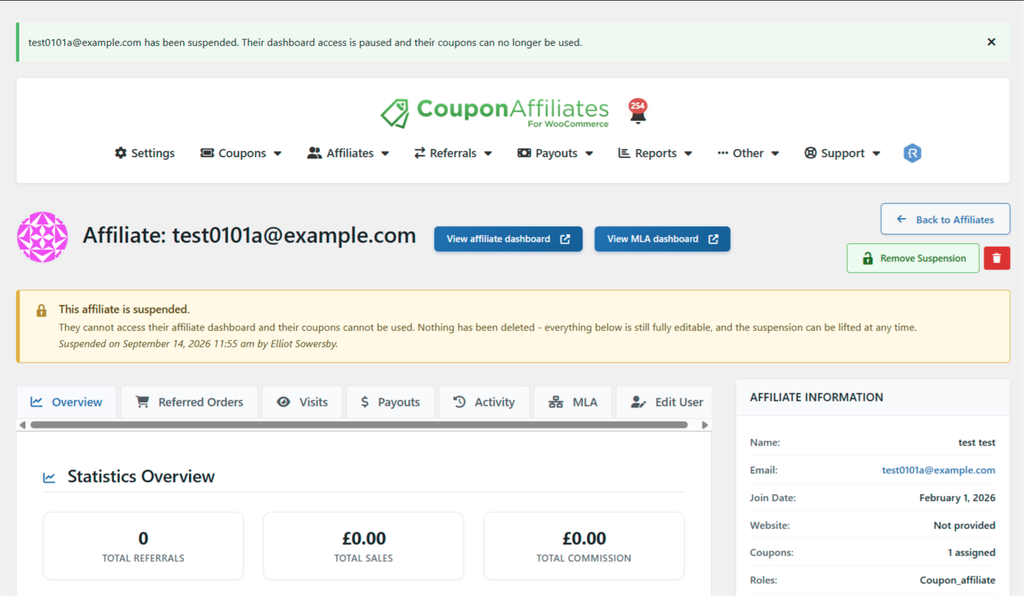
Suspended affiliates are easy to spot. They carry a “Suspended” badge on the affiliates list, and their View Affiliate page shows a banner with the date they were suspended and who suspended them. Their coupons get a padlock and a “Locked” label beside the coupon code, on both the Coupon Affiliates coupons list and the WooCommerce Coupons list, so you are not left wondering why a code has stopped working.
Suspending and un-suspending is recorded in the activity log, so there is a record of who did it and when.
What the affiliate sees
No email is sent. If a suspended affiliate visits their dashboard they get a short notice in place of it, telling them their account has been paused, that their dashboard and coupons are temporarily unavailable, that nothing has been deleted, and to get in touch if they think it is a mistake. A customer trying to use one of their coupons at checkout is told the coupon is not valid, with no mention of the affiliate.
The affiliate report has been rebuilt
The scheduled report that goes out to affiliates was three blocks of statistics in an email, with an optional PDF copy. It is now a proper report.
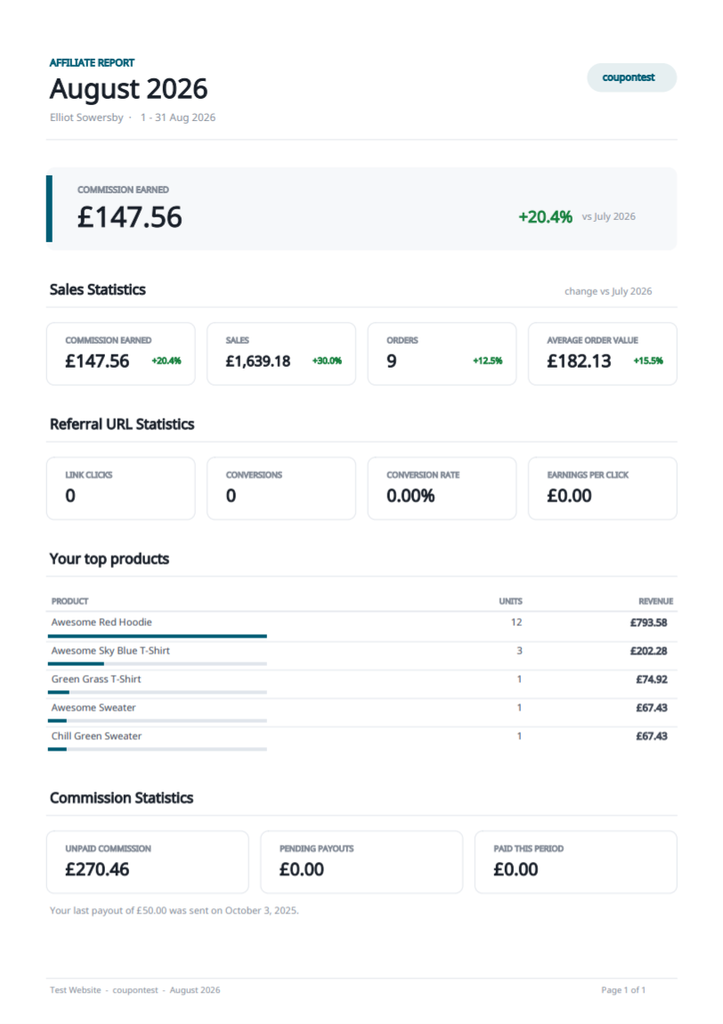
Alongside the figures it already had, it can show a headline earnings banner, a percentage change against the previous period on every statistic, best selling products, where the clicks came from (referring sites, landing pages and campaigns), new versus returning customers, payout activity, their leaderboard position, and their sub-affiliate network totals if you use multi-level affiliates.
Six extra statistics are available as cards: average order value, earnings per click, items sold, commission per order, paid this period and paid to date.
Three templates, and a switch for everything
Not everyone wants the full thing, so there are three templates to start from:
- Modern. The full report, with products and traffic sources.
- Minimal. Headline figures and a link to the dashboard, nothing else.
- Classic. The original three blocks of statistics, if you liked the old one.
From there, every section and every individual statistic has its own switch, so you can build the report exactly as you want it. Anything you switch off is no longer calculated at all, so a shorter report is also a quicker one to generate.
There are new settings for the accent colour, how many statistic cards sit on a row, the paper size of the PDF, the subject line, the wording of every section heading, the dashboard button text, and a plain text version of the email for clients that prefer one. The settings tab itself has been reorganised into titled panels, which it badly needed given how many options there now are.
Preview a real report before you send one
There is a “Preview” button on the settings screen. Give it a coupon code and it renders the real report for that affiliate, both the email and the PDF, without sending anything to anyone. You can also send an example report to your own email address to check how it lands in an inbox, and the dialog tells you whether the PDF was attached, and why not if it was not.
Reports now send in batches
Previously every affiliate was processed in a single cron request. On a programme with a few hundred affiliates that could run past the PHP time limit, and whoever was left in the queue simply never got a report.
Reports are now sent in batches in the background, with a status panel on the settings screen showing the next run, how many were sent, how many failed, and why. You can set how many go out per batch. There are also options to skip affiliates with no activity in the period, to delete generated PDFs after a set number of months, and to block direct web access to the saved report files.
A report never shows more than the dashboard does
This one is easy to get wrong by hand. If you have hidden commission, referral URLs, products in the orders list, customer names, campaigns, payouts or the multi-level network from the affiliate dashboard, those sections are now left out of the report automatically. The matching toggles appear greyed out in the settings with the reason, rather than quietly sending an affiliate figures you deliberately hid from them.
The email and the PDF are also built from one set of figures and one set of layout components, shared with payout statements, so the two documents agree with each other and look like they came from the same place.
Report fixes
Some of these had been wrong for a while, and are worth reading if you had reports switched on:
- Weekly reports covered the wrong dates. The date range was built using “first day of last week”, which PHP does not understand as a week, so weekly reports were covering a range roughly two months wide.
- Quarterly reports were always empty. The range started on the first day of the upcoming quarter, which has no orders in it yet.
- Everything said “last month”. The subject line, the PDF title and the saved file path all said last month, whatever the schedule was actually set to.
- The PDF sometimes went missing. The attachment was passed to the mailer as a URL rather than a file path, so some SMTP plugins sent the email without it.
- Report styling leaked into your other emails. It was being added to every WooCommerce email the store sent, and once a report email logo was set it replaced the store logo in customer order emails too. Styling is now applied only while a report is being sent.
- Outlook stacked the figures into one long column. The statistics grid used floated columns, which Outlook ignores. It is all tables now, which render the same everywhere and stay readable at phone width.
- Names and currency symbols came out wrong in the PDF. It used a core font that cannot render anything outside Western European characters. It now uses the same embedded Unicode font as payout statements.
- Bold text was not bold. That Unicode font ships without a bold face, so headings and figures in PDF reports and statements rendered at regular weight. Bold is now synthesised when no bold face is available.
Report PDFs are now saved with an unguessable filename, and a shop manager can view or download any affiliate’s current report from the settings screen. On the PDF itself, stat cards are balanced across rows so a group never ends with a single card on its own, and tables can continue onto the next page rather than leaving the previous one half empty.
FluentCRM support
FluentCRM has been added to the mailing list integrations.
Pick a list and a tag to apply when an affiliate joins your program, with an option to require double opt-in.
Pick the day of month scheduled payout requests run
A monthly payout schedule always ran on the 1st.
You can now choose any date from the 1st to the 31st, or “Last day of the month”.
If the date you pick does not exist in a given month, such as the 31st in February, the last day of that month is used instead.
Full Changelog
- New: Suspend Affiliates > You can now suspend an affiliate instead of deleting them, from a “Suspend” button on the View Affiliate page or from the actions dropdown on the affiliates list. A suspended affiliate cannot access their affiliate dashboard, portal or MLA dashboard, and none of their coupons can be applied to a cart, auto-applied from a referral link, or used at checkout. Nothing is deleted – the user, their coupons, statistics, commission and payout history are all kept and stay fully viewable and editable by admins, and the suspension can be lifted at any time.
- New: Suspend Affiliates > Suspended affiliates are flagged with a “Suspended” badge on the affiliates list and a banner on their View Affiliate page showing when they were suspended and by whom. Their coupons show a “Locked” padlock beside the coupon code on both the Coupon Affiliates coupons list and the WooCommerce Coupons list.
- New: Suspend Affiliates > Suspending and un-suspending an affiliate is recorded in the activity log.
- New: (PRO) Affiliate Reports > The scheduled affiliate report has been rebuilt. Alongside the existing figures it can now show a headline earnings banner, a percentage change against the previous period on every statistic, best selling products, where the clicks came from (referring sites, landing pages and campaigns), new versus returning customers, payout activity, leaderboard position, sub-affiliate network totals.
- New: (PRO) Affiliate Reports > Three templates – “Modern” (the full report), “Minimal” (headline figures and a dashboard link) and “Classic” (the original three blocks of statistics) – plus individual switches for every section and every statistic, so each report can be built exactly as you want it. Anything switched off is no longer calculated, so a shorter report is also a faster one.
- New: (PRO) Affiliate Reports > A “Preview” button on the settings screen renders the real report for any coupon, email and PDF, without sending anything.
- New: (PRO) Affiliate Reports > Extra statistics available as cards: average order value, earnings per click, items sold, commission per order, paid this period and paid to date.
- New: (PRO) Affiliate Reports > New settings for the accent colour, cards per row, paper size, subject line, every section heading, the dashboard button text, and a plain text version of the email for clients that prefer one.
- New: (PRO) Affiliate Reports > Reports are now sent in batches in the background, with a schedule status panel showing the next run, how many were sent, and why any failed. Previously every affiliate was processed in one cron request, which could run past the PHP time limit on a large programme and leave the remaining affiliates without a report.
- New: (PRO) Affiliate Reports > Options to skip affiliates with no activity in the period, to delete generated PDFs after a number of months, and to block direct web access to the saved report files.
- New: (PRO) Mailing List Integrations > FluentCRM is now supported. Choose a list and a tag to apply when an affiliate joins your program, with an option to require double opt-in.
- New: (PRO) Scheduled Payout Requests > You can now choose which day of the month a monthly schedule runs on, rather than always the 1st. Pick any date from the 1st to the 31st, or “Last day of the month”. If the chosen date does not exist in a month (such as the 31st in February), the last day of that month is used instead.
- Tweak: (PRO) Affiliate Reports > The email and the PDF are now built from one set of figures and one set of layout components shared with payout statements, so the two documents agree with each other and look related.
- Tweak: (PRO) Affiliate Reports > Report PDFs are saved with an unguessable filename, and a shop manager can view or download any affiliate’s current report from the settings screen.
- Tweak: (PRO) Affiliate Reports > A report never shows an affiliate more than their dashboard does. Sections tied to a dashboard feature you have hidden (commission, referral URLs, products in the orders list, customer names, campaigns, payouts, the multi-level network) are left out of the report automatically.
- Tweak: (PRO) Affiliate Reports > The Reports settings tab has been reorganised into titled panels with related options side by side, and the preview / test dialog now reports whether the PDF was attached to the test email (and why not, if it was not). Section toggles whose dashboard feature is switched off are shown greyed out with the reason.
- Tweak: (PRO) Affiliate Reports > Stat cards on the PDF are balanced across rows so a group never ends with a single card, and tables may continue onto the next page instead of leaving the previous page half empty.
- Fix: (PRO) Affiliate Reports > Weekly reports covered the wrong dates. The date range was built with “first day of last week”, which PHP does not understand as a week, so weekly reports were reporting on a range roughly two months wide.
- Fix: (PRO) Affiliate Reports > Quarterly reports were always empty. The range started at the first day of the UPCOMING quarter, which has no orders in it yet.
- Fix: (PRO) Affiliate Reports > The subject line, PDF title and saved file path always said “last month”, whatever the schedule was set to.
- Fix: (PRO) Affiliate Reports > The PDF attachment was passed to the mailer as a URL rather than a file path, so some SMTP plugins sent the email without it.
- Fix: (PRO) Affiliate Reports > Report styling was added to every WooCommerce email the store sent, and once a report email logo was set it replaced the store logo in customer order emails too. Report styling is now applied only while a report is being sent.
- Fix: (PRO) Affiliate Reports > The statistics grid was laid out with floated columns, which Outlook ignores, so the figures stacked into one long column for many recipients. Everything is now built from tables that render the same in every mail client, and stays readable at phone width.
- Fix: (PRO) Affiliate Reports > PDFs used a core font that cannot render anything outside Western European characters, so affiliate names and many currency symbols came out wrong. They now use the same embedded Unicode font as payout statements.
- Fix: (PRO) PDF documents > Bold text in PDF reports and statements was rendering at regular weight, because the embedded Unicode font ships without a bold face. Bold is now synthesised when no bold face is available, so headings, figures and labels have proper weight contrast.
- Fix: A PHP warning (“Attempt to read property “ID” on false”) was logged on every cart and checkout request when “Allow affiliate user to apply their own coupon code at cart / checkout” was switched off and the billing email address did not belong to a registered user account. The coupon check now looks the user up safely and is skipped when there is no matching account.

Elliot Sowersby is a WordPress developer from Yorkshire, United Kingdom. He is the founder and lead developer of Coupon Affiliates and RelyWP.

 English
  Spanish
  German
  French
Leave a Reply