
Affiliate Dashboard for WooCommerce
Give every affiliate a dashboard they’ll actually use.
Affiliates log in to your WooCommerce affiliate dashboard to see their sales, commission, referral links, creatives and payouts, all in real time. Show it inside your theme, or as a full-screen portal with your own branding.
Free
For your affiliates
A WooCommerce affiliate dashboard in your theme
Add the dashboard to any page with the [couponaffiliates] shortcode, or let the setup wizard create the page for you. Affiliates log in with their WordPress account, and only see the coupons assigned to them.
Affiliates with more than one coupon get a list of their coupons first, and can switch between them from the dashboard header.
- Statistics, Referred Orders, Referral URL and Settings tabs
- A login form shows when affiliates aren’t logged in
- Re-order the tabs and choose what each one shows
- Rename “Affiliate” to “Partner” or anything you like
Free
Full-screen & on-brand
The Affiliate Portal
Prefer something more modern? Switch on the Affiliate Portal for a standalone, full-screen dashboard that doesn’t depend on your theme.
Add your logo, footer text and brand colours, and choose your own page title and URL. It has all the same features as the normal dashboard.
- Your logo, colours and font
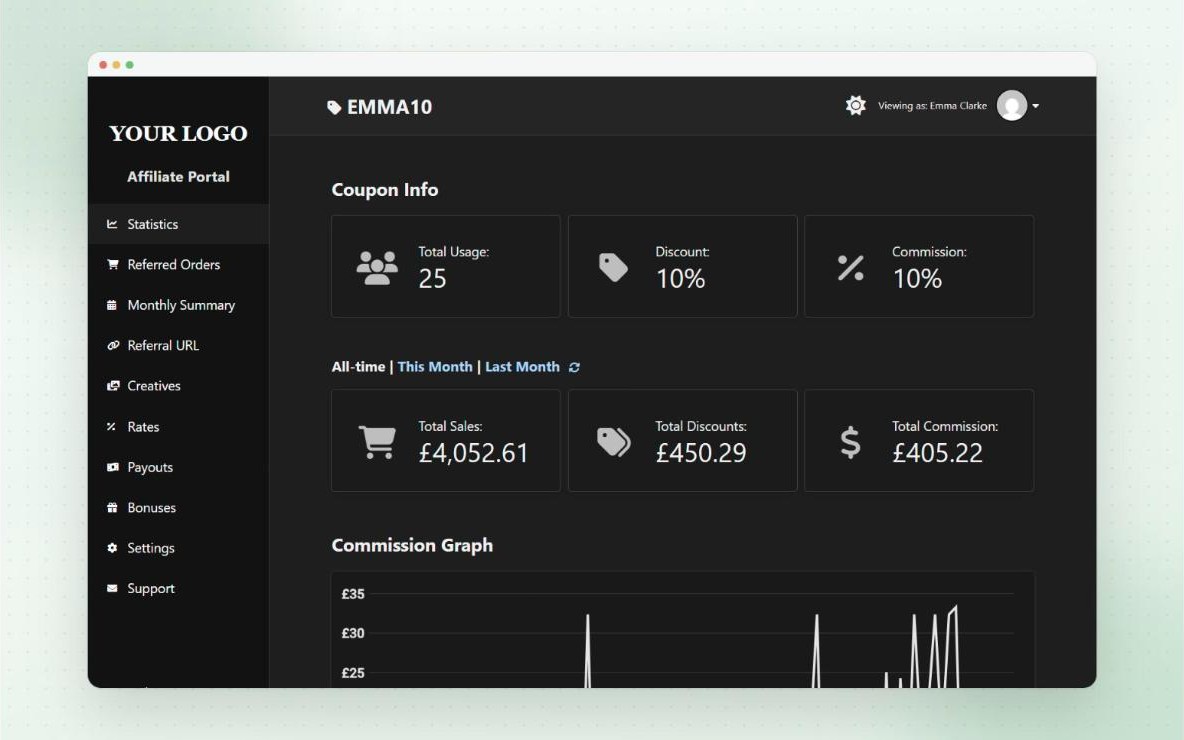
- Optional dark mode
- Login and registration forms built in


It’s exactly what I was looking for in an affiliate plugin, and all my affiliates are loving the dashboard access.
@danielamedeira on WordPress.org
Free
Real-time stats
Statistics and commission graphs
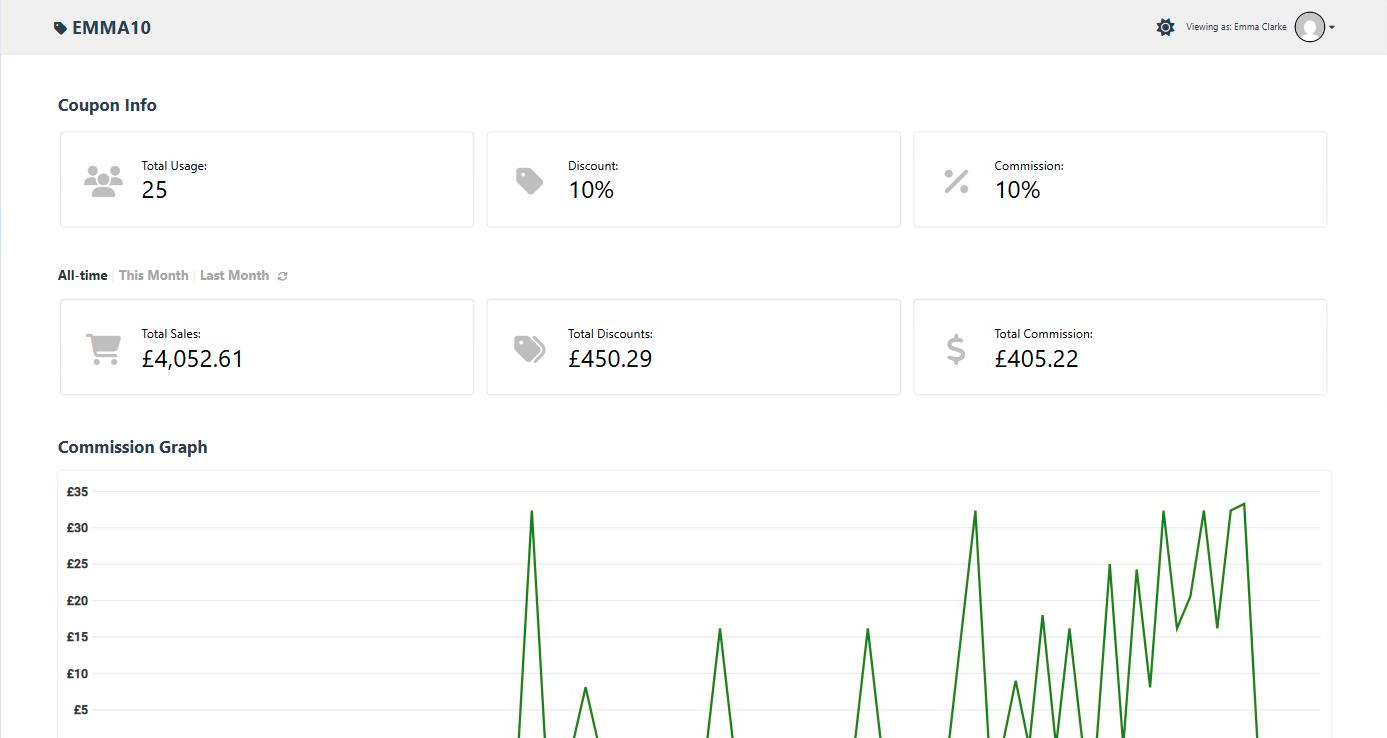
The Statistics tab shows affiliates their total coupon usage, sales, discounts and commission, updated in real time as orders come in.
With Pro, a commission graph shows earnings day by day for the last 90, 30 or 7 days, along with their unpaid, pending and paid commission.
- Choose which sections show, and in what order
- Commission line graphs (Pro)
- Payout summary on the Statistics tab (Pro)
Free
Full transparency
Referred orders and monthly summaries
Affiliates can see every order that used their coupon, with the date, total, discount, products and the commission they earned. They can filter by date range to see totals for any period.
With Pro, a Monthly Summary tab shows the past 12 months at a glance, and both tables can be exported to Excel.
- Choose which order columns to show
- Optionally show the customer’s last name or initial
- Monthly Summary and Excel export (Pro)
Pro
Ready-made marketing
Creatives and personalised banners
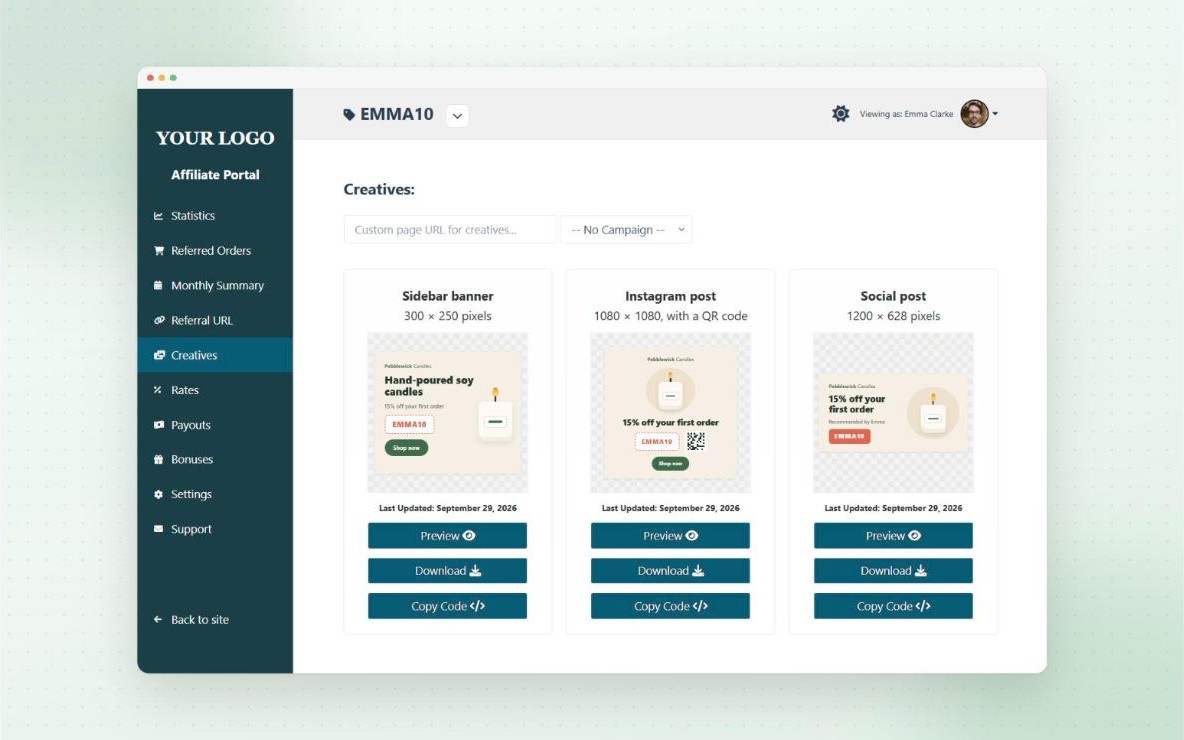
Give affiliates banners, images, videos, PDFs and brand colours to use in their marketing, each with preview, download and copy-code buttons.
Dynamic creatives go further. Design a banner once in the visual designer, and every affiliate gets their own version with their coupon code, discount and a QR code of their referral link.
- Group creatives into categories
- Schedule creatives for set dates
- 16 starter layouts and common banner sizes
Pro
What they’ll earn
Product rates table
A Rates tab lists every product with its price, the affiliate’s commission rate, and how much they’d earn per sale, with a button to copy a referral link to each one.
It helps affiliates pick the products worth promoting, and answers “how much will I earn?” before they ask.
- Search, pagination and an optional category filter
- Choose which columns to show
- Also available as a shortcode
Free
Make it yours
Customise the dashboard
Choose the tab style, colours, icons, spacing and font size, add custom CSS, and let affiliates switch to dark mode. On mobile, the menu can show as tabs or a dropdown.
With Pro, add your own custom tabs with any content from the editor, including shortcodes from other plugins, or link a tab to another page.
- Design settings with no code needed
- Custom tabs (Pro)
- Fully translatable
Free
On every page
Floating affiliate widget
Add a floating button to your store that opens a compact version of the dashboard. Affiliates can grab a referral link for the page they’re on, and check their stats and recent orders without leaving your shop.
Visitors who aren’t affiliates yet see your registration form, with the key benefits of joining your program.
- 6 positions, 3 sizes and your own colours
- Show or hide it on specific pages, devices and users
- Payouts, creatives, short links and QR codes in the widget (Pro)
And more
Also included
- Account settings tab Free
Affiliates manage their profile, payout details and password. - Email notifications Free
Affiliates are emailed when an order uses their coupon. - Referral URL generator Free
Affiliates create links to any page, with click tracking. - Payouts tab Pro
Affiliates request payouts and download invoices or statements. - Bonuses tab Pro
Affiliates see their performance bonuses and progress. - Mobile friendly Free
The dashboard and portal work on any screen size.
Questions
Frequently asked questions
Which shortcode shows the affiliate dashboard?
Use [couponaffiliates]. Affiliates log in and see the coupons assigned to them. Shortcodes guide
Can one affiliate have several coupons?
Yes. They see a list of their coupons first, then can switch between them from the dashboard header. Multiple coupons guide
Is the Affiliate Portal a Pro feature?
No. The portal is in both the free and Pro versions. Affiliate Portal guide
Can affiliates export their orders?
With Pro, Export to Excel buttons appear on the Referred Orders and Monthly Summary tables. Export guide
Can I add my own content to the dashboard?
Yes. With Pro custom tabs, you can add content from the editor, use shortcodes, or link a tab to another page. Custom tabs guide
Is the floating widget free?
Yes. Some parts inside the widget, like payouts, creatives, short links and QR codes, need Pro. Floating widget guide
Ready to launch your affiliate program?
Try Coupon Affiliates Pro free for 7 days, or get started with the free version on WordPress.org.