
How to Pay Affiliates in Store Credit (WooCommerce Guide)
To pay affiliates in store credit, you add their commission to a wallet on their customer account instead of sending them money. They spend it at your checkout like a gift card.
In WooCommerce, that takes an affiliate plugin that supports store credit payouts (Coupon Affiliates PRO does) and somewhere to hold and manage the credit balance, such as the free Simple Store Credit plugin.
Setting it up only takes a few minutes. The harder part is deciding who should get credit, how much extra to offer for taking it, and what happens to balances nobody spends. That’s what most of this guide covers.
Quick disclosure: we make both Coupon Affiliates and Simple Store Credit, so the settings and examples below come from our own plugins. The advice on who to offer credit to, and what it costs, applies whatever you use.
Jump to a section:
- Which affiliates should you pay in store credit?
- What store credit payouts cost you
- Offering extra commission for choosing credit
- Wallet balance or voucher codes?
- Expiry and unspent credit
- How to set up store credit payouts
- Moving balances from another wallet
- Frequently asked questions
Which Affiliates Should You Pay in Store Credit?
Store credit only works for people who want to buy from you. For an affiliate who orders every month anyway, a $40 balance is as good as cash, and possibly better if you add a bonus on top. For a blogger who has never placed an order, it’s close to worthless, and offering it as the only option will put them off joining.
It tends to suit:
- Customers who became affiliates. Coupon-based programs pick up a lot of these, because a regular buyer with a personal discount code is an easy recruit. Our guide to recruiting affiliates covers how to find them.
- Stores people buy from again and again. Supplements, coffee, pet food, cosmetics, craft supplies. If most customers only buy from you once every few years, a credit balance just sits there.
- Small commission amounts. When an affiliate earns $8 a month, a cash payout is barely worth the admin. Dropping it into their wallet takes a click.
It’s a poor fit for content sites, coupon and deal sites, and influencers who treat affiliate income as income. Most of the types of affiliates you’d recruit from outside your customer list fall into that group.
That’s why we’d almost always offer credit alongside a cash method, and let each affiliate pick. In Coupon Affiliates, affiliates choose their payout method in the Settings tab of their dashboard, so one program can pay some people through PayPal and others in credit.
What Store Credit Payouts Cost You
A cash payout costs you exactly what you send, plus any transfer fees. Store credit costs you whatever it takes to fulfil the order it’s spent on. The affiliate spends credit at your retail prices, but you pay for the goods at cost.
Here’s a worked example with made-up but typical numbers. Say a referred order is worth $100, you pay 10% commission, and your products cost you 40% of their retail price.
| Cash payout | Store credit payout | |
|---|---|---|
| Commission on a $100 order | $10.00 | $10.00 |
| Bonus for choosing credit (25%) | None | $2.50 |
| What the affiliate receives | $10.00 cash | $12.50 credit |
| Cost of the goods when it’s spent | Not applicable | $5.00 |
| Transfer fees | Whatever PayPal, Stripe or your bank charges | None |
On those numbers, the affiliate gets 25% more value and you spend half as much. The table leaves some things out, though. Shipping and packing costs still apply to the order the credit is spent on. And if the affiliate would have bought those products at full price anyway, the real cost is the $12.50 you didn’t collect, not the $5.00.
So the savings are real, but they’re largest when credit gets people to order more often or add extra items. Keep an eye on whether it does.
Offering Extra Commission for Choosing Credit
If credit and cash are worth the same, most affiliates will take cash. A bonus gives them a reason to pick credit, and it’s what makes the example above work.
Coupon Affiliates has a Bonus Commission setting in the Store Credit Payouts section. You enter a percentage, and it’s added on top of the payout when you pay it as credit. Set it to 25% and a $40 payout arrives as $50 in the affiliate’s wallet. It works with the built-in wallet and with Simple Store Credit.
To pick a number, work backwards from your margin. The bonus is only safe while the cost of the credit (commission plus bonus, times your cost of goods) stays below the cash commission you’d otherwise pay. At 40% cost of goods, even a 50% bonus costs you less than cash. At 80%, a 25% bonus costs the same as cash before you count shipping, so there’s no saving left. The commission and break-even calculators on our free tools page are handy for testing a few rates, and our guide to setting commission rates covers the base rate itself.
Whatever you choose, put it in your affiliate terms, along with whether credit can be swapped for cash later. (We’d say no. Otherwise the bonus becomes free money.)
Wallet Balance or Voucher Codes?
With Simple Store Credit connected, Coupon Affiliates gives you a Payout Delivery Method setting with two choices.
Account Balance (Wallet) is the default. Each payout is added to one running balance on the affiliate’s account, which they apply at the cart or checkout while logged in. It’s the simpler option for affiliates, and it can be reversed: if you reverse a payout, the amount comes back out of the balance.
Credit Voucher (Coupon Code) issues a separate code for each payout, stored as a WooCommerce coupon. Vouchers can be spent in part, with the rest kept for another order, and you can give them an expiry date. The drawback is that a voucher can’t be taken back automatically once it’s issued. If a payout needs reversing, you have to cancel the voucher yourself.
We’d go with the wallet unless you have a reason not to. Vouchers make more sense if you want every payout to have its own expiry date, or if affiliates like to pass credit on to someone else. If you do use vouchers, the Include voucher credit in displayed balance? option shows affiliates one combined total rather than their wallet balance alone.
One thing applies to both: credit belongs to the affiliate’s WordPress user account, not to their coupon. If you ever move a coupon to a different person, their credit stays with the old account.
Expiry and Unspent Credit
Credit you’ve issued but nobody has spent is still something you owe. A few hundred dollars across a small program won’t matter much. Thousands, spread across affiliates who’ve drifted away, will be harder to ignore.
Simple Store Credit’s Reports screen helps you keep track. It shows how much credit you’ve issued against how much has been spent, broken down by where the credit came from.
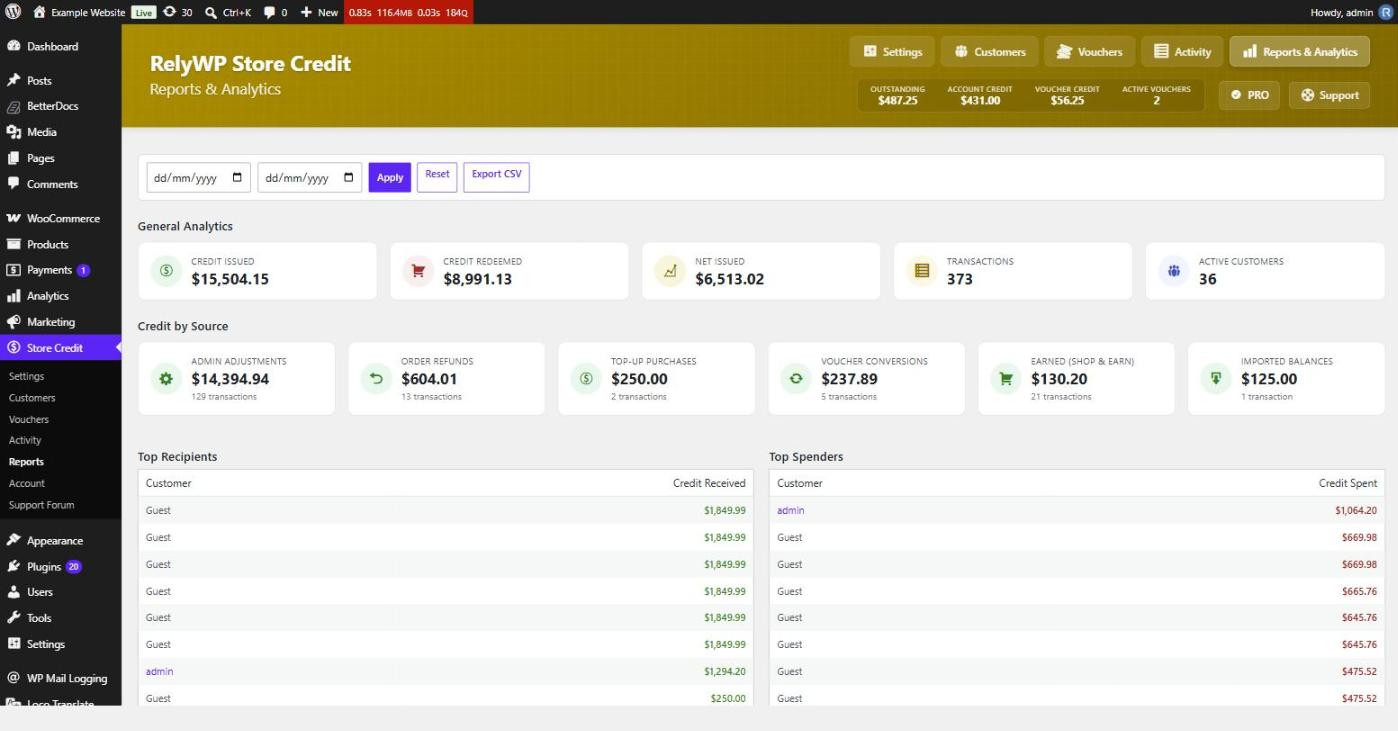
You have two ways to limit what’s left outstanding.
- Voucher expiry. The Voucher Expiry (Days) setting in Coupon Affiliates applies when you pay out as vouchers. Leave it at 0 to fall back on the expiry set in Simple Store Credit, or on no expiry at all.
- Balance expiry. Simple Store Credit PRO can expire unused credit a set number of days after it was earned, with reminder emails before it lapses. Each amount gets its own date, and checkout spends whatever is closest to expiring first, so nobody loses credit they could have used.
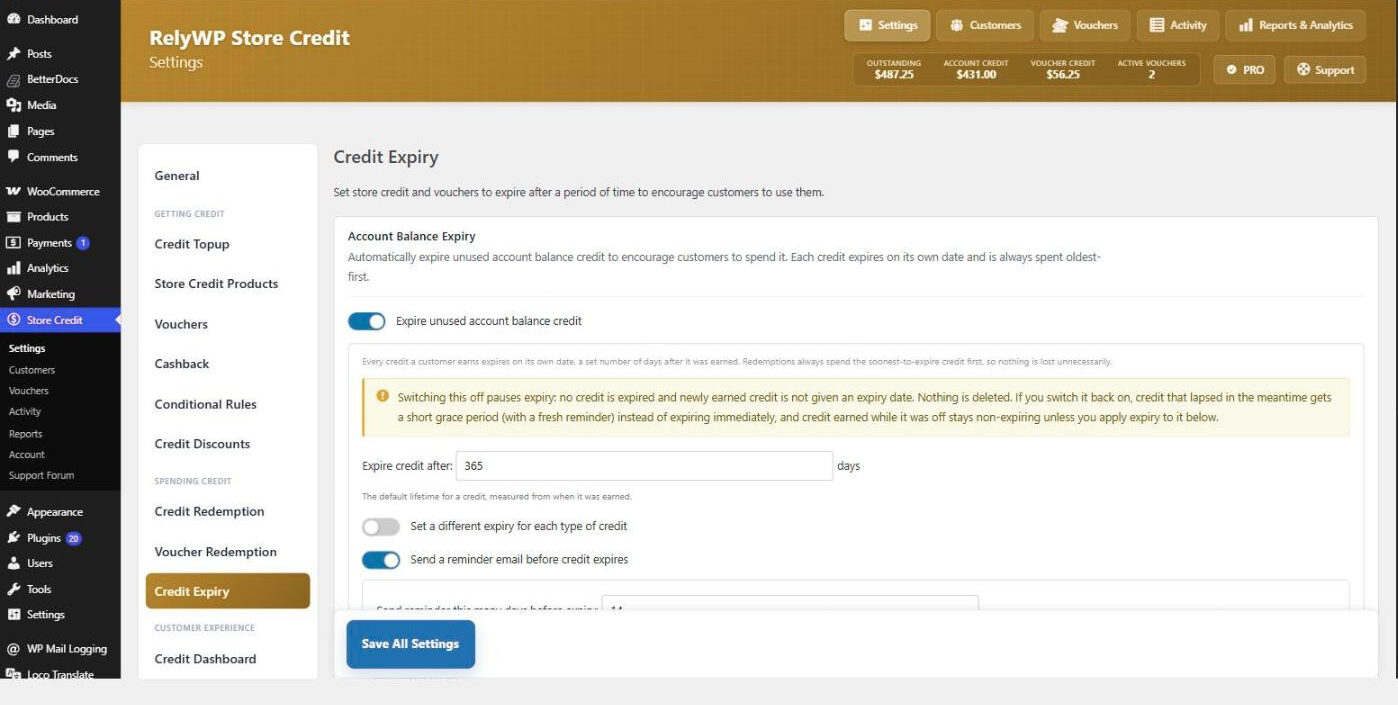
Rules on expiring stored value vary by country and state, so check what applies to you before switching expiry on, and tell affiliates about it upfront. It’s also worth asking your accountant how to record commission paid as credit, since it won’t look like a normal payout in your books.
You can also cap how much credit goes on a single order. Simple Store Credit has minimum and maximum redemption limits, which suit stores that don’t want an order paid entirely in credit.
How to Set Up Store Credit Payouts
Store credit payouts are part of the payouts system in Coupon Affiliates PRO. Simple Store Credit’s free version from WordPress.org is enough for the integration.
- In Coupon Affiliates, turn on Store Credit Payouts in the Payouts settings tab, and enable the module under PRO Modules.
- Install Simple Store Credit from WordPress.org and activate it. Its defaults work straight away.
- Back in the Store Credit Payouts section, choose Simple Store Credit in the Wallet System dropdown. A “Connected” badge confirms it’s working.
- Pick the payout delivery method, set a Bonus Commission if you want one, and edit the Custom Affiliate Commission Text. That text becomes the note on each wallet transaction, so affiliates can see what the credit was for.
- Place a small test order with store credit applied before telling affiliates about it.
After that, a credit payout works like any other. The affiliate requests it (or a schedule does), and you click Pay as Credit on the Payouts page, or clear a batch with Bulk Pay. Store credit also works with automatic payouts, which makes sense here because there’s no money leaving your account. Our full guide to paying affiliates in WooCommerce covers requests, schedules and the other methods, and the integration docs list every setting.
If you’d rather not add another plugin, Coupon Affiliates also has a basic built-in wallet, and supports TeraWallet and YITH Account Funds through integration addons. Simple Store Credit is the one we recommend, mainly because of what it gives the affiliate.
What affiliates see
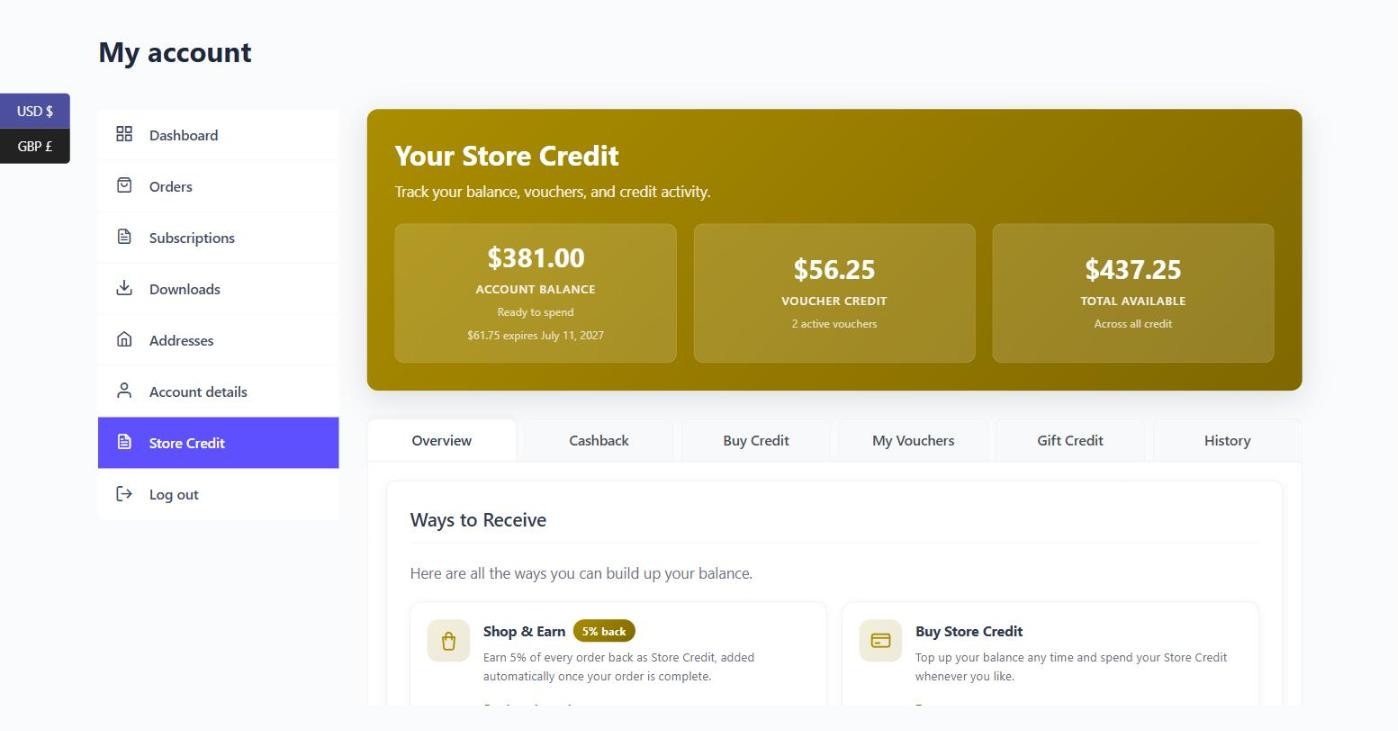
With the built-in wallet, affiliates see their balance in the affiliate dashboard and a notice at the cart offering to apply it. Simple Store Credit adds a Store Credit page to their My Account area with their balance, any vouchers, and a history of every payout and purchase.
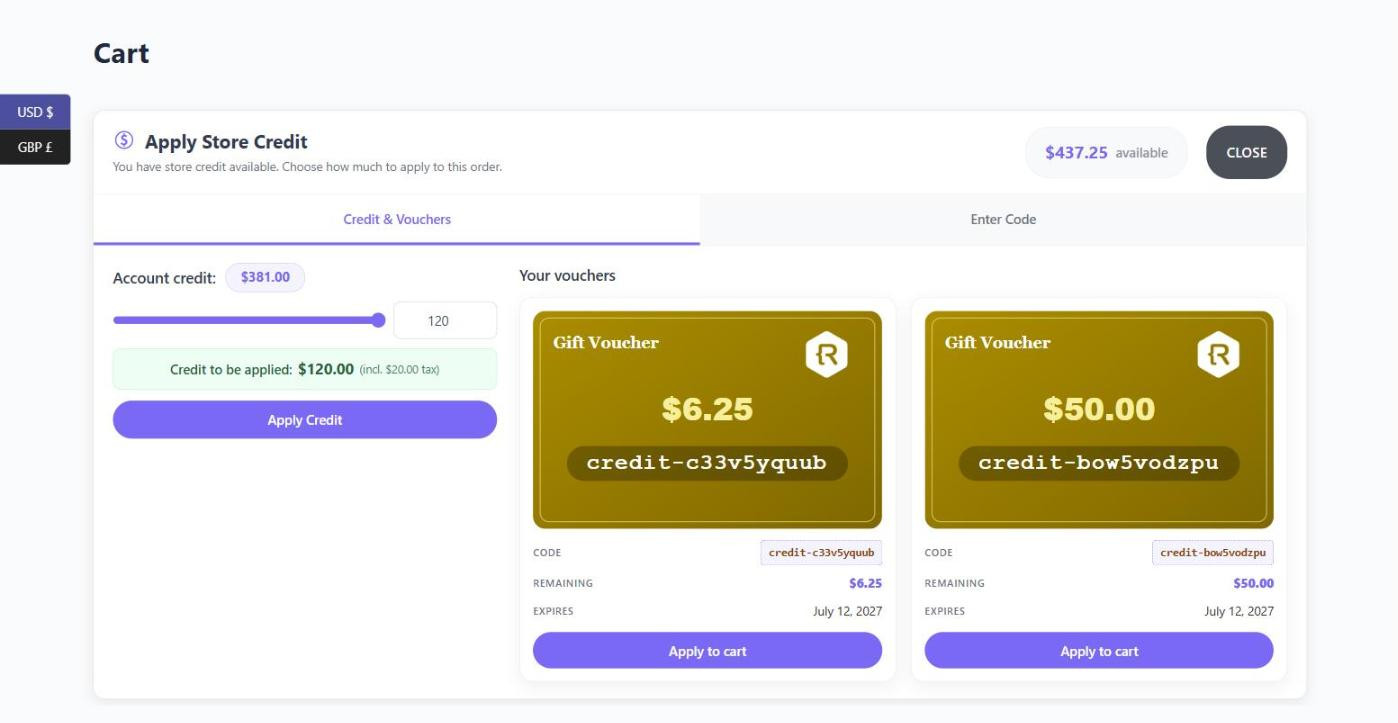
To spend it, they use the redemption tool on the cart and checkout (block or classic). They can apply all of their balance or slide it down to a smaller amount, and pick from their vouchers. Using a balance and a voucher on the same order is a setting you can switch on.
Moving Balances From Another Wallet
If you’ve been paying credit through the Coupon Affiliates built-in wallet, a panel at the bottom of the integration settings shows how many users still hold a balance and what it adds up to. From there, the migration tool copies those balances into Simple Store Credit. Check a few affiliates’ balances afterwards, then use Clear Built-in Balances so the same credit can’t be spent twice. Each cleared balance is backed up first.
Coming from TeraWallet or another wallet plugin works much the same way. Simple Store Credit’s migration tool imports balances and transaction history, previews what it found before you start, and is safe to run again. Keep the old plugin active until you’ve checked the results, then deactivate it straight away.
Frequently Asked Questions
Can affiliates choose between cash and store credit?
Yes. Enable store credit alongside PayPal, Stripe, Wise or bank transfer, and each affiliate picks their method in their dashboard settings. You can also limit payout methods to certain user roles.
Do I need Simple Store Credit PRO?
No. The integration works with the free version. PRO adds things like balance expiry, cashback for customers and gifting, none of which you need for paying affiliates.
Can I pay affiliates in store credit with the free version of Coupon Affiliates?
Not automatically, because payouts are a PRO feature. On the free version you could add credit to each affiliate’s account by hand in Simple Store Credit, using the commission figures from your reports. That’s fine for a handful of affiliates.
What if a payout was a mistake?
Reverse it from the Payouts page. With wallet delivery, the amount is taken back out of the balance. With vouchers, cancel the voucher yourself in Simple Store Credit.
Is It Worth Offering?
If a decent share of your affiliates also buy from you, yes. Offer it next to cash, add a bonus your margins can cover, and use the wallet rather than vouchers unless you need per-payout expiry. If your affiliates are mostly bloggers and deal sites, it won’t do much for you, and cash is fine.
We build both plugins, so weigh our recommendation with that in mind. Simple Store Credit is free to install, and Coupon Affiliates PRO has a 7-day free trial, which is enough time to pay yourself a test payout in credit and spend it.

Elliot Sowersby is a WordPress developer from Yorkshire, United Kingdom. He is the founder and lead developer of Coupon Affiliates and RelyWP.

Leave a Reply