
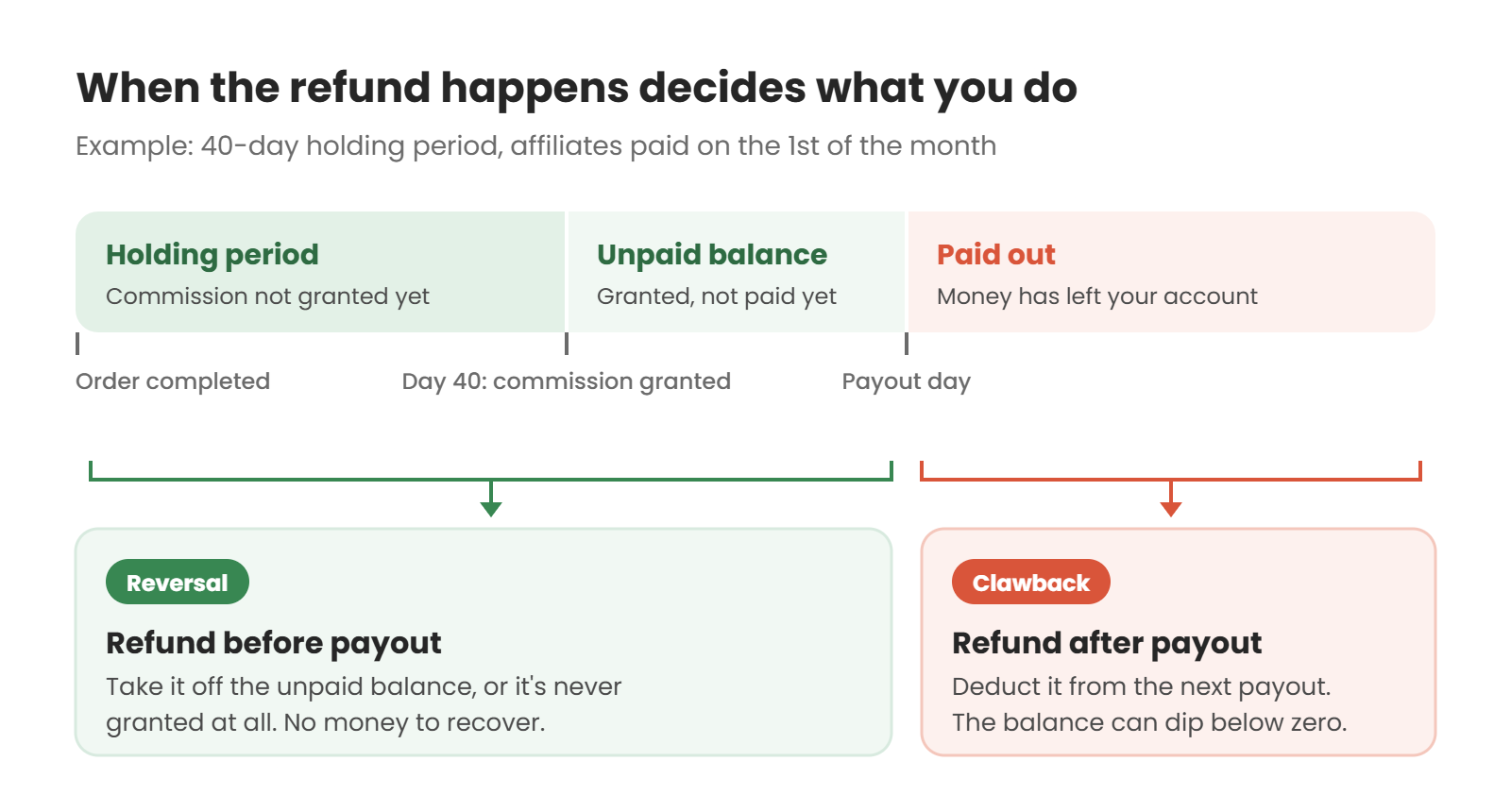
When a customer refunds an order an affiliate referred, the affiliate’s commission on that order should be canceled too. If you haven’t paid it out yet, you just take it off their balance. That’s a commission reversal. If you have already paid it, you recover it by deducting the amount from their next payout. That’s a clawback.
The easiest way to avoid clawbacks is to hold commission for at least as long as your refund window, so most refunds come in before any money is paid out. The rest comes down to a few decisions you should make before the first refund turns up, and then write into your affiliate terms: how partial refunds, exchanges, store credit refunds and chargebacks are treated.
Quick disclosure: we make Coupon Affiliates, a WooCommerce affiliate plugin, so the setup section uses our settings. The policy advice applies whatever you use.
Jump to a section:
- Commission reversal vs clawback
- How long to hold commission
- What to do in each refund scenario
- Recovering commission you’ve already paid
- How refunds work in Coupon Affiliates
- What to put in your affiliate terms
- Frequently asked questions
Commission Reversal vs Clawback
The two terms get used interchangeably, but the difference matters for how the conversation with your affiliate goes.
| Commission reversal | Clawback | |
|---|---|---|
| When it happens | The order is refunded before the commission is paid out | The order is refunded after the commission is paid out |
| What the affiliate sees | Their unpaid balance goes down | Their next payout is smaller, or their balance goes below zero |
| Money changes hands? | No | Yes, you’re recovering money already sent |
| How it usually feels to the affiliate | Fair, if they know the rules | Annoying, even when they know the rules |
Most affiliates expect reversals. Disputes usually start with clawbacks, because the affiliate has already counted that money as theirs. So the aim is to set things up so that nearly every refund is a reversal.
How Long to Hold Commission
A holding period (also called a commission delay or validation period) keeps new commission out of the affiliate’s payable balance for a set number of days. If the order is refunded during that time, the commission is simply never granted.
Start from your returns policy, then add the time a return takes to process:
- Your return window. How many days a customer has to ask for a refund, plus any legal cancellation period that applies where you sell.
- Shipping time back to you. A customer can request a return on day 29 and the parcel might not reach you for another week.
- Your own processing time. How long it takes you to check the item and issue the refund once it arrives.
So a store with a 30-day return policy might set a 40 or 45-day hold. A store selling digital downloads with a 14-day money-back guarantee could get away with 15 to 20 days.
Longer isn’t automatically better. Affiliates notice when they wait two months for their first payout, and the ones with other options will promote someone else. The hold and your payout schedule also stack. With a 40-day hold and payouts on the 1st of each month, an order completed on May 2 becomes payable around June 11 and goes out on July 1, nearly two months later. It’s often better to pick a hold that catches most refunds and accept the occasional clawback than to make everyone wait for the rare late return.
Your own refund data is the best guide. Look at how many days after the order your refunds usually happen, and set the hold to cover the bulk of them. Our guide to affiliate marketing KPIs covers tracking refund rates for affiliate-referred orders, which are sometimes higher than your store average. If you sell clothing, returns are a bigger deal again, and our guide to fashion affiliate programs goes into that.
What to Do in Each Refund Scenario
Full refunds are easy to handle. With the other cases, stores often make up the rules as they go, and that leads to disputes. Here’s a sensible default for each, using a $120 order with 10% commission ($12) as the example.
| Scenario | Suggested rule | Commission after |
|---|---|---|
| Full refund, commission not paid yet | Reverse it | $0 |
| Full refund, commission already paid | Deduct it from the next payout | $0 (the $12 comes off later earnings) |
| Partial refund of $40 | Recalculate on what the customer kept | $8 |
| Exchange for the same item or same value | Leave it alone | $12 |
| Refunded to store credit | Your call (see below) | $0 or $12 |
| Chargeback (dispute with the bank) | Reverse it while the dispute is open, reinstate it if you win | $0, then $12 if won |
| Order canceled before it ships | Never grant it | $0 |
Exchanges
An exchange shouldn’t cost the affiliate anything, because the customer kept a product. The problem is how you process it. If you refund the original order and place a new one, the new order won’t have the affiliate’s coupon on it, and the affiliate loses their commission without anyone meaning them to.
Either swap the item on the original order without refunding it, or make sure the replacement order is credited to the same affiliate. In Coupon Affiliates, the Coupon Affiliate box on the order screen lets you add the affiliate’s coupon to an existing order for tracking, with a zero discount. If that order is already completed, you’ll also need to click Grant commission (PRO), since commission is only added automatically when an order first reaches Completed.
Refunds to store credit
If you refund customers in store credit instead of cash, the money hasn’t left your business, and you could argue the affiliate’s sale still stands. On the other hand, the customer is likely to spend that credit on a new order the affiliate didn’t refer.
Either rule is reasonable, as long as it’s written down. Most stores keep it simple and treat a store credit refund like any other refund. That’s also what happens by default if you refund through WooCommerce’s refund screen, because the order records a normal refund. Our own Simple Store Credit plugin works that way: WooCommerce logs the refund against the order and the plugin adds the same amount as credit. If you want affiliates to keep commission on credit refunds, you’d need to grant it back by hand.
Chargebacks
A chargeback is when the customer disputes the payment with their bank instead of asking you for a refund. It can arrive long after your holding period has ended, so it’s one of the likelier causes of a real clawback.
How it shows up in WooCommerce depends on your payment gateway. With the WooCommerce Stripe extension, an open dispute moves the order to On Hold, and a dispute decided in the cardholder’s favor sets it to Failed. Both take the order out of Completed. In Coupon Affiliates with no commission delay set, that removes the commission the same way a cancellation does. If you win the dispute and move the order back to Completed, the commission can be granted again.
If one affiliate’s referrals keep turning into chargebacks, look into it as possible fraud. Our guide to coupon abuse and affiliate fraud covers what to look for.
Subscription renewals
Each renewal is its own order, so a refunded renewal reverses the commission on that renewal only. Commission the affiliate earned on earlier payments stays theirs. Our guide to recurring affiliate commissions covers renewals in more detail.
Recovering Commission You’ve Already Paid
Even with a sensible hold, some refunds will come after payout. Here’s how to recover the money without falling out with the affiliate.
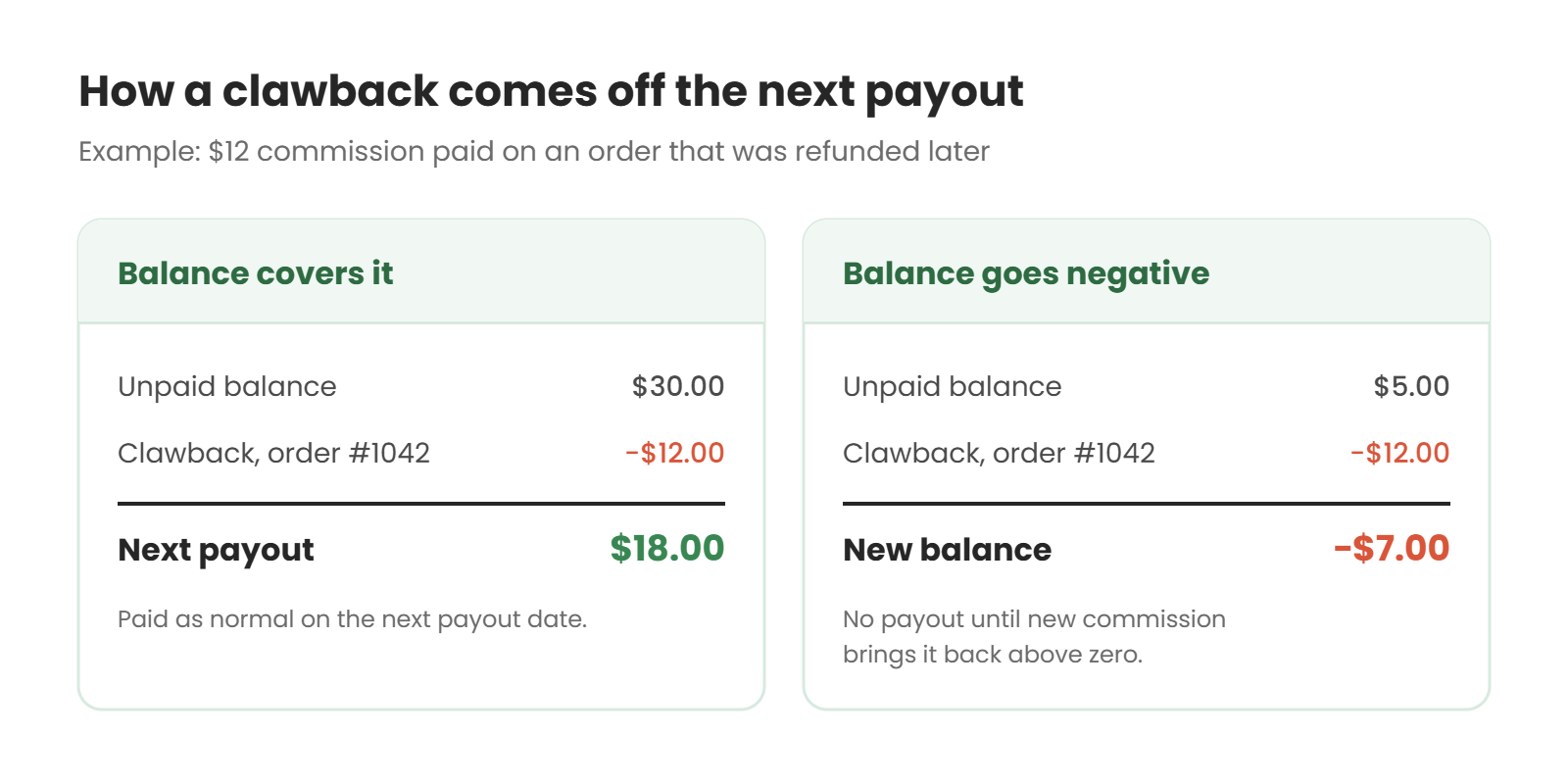
Net it off future earnings. Don’t ask the affiliate to send money back. Take the amount off their next payout instead. If their unpaid balance is $30 when a $12 clawback comes in, they get $18 next time. If the clawback is bigger than their balance, the balance goes negative and their next commissions pay it off before anything new becomes payable.
Tell them before they notice. An affiliate who spots a smaller payout with no explanation will assume the worst. A short email with the order number, the refund date and the amount deducted heads that off. In Coupon Affiliates, the free Referred Order Cancelled email lets affiliates know automatically when a completed order they referred is canceled, refunded or fails. You’ll find it in the Emails settings.
Decide where you’ll let it go. Chasing a $3 clawback from an affiliate who has stopped promoting you isn’t worth anyone’s time. Some stores write off small amounts, or anything owed by an affiliate who leaves the program with a negative balance. If you do, put the write-off limit in your terms so every affiliate is treated the same way.
Be careful about cash demands. Whether you can make an affiliate repay commission in cash depends on your agreement and local law. Recovering it from future earnings avoids the question for most programs. If a large amount is involved and the affiliate has left, get advice from a lawyer.
How Refunds Work in Coupon Affiliates
If you use Coupon Affiliates, here’s what the plugin does with refunds and which settings control it. Commission becomes “unpaid commission” that affiliates can request once a referred order reaches the status you choose, which is Completed by default. Our guide to paying affiliates in WooCommerce covers the rest of the payout settings.
With no commission delay
Commission goes into the affiliate’s unpaid balance as soon as the order is completed. After that:
- Full refunds and cancellations take the order’s commission straight back off the affiliate’s unpaid balance. This happens whether or not the commission has already been paid out, so a refund after payout can take the balance below zero. The affiliate then earns it back from future commission.
- Partial refunds recalculate the commission on what’s left of the order and adjust the balance by the difference.
- Amount-only refunds, where you type a total into WooCommerce’s refund box without choosing which items it covers, can’t be recalculated automatically, because there are no items to work from. The Coupon Affiliate box on the order flags any commission that’s higher than the order is now worth, with a Deduct button that takes off the difference (PRO).
With a commission delay (PRO)
Set Delay Commission (Number of Days) in the Payouts settings (if you don’t see the tab, switch the settings menu to All settings), and commission is only added to the affiliate’s balance once that many days have passed and the order is still completed. A refund inside the window means the commission is never granted at all, so there’s nothing to recover.
The one thing to know: with a delay switched on, a refund that comes after the commission has been granted isn’t taken off automatically. The Coupon Affiliate box on the order shows how much was over-granted, and you click Deduct to remove it. If you use a delay, check any recently refunded orders as part of your payout routine.
A canceled or failed order with no refund recorded against it, such as a lost chargeback, doesn’t show the Deduct button at all. To recover that commission, lower the affiliate’s Unpaid Commission amount with Quick Edit on their coupon.
The delay runs on a daily WordPress cron job, so check that cron is working on your site before you rely on it.
In the free version
The free version doesn’t keep paid and unpaid balances, because payouts are part of PRO. Refunds still lower the commission shown for the order in the affiliate’s statistics and your reports, so if you pay affiliates by hand from those figures, refunded orders drop out. The refund docs have the details.
What to Put in Your Affiliate Terms
Your refund rules only protect you if affiliates agreed to them before they started promoting you. Add a short section to your affiliate terms and conditions covering:
- How long commission is held before it can be paid out
- That refunded, canceled or charged-back orders earn no commission
- How partial refunds, exchanges and store credit refunds are treated
- That commission already paid on a later-refunded order is deducted from future payouts
- What happens to a negative balance if the affiliate leaves the program
Here’s example wording you can adapt. It isn’t legal advice, so have someone qualified check your final terms.
Refunds and cancellations. Commission is held for 40 days after an order is completed before it becomes payable. Orders that are refunded, canceled or charged back earn no commission. For partial refunds, commission is recalculated on the amount the customer kept. Exchanges for an item of the same value do not affect commission. Orders refunded to store credit are treated as refunds. If an order is refunded after its commission has been paid, the amount is deducted from your next payout. Any negative balance below $10 is written off if you leave the program.
Swap in your own numbers. If you use the terms generator in Coupon Affiliates PRO, add this as its own section after generating the page.
Frequently Asked Questions
Do affiliates get commission on refunded orders?
Not usually. Most programs cancel commission on orders that are refunded in full, and recalculate it on partial refunds. Whatever your rule, put it in your affiliate terms.
What is a commission clawback?
Recovering commission that has already been paid out, because the order behind it was later refunded, canceled or charged back. It’s normally taken off the affiliate’s next payout rather than asked for in cash.
How long should a commission holding period be?
At least as long as your refund window, plus time for returns to arrive and be processed. For a 30-day return policy, 40 to 45 days is a sensible starting point. Shorten it if your refund data shows most refunds happen early.
Can an affiliate’s balance go negative?
In Coupon Affiliates PRO, yes. If an order is refunded after its commission was paid, the deduction can take the unpaid balance below zero. The affiliate can’t request a payout until new commission brings it back above zero.
Should affiliates lose commission when a customer exchanges a product?
Generally no, because the customer kept a product. Just make sure the way you process exchanges doesn’t refund the original order and leave the replacement order uncredited.
Getting It Right Before the First Refund
Set a holding period that covers your returns, decide how you’ll treat partial refunds, exchanges, store credit and chargebacks, and write it all into your terms before you recruit anyone. After that, most refunds will be simple reversals. When a clawback does happen, you deduct it from the next payout and send the affiliate a short email about it.
We make Coupon Affiliates, so weigh our setup advice with that in mind. If you want to see how it handles refunds on your own store, the free WooCommerce affiliate plugin is on WordPress.org and PRO has a 7-day free trial. Refund a test order and watch what happens to the affiliate’s balance.

Elliot Sowersby is a WordPress developer from Yorkshire, United Kingdom. He is the founder and lead developer of Coupon Affiliates and RelyWP.

Leave a Reply