
Lifetime commission pays an affiliate for future orders from a customer they referred, not only the first one. Once a customer uses an affiliate’s coupon, they’re linked to that affiliate, and their later orders earn commission even if they never use the code again.
It suits stores where customers come back and reorder: coffee, pet food, cosmetics, supplements, cleaning products or printer ink. This guide explains how lifetime commission works in WooCommerce, how it differs from recurring commission, how to set rates for it, and the limits to know before you switch it on. The setup steps use Coupon Affiliates PRO.
Lifetime commission vs recurring commission
The two are easy to mix up:
- Recurring commission pays on subscription renewals. It’s tied to a WooCommerce Subscriptions subscription, and the affiliate earns commission each time it renews.
- Lifetime commission pays on future orders from a linked customer, whether those are subscription orders or normal one-off orders.
If most of your repeat revenue comes from subscriptions, read our guide to recurring affiliate commissions for WooCommerce Subscriptions. If customers come back and place new orders themselves, lifetime commission is the better fit.
How lifetime commission works
In Coupon Affiliates, a customer becomes linked to an affiliate when one of these happens:
- They place an order referred by the affiliate, through their coupon code or referral link, while lifetime commission is on.
- They create an account after following the affiliate’s referral link, if you’ve turned on “Track user registrations as a lifetime referral“.
- You link them by hand, from the affiliate’s Lifetime tab or the customer’s user profile.
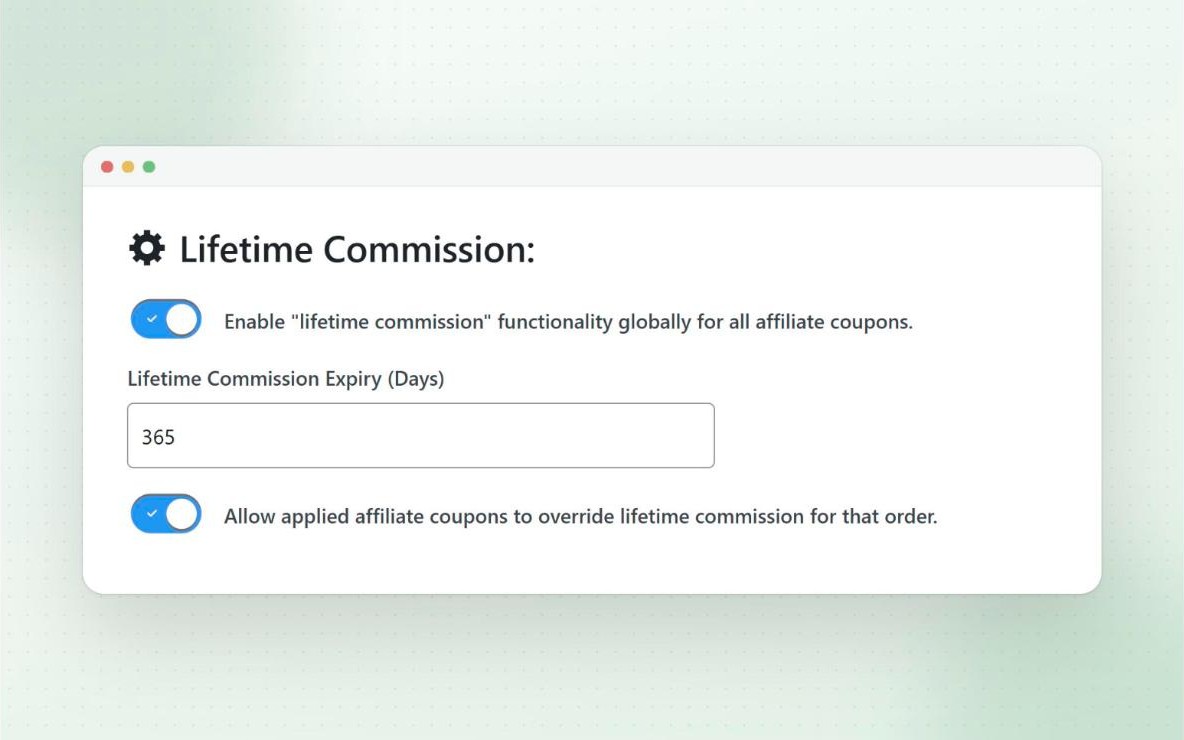
After that, the customer’s future orders count as referrals for that affiliate, with or without a coupon. By default, while the link is active, an order that uses a different affiliate’s code still goes to the original affiliate. If you’d rather the code used on the order decides, turn on “Allow applied affiliate coupons to override lifetime commission for that order”.
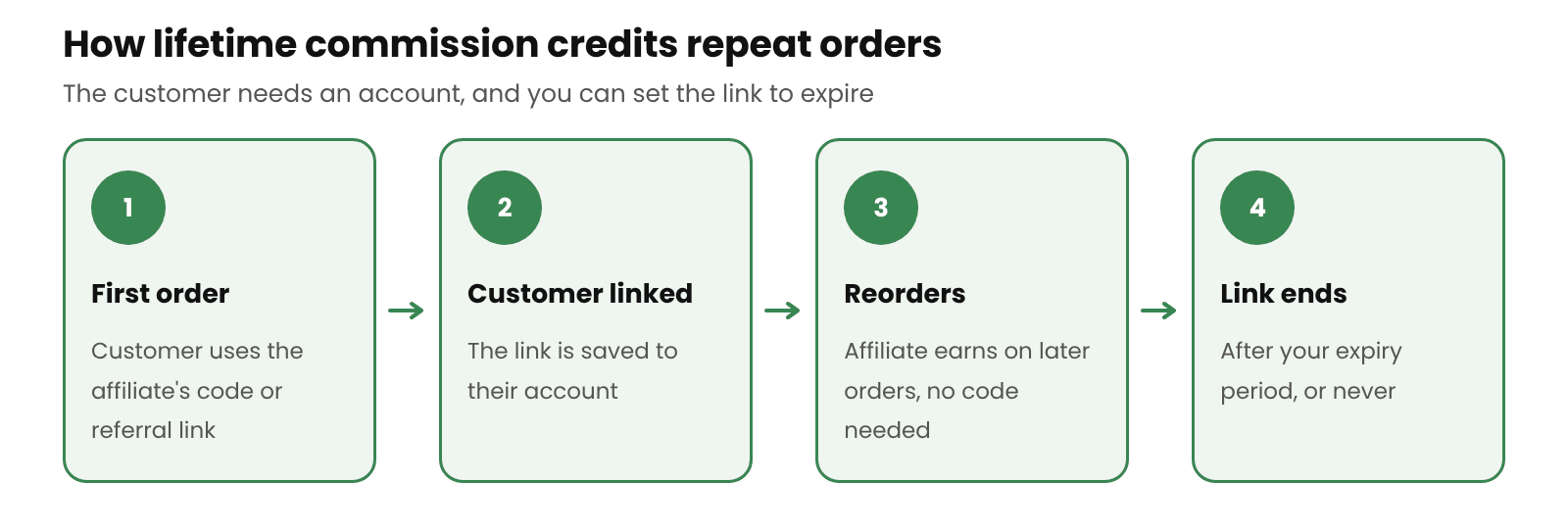
To turn it on, enable “Enable lifetime commission features” under Coupon Affiliates > Settings > Commission. You can then use lifetime commission for all affiliate coupons, or only on the coupons you choose. Full details are in the lifetime commission docs.
Setting an expiry
A lifetime link doesn’t have to last forever. Under Settings > Commission, you can set an expiry period in days, for all coupons or per coupon. Leave it at 0 for no expiry.
By default, each new order with the affiliate’s coupon pushes the expiry back by the full period, so a customer who keeps using the code can stay linked indefinitely. From version 8.6.0, you can enable “Don’t extend the expiry date when the customer uses the coupon again” to keep a fixed window instead, such as exactly 365 days from the customer’s first order.
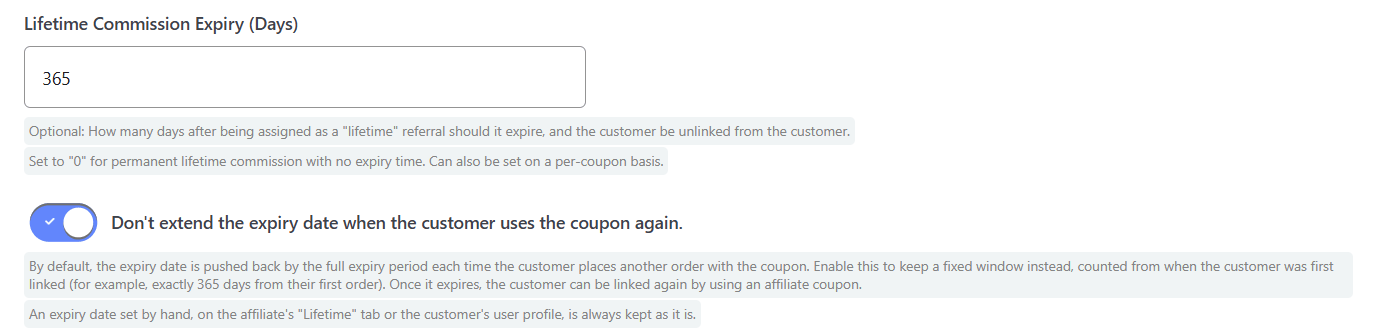
A fixed window keeps your costs predictable. A 12-month window is a reasonable starting point for consumables: the affiliate earns from the customer’s first year of reorders, and you keep the full margin after that.
What doesn’t get linked automatically
Check these limits before you rely on lifetime commission:
- Guest checkouts. Links are stored against a WordPress user account, so customers who check out as guests can’t be linked. If most of your customers buy as guests, encourage account creation at checkout, or lifetime commission will cover few of your repeat orders.
- Past orders. Orders placed before you enabled the feature aren’t scanned, so existing customers aren’t linked automatically.
- Links from other plugins. Customer-to-affiliate links from plugins such as AffiliateWP aren’t imported.
In each of these cases, you can link the customer by hand.
How to link a customer by hand
Open the affiliate from Coupon Affiliates > Affiliate Users, go to the Lifetime tab and click Link a Customer. Search for the customer, choose which of the affiliate’s coupons to link, and set an expiry date if you want one.
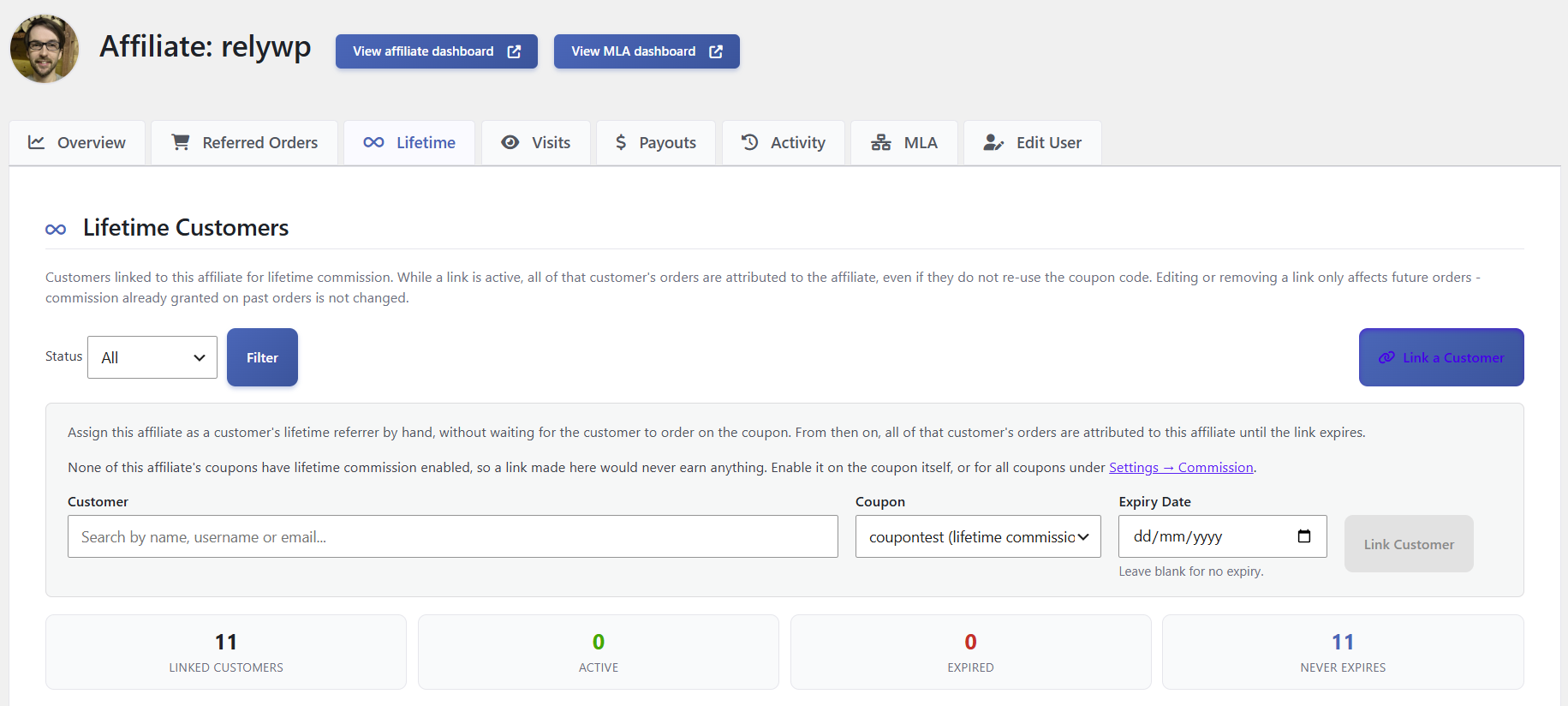
The Lifetime tab also lists every customer linked to that affiliate, with the linked coupon, expiry date and status, and you can edit any row. Changing or removing a link only affects future orders. Commission already granted on past orders stays as it is. For more detail, see how to connect an affiliate to an existing customer.
How to set rates with lifetime commission
With lifetime commission, the numbers work differently. A customer who reorders every month could earn the affiliate commission twelve times a year. Compare two options for a customer who spends $40 a month:
- 20% on the first order only: $8 in total.
- 5% on every order for 12 months: $24 in total.
The second option costs more per customer, but it pays affiliates for the customers who stay, which gives them a reason to promote products people keep buying. Before you switch lifetime commission on:
- Work out what a typical customer spends with you in a year, not only on their first order.
- Decide what share of that yearly spend you can give up.
- Set an expiry if you want a limit on how long you pay.
Our guide to setting affiliate commission rates and our commission calculator help with the numbers.
When lifetime commission is a good idea
It usually suits stores with:
- Products that run out and get reordered
- Affiliates who build long-term trust, such as coaches, practitioners and niche creators
- Customers who mostly check out with an account
It’s usually not worth it for stores with:
- Mostly one-off purchases, such as furniture or a single course
- Mostly guest checkouts
- Margins too thin to cover commission on every order
Frequently asked questions
What is lifetime affiliate commission?
It’s a commission setup where a customer stays linked to the affiliate who first referred them, and the affiliate earns commission on that customer’s future orders, not only the first one.
Does the customer need to use the coupon again?
No. Once the customer is linked, their future orders are credited to the affiliate even without a coupon.
What happens if a linked customer uses another affiliate’s code?
By default, the order is still credited to the original affiliate while the link is active. You can change that with the setting that lets applied affiliate coupons override lifetime commission for that order. Once the link expires, the customer can be linked to a new affiliate.
Does lifetime commission work with guest checkout?
No. Links are saved against a WordPress user account, so guest customers can’t be linked.
Is lifetime commission in the free version?
No, it’s a PRO feature. The free version tracks commission on orders that use the affiliate’s coupon or referral link.
Final thoughts
If your customers reorder, paying affiliates only on the first order leaves them with little reason to send you customers who stay. Lifetime commission pays them for those customers too. Work out your rate from yearly customer spend, set an expiry if you want a limit, and make sure most customers check out with an account. You can try it with the 7-day free trial of Coupon Affiliates PRO.

Elliot Sowersby is a WordPress developer from Yorkshire, United Kingdom. He is the founder and lead developer of Coupon Affiliates and RelyWP.

Leave a Reply