
Las notificaciones por SMS le permiten enviar mensajes de texto automáticos a los afiliados y administradores del sitio cuando se producen eventos clave, como una nueva venta de referidos, el procesamiento de un pago o la aprobación de un registro.
Los mensajes se envían a través de Twilio, un servicio de entrega de SMS de terceros.
Conecta tu cuenta Twilio al plugin introduciendo tus credenciales API en la configuración.
Los afiliados pueden:
- Recibir alertas SMS instantáneas de la actividad de los afiliados de su propia cuenta
- Introduce su número de teléfono desde su panel de control
- Cancelar las notificaciones por SMS en cualquier momento (si lo permites)
- Proporcionar su número de teléfono al registrarse (si el campo de registro está habilitado)
Como administrador del sitio, puedes:
- Elige exactamente qué eventos desencadenan un SMS (activación por evento)
- Personalizar la plantilla de mensajes para cada evento
- Reciba sus propias alertas SMS de administración en un número de teléfono distinto
Precios:
Puede consultar los precios de Twilio SMS aquí: https://www.twilio.com/en-us/sms/pricing/us/
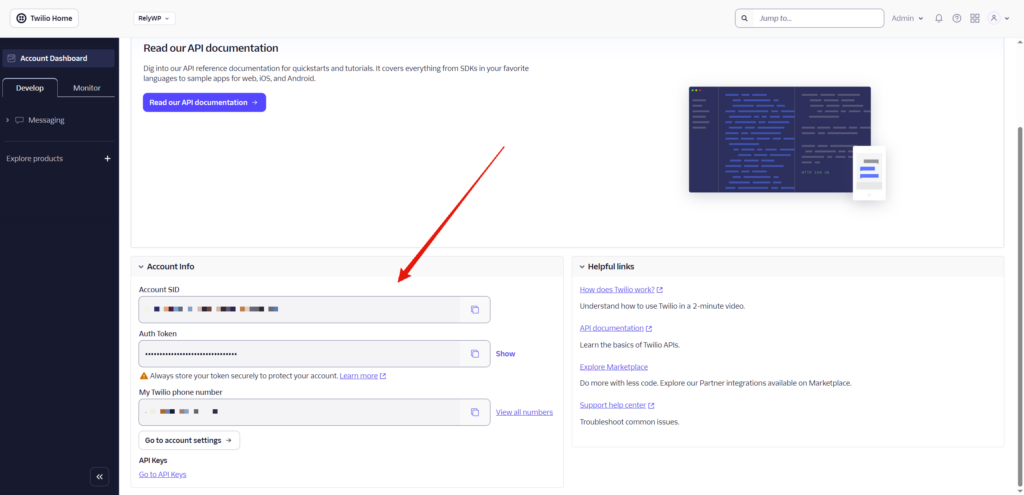
1. Obtenga sus credenciales Twilio
- Iniciar sesión en consola.twilio.com
- Desde el salpicadero, copia tu:
- Cuenta SID
- Token de autenticación
- Ir a Números de teléfono → Gestionar → Números activos y anota tu número de teléfono Twilio (por ejemplo.
+12345678901)- Si aún no tiene uno, haga clic en Obtener un número de teléfono (prueba gratuita)
- Configure sus datos de facturación y notificaciones de crédito
2. Configurar el plugin
Ir a Cupones Afiliados > Configuración > Módulos PRO y activa “Notificaciones SMS”.
A continuación, ve a la pestaña de configuración “Notificaciones SMS”.
| Campo | Valor |
|---|---|
| Activar las notificaciones por SMS | Activar |
| SID de cuenta Twilio | Pegar desde la consola Twilio |
| Token de autenticación Twilio | Pegar desde la consola Twilio |
| Número “De” Twilio | Tu número Twilio en formato E.164, por ejemplo. +12345678901 |
Una vez rellenado, utilice el botón Enviar SMS de prueba introduzca cualquier número de teléfono y haga clic en él para confirmar la entrega de mensajes antes de activar los eventos en directo.
3. Controles de afiliación
Todavía en la página de configuración de SMS, en Controles de afiliación:
| Opción | Descripción |
|---|---|
| Mostrar el campo “Número de teléfono SMS” en el salpicadero | Los afiliados pueden introducir su propio número de teléfono en la pestaña "Configuración" de su panel de control. |
| Permitir que los afiliados se den de baja | Añade una casilla de exclusión voluntaria en la pestaña "Ajustes" del panel de afiliación. |
| Mostrar el campo “Número de teléfono” en el formulario de inscripción | Añade un campo de teléfono al formulario de registro de afiliados - el número se guarda automáticamente y se utiliza para SMS. Esta configuración se sincroniza con Registro > Campos adicionales > Campo “Número de teléfono |
Número de teléfono prioritario: Si un afiliado ha introducido un número en el campo SMS de la configuración de su panel de control, se utilizará ese número. En caso contrario, se utilizará el número que figure en los detalles de la cuenta (o en el formulario de registro).
4. Eventos de notificación (afiliado)
En Eventos de notificación SMS (Afiliado), activa cualquier combinación de las siguientes.
Cada uno tiene su propio conmutador y una plantilla de mensaje personalizable:
| Evento | Disparador |
|---|---|
| Nueva venta de referencia | Se activa cuando se realiza un pedido utilizando el cupón del afiliado |
| Orden de remisión Anulada / Reembolsada | Se dispara cuando se cancela, reembolsa o falla un pedido referido completado |
| Pago de comisiones | Se activa cuando un administrador marca un pago como pagado |
| Registro de afiliados aprobado | Se activa cuando un administrador aprueba una solicitud de afiliación |
| Solicitud de pago presentada | Se activa cuando un afiliado envía una solicitud de pago |
Plantillas de mensajes y etiquetas merge
Cada evento tiene un mensaje por defecto. Puede personalizar el texto y utilizar cualquiera de estas etiquetas merge:
| Etiqueta | Sustituido por |
|---|---|
{nombre} | Nombre para mostrar del afiliado |
{coupon} | Código de cupón del afiliado |
{comisión} | Importe de la comisión devengada |
{id} | ID de la orden o del pago |
{cantidad} | Importe del pago |
{estado} | Estado del nuevo pedido (cancelado/reembolsado/fracasado) |
{nombre_del_sitio} | Nombre de su sitio web |
5. Eventos de notificación (Admin)
En Eventos de notificación SMS (Admin), introduzca un Número de teléfono del administrador (formato E.164) y activar cualquier evento para recibir alertas administrativas. Los mismos 5 eventos de afiliados están disponibles, además:
| Evento | Disparador |
|---|---|
| Registro de nuevos afiliados | Se activa cuando se presenta una nueva solicitud de afiliación |
Los mensajes administrativos disponen de las mismas etiquetas merge, además de {email} (dirección de correo electrónico del afiliado) en el acto de inscripción.
6. Campo de teléfono del formulario de inscripción
Recoger los números de teléfono de los afiliados en el momento de la inscripción:
- Ir a Configuración > Registro > Campos adicionales
- Activar “Campo ”Número de teléfono
- Opcionalmente, establezca una etiqueta personalizada y márquela como Requerido
El número enviado se guarda en el perfil del afiliado y se utiliza automáticamente como su número SMS.
7. Experiencia de afiliación
Ficha Configuración del panel de control (si el campo de teléfono está activado):
- Los afiliados ven un Número de teléfono para notificaciones por SMS introducen su número en formato internacional, por ejemplo.
+12345678901 - Si la opción de exclusión está activada, también verán un mensaje Notificaciones por SMS casilla
Formulario de inscripción (si el campo de teléfono de registro está activado):
- Aparece un campo de número de teléfono en el formulario de inscripción
- El número se guarda al registrarse y está disponible inmediatamente para disparar SMS
 English
  Spanish
  German
  French