
Version 8.7.0 of Coupon Affiliates is now available!
This is a big one. The main addition is a Migration Tool, which moves your affiliate program over from another affiliate plugin, including AffiliateWP, SliceWP and YITH WooCommerce Affiliates. It brings across your affiliates, their coupons and their referral history, and it keeps the links your affiliates have already shared working.
The affiliate portal also gets four new themes, and you can now see your changes in a live preview while you edit the settings. Setting up a small program is quicker too, with a shorter “Essentials” route through the setup wizard and the settings. On the PRO side, there are several fixes to how Multi-Level Affiliates commission is paid and taken back.
Migrate from another affiliate plugin (Beta)
Switching affiliate plugins used to mean rebuilding your program by hand. The new Migration page, under Coupon Affiliates > Admin Tools > Migration, does it for you. It reads the other plugin’s data straight from the database, so it still works after you have deactivated that plugin.
It supports:
- AffiliateWP
- Affiliate For WooCommerce
- SliceWP
- YITH WooCommerce Affiliates
- Solid Affiliate
- Ultimate Affiliate Pro
- Affiliates (itthinx)
- AffiliatePress
- Affiliates Manager
Any of these with data on your site shows up as a card at the top of the page. Pick one to start.
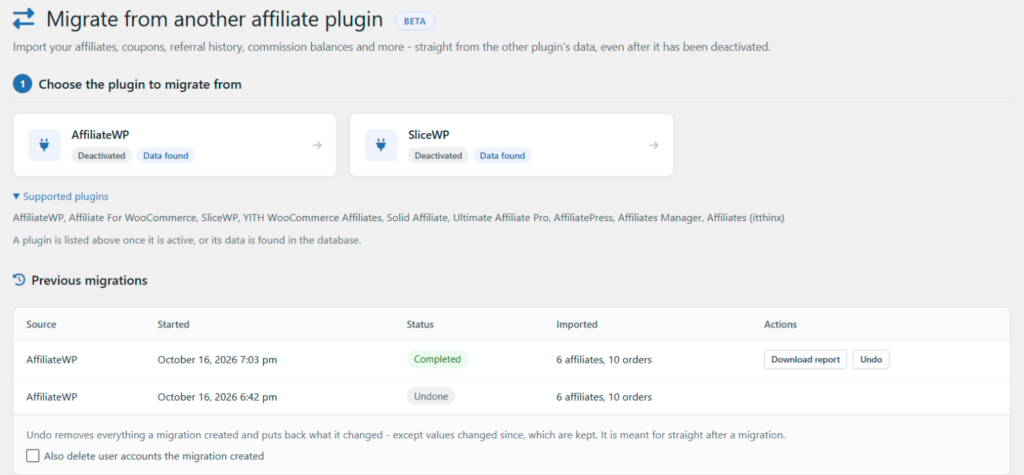
In the free version, it imports your affiliates and their user accounts, coupons, affiliate applications, referral history with the commission that was recorded, referral visits, and your main program settings. With PRO, it also brings over commission balances, payouts and payout details, custom commission rates, affiliate groups and creatives.
Since Coupon Affiliates tracks each affiliate through a coupon, every imported affiliate needs one. The tool assigns the coupons they already have, and creates one from your template coupon for anyone without one.
See what will move before anything changes
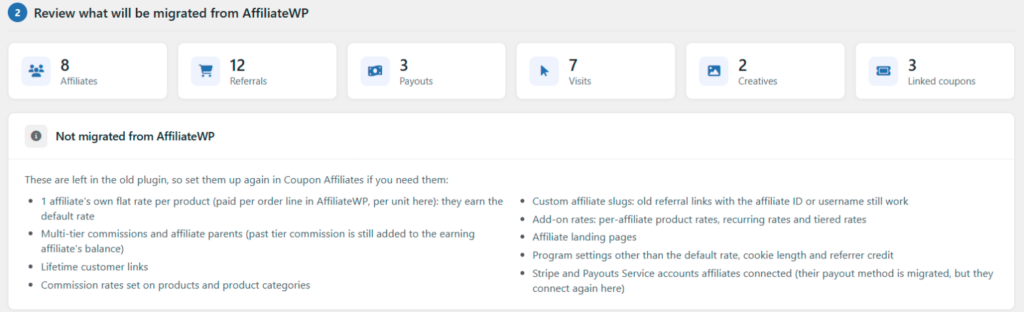
Once you pick a plugin, the tool counts up what it found: affiliates, referrals, payouts, visits, creatives and linked coupons. Below that, it lists anything it can’t bring across, so you know what to set up again yourself. For AffiliateWP, that includes things like multi-tier commissions and add-on rates.
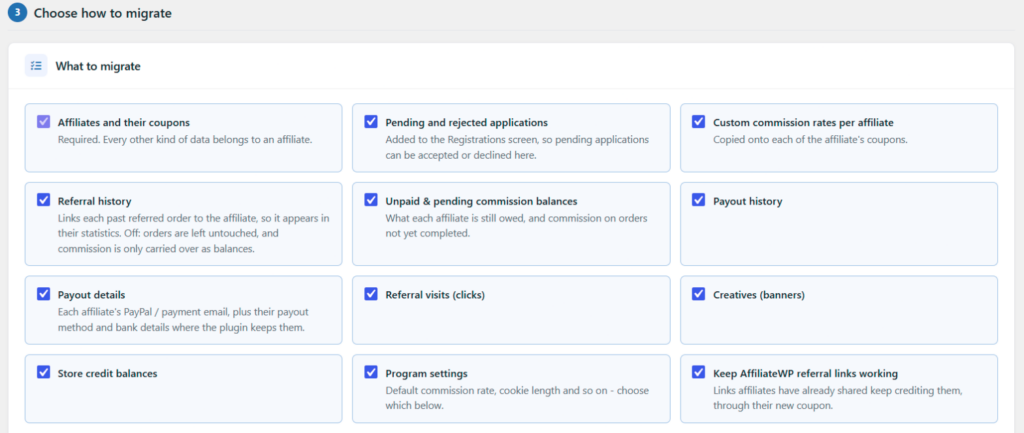
You can then choose what to import, and how. For example, you can import inactive or banned affiliates as suspended, only bring in referrals or visits from a certain date, and decide how to handle a coupon code that is already taken.
Old referral links keep working
If your affiliates have already shared referral links from the old plugin, the tool keeps those links crediting the right affiliate, through their new coupon. You can also choose how many days to keep crediting visitors who arrived with the old plugin’s referral cookie (60 by default), so people referred just before you switched still earn your affiliates their commission.
Every migration can be undone
The old plugin’s data is never changed. Every migration is listed under “Previous migrations” with a downloadable report, and an “Undo” button that removes what the migration created and puts back what it changed. Undo is meant for straight after a migration: if a value has been edited since, the newer value is kept.
Before you start, the tool asks you to confirm you have a recent database backup, and that you have tested the migration on a staging site first (or are happy to go ahead without one). We would recommend both, especially while the tool is in beta. Migrations can also be run from the command line with WP-CLI, using wp wcusage-migrate.
If you are still deciding whether to switch, our Coupon Affiliates vs AffiliateWP comparison goes through the main differences.
Four new affiliate portal themes
The affiliate portal has a new “Portal Theme” setting, under Settings > General > Customise Affiliate Portal Design. Alongside the existing “Classic” design, you can now pick from “Sleek”, “Modern”, “Canvas” and “Spotlight”.
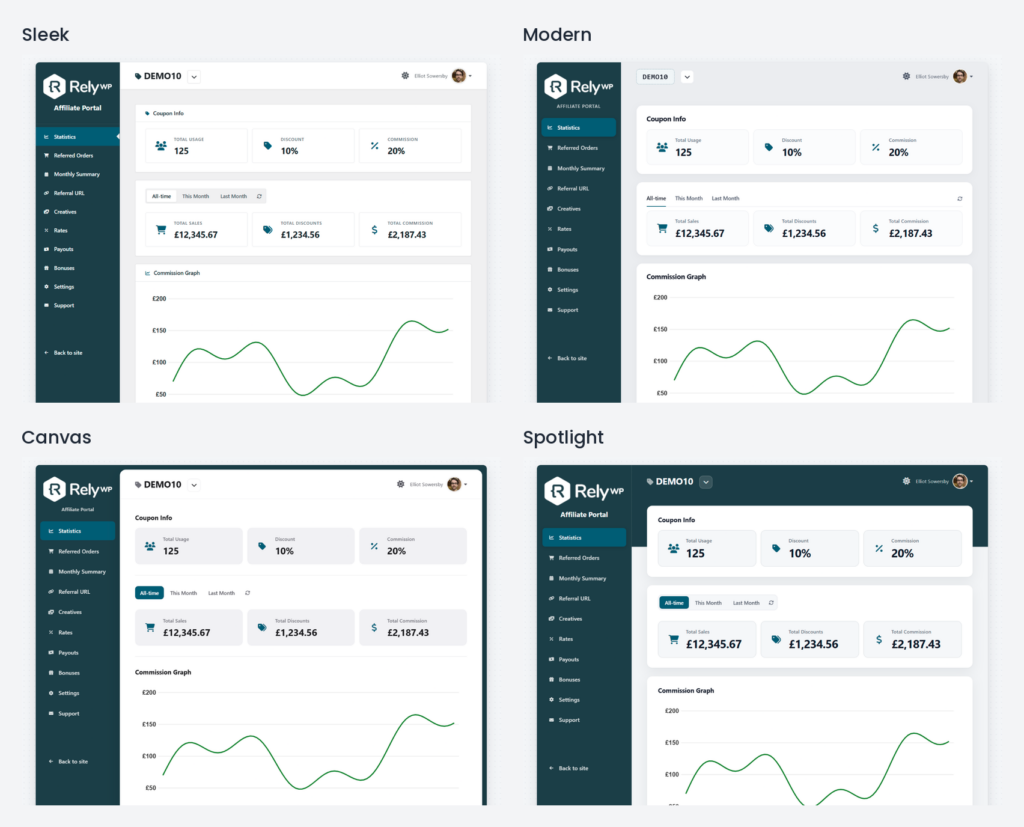
Each theme restyles the whole portal, including dark mode and the mobile layout. The new themes also add status badges, a balance card on the Payouts tab, and a share card with a QR code on the Referral URL tab.
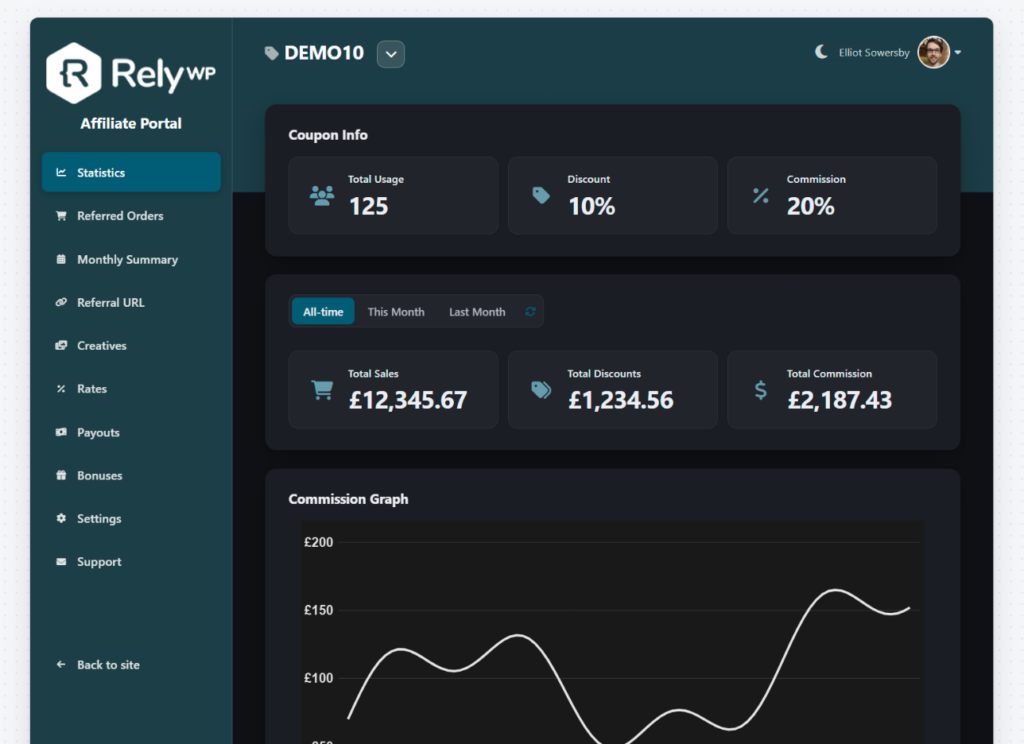
The themes are in the free version, and they still use your own logo and brand colours.
Preview the dashboard while you edit settings
On the General tab of the settings, click “Dashboard Preview” on the right and a Live Preview panel opens beside your settings. It shows the affiliate dashboard (or the portal, if you use it) with example data, and it updates as you change things. You can switch between desktop and mobile, light and dark, or expand it to a larger view.
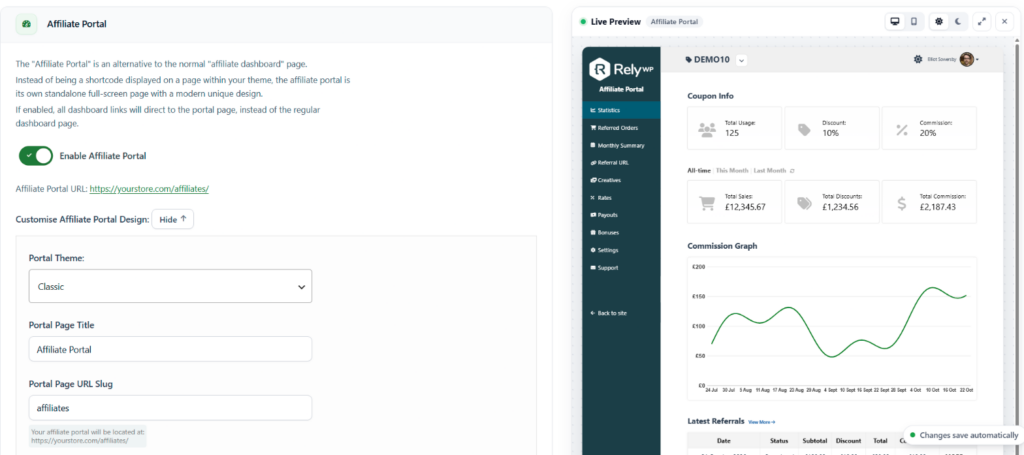
To go with this, the portal colour and font settings have moved to General > Customise Affiliate Portal Design, next to the preview. If you don’t use the portal, the “Design” tab shows the normal dashboard colour settings instead.
A quicker setup for small programs
Not every store needs a full affiliate program with a public sign-up form. Some just want to give a coupon to a friend, a partner or a regular customer who has offered to promote them. The setup wizard now starts by asking which of these you are setting up:
- An open affiliate program. The full wizard, which walks you through the dashboard, registration, commission and email settings.
- Just a few people I know. The new “Essentials” setup. It only asks for your commission rate, the customer discount and whether to allow public sign-ups. It then creates the dashboard page and a template coupon, and helps you add your first affiliate.
- I’ll set it up myself. Skips the wizard and takes you straight to the settings.
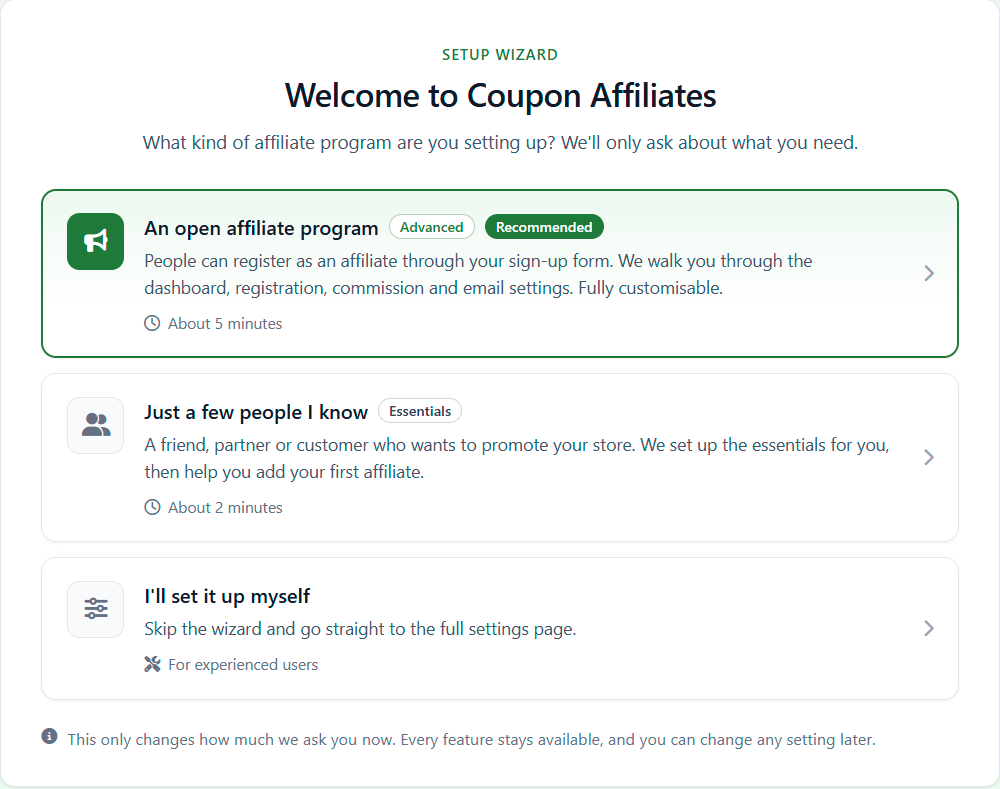
Whichever you choose, every feature stays available, and you can change any setting later. The “Commission” step in the wizard also now suggests 10% the first time you see it, instead of starting at 0%.
There is a matching “Essentials / All settings” switch at the top of the settings menu. Essentials shows only the main tabs, with a link at the bottom to show the rest. Your choice is remembered for each admin, so one person can keep the short menu while another sees everything.
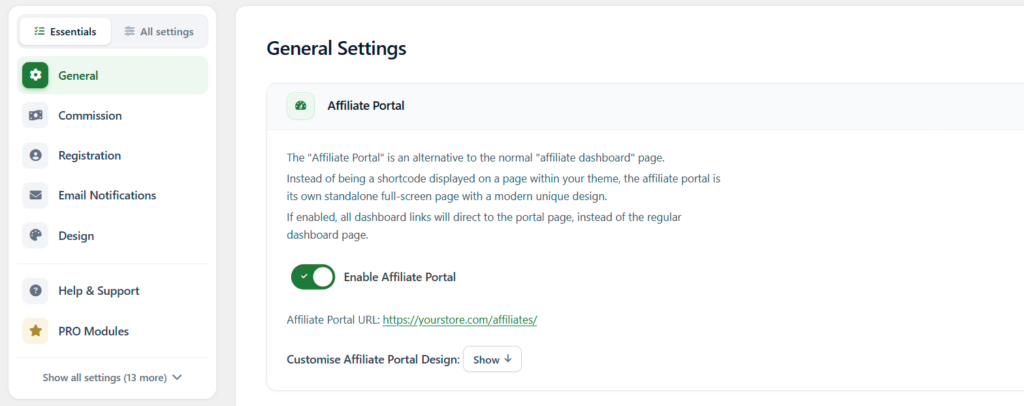
Two smaller additions help new stores get going. The Coupon Affiliates dashboard shows a “Getting started” checklist until you add your first affiliate. And if you go to “Add New Affiliate” without a template coupon set up (or the one you set no longer exists), a “Create Template Coupon For Me” button makes one for you, with 10% off, and selects it.
A redesigned settings page
The settings page has had a full tidy up. Each tab is now split into cards with icon headings, the left menu has icons for every tab, and the whole page uses one green accent colour. Fields and buttons are neater, number fields show their units, and the colour pickers are smaller. The setup wizard has been redesigned to match.
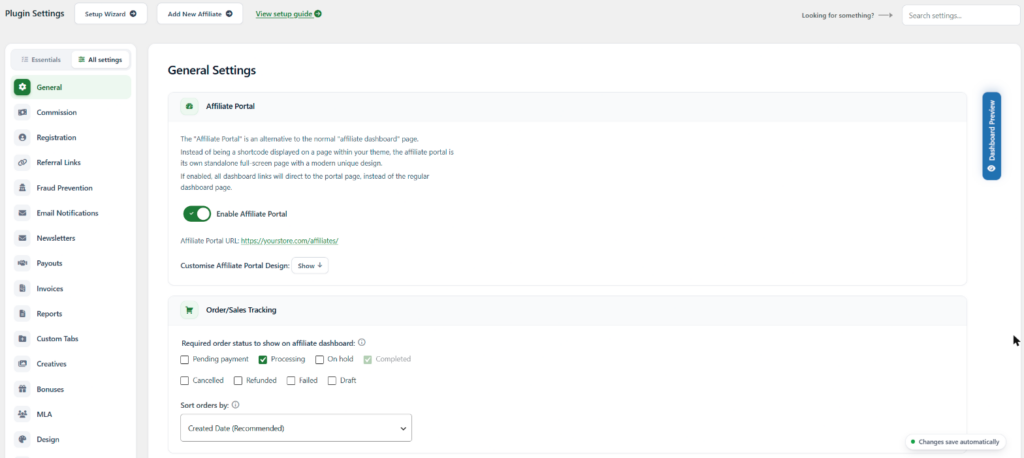
Nothing has been removed, and your saved settings are unchanged. If you can’t find a setting, use the “Search settings” box in the top right.
Multi-Level Affiliates commission fixes (PRO)
We went through how Multi-Level Affiliates commission is paid and taken back, and fixed several problems. The biggest is that the “Remove MLA commission from sub-affiliate’s commission” option was not working properly. It now works again, for orders placed after you update.
The other MLA fixes:
- Parents are now paid their MLA commission when “Delay Commission” is set.
- Parents are never paid twice for the same order, and are not paid at all once their account has been deleted.
- When commission is taken back (including partial refunds and “Deduct”), parents lose exactly what they were paid for that order.
- The “(MLA) New Sub-Affiliate Referral” email is no longer sent for pending orders, or when commission is taken back.
- MLA earnings totals on the dashboard, the admin MLA pages and the order screen now show the commission that was paid, instead of estimates worked out at your current rates.
- On PHP 8, filtering the MLA dashboard’s “Orders” tab by date could hide the Commission column.
Other fixes and tweaks
A few payout fixes (PRO):
- A saved pending commission of 0 on an order was being recalculated, which could wrongly change the coupon’s pending commission.
- “Create Payout Request” did nothing on the admin “Create Payouts” page for affiliates whose payout method has no details field.
- The “Payment Threshold” was not checked when a payout request came through the REST API, or was posted to the dashboard directly.
- The “Delay Commission (Number of Days)” description now says that the days are counted from when the order is completed.
And some smaller ones:
- The affiliate portal “Primary Font” setting was not being saved.
- In the free version, the “subscription renewals” commission toggle could be switched off but never saved. It is now shown as a PRO option.
- In the portal, having exactly three coupons pushed the footer out of place, and on mobile the “Recent Clicks” labels showed against the wrong values.
- (PRO) On the Monthly Summary, mobile labels no longer move when a column is hidden, “Quantity” now reads “Orders”, and empty product rows are hidden.
- (PRO) The order screen’s commission breakdown shows an “Adjustments” row when needed, so the rows add up to the total.
- (PRO) In the admin header menu, “Manage Creatives”, “View Short URLs” and “PDF Invoices” now open the right pages.
- (PRO) Fixed an “Undefined variable $coupon_code” PHP warning with lifetime commission orders that were refunded, cancelled or changed status.
- On the AI & MCP tab, WPVibe is now suggested as a connector plugin for claude.ai, ChatGPT and other web connectors.
- Fixed a few PHP notices, on referral link visits and on the admin “Registrations” list.
For developers
For Multi-Level Affiliates (PRO), the MLA commission paid to each parent is now saved in a wcu_mla_granted order meta, and wcusage_mla_ledger_since records when 8.7.0 was first run. There are new wcusage_mla_calculate_order_breakdown(), wcusage_mla_calculate_tier_commission() and wcusage_mla_get_parent_earnings() functions, and new wcusage_mla_parent_earnings and wcusage_mla_remove_parent_commission_applies filters.
Also new in this release:
wcusage_portal_themeandwcusage_essential_settings_tabsfilters, and awcusage_setup_modeoption (quick,fullormanual).- The
wcusage_calculate_edit_commissionfilter now passes the figure being filtered and the order totals. A newwcusage_filter_zero_order_commissionfilter applies it to orders with no commission. - (PRO) A new
wcusage_hook_after_adjust_commissionaction for partial refunds and “Deduct”.wcusage_hook_after_update_commissionnow also fires when delayed commission is added.
Full Changelog
- New: Migration Tool (Beta) > A new “Migration” page (under “Admin Tools”) moves your program over from AffiliateWP, Affiliate For WooCommerce, SliceWP, YITH WooCommerce Affiliates, Solid Affiliate, Ultimate Affiliate Pro, Affiliates (itthinx), AffiliatePress or Affiliates Manager. Imports affiliates, coupons, applications, referral history, visits and settings, and keeps old referral links working. (PRO) Also imports balances, payouts, custom rates, groups and creatives. Includes a preview, never changes the old plugin’s data, can be fully undone, and is available through WP-CLI (“wp wcusage-migrate”).
- New: Affiliate Portal > New “Portal Theme” setting with four new themes alongside “Classic”: “Sleek”, “Modern”, “Canvas” and “Spotlight”. Each restyles the whole portal (including dark mode and mobile) and adds status badges, a Payouts balance card and a Referral URL share card with QR code.
- New: Settings > A “Live Preview” button on the “General” tab previews the affiliate dashboard or portal with example data, updating as you change settings, with desktop/mobile and light/dark views.
- New: Setup Wizard > Now starts by asking what kind of program you are setting up: “Advanced” (the full wizard), “Essentials” (a quicker setup for small programs) or “I’ll set it up myself”. Essentials asks only for commission rate, customer discount and public sign-ups, creates the dashboard page and template coupon, then helps you add your first affiliate.
- New: Settings > An “Essentials / All settings” switch at the top of the settings tabs. Essentials shows only the main tabs, with a link to show the rest. The choice is remembered for each admin.
- New: A “Getting started” checklist on the Coupon Affiliates dashboard, shown until your first affiliate is added.
- New: Add New Affiliate > A “Create Template Coupon For Me” button creates and selects a template coupon (10% off) when none is set or the set one does not exist.
- Tweak: Settings > Redesigned settings page: tabs split into cards with icon headings, a new left menu card with tab icons, one green accent colour, tidier fields and buttons, clearer text sizes, unit labels in number fields, compact colour pickers everywhere, and a tidier dashboard tabs list. The setup wizard is redesigned to match.
- Tweak: Settings > Portal colour and font settings are now under “General > Customise Affiliate Portal Design”, beside the live preview. When the portal is disabled, the “Design” tab shows the dashboard colour settings instead.
- Tweak: Setup Wizard > The “Commission” step now suggests 10% instead of 0% the first time it is shown.
- Tweak: AI & MCP > WPVibe is now suggested as a connector plugin for claude.ai, ChatGPT and other web connectors, and its ability calls show as “MCP” in recent activity.
- Tweak: (PRO) Payouts > The “Delay Commission (Number of Days)” description now correctly says days are counted from when the order is completed.
- Tweak: (PRO) The order screen’s commission breakdown now shows an “Adjustments” row when needed, so the rows add up to the total.
- Tweak: Affiliate Portal > Referral URL > The “Select a Campaign” section now lines up with “Page URL”.
- Fix: (PRO) Multi-Level Affiliates > “Remove MLA commission from sub-affiliate’s commission” has had no effect since 6.0.0. It now works for orders placed after updating.
- Fix: (PRO) Multi-Level Affiliates > Parents are now paid MLA commission when “Delay Commission” is set, are never paid twice for an order or after their account is deleted, and lose exactly what they were paid when commission is taken back (including partial refunds and “Deduct”). The “(MLA) New Sub-Affiliate Referral” email is no longer sent for pending orders or when commission is taken back.
- Fix: (PRO) Multi-Level Affiliates > MLA earnings totals on the dashboard, admin MLA pages and order screen now show the commission actually paid, instead of often-wrong estimates at current rates.
- Fix: (PRO) Multi-Level Affiliates > On PHP 8, filtering the MLA dashboard’s “Orders” tab by date could hide its Commission column.
- Fix: (PRO) Payouts > A saved pending commission of 0 on an order was recalculated, which could wrongly change the coupon’s pending commission.
- Fix: (PRO) Payouts > “Create Payout Request” did nothing on the admin “Create Payouts” page for affiliates whose payout method has no details field.
- Fix: (PRO) Payouts > The “Payment Threshold” was not checked when a payout request was sent through the REST API or posted to the dashboard directly.
- Fix: (PRO) Admin header menu > “Manage Creatives”, “View Short URLs” and “PDF Invoices” now open the correct pages, and “PDF Invoices” follows the “Payout Statements” setting.
- Fix: (PRO) Lifetime Commission > Fixed an “Undefined variable $coupon_code” PHP warning when a lifetime affiliate’s order was refunded, cancelled or changed status.
- Fix: Settings > The affiliate portal “Primary Font” was not saved.
- Fix: The “subscription renewals” commission toggle could be switched off in the free version but never saved. It is now shown as a PRO option.
- Fix: Affiliate Portal > With exactly three coupons the portal footer was pushed out of place, and on mobile the “Recent Clicks” labels showed against the wrong values.
- Fix: (PRO) Monthly Summary > Mobile labels no longer shift when a column is hidden, “Quantity” now reads “Orders”, and empty product rows are hidden.
- Fix: Fixed a “Translation loading … triggered too early” notice on referral link visits, and a “strtotime(): Passing null” notice (PHP 8.1+) and “Nov 30th, -0001” tooltip on the admin “Registrations” list.
- Fix: Setup Wizard > Two “Create Your First Affiliate” buttons on the last step did not show as buttons.
- Dev: (PRO) Multi-Level Affiliates > MLA commission paid to each parent is now saved in a “wcu_mla_granted” order meta, and “wcusage_mla_ledger_since” records when 8.7.0 was first run. New functions “wcusage_mla_calculate_order_breakdown()”, “wcusage_mla_calculate_tier_commission()” and “wcusage_mla_get_parent_earnings()”, and new “wcusage_mla_parent_earnings” and “wcusage_mla_remove_parent_commission_applies” filters.
- Dev: New “wcusage_portal_theme” and “wcusage_essential_settings_tabs” filters, and a “wcusage_setup_mode” option (“quick”, “full” or “manual”).
- Dev: The “wcusage_calculate_edit_commission” filter now passes the figure being filtered and the order totals. New “wcusage_filter_zero_order_commission” filter to apply it to orders with no commission.
- Dev: (PRO) New “wcusage_hook_after_adjust_commission” action for partial refunds and “Deduct”. “wcusage_hook_after_update_commission” now also fires when delayed commission is added.
- Other: Updated the Freemius SDK.
Update now
Update from Dashboard > Updates in wp-admin as usual. You will find the Migration Tool under Coupon Affiliates > Admin Tools > Migration, and the new portal themes under Settings > General > Customise Affiliate Portal Design.
If you are setting up a new program, the setup guide walks through the basics. And if you run into any problems with a migration, please get in touch so we can help and improve the tool.

Elliot Sowersby is a WordPress developer from Yorkshire, United Kingdom. He is the founder and lead developer of Coupon Affiliates and RelyWP.

Leave a Reply