
Tiered affiliate commission pays an affiliate a higher rate once they pass a sales target. WooCommerce has no affiliate features of its own, so you need an affiliate plugin that can raise an affiliate’s rate automatically when they hit a goal. In Coupon Affiliates PRO you do this with a performance bonus for each tier. This guide gives three tier structures with the math worked out, then the setup steps.
Best for:
- Rewarding long-term partners: tiers based on all-time sales
- Programs with many small affiliates: tiers based on order count
- Keeping affiliates active every month: a repeating monthly bonus in place of a permanent rate rise
Disclosure: we make Coupon Affiliates (a RelyWP plugin), and the setup steps below use it. We also cover one other WooCommerce plugin that offers tiers, and we’ve listed a downside for each.
Jump to a section:
- What tiered commission means
- How we checked the details
- Three tier structures at a glance
- Structure 1: Tiers based on all-time sales
- Structure 2: Tiers based on order count
- Structure 3: A repeating monthly bonus
- Check your margin at the top tier
- How to set up tiers in Coupon Affiliates
- Other WooCommerce plugins with tiers
- Frequently asked questions
What tiered commission means
In a tiered structure, every affiliate starts on a base rate. When their sales pass a threshold you set, their rate goes up. A common setup has three levels, often called Bronze, Silver and Gold.
The term gets confused with multi-tier or multi-level commission, where an affiliate also earns from the sales of people they recruit. That is a different feature. If you want it, see our guide to multi-level affiliate programs in WooCommerce. This post covers performance tiers only.
Tiers are one of several ways to reward your best affiliates. Our list of affiliate incentives covers the others, such as one-off bonuses and store credit.
How we checked the details
The Coupon Affiliates steps come from our own documentation and feature pages as of November 2026. For Affiliate for WooCommerce, we read its product page and its tiered commission documentation on WooCommerce.com in the same month. Prices and ratings are from those pages and can change. The dollar figures in the examples are our own arithmetic, not data from real programs.
Three tier structures at a glance
| Structure | Tiers | Resets? | Good fit for |
|---|---|---|---|
| All-time sales | 10% to start, 12% after $10,000, 15% after $50,000 | No | Stores with a small group of long-term partners |
| Order count | 10% to start, 12% after 25 orders, 15% after 100 orders | No | Stores with low order values and many affiliates |
| Monthly bonus | 10% on every sale, plus $100 for $10,000 in sales in a month | Every month | Stores that want steady activity all year |
Structure 1: Tiers based on all-time sales
Each affiliate moves up when the total sales they have referred pass a set amount. Once they reach a tier, they keep it.
| Tier | All-time referred sales | Commission rate |
|---|---|---|
| Bronze | $0 to $9,999 | 10% |
| Silver | $10,000 to $49,999 | 12% |
| Gold | $50,000 and over | 15% |
The new rate applies to orders placed after the affiliate reaches the tier. Earlier orders stay at the rate they were paid at. An affiliate earns the following at two points:
- $12,000 in sales: the first $10,000 at 10% is $1,000, and the next $2,000 at 12% is $240. The total is $1,240, compared with $1,200 on a flat 10%.
- $60,000 in sales: $1,000 on the first $10,000, $4,800 on the next $40,000 at 12%, and $1,500 on the last $10,000 at 15%. The total is $7,300, which works out at about 12.2% overall.
Pros: simple to explain, and it rewards the affiliates who have brought you the most revenue.
Cons: an affiliate who reaches Gold keeps 15% even if their sales slow down later.
Structure 2: Tiers based on order count
Here the trigger is the number of orders, not their value. It suits stores where most orders are a similar size, and it gives newer affiliates a target they can reach sooner.
| Tier | All-time referred orders | Commission rate |
|---|---|---|
| Starter | 0 to 24 | 10% |
| Regular | 25 to 99 | 12% |
| Top | 100 and over | 15% |
With an average order of $80, an affiliate reaches the second tier after about $2,000 in sales. In the first structure they would need $10,000.
Pros: the first step up is within reach for small affiliates.
Cons: order count ignores order value, so an affiliate who sends many small orders moves up faster than one who sends fewer large ones.
Structure 3: A repeating monthly bonus
If you’d like the reward to reset, keep one commission rate and add a bonus that affiliates can earn again each month. For example, pay 10% on every sale, plus a $100 bonus when an affiliate refers $10,000 in sales in a calendar month.
An affiliate who refers $10,000 in a month earns $1,000 in commission and the $100 bonus. That is $1,100, the same as an 11% rate for that month. The next month they start from zero again.
Pros: affiliates have a reason to keep selling every month, and your rate never goes up for good.
Cons: an affiliate who misses the target by a small amount gets nothing extra for that month.
Check your margin at the top tier
Work out what your highest tier costs before you publish it. Most affiliate coupons also give the customer a discount, and both come out of the same sale.
Take a $100 product, a 10% customer discount and a 15% commission paid on the discounted price. The customer pays $90, and the affiliate earns $13.50. Together the discount and commission come to $23.50, or 23.5% of the list price.
You can test your own numbers in our affiliate commission calculator. For help picking the base rate, see how to set affiliate commission rates in WooCommerce.
How to set up tiers in Coupon Affiliates
Tiers use the Performance Bonuses module, which is part of Coupon Affiliates PRO. You create one bonus for each step up. A bonus has a trigger (the goal) and one or more rewards.
- In the plugin settings, open the PRO Modules tab and enable Performance Bonuses.
- Open the Bonuses tab and click Add New Bonus.
- Set the trigger. For structure 1, choose Total Sales Referred for the All-Time period and enter 10,000. For structure 2, choose Total Number of Orders and enter 25.
- Set the bonus to be awarded once.
- Choose the reward. Pick the option to set new commission rates for the affiliate and enter 12%.
- Publish the bonus, then repeat the steps for the next tier (50,000 in sales, or 100 orders, with a 15% rate).
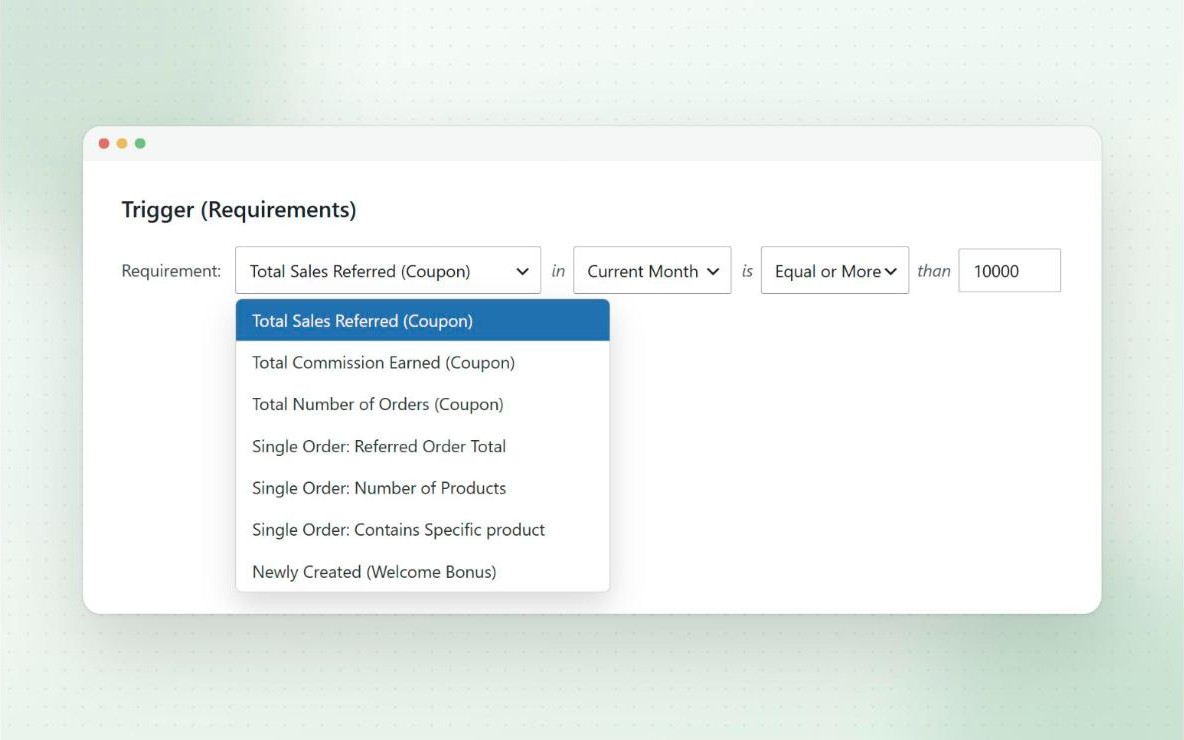
Bonuses are checked against each coupon’s saved all-time stats. The setting for this is in the Debug tab and is on by default. If it has been turned off, the plugin shows a notice and won’t let you publish a bonus until you turn it back on.
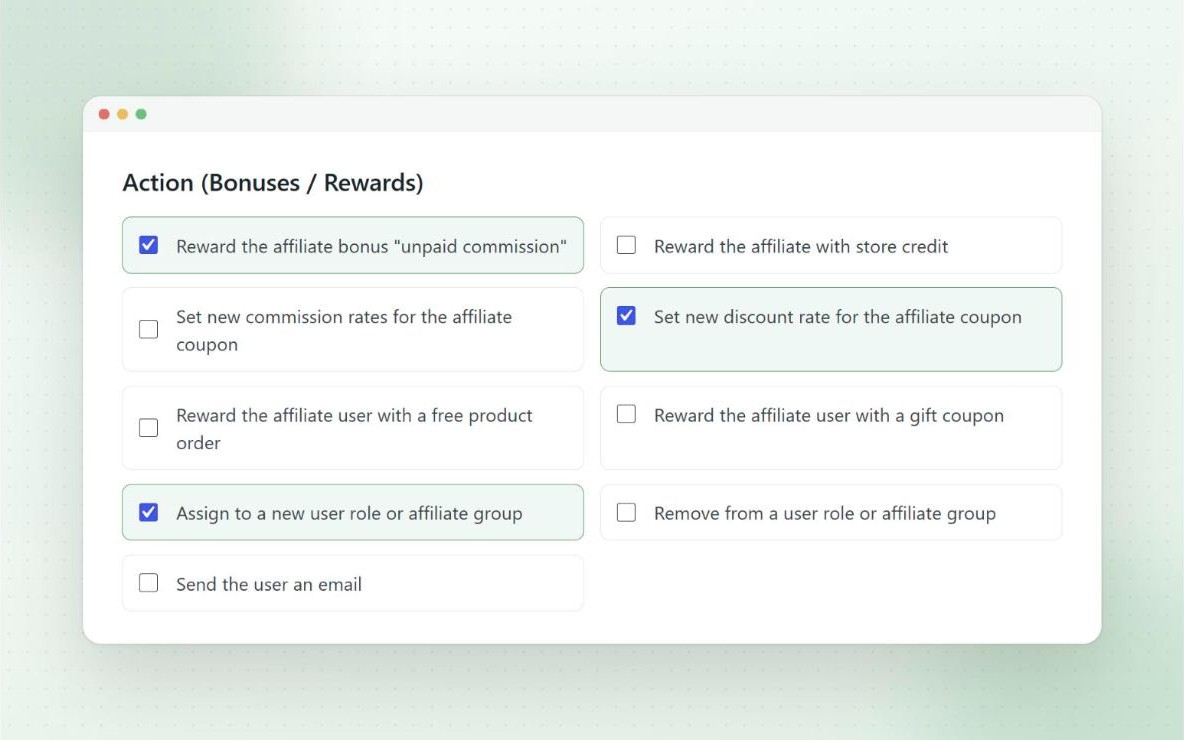
For structure 3, set the trigger to Total Sales Referred for the Current Month, set it to repeat monthly, and choose bonus commission as the reward. The bonus is added to the affiliate’s unpaid commission and paid out with the rest of their earnings.
Using affiliate groups as tiers
You can also build tiers from affiliate groups. Create a group for each tier, such as Bronze, Silver and Gold, and give each group its own commission rate. Then use the role or group change reward, which adds the affiliate to the next group and removes them from the old one in the same step.
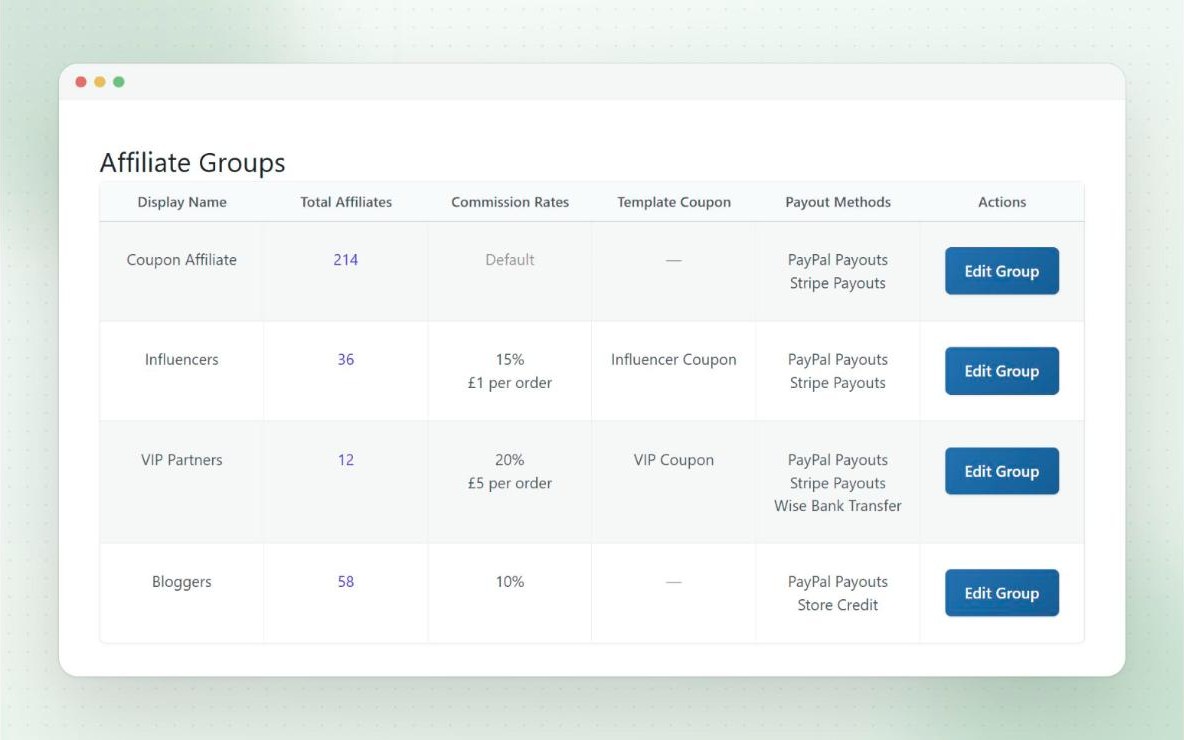
This takes a little longer to set up. In return, each tier can have its own creatives, payout methods and bonuses as well as its own rate.
What affiliates see
Each bonus appears on a Bonuses tab in the affiliate dashboard with a progress bar, so affiliates can see how far they are from the next tier. A rewards log on the same tab lists what they have earned so far. The performance bonuses docs describe every trigger and reward.
Pros: rate changes happen automatically, affiliates can track their progress, and one bonus can give several rewards at once.
Cons: performance bonuses and groups are PRO features, so tiers aren’t available in the free version. The setup above only moves affiliates up. If you want the reward to drop away after a quiet period, use the monthly bonus in structure 3.
Pricing: PRO starts at $179.99 a year for one site, with a 7-day free trial. Current prices are on the pricing page.
Other WooCommerce plugins with tiers
Coupon Affiliates is not the only option. Affiliate for WooCommerce by StoreApps lists tiered, performance-based commission as a feature. You build it from commission plans with rules for an affiliate’s revenue, order count, number of customers, or days since their last referral.
Best for: stores that prefer to buy extensions from the WooCommerce Marketplace.
Pros: it costs less than our PRO plan, and its rules can combine several conditions in one plan.
Cons: its tiered commission documentation doesn’t say what period the revenue and order totals cover, so check that before you rely on a tier that should reset.
Pricing: $99 for one year. It was rated 4.5 out of 5 from 124 reviews when we checked.
For a wider comparison, see our roundup of the best WooCommerce affiliate plugins.
Frequently Asked Questions
Does WooCommerce have tiered affiliate commission built in?
No. WooCommerce has no affiliate features, so tiers need an affiliate plugin that supports them.
Does a new tier change commission on past orders?
In Coupon Affiliates, a reward that changes the commission rate applies to future orders only. The order that triggered the bonus keeps the old rate.
How many tiers should I have?
Three is enough for most stores. With more than that, each step is small and harder for affiliates to follow.
Should tiers be based on sales or orders?
Use sales if your order values vary a lot, because it tracks the revenue an affiliate brings in. Use order count if most orders are a similar size and you want a first target that new affiliates can reach quickly.
Can I give one affiliate a higher rate without tiers?
Yes. Coupon Affiliates PRO lets you set a commission rate for a single affiliate or coupon. See the commission settings for the options.
Summary
Start with a base rate your margin can carry, then add two higher tiers at sales levels only your top affiliates will reach. Work out the cost of the top tier, with the customer discount included, before you announce it. If you’d like a reward that resets, a monthly bonus does that without raising anyone’s rate for good.
We make Coupon Affiliates, so weigh our view with that in mind. Tiers need the PRO version, which has a 7-day free trial. You can also launch a demo site to look around before you install anything.

Elliot Sowersby is a WordPress developer from Yorkshire, United Kingdom. He is the founder and lead developer of Coupon Affiliates and RelyWP.

Leave a Reply