
To run an Instagram affiliate program for your store, give each creator their own discount code and a link they can use in their bio and Stories. Links typed into Instagram captions can’t be clicked, so most followers either type the code at checkout or tap a link sticker in a Story. Your affiliate plugin then credits the creator for every order that uses their code.
This guide is for store owners, not creators. It covers where links work on Instagram, how Instagram’s own affiliate tags compare with running your own program, the steps to set one up, and the disclosure rules your creators need to follow.
Jump to what you need:
- Deciding between Instagram’s tools and your own? Instagram’s affiliate tags vs your own program
- Planning content? Where shoppers can click on Instagram
- Ready to start? How to run an Instagram affiliate program
- Using WooCommerce? Setting it up in WooCommerce
A quick disclosure: we make Coupon Affiliates, a coupon-based affiliate plugin for WooCommerce, and we use it as the example in the setup section, including what it can’t do on Instagram.
Instagram’s Affiliate Tags vs Running Your Own Program
Instagram has tried affiliate features before. Its first in-app affiliate tool for creators launched in 2021 and closed in 2022. In April 2026 Instagram started letting creators tag products in Reels with affiliate links, with up to 30 products per Reel. It started in the US, India, Brazil, Indonesia and Thailand, with more countries planned.
For a store, the main requirement is a product catalog on Meta. Creators can only tag products that are in a Meta commerce catalog. WooCommerce stores can sync their products to one with Meta’s free Facebook for WooCommerce plugin. We couldn’t find clear public details on how smaller stores set and pay commission through the new tags, so check the current terms in your Meta business account before you plan around them.
Running your own program is a different thing. You recruit the creators, give them codes and links, and pay them from your own store. The two can run side by side. Here’s how they compare:
| Instagram’s affiliate tags | Your own program | |
|---|---|---|
| Where it works | Tagged Reels | Reels, Stories, posts, Lives, DMs, and other platforms like TikTok, YouTube and podcasts |
| What you need | Products in a Meta commerce catalog | An affiliate plugin on your store |
| Who can join | Eligible creators in supported countries | Anyone you approve |
| Tracking | Inside Meta | Codes and links on your own store |
| Your terms | Set within Meta’s rules | Your commission, your discount, your payout schedule |
If you already work with creators, or they promote you outside Reels, your own program covers more of what they post. Instagram’s tags can still help Reels shoppers buy faster, so it’s reasonable to use both.
Where Shoppers Can Click on Instagram
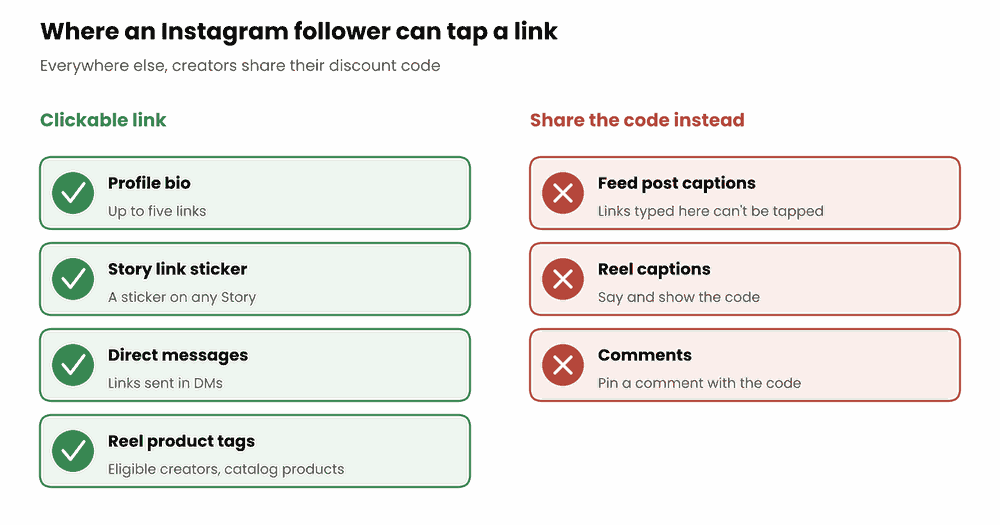
Instagram limits where links can go, so creators need to promote you differently in each place.
| Place | Clickable link? | What creators do instead |
|---|---|---|
| Profile bio | Yes, up to five links | Add your store link, or their own landing page |
| Story | Yes, with the link sticker | Add their referral link to a sticker on each Story |
| Feed post caption | No | Put the discount code in the caption |
| Reel caption | No | Say the code in the video and show it on screen |
| Comments | No | Pin a comment with the code |
| Direct messages | Yes | Send the link to followers who ask |
| Reel product tags | Yes, for eligible creators | Tag catalog products (see above) |
Instagram opened the link sticker to all accounts in October 2021. New accounts and accounts that break Instagram’s rules can’t use it.
Why Discount Codes Work Well on Instagram
Most Instagram content can’t carry a working link, but a code works anywhere a follower can read or hear it. A few other things help codes on Instagram:
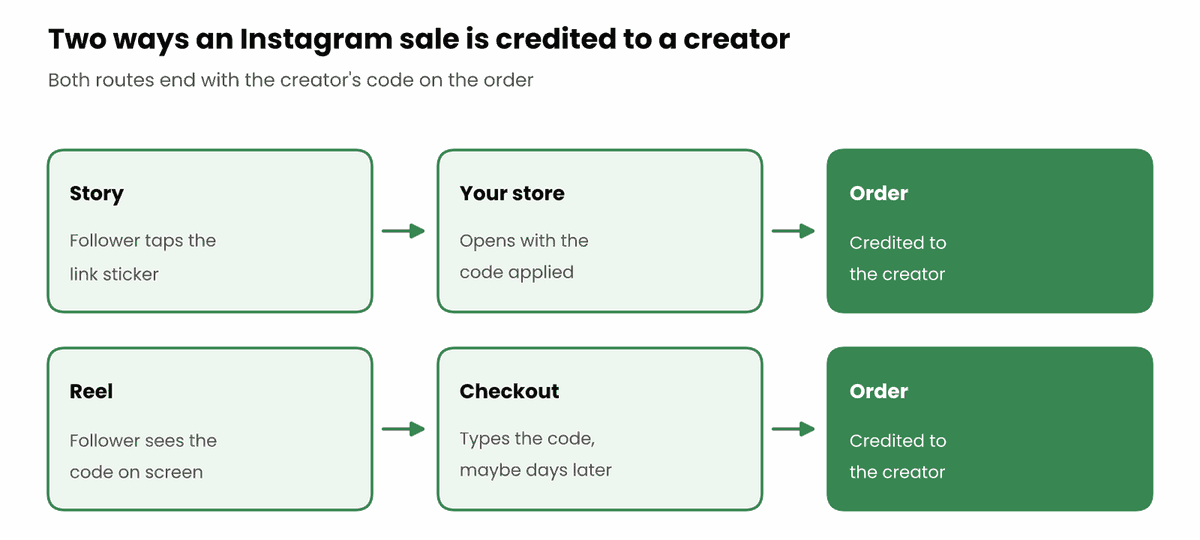
- Shoppers buy later. Someone sees a Reel on their phone in the evening and buys on their laptop at the weekend. The code still works. A referral link only helps if they tap it first.
- Links open inside Instagram. Tapping a link opens Instagram’s in-app browser. If the shopper leaves and buys in Safari or Chrome later, the referral cookie from that first visit isn’t there. A typed code still counts.
- People screenshot Stories. A code on screen gets saved and used days after the Story has gone.
- Followers get money off. The discount is a reason to buy now, and it gives the creator something specific to offer.
Links are still useful in bios, Story stickers and DMs. A good setup gives each creator both: a referral link that applies their code automatically, and the code itself for everything else. Our guide to cookieless affiliate tracking covers how code-based tracking works in more detail.
How to Run an Instagram Affiliate Program
These steps are specific to Instagram. For the wider picture of working with creators on any platform, see our guide to influencer affiliate marketing.
1. Pick creators whose followers buy what you sell
Follower count matters less than who the followers are. Look at a creator’s comments and Story replies to see whether their audience asks about products, prices and where to buy. A smaller account in a specific niche can be a better fit than a large general account. Your own customers who post on Instagram are worth inviting too.
Ask applicants for their Instagram handle and how they plan to promote you, so you can check their account before you approve them.
2. Give each creator their own code
Every creator needs a code that is theirs alone, so each sale goes to the right person. Short, readable codes work best on Instagram because people see them for a few seconds in a Story or Reel. A creator’s name plus the discount, like MAYA15, is easy to remember and easy to say out loud. For more ideas, see our list of catchy discount code ideas.
3. Give them a link for their bio and Stories
Give each creator a referral link that opens your store with their code already applied (WooCommerce can do this with URL coupons). A short link is easier to fit in a bio. You can also give each creator their own landing page with their name and code on it, which works well as the link in their bio. Our guide to building affiliate landing pages shows how.
4. Brief them on the formats that sell
Tell creators what you’d like them to post, and leave the style to them. Posts in their own words match the rest of their content. Formats that work on Instagram include:
- Story sequences showing the product in use, with a link sticker on the last Story.
- Reels with the code said out loud and shown on screen.
- Carousels comparing products or showing how to use one, with the code in the caption.
- Saved Story highlights, so the code and link stay on their profile after the Stories expire.
Send them good photos and short clips they can use. Our guide to affiliate creatives covers what to include.
5. Track each creator and each placement
With one code per creator, you can see who made each sale. To see which placement worked, add a campaign tag to the creator’s links, so bio clicks and Story clicks show up separately. Check results monthly and talk to creators about what’s working. Our guide to WooCommerce coupon tracking explains how to read the numbers.
6. Pay commission after the return window
Some orders get returned, especially in fashion. Wait until your return window has closed before paying commission on an order, and take commission off refunded orders. Our guide to refunds and clawbacks covers how to set that up, and our guide to affiliate commission rates helps you pick a rate.
Disclosure Rules for Instagram Affiliates
Creators who earn commission from your store have to tell their followers. In the US, the FTC’s Disclosures 101 for Social Media Influencers guide says to disclose the relationship if a creator got anything of value for mentioning a product. On Instagram Stories, it says to put the disclosure over the picture, not only in a profile or mixed in with hashtags. It also says not to assume a platform’s own disclosure tool is enough on its own.
In the UK, the ASA’s influencer guide says an ad must be obviously identifiable, and the ASA has ruled against posts with discount codes that didn’t make this clear. Labeling the post with “Ad” or “#ad” at the start is the safest choice.
In practice, ask your creators to:
- Start the caption or Story with “Ad” or “#ad”.
- Use Instagram’s “Paid partnership” label as well, not instead.
- Mention that they earn from sales made with their code.
Put these rules in your affiliate terms, and check posts from time to time. This is general guidance, not legal advice, so check the rules for the countries you sell in.
Setting It Up in WooCommerce
WooCommerce doesn’t track affiliates on its own, so you need an affiliate plugin. Here’s how the steps above work in Coupon Affiliates. Features marked PRO need the paid version.
Let creators apply with their own code
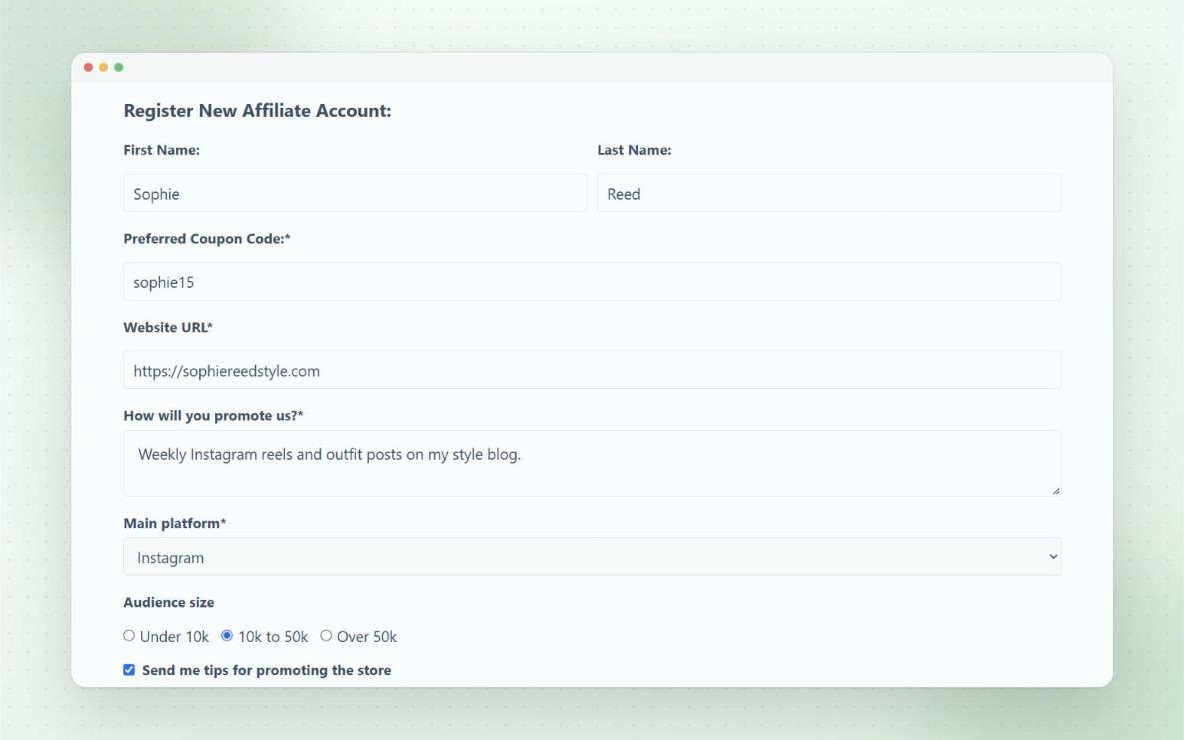
Add the affiliate registration form to a page and link to it from your Instagram bio. Applicants pick their preferred code, and when you approve them, their coupon is created from a template coupon with your discount and commission settings. With PRO, you can add custom fields to the form, such as their Instagram handle and audience size.
Track bio and Story clicks separately (PRO)
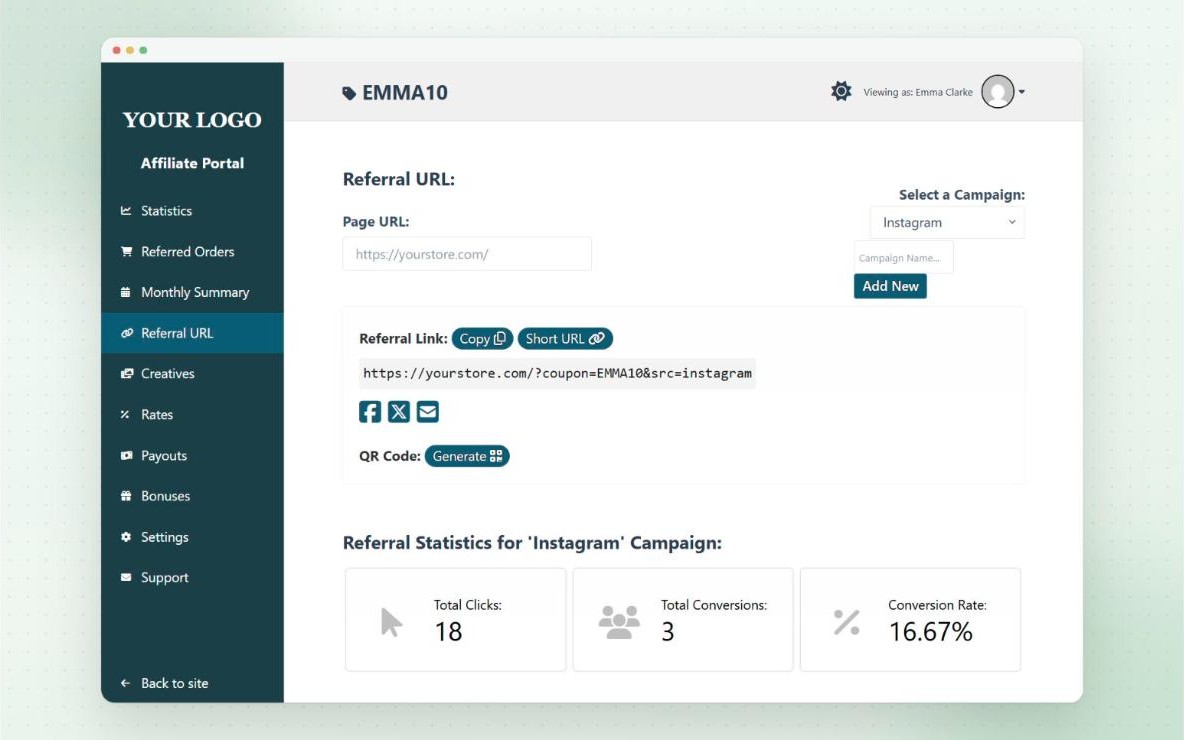
Creators can make a campaign for each place they share their link, such as their bio or a Story series. Each campaign gets its own link with its own clicks, conversions and conversion rate.
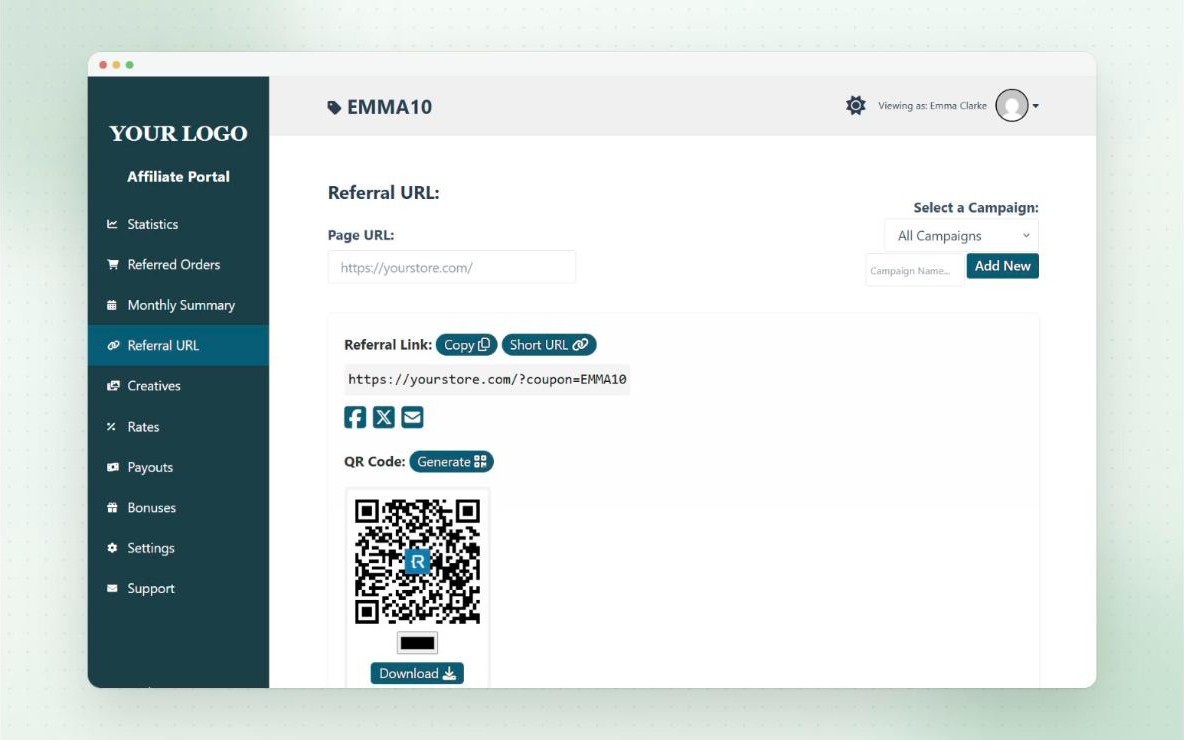
Short links and QR codes (PRO)
Creators can turn any referral link into a short link on your own domain, which fits better in a bio or link sticker. They can also make a QR code, which is handy on screen in a Story or Reel.
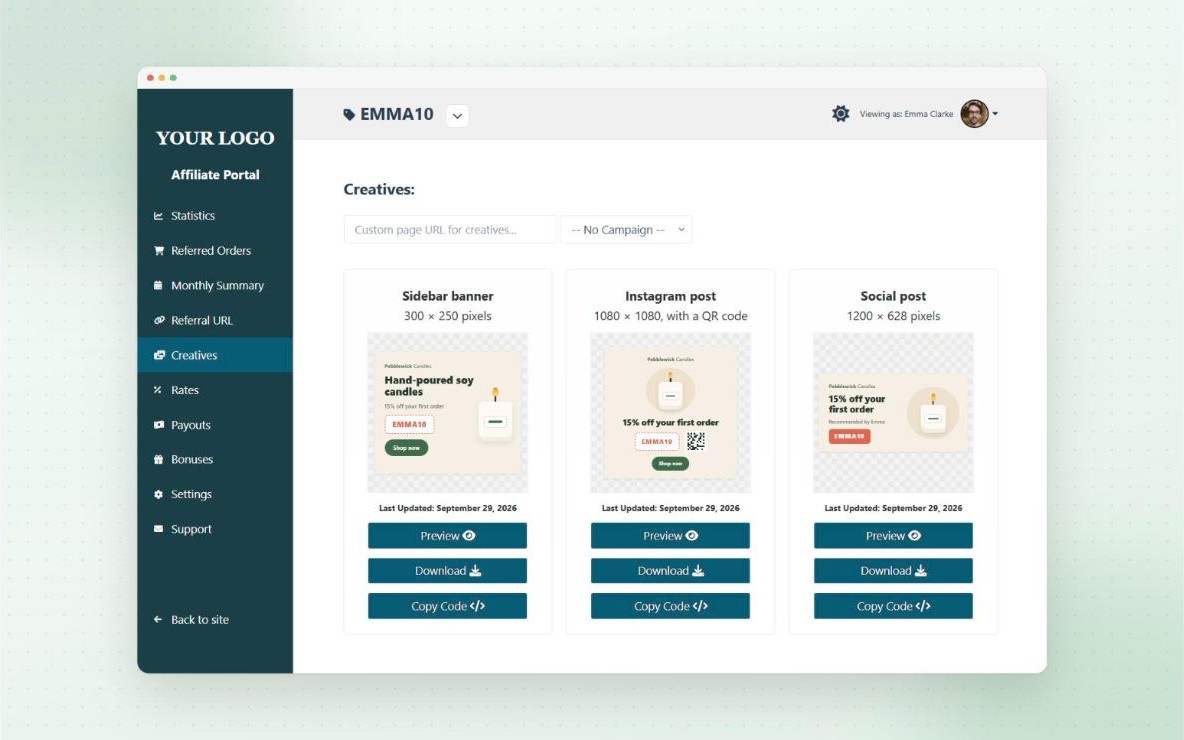
Ready-made Instagram posts (PRO)
Dynamic creatives let you design a post once, and every creator gets their own copy with their code and a QR code of their link. They can download it and post it straight away.
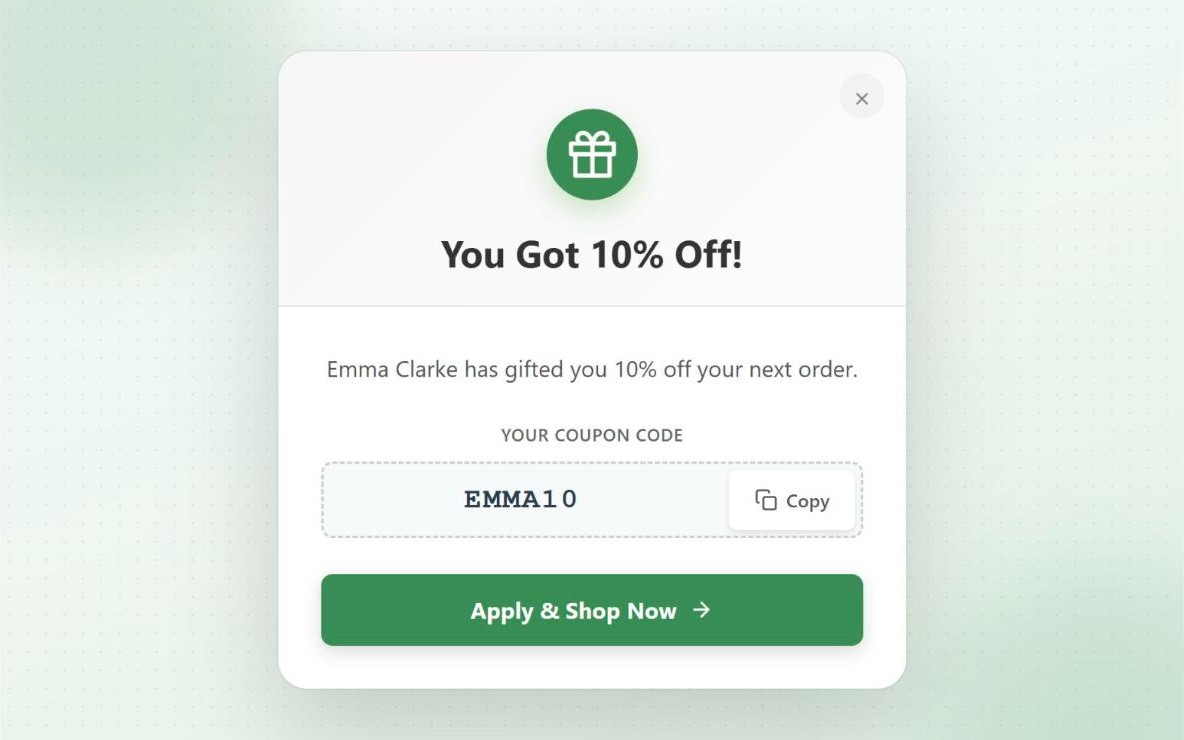
Welcome visitors from a creator (PRO)
When someone arrives through a creator’s link, a popup can show the discount, the code and the creator’s name. It tells the shopper the discount is real, and that they came from the creator they follow.
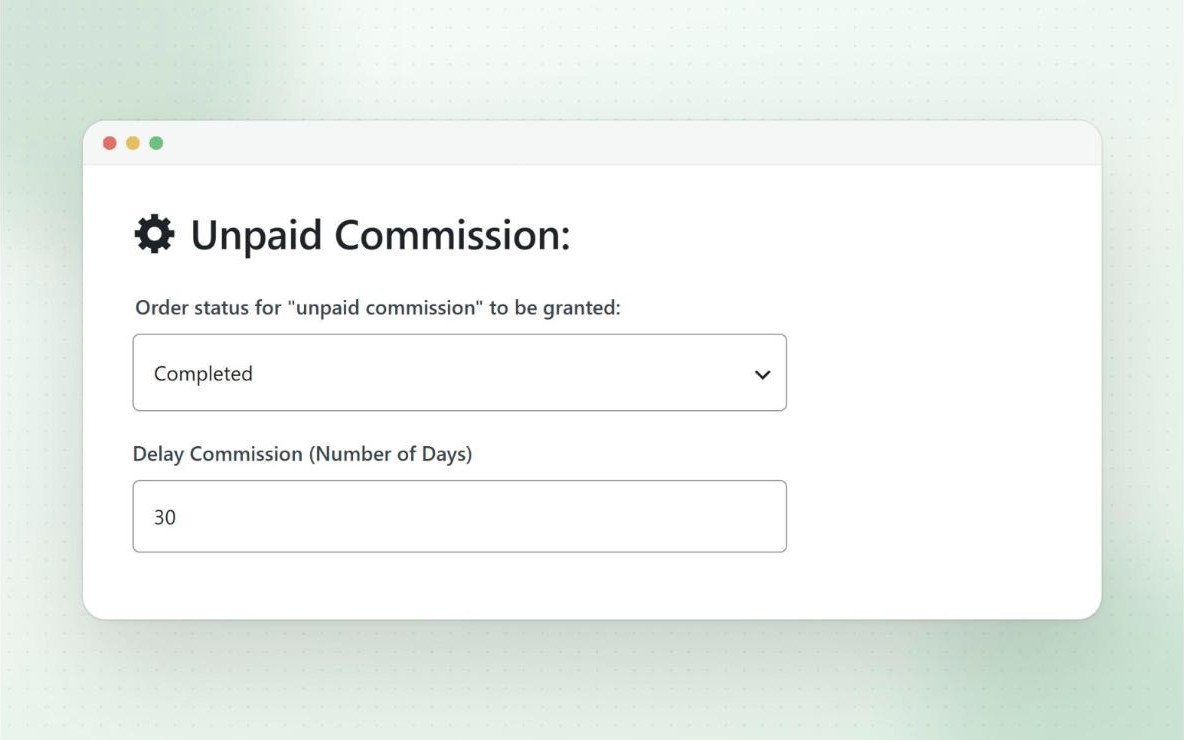
Pay after the return window (PRO)
You can delay commission by a set number of days after an order completes, and commission is removed if the order is refunded. Payouts through PayPal, Stripe, Wise or store credit also need PRO. On the free version, you pay creators outside the plugin.
What it doesn’t do for Instagram: Coupon Affiliates doesn’t connect to Instagram’s product tags, and it can’t show a creator’s reach, views or likes. You only see clicks on their links and the orders placed with their code on your store. For Instagram stats, you’ll still need the creator’s own insights.
Pricing: the free version is on WordPress.org. PRO costs $23.99 a month, $179.99 a year or $599.99 once for one site, with 25% off your first payment at the time of writing. There’s a 7-day free trial and a 14-day money-back guarantee. See our pricing page for current prices, or how Coupon Affiliates works for influencer programs.
Mistakes to Avoid
- Giving several creators the same code. You can’t tell who made the sale, and nobody gets paid fairly.
- Letting a code spread to coupon sites. Popular codes end up on coupon websites, and you pay commission on shoppers the creator never reached. Limit codes to new customers or one use per customer, and see our guide to coupon abuse and fraud.
- Asking for feed posts only. Stories have the link sticker, and Reels reach people who don’t follow the creator yet. A feed post alone misses both.
- Paying before returns come in. Commission paid on a returned order is hard to get back.
- Writing the captions for them. A scripted caption sounds different from the rest of the creator’s posts.
Frequently Asked Questions
Do I need Instagram Shopping to run an Instagram affiliate program?
No. Your own program only needs an affiliate plugin on your store. Creators share codes and links, and the orders happen on your website. You only need a Meta product catalog if you want creators to use Instagram’s own product tags.
Can I use Instagram’s affiliate tags with WooCommerce?
Creators can only tag products in a Meta commerce catalog. The Facebook for WooCommerce plugin syncs WooCommerce products to Meta, but the affiliate tags are still rolling out by country, so check what’s available in your Meta business account.
Should Instagram creators share codes or links?
Both. Codes work in captions, Reels, Lives and anywhere a link can’t be clicked. Links work in bios, Story stickers and DMs. A referral link that applies the creator’s code automatically covers both cases.
Are small Instagram accounts worth working with?
Often, yes. A small account in your exact niche can be a better fit than a large general one. Since you only pay commission on sales, there’s little risk in approving them.
What commission should I pay Instagram creators?
There’s no standard rate. Work back from your margin, then decide whether you also need to pay a fee for the post itself. Our guide to affiliate commission rates walks through it.
Do creators have to disclose affiliate codes on Instagram?
Yes. In the US and UK, a creator who earns from a code has to make that clear. Ask them to start with “Ad” or “#ad” and use the “Paid partnership” label as well.
Our Take
Instagram makes links hard to share, so you’ll track most creator sales through codes. Give every creator their own code and a link for their bio and Stories, pay commission after returns have cleared, and make sure they label their posts. Instagram’s new affiliate tags may help Reels shoppers, but they only cover catalog products in some countries, while a code works in every post.
We’re biased, since we make a coupon-based plugin. If your creators post mostly on Instagram, though, a code-first setup will credit them for more of the sales they make. If you’d like to try it, the free version of Coupon Affiliates covers codes, referral links and the affiliate dashboard.

Elliot Sowersby is a WordPress developer from Yorkshire, United Kingdom. He is the founder and lead developer of Coupon Affiliates and RelyWP.
Leave a Reply