
The short answer: affiliate traffic usually converts at somewhere between 1% and 3% of clicks, but the more useful benchmark is your own store’s average. To raise it, first make sure every affiliate sale is actually being tracked. Then send visitors to a page that matches what the affiliate promoted, and apply their discount for them.
This guide is for store owners running their own affiliate program. “Conversion rate” here means the share of clicks on your affiliates’ referral links that turn into an order. If you’re trying to get more people to sign up as affiliates instead, our guides to building an affiliate signup page and recruiting affiliates cover that.
Disclosure: we make Coupon Affiliates, a WooCommerce affiliate plugin. Some of the fixes below mention its features, but most of them work whatever you use to run your program.
In this guide
- What’s a good affiliate conversion rate?
- Check you’re counting every sale first
- Send clicks to the right page
- Apply the discount for them
- Fix what makes people leave at checkout
- Help affiliates promote what sells
- Compare conversion rates by affiliate
- FAQ
What’s a good affiliate conversion rate?
Here’s the formula:
Affiliate conversion rate = orders from referral links ÷ referral link clicks × 100
So 40 orders from 2,000 clicks is a 2% conversion rate.
For a rough benchmark, Jerrid Grimm of impact.com is quoted in a Shopify article saying that “conversion rates in the affiliate channel vary from 1% to 3%.” For comparison, IRP Commerce’s market data put the average conversion rate for UK and Irish online retailers on its platform at 2.23% in August 2026, counting all traffic rather than affiliate traffic alone.
Treat both as loose reference points. A more useful test is your own store: if affiliate visitors convert well below your normal visitors, something between the click and the checkout isn’t working. What’s normal also depends on the affiliate. A coupon site sends people who were already about to buy, so its rate can look high. Someone clicking from a blog review or a YouTube description is often earlier in the decision and converts less often, even when they’re good customers in the end.
Conversion rate is one of several numbers to track together. Our guide to affiliate marketing KPIs covers the others, like cost of sale and new-customer share.
Check you’re counting every sale first
Sometimes a low conversion rate turns out to be a tracking problem. Before changing anything on your site, make sure the orders are being credited.
Referral links usually work by storing a cookie when someone clicks, then matching the order to that cookie at checkout. A few common setups can stop that cookie from being saved:
- Cookie consent banners. If a visitor browses away from the first page before accepting cookies, the referral may never be stored.
- Edge caching. Services like Cloudflare APO can serve a cached page without running the code that sets the cookie.
- Cookie stripping on some hosts. A few LiteSpeed-based hosts remove cookies from server responses unless you ask them to allow the plugin’s cookies.
The quickest check is to click one of your own referral links in a private browser window, place a test order, and see whether it’s credited to the right affiliate. Our privacy and cookie settings doc goes through each of these setups and the fixes. By default, Coupon Affiliates also keeps a backup of the referral in the WooCommerce session, so the coupon can still be applied during that visit if the cookie is blocked. That backup doesn’t cover click tracking, though, so fixing the cookie itself still matters.
Browser privacy changes matter less than you might expect here. Referral cookies are set on your own domain, which Safari and Firefox’s tracking protections usually leave alone. And Google said in April 2025 that it would not be “rolling out a new standalone prompt for third-party cookies” in Chrome, keeping its existing settings instead of phasing them out.
If your program uses coupon codes, keep one more thing in mind. People who type an affiliate’s code at checkout without clicking a link are real affiliate sales, but they never show up as clicks. Count them in affiliate revenue, and leave them out of the conversion rate so it isn’t inflated.
Send clicks to the right page
If an affiliate posts about your running shoes and their link drops people on your homepage, most of those visitors have to go looking for the product. Some won’t bother.
The fix is to make the page match the promotion. Encourage affiliates to link to the product or category they’re talking about, not your homepage. With Coupon Affiliates, affiliates can generate a referral link for any page on your site from their dashboard, so this takes them seconds.
For bigger partners, a dedicated landing page goes further. It can use the affiliate’s name, repeat their discount, and show the products their audience cares about. The PRO affiliate landing pages feature links a page to an affiliate’s coupon so it works like a referral link. Dynamic landing pages (also PRO) go a step further and build a personalized page for every affiliate from one template, filling in details like “{affiliate_name}” and “{affiliate_discount}”. Our guide to building affiliate landing pages automatically walks through the setup.
Whatever page they land on, check it on a phone. A lot of affiliate traffic comes from social apps and email, so the mobile version is often the one that counts.
Apply the discount for them
An affiliate’s discount is often the reason someone clicked. If they then have to remember a code and find the coupon field at checkout, you’ve added a step where they can get distracted or give up.
Two things help:
- Apply the coupon automatically. In Coupon Affiliates, referral links can apply the affiliate’s coupon automatically at checkout, with an option to apply it on the first page they visit instead. This is in the free version.
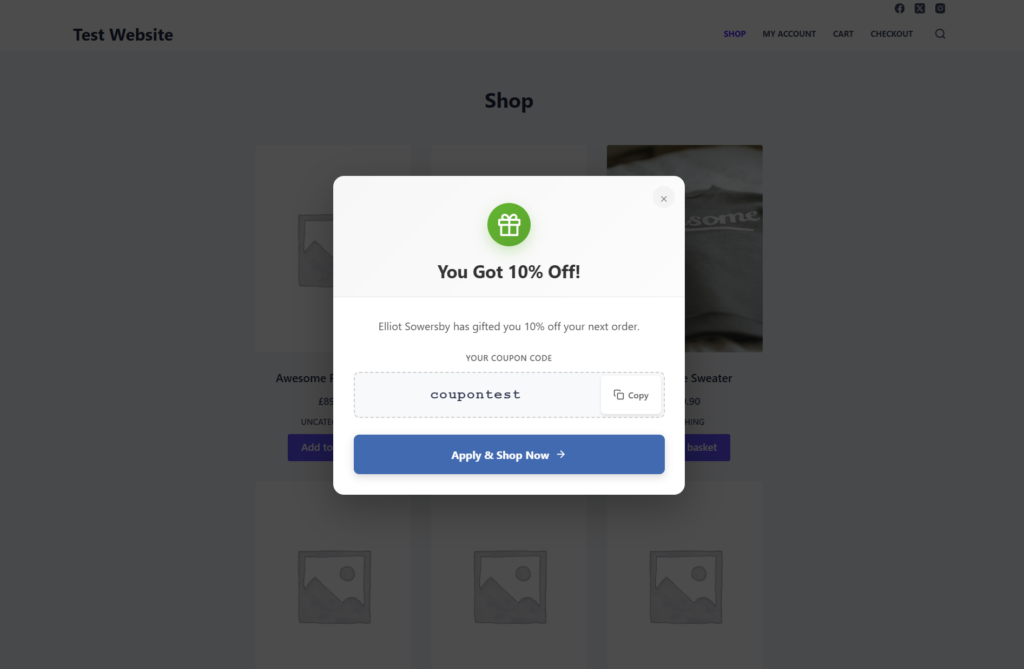
- Tell them it’s been applied. A visitor who knows they’re getting 10% off is more likely to keep browsing. The referral welcome popup (PRO) greets people arriving from a referral link with the affiliate’s name, the discount and the code. You can show it as a popup, a bar at the top or bottom of the page, or a small widget in a corner or on the side.
Fix what makes people leave at checkout
Affiliate visitors abandon carts for the same reasons as everyone else. In Baymard Institute’s checkout research, leaving aside people who were just browsing, the most common reason US online shoppers gave for abandoning an order was extra costs being too high (40%). Being made to create an account (18%) and a long or complicated checkout (17%) were also on the list.
For a WooCommerce store, that usually means:
- Showing shipping costs before checkout, on the product or cart page.
- Allowing guest checkout.
- Cutting checkout fields you don’t need.
- Offering the payment methods your customers expect, such as PayPal or Apple Pay.
These changes help every visitor. They matter more for affiliate traffic, because many of those visitors are buying from you for the first time.
Help affiliates promote what sells
Affiliates can only guess which products convert unless you tell them. You can see it in your orders; they can’t. Share it:
- Tell them what’s selling. Your best-selling products and best-converting pages make good content for an affiliate newsletter.
- Give them creatives with the code already on. Banners that show the affiliate’s own code and discount do some of the selling before the click. Coupon Affiliates PRO can generate these for each affiliate with dynamic creatives, and our guide to making creatives for affiliates has design tips.
- Campaign links for testing. With referral campaigns (PRO), an affiliate can create a separate link for each post or video and see the clicks and conversion rate for each one. That shows them which content to make more of.
Recruiting also affects conversion. An affiliate whose audience already buys what you sell will convert better than a bigger one whose followers don’t. Our guide to types of affiliates covers which kinds suit which stores.
Compare conversion rates by affiliate
One program-wide conversion rate hides a lot. Look at it per affiliate and per traffic source instead, and the problems (and the partners worth investing in) show up quickly.
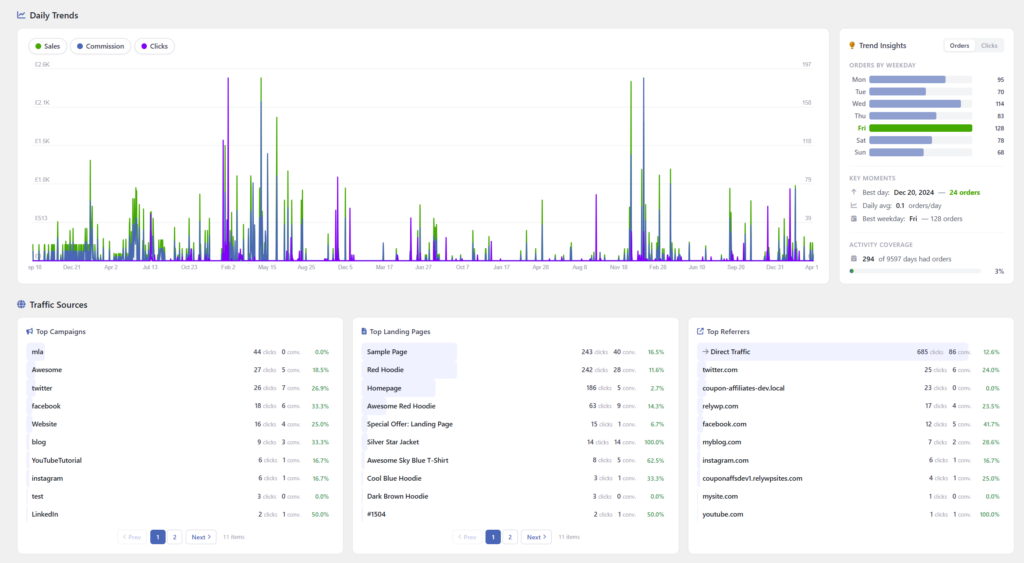
In Coupon Affiliates, the admin reports show clicks, conversions and conversion rate for any date range (up to the last 3 months in the free version). They also list your top landing pages and referring sites, plus top campaigns in PRO, with clicks and conversions for each. The report’s advanced filters can also narrow it down to affiliate coupons with a conversion rate above or below a value you choose.
Some patterns to look for:
- Lots of clicks, almost no orders. Usually the audience isn’t a match for the product, or the link goes to the wrong page. Occasionally it’s low-quality or incentivized traffic, which the fraud prevention settings can help with.
- A conversion rate that looks too good. Often a coupon code that has leaked onto deal sites and is being used by customers who were already checking out. Check the new-customer share for that code, and see our guide to coupon abuse and fraud.
- A good rate on low traffic. A small affiliate who converts well is someone to talk to. They may be able to send more of the same visitors with a bit of support or a better offer.
Frequently asked questions
What is a good conversion rate for affiliate marketing?
Jerrid Grimm of impact.com has put the typical range at 1% to 3% of affiliate clicks. The better comparison is your own store’s overall conversion rate. If affiliate traffic converts well below it, look at landing pages, tracking and audience fit.
How do you calculate affiliate conversion rate?
Divide the number of orders that came through referral links by the number of referral link clicks, then multiply by 100. Leave out orders where a customer typed a code without clicking a link, since those have no click to count against.
Why is my affiliate conversion rate low?
The usual causes are sales that aren’t being tracked, links that go to the homepage instead of the promoted product, a discount the visitor has to apply themselves, and affiliates whose audience doesn’t match what you sell. Check tracking first, because it’s the quickest to rule out.
Does a bigger discount improve affiliate conversion rates?
It can, but it costs you on every order, including ones that would have happened anyway. Try making the existing discount easier to use first, with auto-applied coupons and a clear message on arrival, before raising it.
Is this the same as the conversion rate for affiliate sign-ups?
No. That’s the share of visitors to your affiliate page who apply to join. For that, see our guide to affiliate signup pages.
PS: Want to see which affiliates convert, and apply their discounts automatically? Coupon Affiliates runs your affiliate program inside WooCommerce, with coupon and referral link tracking built in. Start with the free version, or try PRO with a 7-day free trial.

Bill Ricardi is a former Silicon Valley sysadmin, and uTest’s 2010 Performance Tester of the Year. He was test manager for Deloitte before becoming a full time author in 2017, and is also a regular contributor to the Coupon Affiliates blog.
Leave a Reply