Skip to content
Coupon Affiliates
  • Features
  • Pricing
  • Testimonials
  • Support
    • Support Ticket
    • Sales Support
    • Documentation
    • Roadmap
    • Feature Request
    • Changelog
    • Plugin Demo
    • Account
  • Contact Us
  • Blog
  • Trusted by 5800+ businesses to power their affiliate program.
  • Try for free
Coupon Affiliates

Plugin Documentation

Setup

4
  • Setup Guide – How to get started!
  • How to install the Coupon Affiliates Plugin
  • How to assign users to coupons.
  • Shortcodes

Commission + Payouts

34
  • (PRO) Commission Tracking and Payouts
  • Flexible Commission Settings
  • Set custom commission per affiliate / coupon.
  • Set custom commission per product
  • Set custom commission per user role.
  • Set per-affiliate product-level commission rates.
  • Set a custom referrer for orders.
  • (PRO) Invoices
  • (PRO) Statements
  • (PRO) Scheduled Payout Requests
  • (PRO) Automatic Payouts
  • (PRO) Payouts – How to Pay Affiliates
  • (PRO) Lifetime Commission
  • (PRO) User Registrations as Lifetime Referral
  • (PRO) User-Role Specific Payout Methods
  • Maximum Commission Per Order
  • Hide Commission for Non-Affiliate Coupons.
  • How to edit an affiliates “unpaid commission”?
  • How to grant “unpaid commission” for past completed orders which are still unpaid
  • Manual Admin Payouts Requests
  • (FREE) How to pay affiliates with the FREE version.
  • Never update the saved “commission” value for past orders.
  • Unpaid Commission is “0” even though there are referred orders.
  • Method: Wise Payouts - Bank Transfer
    • (PRO) Wise Payouts: Bank Transfer
  • Method: PayPal Payouts
    • (PRO) PayPal Payouts
    • (PRO) PayPal Payouts – Setup
    • (PRO) PayPal Payouts – Error Messages
  • Method: Stripe Payouts
    • (PRO) Stripe Payouts
    • (PRO) Stripe Payouts – Setup Guide
    • (PRO) Stripe Payouts – Standard vs Express
  • Method: Store Credit
    • (PRO) Store Credit Payouts
    • (PRO) Store Credit Payouts – Integrations
  • Method: Manual Bank Transfer
    • (PRO) Bank Transfer Payouts
  • Method: Manual Payout Solution
    • (PRO) Manual Payouts for Custom Payment Solutions

Affiliate Dashboard

10
  • Affiliate Portal
  • Affiliate Dashboard Statistics
  • Floating Affiliate Widget
  • Recent Orders Table
  • (PRO) Monthly Summary Table
  • (PRO) Export to Excel
  • (PRO) Line Graphs
  • (PRO) Product Rates Table
  • (PRO) Custom Tabs
  • Re-Ordering Dashboard/Portal Menu Links

Referral URLs

14
  • Referral URLs
  • Referral URL Click History (Visits)
  • (PRO) Referral URL Campaigns
  • (PRO) Creatives
  • (PRO) Dynamic Creatives
  • (PRO) Affiliate Landing Pages
  • (PRO) Dynamic Landing Pages
  • (PRO) Social Sharing for Referral URLs
  • (PRO) Short URL Generator for Referral URLs
  • (PRO) QR Code Generator for Referral URLs
  • (PRO) Referral Welcome Popups
  • (PRO) Direct Link Tracking
  • Tracking URL Conversions Without Coupon
  • Referral Links: Attribution Model – Last-Click or First-Click

Affiliate Registration

12
  • Affiliate Registration
  • Create Affiliate Registrations Manually
  • Template Coupon Code
  • Registration Form CAPTCHA (Spam Prevention)
  • (PRO) Dynamic Coupon Generation
  • (PRO) Multiple Template Coupons
  • (PRO) Custom Fields for Affiliate Registration
  • (PRO) Automatically Accept Affiliate Registrations
  • (PRO) Auto Affiliate Registration for New Users
  • How to Prevent Spam Submissions on Your Affiliate Registration Form
  • (PRO) Affiliate Registration on Checkout
  • Mailing List Integrations

Reporting

2
  • Admin Reports & Analytics
  • (PRO) Affiliate Email Reports

Multi-Level Affiliates

10
  • Multi-Level Affiliates – Overview
  • (PRO) MLA – How to edit a user’s parents
  • (PRO) MLA – How to edit the MLA “unpaid commission” for a parent
  • (PRO) MLA – Make MLA invite links a normal referral link.
  • (PRO) MLA – Make MLA Dashboard “Invite Only”
  • (PRO) MLA – Auto-assign referred customers as an MLA sub-affiliate.
  • “MLA Users” Admin Page
  • “Rates” Tab on the MLA Dashboard
  • Per-Group & Per-User MLA Commission Rates
  • Sub-Affiliate Registrations on the MLA Dashboard

Integrations

7
  • WooCommerce – Integration Guide
  • LifterLMS – Integration Guide
  • LearnDash – Integration Guide
  • TutorLMS – Integration Guide
  • MemberPress – Integration Guide
  • Paid Memberships Pro – Integration Guide
  • (PRO) Store Credit Payouts – Integrations

Admin Tools

10
  • View and Manage Affiliate Users
  • Import/Export Custom Tables
  • Bulk Create: Affiliate Coupons
  • Bulk Assign: Coupons to Orders
  • Bulk Edit: Product Settings
  • Bulk Edit: Coupon Settings
  • Signup Promo Page Generator
  • Affiliate Terms of Use Generator
  • Export affiliate users to a CSV file
  • Admin Notifications

Other Features

17
  • SMS Notifications
  • Affiliate Groups
  • (PRO) Performance Bonuses
  • (PRO) Affiliate Leaderboards
  • Affiliate Fraud Prevention Features
  • Affiliate Email Newsletters
  • Email Notifications
  • Multi-Currency Support & Setup
  • (PRO) Automated Conversion Rates
  • Admin – List of all ‘Affiliate Dashboard’ Links
  • Admin – Assign affiliate users to coupons
  • Limit coupons to new customers only (first order)
  • Subscriptions (Recurring Referrals)
  • Tax/VAT Calculations
  • Vanity Coupon Codes
  • Show “Affiliate” link on “My Account” Page
  • Automatically send emails when affiliates reach certain goals

General Questions + Help

39
  • How do I get support?
  • Translations & Localization
  • How to refresh statistics for past orders
  • Select which order statuses to show on the affiliate dashboard
  • How to “Quick Edit” your WooCommerce Coupon Codes
  • How to manually assign referral coupons to “completed” orders
  • Set additional email addresses for affiliate notifications.
  • Set the coupon history start date
  • How to customise the email templates
  • My PRO features and settings are not showing. How do I fix this?
  • How do I only show “completed” orders on affiliate dashboard?
  • How do I change commission rates for new orders only?
  • How do I apply custom tax adjustments to stats and commission?
  • How do I include or exclude tax/VAT from stats and commission?
  • What happens when an order is refunded or partially refunded?
  • Are shipping costs excluded from stats and calcuations?
  • How can I prevent the calculated commission for past orders from changing if I update commission rates?
  • Can I assign affiliate users to multiple coupons?
  • How do I manually connect an affiliate to an existing customer as a lifetime affiliate?
  • Custom Terminology: Change the “Affiliate” text to say something else such as “Refer a Friend”.
  • Can I use this plugin for coupon marketing campaigns?
  • How to migrate from other affiliate plugins?
  • How to Delete A WordPress User
  • How to Remove an Affiliate User
  • How to migrate my data to a new website?
  • Will more features be added in the future?
  • What’s the difference between Yearly and Lifetime plan?
  • Using One License for Live / Production, Staging, Dev and Localhost Sites
  • Users can not login after their affiliate registration is accepted.
  • Does the plugin work with WooCommerce High-Performance Order Storage?
  • How to Check if Cron Jobs are Working in WordPress
  • Replace WP-Cron with a Real Cron Job
  • Limit WooCommerce coupons to only be used on certain products
  • Apply coupon field is not showing on cart / checkout
  • How to join the beta program.
  • Do you have a demo site where I can try the PRO version?
  • My PRO version will not activate, it stays on the free version.
  • Using One License for Live & Staging Sites
  • Switch PRO license to another website or domain

Errors and Issues

17
  • Website being attacked by fake users? How to stop it and bulk delete them.
  • Why referral links / URLs may not work, and how to fix them.
  • Referral links redirect to blog/posts page
  • My email notifications are not working. How do I fix this?
  • Short URLs are not working, how do I fix them?
  • Affiliate dashboard is not showing, or it doesn’t stop saying “loading”. How do I fix this?
  • The stats/content isn’t loading on my dashboard. How can I fix this?
  • How to fix empty admin reports (showing as “0”).
  • Hosted with Cloudways? How to fix ajax loading error on affiliate dashboard.
  • How to fix “ERROR: Failed to load ajax request.”
  • How to Fix “404 Error on Posts or Pages” in WordPress
  • Dashboard link is showing a 404 error?
  • WooCommerce password reset link shows “page not found”.
  • How to fix “Invalid Post Type” error.
  • How to Increase “PHP Time Limit” on a WordPress Site
  • How to increase PHP “Max Input Vars” Limit
  • How to Check WP_DEBUG Logs in WordPress

Developers

3
  • Developers: Code Snippets & Resources
  • How to auto-apply coupon when a certain product is in WooCommerce cart (Function)
  • Disable the “Custom Commission Per Coupon, Product and User” features for certain admins (Function)
  • Home
  • Docs
  • Other Features
  • SMS Notifications
View Categories

SMS Notifications

4 min read

SMS Notifications lets you send automatic text messages to affiliates and site admins when key events happen – such as a new referral sale, a payout being processed, or a registration being approved.

Messages are sent via Twilio, a third-party SMS delivery service.

You connect your Twilio account to the plugin by entering your API credentials in the settings.

Affiliates can:

  • Receive instant SMS alerts for their own account affiliate activity
  • Enter their phone number from their dashboard
  • Opt out of SMS notifications at any time (if you allow it)
  • Provide their phone number when registering (if the registration field is enabled)

As the site admin, you can:

  • Choose exactly which events trigger an SMS (per-event toggles)
  • Customise the message template for each event
  • Receive your own admin SMS alerts on a separate phone number

Pricing:

You can view the pricing for Twilio SMS here: https://www.twilio.com/en-us/sms/pricing/us/


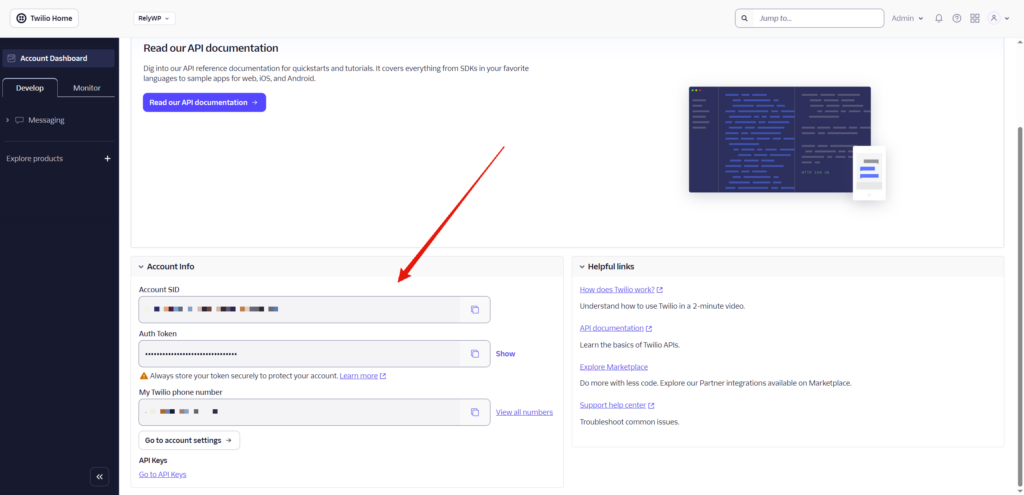
1. Get Your Twilio Credentials

  1. Log in to console.twilio.com
  2. From the dashboard, copy your:
    • Account SID
    • Auth Token
  3. Go to Phone Numbers → Manage → Active Numbers and note your Twilio phone number (e.g. +12345678901)
    • If you don’t have one yet, click Get a phone number (free on trial)
  4. Setup your billing details and credit notifications
2. Configure the Plugin

Go to Coupon Affiliates > Settings > PRO Modules and enable “SMS Notifications”.

Then go to the “SMS Notifications” settings tab.

FieldValue
Enable SMS NotificationsToggle on
Twilio Account SIDPaste from Twilio console
Twilio Auth TokenPaste from Twilio console
Twilio “From” NumberYour Twilio number in E.164 format, e.g. +12345678901

Once filled in, use the Send Test SMS button – enter any phone number and click it to confirm messages are delivering before enabling live events.


3. Affiliate Controls

Still on the SMS settings page, under Affiliate Controls:

OptionDescription
Show “SMS Phone Number” field on dashboardAffiliates can enter their own phone number in their dashboard Settings tab
Allow affiliates to opt outAdds an opt-out checkbox on the affiliate dashboard Settings tab
Show “Phone Number” field on registration formAdds a phone field to the affiliate sign-up form – the number is saved automatically and used for SMS. This setting is synced with Registration > Extra Fields > “Phone Number” Field

Phone number priority: If an affiliate has entered a number in their dashboard settings SMS field, that is used. If not, the number from their Account Details (or registration form) is used as a fallback.


4. Notification Events (Affiliate)

Under SMS Notification Events (Affiliate), enable any combination of the following.

Each has its own toggle and a customisable message template:

EventTrigger
New Referral SaleFires when an order is placed using the affiliate’s coupon
Referred Order Cancelled / RefundedFires when a completed referred order is cancelled, refunded, or failed
Commission Payout PaidFires when an admin marks a payout as paid
Affiliate Registration ApprovedFires when an admin approves an affiliate application
Payout Request SubmittedFires when an affiliate submits a payout request

Message Templates & Merge Tags

Each event has a default message. You can customise the text and use any of these merge tags:

TagReplaced with
{name}Affiliate’s display name
{coupon}Affiliate’s coupon code
{commission}Commission amount earned
{id}Order or payout ID
{amount}Payout amount
{status}New order status (cancelled/refunded/failed)
{site_name}Your site name

5. Notification Events (Admin)

Under SMS Notification Events (Admin), enter an Admin Phone Number (E.164 format) and enable any events to receive admin alerts. The same 5 affiliate events are available, plus:

EventTrigger
New Affiliate RegistrationFires when any new affiliate application is submitted

Admin messages have the same merge tags available, plus {email} (affiliate’s email address) on the registration event.


6. Registration Form Phone Field

To collect affiliate phone numbers at sign-up:

  1. Go to Settings > Registration > Extra Fields
  2. Enable “Phone Number” Field
  3. Optionally set a custom label and mark it as Required

The submitted number is saved to the affiliate’s profile and automatically used as their SMS number.


7. Affiliate Experience

Dashboard Settings tab (if the phone field is enabled):

  • Affiliates see a Phone Number for SMS Notifications field – they enter their number in international format, e.g. +12345678901
  • If opt-out is enabled, they also see an Opt out of SMS notifications checkbox

Registration form (if the registration phone field is enabled):

  • A phone number field appears on the sign-up form
  • The number is saved on registration and immediately available for SMS triggers

Need help with something?

Create a support ticket >>
What are your Feelings

Increase your revenue with the #1 coupon-based affiliate plugin for WooCommerce... risk-free!

7 Day Trial 14 Day Money Back Guarantee No Extra Fees

Free 7 Day Trial

🎉 Celebrating 10 years of Coupon Affiliates! Read our story. 🎉

Product

  • Plugin Features
  • Pricing
  • Roadmap
  • Changelog
  • Feature Requests

Resources

  • Documentation
  • Plugin Demo
  • Blog
  • Testimonials
  • Comparisons

Support

  • PRO Support
  • Community Forums
  • Setup Guide
  • Enterprise Support
  • Customer Login

Company

  • About The Founder
  • Our Affiliate Program
  • Terms and Conditions
  • Privacy Policy
  • Cookies Policy
en_US English
en_US English es_ES Spanish de_DE German fr_FR French

Copyright © 2026 - RelyWP Ltd.

Registered in England & Wales with registration number: 11865883

Twitter Facebook-f Youtube

Woo® and WooCommerce® are trademarks of WooCommerce, Inc. Coupon Affiliates is not affiliated with or endorsed by WooCommerce, Inc.

logo
  • Features
  • Pricing
  • Testimonials
  • Support
    • Support Ticket
    • Sales Support
    • Documentation
    • Roadmap
    • Feature Request
    • Changelog
    • Plugin Demo
    • Account
  • Contact Us
  • Blog
  • Trusted by 5800+ businesses to power their affiliate program.
  • Try for free
Speak a different language? Change to:
en_US English
en_US English
es_ES Spanish
de_DE German
fr_FR French
Change Language
Close